
1. Produktet er slutview
The GIGABYTE G24F 2 is a 23.8-inch gaming monitor designed for an immersive visual experience. It features a Super Speed IPS panel, Full HD (1920 x 1080) resolution, and a high refresh rate for smooth gameplay.

Figur 1.1: Forside view of the GIGABYTE G24F 2 gaming monitor.
Nøglefunktioner:
- Panelstørrelse: 23.8-inch SS IPS display
- Opløsning: 1920 x 1080 (FHD)
- Svartid: 1ms MPRT
- Opdateringshastighed: 165Hz (Overclockable to 180Hz)
- Farvemætning: 95% DCI-P3, 125% sRGB
- Lysstyrke: 300 cd / m2 (TYP)
- Kontrastforhold: 1100:1
- Forbindelse: 2 x HDMI 2.0, 1 x DisplayPort 1.2 (HDR capable), 2 x USB 3.2 Gen 1 Downstream, 1 x USB 3.2 Gen 1 Upstream, 1 x Earphone Jack
- Særlige funktioner: OSD Sidekick, Aim Stabilizer, Black Equalizer, Dashboard, Crosshair, Timer, Counter, Auto-Update, Smart OD, HDR Ready, Flicker-free, Kensington lock
2. Sikkerhedsoplysninger
Læs venligst alle instruktioner omhyggeligt, inden du bruger skærmen. Gem denne manual til senere brug.
- Udsæt ikke skærmen for regn eller fugt for at undgå brand- eller stødfare.
- Åbn ikke skærmen casing. Der er ingen dele indeni, som kan serviceres af brugeren. Overlad al service til kvalificeret personale.
- Placer skærmen på en stabil, plan overflade for at forhindre den i at falde.
- Sørg for tilstrækkelig ventilation omkring skærmen. Bloker ikke ventilationsåbningerne.
- Brug kun den strømadapter og de kabler, der er leveret af producenten.
- Tag stikket til skærmen ud af stikkontakten under tordenvejr eller når den ikke bruges i længere perioder.
- Clean the screen with a soft, lint-free cloth. Avoid using liquid cleaners directly on the screen.
3. Pakkens indhold
Bekræft at alle varer er til stede i din pakke:
- GIGABYTE G24F 2 Monitor
- Monitorstativ (base og hals)
- Strømkabel
- HDMI kabel
- USB Cable (Upstream)
- Hurtig startguide (QSG)
- Garantikort

Figur 3.1: Bagside view of the monitor, illustrating the stand attachment area.
4. Opsætning
4.1 Samling af stativet
- Tag forsigtigt skærmens og stativets komponenter ud af emballagen.
- Fastgør stativets hals til skærmpanelet. Sørg for, at den klikker sikkert på plads, eller at den er fastgjort med skruer, hvis de medfølger.
- Fastgør stativets base til stativets hals. Spænd fingerskruen eller skruerne i bunden af basen.
- Placer den samlede skærm på en stabil, plan overflade.
4.2 Tilslutning af skærmen
Connect the monitor to your computer and other devices using the appropriate cables.

Figur 4.1: Skærmforbindelsesporte.
- Strømtilslutning: Tilslut strømkablet til skærmens strømindgang og derefter til en stikkontakt.
- Videoforbindelse:
- For optimal performance, use the DisplayPort 1.2 cable to connect to your computer's graphics card.
- Alternatively, use one of the two HDMI 2.0 ports.
- USB Upstream-forbindelse: Connect the provided USB 3.2 Gen 1 Upstream cable from your computer to the monitor's upstream USB port to enable the monitor's downstream USB ports.
- USB Downstream Connections: Connect USB devices (e.g., keyboard, mouse) to the monitor's two USB 3.2 Gen 1 Downstream ports.
- Lydudgang: Connect headphones or external speakers to the Earphone Jack.
5. Betjening af monitoren
5.1 Tænd/sluk
Press the power button, usually located on the bottom or rear of the monitor, to turn the monitor on or off. The power indicator light will show the monitor's status.
5.2 On-Screen Display (OSD) menu
The OSD menu allows you to adjust various monitor settings. Navigate the OSD using the joystick or buttons typically found on the rear of the monitor.

Figure 5.1: OSD Sidekick software for convenient monitor control.
For advanced control, install the OSD Sidekick software on your PC. This utility allows you to adjust monitor settings directly from your desktop.
5.3 Spilfunktioner
The GIGABYTE G24F 2 includes several features to enhance your gaming experience:
- Aim Stabilizer: Reduces motion blur and improves visual clarity in fast-paced games.
- Sort equalizer: Enhances visibility in dark areas of the game without overexposing bright areas.

Figure 5.2: Black Equalizer in action.
- Dashboard: Displays real-time hardware information (e.g., CPU/GPU temperature, usage) directly on the screen.

Figure 5.3: Dashboard displaying system metrics.
- Hårkors: Provides a customizable on-screen crosshair to assist with aiming.

Figure 5.4: On-screen Crosshair.
- Timer/tæller: On-screen timers and counters for in-game tracking.
- Smart OD: Optimizes overdrive settings for the best response time.
- Automatisk opdatering: Ensures the monitor's firmware and OSD Sidekick software are up-to-date.
5.4 Skærmindstillinger
- Opdateringshastighed: The monitor supports up to 165Hz, with an overclock option to 180Hz, for fluid motion.
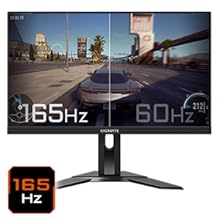
Figure 5.5: Visual comparison of 165Hz vs. 60Hz refresh rate.
- Svartid: Enjoy a 1ms MPRT (Moving Picture Response Time) for minimal ghosting.
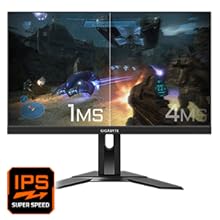
Figure 5.6: Visual comparison of 1ms vs. 4ms response time.
- Farveskala: The monitor covers 95% DCI-P3 and 125% sRGB for vibrant and accurate colors.
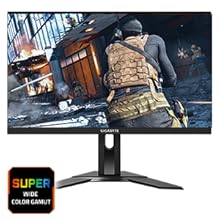
Figure 5.7: Wide color gamut for rich visuals.
- Lavt blåt lys: Reduces blue light emissions to protect your eyes during extended use.
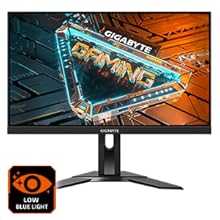
Figur 5.8: Funktionen Low Blue Light reducerer øjenbelastning.
- Flimmerfri: Eliminerer skærmflimmer for en mere behagelig oplevelse viewoplevelse.

Figure 5.9: Flicker-Free technology for comfortable viewing.
5.5 Produktfunktionsvideo
Video 5.1: En overview of the GIGABYTE G24F 2 monitor's features and specifications.
6. Vedligeholdelse
Korrekt vedligeholdelse sikrer din skærms levetid.
- Rengøring af skærmen: Tør forsigtigt skærmen af med en blød, tør og fnugfri klud. Tør forsigtigt genstridige mærker afampRengør kluden med vand eller en specialiseret skærmrens (påfør den på kluden, ikke direkte på skærmen).
- Rengøring af Casing: Brug en blød, tør klud til at tørre skærmen afasing. Undgå slibende rengøringsmidler.
- Ventilation: Sørg for, at ventilationsåbningerne på skærmen er fri for støv og forhindringer.
- Sluk: Turn off and unplug the monitor when not in use for extended periods.
7. Fejlfinding
Hvis du støder på problemer med din skærm, kan du se følgende tabel for almindelige problemer og løsninger.
| Problem | Mulig årsag | Løsning |
|---|---|---|
| Intet billede på skærmen | Power cable not connected; Video cable not connected; Incorrect input source selected | Kontroller strøm- og videokabelforbindelser; vælg den korrekte inputkilde via OSD. |
| Billedet er sløret eller forvrænget | Forkert opløsning; Løst videokabel | Indstil skærmopløsningen til 1920x1080; Sørg for, at videokablet er korrekt tilsluttet. |
| Ingen lyd fra hovedtelefoner/højttalere | Audio cable not connected; Volume too low; Incorrect audio output selected on PC | Check audio cable connection; Adjust volume; Select monitor as audio output on PC. |
| USB-porte virker ikke | USB upstream-kabel ikke tilsluttet | Connect the USB 3.2 Gen 1 Upstream cable from the monitor to your PC. |
| Flimrende skærm | Refresh rate issue; Faulty cable | Ensure refresh rate is set correctly; Try a different video cable. |
8. Specifikationer
Detailed technical specifications for the GIGABYTE G24F 2 monitor.

Figur 8.1: Skærmens dimensioner.
| Feature | Detalje |
|---|---|
| Mærke | GIGABYTE |
| Modelnavn | G24F 2 |
| Modelnummer | 9DG24F2-00-1ABIN |
| Skærmstørrelse | 23.8 tommer |
| Opløsning | 1920 x 1080 pixels (FHD 1080p) |
| Aspektforhold | 16:9 |
| Display Type | LCD (SS IPS Panel) |
| Opdateringshastighed | 165 Hz (180Hz OC) |
| Svartid | 1 Milliseconds (MPRT) |
| Lysstyrke | 300 candela_per_square_meter (TYP) |
| Kontrastforhold | 1100:1 |
| Farvemætning | 95% DCI-P3, 125% sRGB |
| Viewi vinkel | 178 grader |
| Forbindelse | 2 x HDMI 2.0, 1 x DisplayPort 1.2, 2 x USB 3.2 Gen 1 Downstream, 1 x USB 3.2 Gen 1 Upstream, 1 x Earphone Jack |
| Adaptiv synkronisering | FreeSync Premium |
| Strømforbrug | 17.5 watt |
| Varens vægt | 3.2 kilo |
| Varedimensioner (D x B x H) | 5.3D x 54.1B x 32.6H Centimeter |
| Monteringstype | Vægmontering |
| Produktegenskaber | Flicker-Free, Height Adjustment, High Dynamic Range, Tilt Adjustment |
9. Garanti og support
The GIGABYTE G24F 2 monitor comes with a 3 års garanti fra producenten.
For technical support, warranty claims, or further inquiries, please contact GIGABYTE customer service:
- Fabrikant: GIGABYTE Technology (India) Pvt Ltd
- Adresse: B-808, Naman Midtown, Elphinstone Road, Mumbai – 400013 – INDIA
- Telefon: +91-22-40633222
Gem venligst din købsbevis til garantiservice.