
1. Produktet er slutview
The VirtuFit Etappe 2.0i Indoor Cycle is designed for home fitness enthusiasts, offering a robust and interactive training experience. This spin bike features a heavy flywheel, multiple resistance levels, and compatibility with popular fitness applications to enhance your workouts.

Figur 1: Forside view of the VirtuFit Etappe 2.0i Indoor Cycle.

Figur 2: Side view of the VirtuFit Etappe 2.0i Indoor Cycle, highlighting its sturdy frame.
2. Vigtige sikkerhedsoplysninger
Before using the VirtuFit Etappe 2.0i Indoor Cycle, please read and understand all safety instructions. Failure to follow these instructions may result in injury or damage to the equipment.
- Rådfør dig med en læge, før du starter et nyt træningsprogram.
- Hold børn og kæledyr væk fra udstyret under brug.
- Place the cycle on a flat, stable surface with adequate clearance around it.
- Sørg for, at alle bolte og møtrikker er forsvarligt spændt før hver brug.
- Brug passende sportsfodtøj og -sko.
- Overskrid ikke den maksimale brugervægt på 140 kg.
- Stop med at træne med det samme, hvis du føler dig svimmel, føler dig svag eller oplever smerter.
- Undersøg regelmæssigt udstyret for slitage. Må ikke anvendes, hvis det er beskadiget.
3. Pakkens indhold
Kontroller, at alle komponenter er til stede før montering:
- Hovedramme
- Styresamling
- Sadelpind og sadel
- Pedaler (venstre og højre)
- Front and rear stabilizers
- Console/Display unit
- Tabletholder
- Vandflaskeholder
- Monteringsværktøj og hardware
- Brugermanual
4. Samling og opsætning
Follow these steps to assemble your VirtuFit Etappe 2.0i Indoor Cycle:
- Fastgør stabilisatorer: Fastgør de forreste og bageste stabilisatorer til hovedrammen med de medfølgende bolte og skiver. Sørg for, at de er fastgjort ordentligt for at sikre stabilitet.
- Installer pedaler: Identificér venstre (V) og højre (H) pedal. Venstre pedalskruer drejes mod uret, og højre pedalskruer drejes med uret. Spænd dem godt fast til pedalarmene.
- Assemble Seat Post and Saddle: Insert the seat post into the main frame. Adjust the height using the quick-release lever. Attach the deluxe saddle to the seat post, then adjust its horizontal position using the L-bolts for optimal comfort.
- Mount Handlebar Assembly: Slide the handlebar post into the main frame. Adjust the height and secure it with the adjustment knob. Attach the multi-grip handlebar to the post.
- Forbind konsol: Connect the console cables to the main frame. Mount the console onto the handlebar assembly. Place the tablet holder and water bottle holder as desired.
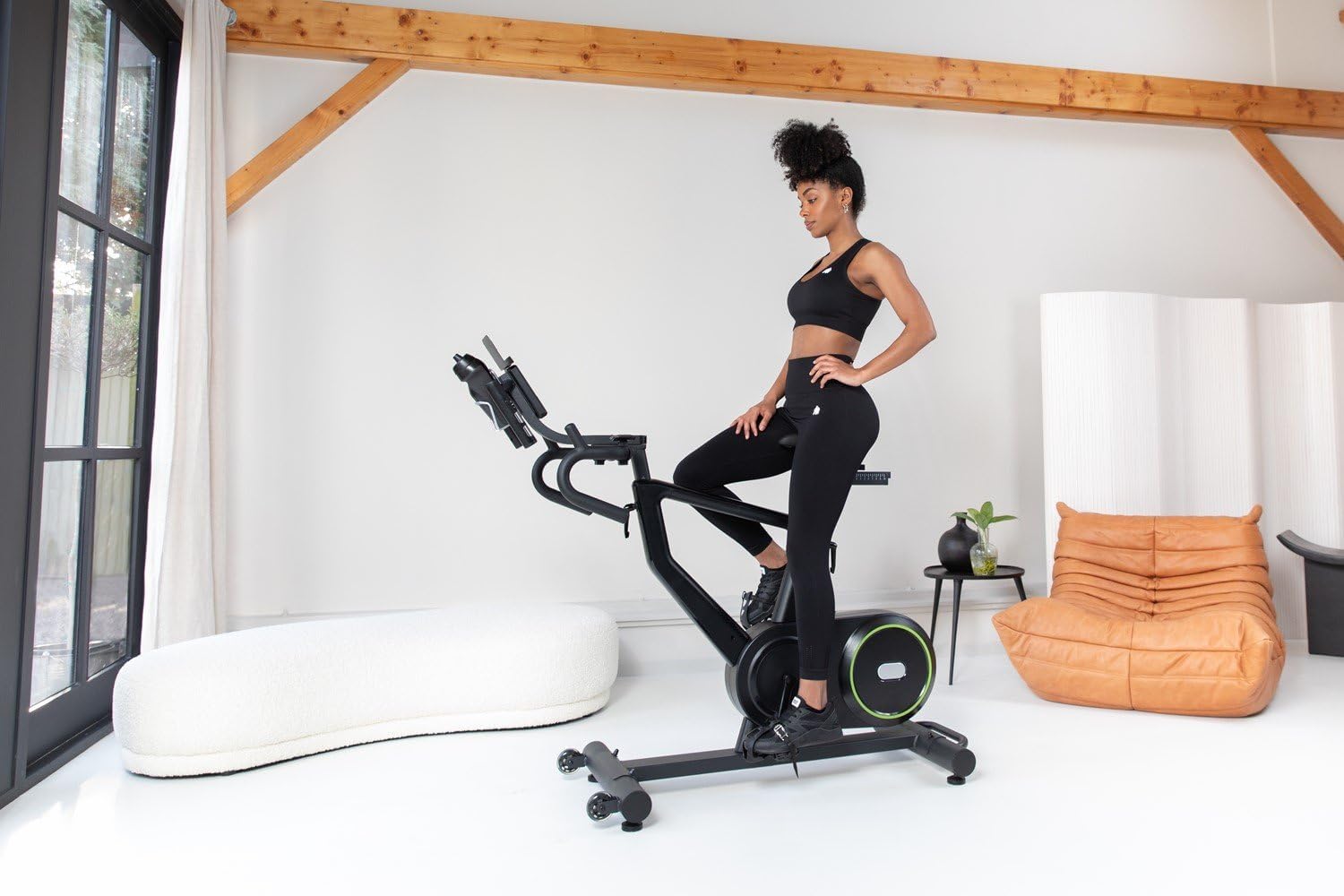
Figure 3: Adjusting the seat height for a comfortable riding position.

Figure 4: Adjusting the handlebar height to suit user preference.
5. Betjeningsvejledning
The VirtuFit Etappe 2.0i offers various training options and adjustments for a personalized workout.
5.1 Konsolfunktioner
The clear LED console displays key workout data:
- Tid: Varigheden af din træning.
- Afstand: Samlet tilbagelagt afstand.
- RPM: Revolutioner Per minut.
- Watt: Power output in watts.
- Hastighed: Aktuel hastighed.
- Gennemsnitshastighed: Average speed during the workout.
- Kalorier: Anslået forbrændte kalorier.
- Puls: Heart rate (requires compatible 5 kHz heart rate monitor, not included).
- Gear: Current resistance level.
Use the console buttons (START, STOP, RESET, ENTER, +/-) to navigate menus, select programs, and adjust settings.

Figur 5: Detaljeret view of the LED console with various workout metrics.

Figure 6: Handlebar controls for adjusting resistance levels during a workout.
5.2 Resistance Levels and Programs
The cycle features 24 resistance levels and 13 pre-programmed training programs. You can manually adjust resistance or select a program for varied intensity.
5.3 App-kompatibilitet
The Etappe 2.0i is compatible with popular training applications such as Zwift, Kinomap, and Fitshow. Connect your tablet or smartphone to the cycle to access interactive workouts, scenic routes, and structured training plans.

Figure 7: Tablet mounted on the console, displaying the Kinomap application.

Figure 8: User engaged in an interactive workout using a fitness application on the tablet holder.
5.4 Videodemonstration
Video 1: This video demonstrates the key features of the VirtuFit Etappe 2.0i Indoor Cycle, including seat and handlebar adjustments, console display, and compatibility with fitness apps like Kinomap and Zwift. It also highlights the 24 resistance levels and various workout programs.
6. Vedligeholdelse
Regular maintenance ensures the longevity and safe operation of your indoor cycle.
- Rensning: Tør cyklussen af med reklameamp en klud efter hver brug for at fjerne sved og støv. Undgå slibende rengøringsmidler.
- Inspektion: Kontrollér regelmæssigt alle bolte, møtrikker og bevægelige dele for fastspænding og slid. Spænd eventuelle løse fastgørelseselementer.
- Smøring: Apply a small amount of silicone-based lubricant to moving parts (e.g., seat post, handlebar post) if they become stiff.
- Opbevaring: Store the cycle in a dry, cool place away from direct sunlight and extreme temperatures.
7. Fejlfinding
Se dette afsnit for løsninger på almindelige problemer:
| Problem | Mulig årsag | Løsning |
|---|---|---|
| Konsollen viser ikke data | Loose cable connection; Console batteries low/dead | Check all cable connections; Replace console batteries. |
| Modstanden ændrer sig ikke | Resistance mechanism issue; Console not registering input | Ensure resistance knob/buttons are functioning; Check internal connections. |
| Ustabil under brug | Uneven surface; Loose stabilizers/feet | Adjust leveling feet; Tighten stabilizer bolts. |
| Knirkende eller skurrende lyd | Loose parts; Lack of lubrication; Internal friction | Inspect and tighten all bolts; Lubricate moving parts; Contact customer support if noise persists. |
8. Specifikationer
- Modelnavn: Etappe 2.0i
- Varemodelnummer: VFSPINBIKE-E2.0i
- Mærke: VirtuFit
- Farve: Mat sort
- Hovedmateriale: Metal
- Produktmål (L x B x H): 132 x 115 x 52 cm
- Varens vægt: 22 kilo
- Max brugervægt: 140 kg
- Svinghjuls vægt: 22 kg
- Modstandsmekanisme: Adjustable Magnetic Resistance (24 levels)
- Strømkilde: Pedal operated (non-electric)
- Særlige funktioner: Calorie counter, Speedometer, Distance monitor, Heart rate monitor (5 kHz compatible), Tablet holder, Water bottle holder
- Anbefalet brug: Indendørs
- App kompatibilitet: Zwift, Kinomap, Fitshow
9. Garanti og support
For warranty information, technical support, or to order replacement parts, please refer to the VirtuFit official webwebstedet eller kontakt din forhandler. Gem din købsbevis til garantikrav.