
1. Vigtige sikkerhedsoplysninger
Læs venligst alle sikkerhedsinstruktioner omhyggeligt, inden du bruger dette produkt. Manglende overholdelse af disse instruktioner kan medføre personskade eller beskadigelse.
- Placering: Avoid placing the camera in unstable locations or within reach of children or pets.
- Magt: Use only the provided AC adapter and power cable. Disconnect power before moving the device.
- Miljø: Keep the camera away from high humidity, dust, and extreme temperatures. This product is not waterproof.
- Opretholdelse: Do not attempt to disassemble or repair the camera yourself. Contact customer support for any issues.

Image: General safety guidelines for camera usage.
2. Pakkens indhold
Bekræft at alle varer er inkluderet i din pakke:
- Galayou G2 Camera Unit
- AC Adapter
- Strømkabel
- Monteringssæt (skruer, ankre)
- Japanese Instruction Manual

Image: The Galayou G2 camera and a smartphone displaying its live feed.
3. Opsætningsvejledning
3.1 Indledende opsætning
- Tænd: Connect the camera to power using the provided AC adapter and cable. The indicator light will turn red.
- App-download: Download the dedicated 'blurams' app from the App Store (iOS) or Google Play Store (Android).
- App-tilladelser: Ensure Bluetooth and Location permissions are enabled for the 'blurams' app in your smartphone settings.
- Nulstil kamera: Press and hold the reset button on the camera until you hear a beep sound. The indicator light will flash red and blue alternately, indicating it's ready for network connection.
- Tilføj enhed i appen: Open the 'blurams' app, tap 'Add Device' or the '+' icon. Select your camera model (G2 or similar D1 model) and choose 'Wi-Fi connection via Bluetooth'.
- Wi-Fi-forbindelse: Enter your 2.4GHz Wi-Fi network name and password. The camera only supports 2.4GHz Wi-Fi.
- QR-kode scanning: The app will display a QR code. Hold your smartphone in front of the camera lens to scan the QR code. You will hear a beep sound from the camera upon successful scan.
- Tilslutningsbekræftelse: The camera will announce 'Connection successful' and then 'Connecting to network'. Once connected, the indicator light will turn solid blue.
3.2 Video Guide: Bluetooth Wi-Fi Connection
Video: This video demonstrates the Bluetooth-assisted Wi-Fi connection method for the D1 camera, which is similar to the G2 model. It shows the steps from app permissions to successful network connection.
3.3 Video Guide: Camera Setup Method
Video: This video provides a general guide on how to set up a Skyworth pet camera, which can be used as a reference for the Galayou G2's setup process.
4. Betjeningsvejledning
4.1 Live View og panorering/tilt-kontrol
Once connected, you can access the live feed through the 'blurams' app. The camera offers a 355° horizontal rotation and 52° vertical rotation for comprehensive coverage.
- Panorering/vip: Brug retningskontrollerne i appen til at justere kameraets viewvinkel.
- Digital zoom: The camera supports 4x digital zoom to view detaljer.

Image: The camera's pan and tilt capabilities, offering a wide field of view.
4.2 Videokvalitet og nattesyn
The G2 camera features 2K high-resolution video (1440p) and a 3-megapixel CMOS sensor for clear images. It also provides advanced night vision capabilities.
- 2K-opløsning: Enjoy clear and detailed video footage.
- Nattesynstilstande: The camera supports three night vision modes: Smart Night Vision (auto-switches between color and black & white based on motion), Color Night Vision (always color), and Infrared Night Vision (always black & white).
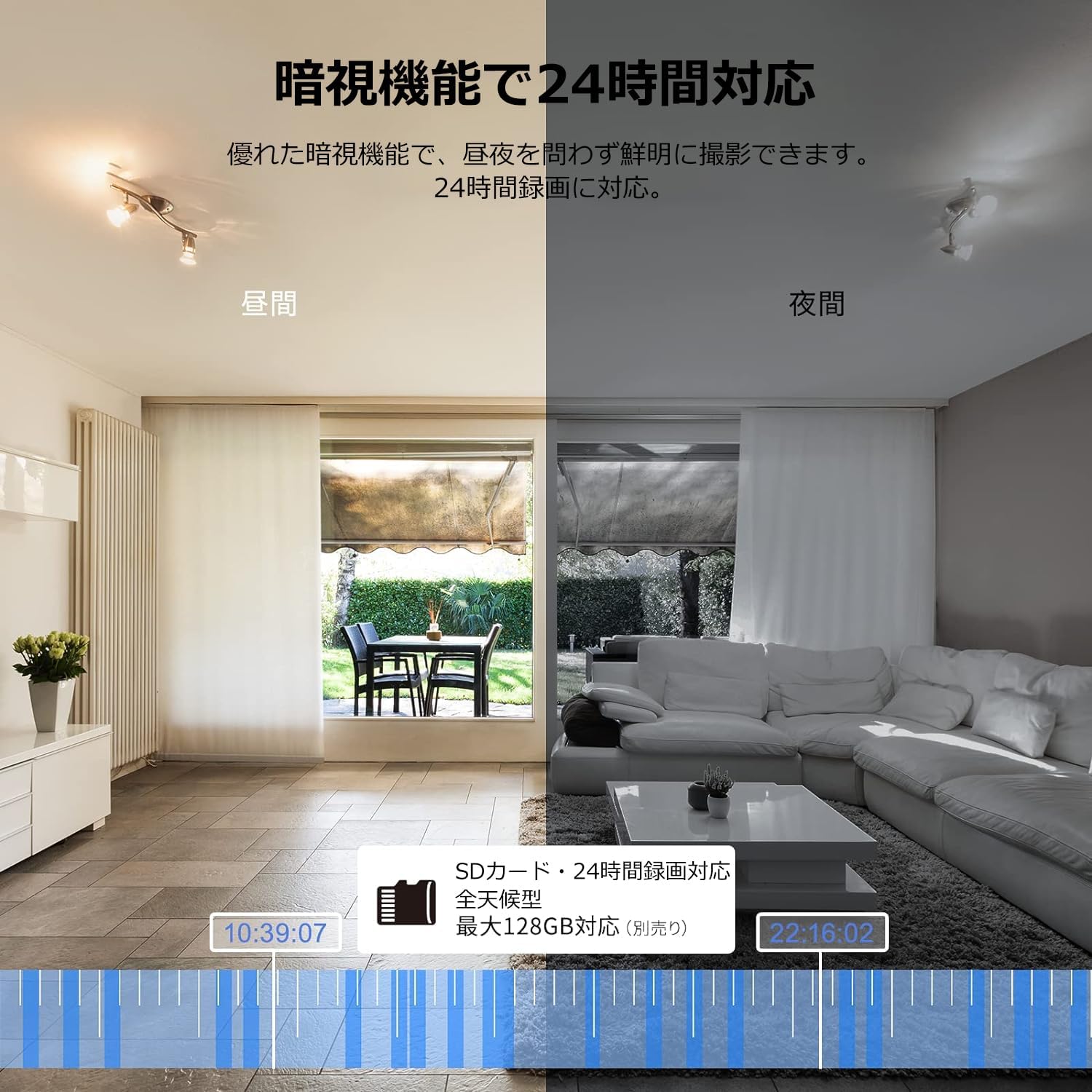
Image: Comparison of day and night vision, demonstrating the camera's ability to record clearly in low light.
4.3 Tovejslyd
Equipped with a microphone and speaker, the camera allows for real-time two-way communication.
- Speak and Listen: Talk to family members or pets through the app, and hear their responses.
- Støjreduktion: The two-way audio features noise reduction for clearer sound.

Image: The camera's two-way audio feature, allowing interaction with pets.
4.4 Motion Detection & Automatic Tracking
The camera can detect motion and automatically track subjects within its field of view.
- Bevægelsesadvarsler: Modtag øjeblikkelige notifikationer på din smartphone, når der registreres bevægelse.
- Automatisk sporing: The camera will follow detected movement, keeping the subject in frame.
- Menneskelig detektion: Advanced AI can differentiate between humans and other moving objects, reducing false alarms.
- Alarm funktion: Trigger an alarm sound from the camera via the app to deter intruders.

Image: Motion detection and alarm features, showing alerts on a smartphone.
4.5 Optagelse og opbevaring
The camera supports both local and cloud storage options for continuous recording.
- MicroSD-kort: Supports up to 128GB microSD cards (sold separately) for 24-hour continuous recording with automatic overwriting.
- Cloud Storage: Optional paid cloud storage service is available for extended recording and backup.
- Videokomprimering: Utilizes H.264 and H.265 compression formats for efficient storage.


Images: MicroSD card recording and cloud storage options.
4.6 Privatlivstilstand
Activate privacy mode to physically cover the camera lens, ensuring your privacy when needed.
- One-Tap Activation: Easily turn off the lens via the app.
- Physical Cover: The camera physically rotates its lens downwards, blocking the view.

Image: Privacy mode icon.
4.7 Alexa-integration
The Galayou G2 is Alexa-certified, allowing for voice control and viewing the camera feed on compatible Alexa devices.
- Stemmekommandoer: Brug stemmekommandoer til view the camera feed on an Echo Show or other Alexa-enabled screen.

Image: Alexa integration with the Galayou G2 camera.
4.8 Multi-Camera Support & Sharing
The app supports adding multiple cameras and sharing access with family members.
- Flere kameraer: Monitor different areas of your home by adding several cameras to the app.
- Familiedeling: Share camera access with up to 4 family members simultaneously.

Image: Family sharing and multi-camera viewing.
4.9 Video Guide: Product Features
Video: This video showcases various features of a Skyworth pet camera, including its monitoring capabilities, which are comparable to the Galayou G2.
4.10 Video Guide: Blurams 300万画素 見守りカメラ
Video: This video highlights the features of a Blurams 3-megapixel monitoring camera, demonstrating functionalities similar to the Galayou G2.
4.11 Video Guide: JUFLSKY 300万画素 360°PTZ機 (Preview)
Video: En kort optaktview videoshowasing a 300-megapixel 360° PTZ camera, similar in functionality to the G2.
5. Fejlfinding
- Kan ikke oprette forbindelse til Wi-Fi:
- Sørg for, at dit Wi-Fi-netværk er 2.4 GHz. Kameraet understøtter ikke 5 GHz-netværk.
- Kontrollér, at din Wi-Fi-adgangskode er nøjagtig.
- Flyt kameraet tættere på din Wi-Fi-router.
- Udfør en fabriksnulstilling på kameraet, og prøv opsætningsprocessen igen.
- No Live Feed:
- Tjek din internetforbindelse.
- Ensure the camera is powered on and the indicator light is solid blue.
- Genstart appen og/eller din smartphone.
- Bevægelsesdetektion virker ikke:
- Bekræft, at bevægelsesdetektion er aktiveret i appens indstillinger.
- Juster bevægelsesdetektionens følsomhed.
- Sørg for, at der ikke er nogen forhindringer, der blokerer kameraets view.
- Dårlig videokvalitet:
- Check your internet speed. A stable connection is required for optimal streaming.
- Sørg for, at kameralinsen er ren.
- Adjust the video quality settings in the app (e.g., from SD to 2K).
6. Specifikationer
| Feature | Specifikation |
|---|---|
| Modelnavn | G2 |
| Monteringstype | Tabletop and Ceiling Mount |
| Videooptagelsesopløsning | 1440p (2K) |
| Farve | Automatic Tracking Camera |
| Inkluderede komponenter | Camera body, AC adapter, Japanese instruction manual, mounting set, power cable |
| Trådløs kommunikationsteknologi | Wi-Fi (kun 2.4 GHz) |
| Effektiv videoopløsning | 2 Megapixels (300万画素) |
| Felt af View | 95 grader |
| Night Vision Range | 7 meter |
| Billedhastighed | 15 fps |
| Materiale | Plast |
| Produktmål (LxBxH) | 7.2 x 7.2 x 10.9 cm |
| Vandmodstandsniveau | Ikke vandtæt |
| Lyskilde | Infrarød |
| Anbefalet brug | Indendørs sikkerhed |
| Indendørs/Udendørs brug | Indendørs |
| Kompatible enheder | Smartphone, Tablet, Desktop, Laptop |
| Strømkilde | Elektrisk med ledning |
| Controller type | App |
7. Garanti og support
The Galayou G2 camera comes with a manufacturer's warranty and customer support.
- Garanti: 1 års producentgaranti.
- Teknisk support: For any issues or questions, please contact GALAYOU customer support through the app or visit the official GALAYOU store on Amazon.