
Sharp RP-TT70
Sharp RP-TT70 Vinyl Record Player Turntable User Manual
Model: RP-TT70
1. Produktet er slutview
The Sharp RP-TT70 is a 12-inch vinyl record player turntable designed to deliver a rich audio experience with modern convenience. It features a classic wooden cabinet and comes with stereo bookshelf speakers. This belt-drive turntable supports multiple playback speeds and offers versatile connectivity options, including dual Bluetooth functionality.

Figure 1.1: Sharp RP-TT70 Turntable and Speakers. The turntable features a stylish wooden finish and a clear dust cover, flanked by two matching stereo bookshelf speakers.
2. Hvad er inkluderet
Kontroller venligst pakkens indhold for at sikre, at alle varer er til stede:
- Sharp RP-TT70 Turntable Unit
- Stereo Bookshelf Speakers (2 units)
- Støvdæksel
- Strømadapter
- Brugervejledning (dette dokument)
3. Opsætningsvejledning
Follow these steps to set up your Sharp RP-TT70 turntable:
- Placering: Placer pladespilleren på en stabil, plan overflade væk fra direkte sollys, varmekilder og for meget støv. Sørg for tilstrækkelig ventilation omkring enheden.
- Højttalerforbindelse: Connect the included stereo bookshelf speakers to the "SPEAKER OUT" terminals on the rear of the turntable. Ensure correct polarity (positive to positive, negative to negative).
- Strømtilslutning: Connect the power adapter to the "POWER IN DC 12V" port on the rear of the turntable, then plug the adapter into a wall outlet.
- Støvdæksel: Fastgør forsigtigt støvdækslet til hængslerne på bagsiden af pladespilleren.

Figure 3.1: Rear Panel Connections. This image highlights the AUX-IN Jack, RCL (R&L) Speaker Out, Pitch (+)(-) Speed Calibration, and Power In DC 12V ports, crucial for proper setup.
4. Betjeningsvejledning
4.1 Afspilning af en vinylplade
- Tænd: Turn the power knob to activate the turntable.
- Vælg hastighed: Adjust the speed selector to match the record's RPM (33 1/3, 45, or 78 RPM). For 45 RPM records, place the included 45 RPM adapter on the spindle.
- Stedrekord: Placer forsigtigt din vinylplade på pladespillerens tallerken.
- Løft tonearm: Løft forsigtigt tonearmen ved hjælp af cue-håndtaget.
- Position pennen: Flyt tonearmen hen over den ønskede startrille på pladen.
- Nederste tonearm: Sænk langsomt tonearmen ved hjælp af cue-håndtaget. Pennen vil have kontakt med pladen, og afspilningen vil begynde.
- Lydstyrkejustering: Adjust the volume using the volume knob on the turntable.
- Auto-stop funktion: The turntable features an auto-stop function that will automatically stop the platter rotation when the record reaches its end.
4.2 Bluetooth-forbindelse
The Sharp RP-TT70 supports dual Bluetooth connectivity, allowing you to stream music in two ways:
- Streaming Vinyl to External Bluetooth Device:
- Sørg for, at pladespilleren er tændt.
- Aktiver Bluetooth-parringstilstand på din eksterne Bluetooth-højttaler eller hovedtelefoner.
- The turntable will automatically search for and connect to nearby Bluetooth devices. The Bluetooth indicator light will illuminate when connected.
- Once connected, audio from your vinyl record will play through the external Bluetooth device.
- Streaming Music from Your Phone to Turntable Speakers:
- Sørg for, at pladespilleren er tændt.
- On your smartphone or other Bluetooth-enabled device, search for "Sharp RP-TT70" in the Bluetooth settings.
- Select the turntable to pair. The Bluetooth indicator light will illuminate when connected.
- Once connected, audio from your phone will play through the turntable's included stereo speakers.
4.3 Ekstraindgang (AUX-IN)
Connect external audio devices such as smartphones, tablets, or MP3 players using a 3.5mm audio cable (not included) to the AUX-IN jack on the rear of the turntable. Switch the input mode to AUX to play audio through the turntable's speakers.
4.4 Hovedtelefonstik
For private listening, connect headphones to the headphone jack located on the front panel of the turntable.
5. Vedligeholdelse
Korrekt vedligeholdelse sikrer din pladespillers levetid og optimale ydeevne:
- Støvdæksel: Always keep the dust cover closed when the turntable is not in use to prevent dust accumulation on the platter and stylus.
- Rengøring af pennen: Gently clean the stylus regularly using a soft brush designed for turntable styli. Brush from back to front.
- Rengøring af drejeskiven: Wipe the turntable and speakers with a soft, dry cloth. Do not use abrasive cleaners or solvents.
- Cartridge and Stylus Replacement: The RP-TT70 uses a changeable ceramic cartridge and stylus. If sound quality degrades or the stylus is damaged, replace it with a compatible Sharp replacement part.
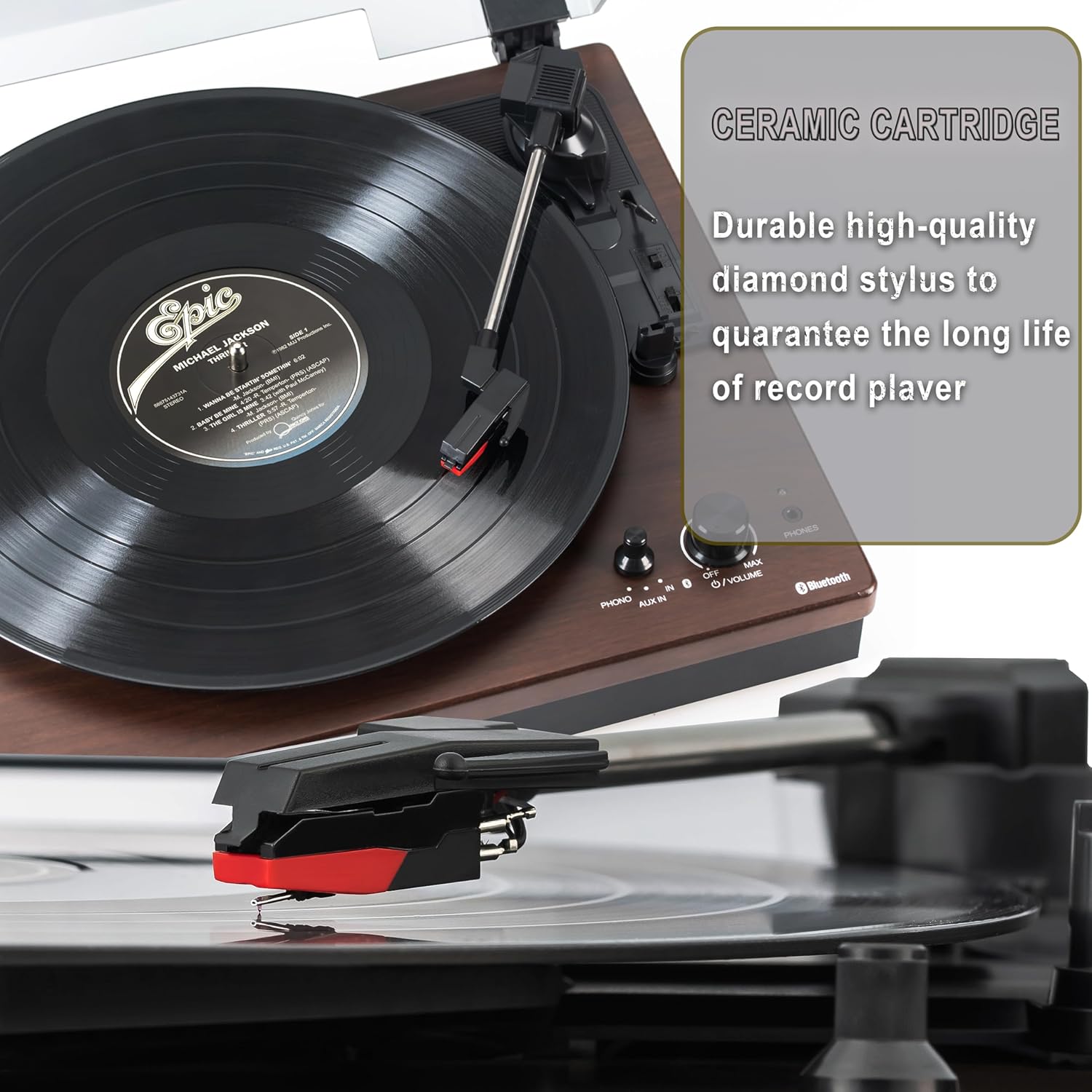
Figure 5.1: Ceramic Cartridge. The turntable is equipped with a durable high-quality diamond stylus designed for extended record playback life.
6. Fejlfinding
If you encounter issues with your Sharp RP-TT70, refer to the following common problems and solutions:
| Problem | Mulig årsag | Løsning |
|---|---|---|
| Ingen strøm | Strømadapteren er ikke tilsluttet, eller stikkontakten er ikke aktiv. | Ensure power adapter is securely plugged into the turntable and a working wall outlet. |
| Ingen lyd fra højttalere | Speakers not connected correctly; Volume too low; Incorrect input mode. | Check speaker cable connections and polarity. Increase volume. Ensure turntable is in PHONO or AUX mode as appropriate. |
| Poor Sound Quality / Skipping | Dirty or worn stylus; Dirty record; Turntable not level. | Clean the stylus and record. Ensure the turntable is on a stable, level surface. Consider replacing the stylus if worn. |
| Problemer med Bluetooth-parring | Device too far; Bluetooth not enabled on external device; Interference. | Ensure devices are within range (approx. 30 ft). Confirm Bluetooth is enabled on the external device. Try restarting both devices. |
| Platter Not Spinning | Belt dislodged; Auto-stop engaged prematurely. | Check if the drive belt is properly seated around the platter and motor pulley. If auto-stop is causing issues, ensure the record is placed correctly. |
7. Specifikationer
| Feature | Detalje |
|---|---|
| Modelnummer | RP-TT70 |
| Mærke | Skarp |
| Produktdimensioner | 16.8 x 13.5 x 2.8 tommer |
| Varens vægt | 18.6 pund |
| Forbindelsesteknologi | Bluetooth (Bi-directional) |
| Understøttede hastigheder | 33 1/3, 45, 78 omdr./min |
| Inkluderede komponenter | Turntable, Stereo Bookshelf Speakers |
| Materiale | Plast, træ |
| Farve | Black (with wooden finish) |
| Patrontype | Changeable Ceramic Cartridge and Stylus |
| Funktioner | Belt-drive, Auto-return, Pitch control, Dust cover |
8. Garanti og support
For warranty information and technical support, please refer to the official Sharp webwebstedet eller kontakt deres kundeservice direkte. Gem din købskvittering som købsbevis i tilfælde af garantikrav.
Ask a question about this manual
Ask about setup, troubleshooting, compatibility, parts, safety, or missing instructions. Manuals+ will review the question and use this page’s manual context to help answer it.