
1. Introduktion
The vLinker FD+ is a portable wireless Bluetooth OBD2 diagnostic scan tool designed for comprehensive vehicle diagnostics. It functions as a code reader, trip computer, logger, and real-time performance monitor. This device is compatible with iOS, Android, and Windows operating systems, making it a versatile tool for both DIY enthusiasts and small repair shops. It supports a wide range of third-party applications, including FORScan, Carista, Torque, DashCommand, JScan, and BimmerCode.
The vLinker FD+ offers advanced features such as MS-CAN protocol support, allowing access to proprietary Ford networks in addition to the 5 standard OBD-II protocols. It is fully compatible with ELM (ELM327, ELM329) and STN command sets, ensuring broad compatibility with various diagnostic software.
2. Produktet er slutview
The vLinker FD+ is engineered for reliability and performance, featuring protection against over-voltage, over-current, over-temperature, and battery drain. Its compact design ensures it does not obstruct driver legroom when plugged into the OBD-II port.

Figure 2.1: vLinker FD+ Connection Modes (Bluetooth, iOS, Android)
This diagnostic tool supports all available electronic control modules, enabling users to read and reset fault codes, retrieve ECU information, and perform various system diagnostics. It is particularly recommended for use with FORScan Lite APP, offering functionalities like reading/clearing fault codes, reading data streams, module resets, and ECU programming.
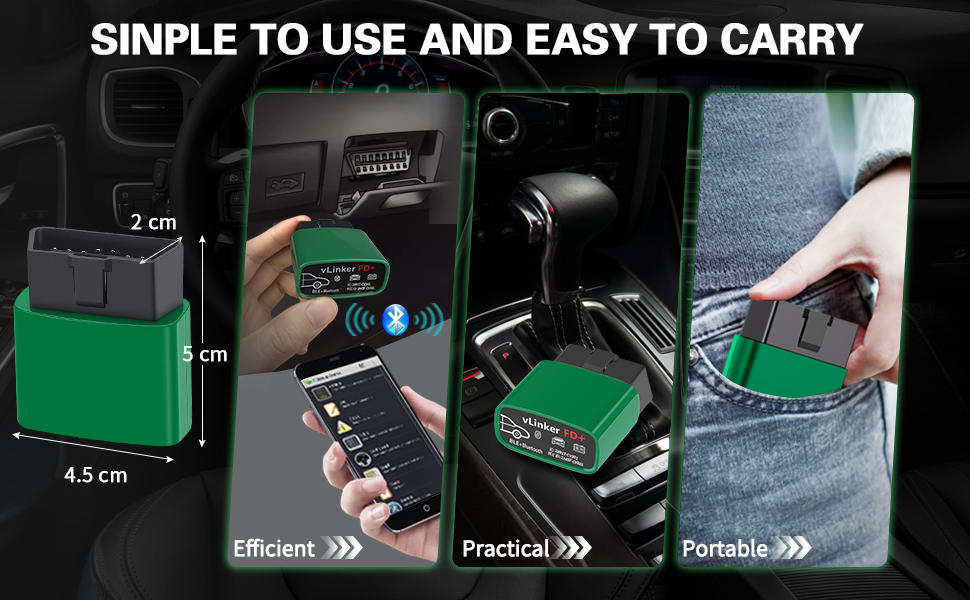
Figure 2.2: Simple to Use and Easy to Carry Design

Figure 2.3: All System Diagnostic Capabilities
3. Opsætningsvejledning
3.1 Første tilslutning
- Find OBD-II-porten: The OBD-II diagnostic port is typically located under the dashboard on the driver's side.
- Plug in the vLinker FD+: Insert the vLinker FD+ device firmly into the vehicle's OBD-II port. The device will power on automatically.
- Download en kompatibel app: Søg efter and download a compatible third-party OBD2 diagnostic application (e.g., FORScan Lite, Torque, Car Scanner) from your device's app store (iOS App Store, Google Play Store, or Windows Store).
- Aktiver Bluetooth: Aktiver Bluetooth på din smartphone eller tablet.
- Par enheden: Open the chosen diagnostic app. The app should guide you through connecting to the vLinker FD+ via Bluetooth. Look for "vLinker FD+" or a similar name in the Bluetooth device list within the app or your device's Bluetooth settings.
3.2 Firmwareopdatering (valgfrit)
To ensure optimal performance and access to the latest features, it is recommended to keep the vLinker FD+ firmware updated. Pirated products cannot be upgraded.
- Download "VgateFwUpdater" App: Søg efter and download the "VgateFwUpdater" app from your device's app store. This app is specifically for firmware updates.
- Scan QR -kode: Open the VgateFwUpdater app and scan the QR code provided on the product packaging or in the manual. Alternatively, you can use the direct link: https://qr19.cn/ALHUXg.
- Auto-connect and Download: In the app, select "Auto connect" based on your product model and click "DOWNLOAD" to initiate the firmware update.
- Vent på færdiggørelse: The app will display the update status. Wait until it shows "Upgrade successful."

Figure 3.1: Firmware Update Process for vLinker FD Series
4. Betjeningsvejledning
Once the vLinker FD+ is connected to your vehicle and paired with your device, you can use a compatible diagnostic application to access various vehicle data and functions.
4.1 Using Diagnostic Apps
- FORScan Lite: Recommended for Ford, Mazda, Lincoln, and Mercury vehicles. Allows access to proprietary MS-CAN protocols for advanced diagnostics and module configuration.
- Torque (Android): Popular for reading engine parameters, fault codes, and performance data.
- Carista (iOS/Android): Offers diagnostics, coding, and service functions for various car brands.
- DashCommand (iOS/Android): Provides customizable dashboards for real-time vehicle data.
- JScan (iOS/Android): Specialized for Jeep vehicles.
- BimmerCode (iOS/Android): For BMW and Mini coding.

Figure 4.1: FORScan Lite App Interface
4.2 Nøglefunktioner
- Læs/slet DTC'er: Retrieve and erase Diagnostic Trouble Codes (DTCs) from the vehicle's ECU.
- Live datastrøm: View real-time sensor data, such as engine RPM, coolant temperature, fuel system status, and more.
- Modul nulstilling: Reset specific control modules.
- ECU Programming/Coding: Perform advanced coding functions (app-dependent).
- Juster parametre: Modify certain vehicle parameters (app-dependent).

Figure 4.2: Compatibility with Multiple Diagnostic Apps
5. Vedligeholdelse
The vLinker FD+ is designed for durability and minimal maintenance. Follow these guidelines to ensure its longevity:
- Hold rent: Tør enheden af med en blød, tør klud. Undgå at bruge skrappe kemikalier eller slibende rengøringsmidler.
- Opbevaring: Opbevar enheden et køligt, tørt sted væk fra direkte sollys og ekstreme temperaturer, når den ikke er i brug.
- Firmwareopdateringer: Regularly check for and install firmware updates using the "VgateFwUpdater" app to maintain optimal performance and compatibility.
- Batteribeskyttelse: The device features built-in battery drain protection. However, for prolonged periods of inactivity, it is advisable to unplug the device from the OBD-II port.

Figure 5.1: Battery Saver Feature
6. Fejlfinding
If you encounter issues with your vLinker FD+, refer to the following common problems and solutions:
- Enheden tænder ikke:
Ensure the vLinker FD+ is fully inserted into the vehicle's OBD-II port. Check if the vehicle's ignition is on (some vehicles require the ignition to be in the 'ON' position, not just 'ACC'). - Kan ikke oprette forbindelse via Bluetooth:
Verify that Bluetooth is enabled on your smartphone/tablet. Close and reopen the diagnostic app. Try restarting your smartphone/tablet. Ensure no other devices are actively connected to the vLinker FD+. For Windows, ensure advanced Bluetooth functions are enabled. - App Not Detecting Vehicle:
Confirm that the vLinker FD+ is properly connected and powered on. Ensure your diagnostic app is up-to-date. Check the app's settings to confirm the correct adapter is selected. If you are unsure about vehicle compatibility, contact vLinker support. - Intermittent Connection Loss:
This can sometimes be caused by interference or a weak Bluetooth signal. Try to keep your smartphone/tablet closer to the vLinker FD+. Ensure the device's firmware is updated. - Problemer med appens funktionalitet:
Some advanced functions may require a paid version of the third-party app. Ensure the app is compatible with your specific vehicle model and year. - Firmwareopdateringsfejl:
Ensure a stable internet connection during the update process. Make sure you are using the official "VgateFwUpdater" app. Note that pirated products cannot be upgraded.
7. Specifikationer
| Feature | Detalje |
|---|---|
| Modelnummer | FD+ BT3.0/BLE4.0 |
| Mærke | vLinker |
| Forbindelse | Bluetooth 3.0/4.0 (BLE) |
| Operativsystemkompatibilitet | iOS, Android, Windows |
| Strømkilde | Vehicle OBD-II port (Battery-free operation) |
| Understøttede protokoller | OBD-II 5 standard protocols (SAE J1850 PWM, SAE J1850 VPW, ISO 9141-2, ISO 14230-4 KWP, ISO 15765-4 CAN), MS-CAN, SAE J1939 CAN, ISO 11898 (raw CAN), up to 64 user-defined protocols. |
| Databuffer | Up to 2K bytes (USART) |
| Baud rate | Op til 230.4 Kbps |
| OBD-anmodningsbyte | Op til 1024 bytes |
| Opvågningstilstande | 3 ways (battery voltage drop, OBD bus active, etc.) |
| Beskyttelse | Over-voltage, over-current, over-temperature, battery drain |
| Dimensioner (ca.) | 5 cm (længde) x 4.5 cm (bredde) x 2 cm (højde) |

Figure 7.1: vLinker FD+ Device Dimensions

Figure 7.2: Supported Protocols
8. Garanti og support
8.1 Producentens garanti
The vLinker FD+ comes with a 1 års producentgarantiDenne garanti dækker materiale- og fabrikationsfejl ved normal brug. Gem venligst din købsbevis i tilfælde af garantikrav.
8.2 Kundesupport
vLinker is committed to providing professional customer service. If you have any questions, concerns, or require technical assistance, please do not hesitate to contact our support team. We are dedicated to assisting you and ensuring your satisfaction with our products.
For support, please refer to the contact information provided with your product packaging or visit the official vLinker webwebsted.