
Mitzu CSA-5715
Mitzu Professional 15" Speaker with Tripod User Manual
Model: CSA-5715 | Brand: Mitzu
1. Sikkerhedsoplysninger
Læs venligst alle sikkerhedsinstruktioner omhyggeligt, inden du bruger dette produkt. Gem denne manual til senere brug.
- Udsæt ikke højttaleren for regn eller fugt for at forhindre brand eller elektrisk stød.
- Åbn ikke højttalerkabinettet. Overlad al service til kvalificeret personale.
- Sørg for tilstrækkelig ventilation. Bloker ikke ventilationsåbninger.
- Brug kun tilbehør/tilbehør specificeret af producenten.
- Beskyt netledningen mod at blive trådt på eller klemt.
- Tag stikket ud af højttaleren under tordenvejr eller når den ikke bruges i længere perioder.
- Undgå at placere højttaleren på ustabile overflader.
- Do not operate the speaker near heat sources such as radiators, heat registers, stoves, or other apparatus (including ampløftere), der producerer varme.
2. Produktet er slutview
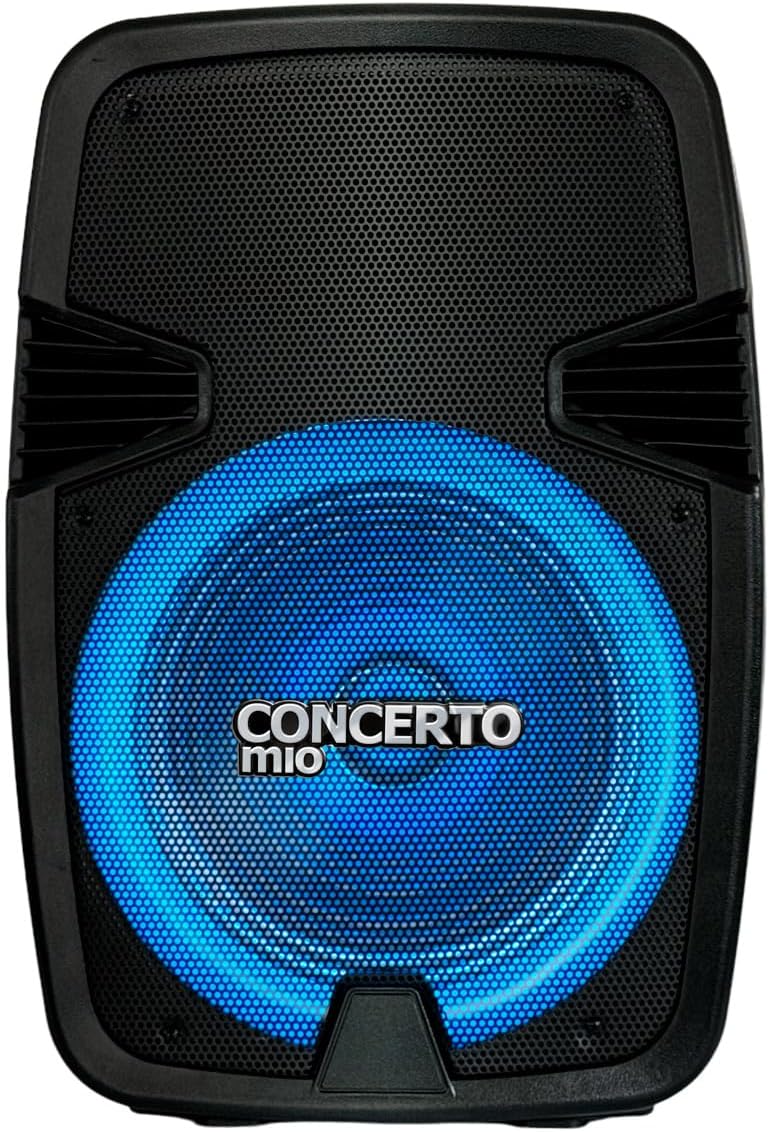
The Mitzu CSA-5715 is a professional 15-inch speaker designed for high-quality audio output, featuring Bluetooth connectivity, USB and auxiliary inputs, and integrated LED lighting. It comes with a tripod for optimal sound projection.


3. Opsætning
- Udpakning: Carefully remove the speaker and all accessories from the packaging. Verify all components are present: speaker unit, tripod, power cable, and user manual.
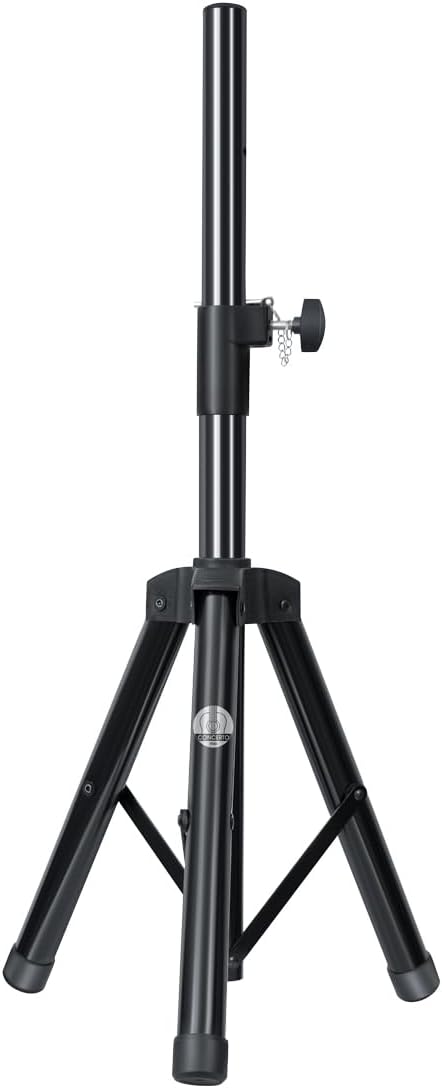
- Stativsamling:
- Extend the tripod legs fully and ensure they are locked securely.
- Adjust the height of the tripod to your desired level, ensuring the locking pin is engaged and the knob is tightened.
- Carefully place the speaker onto the tripod pole, ensuring it is stable and centered.
- Strømtilslutning: Connect the power cable to the speaker's power input on the rear panel, then plug the other end into a suitable electrical outlet (AC 120V/60Hz).
- Startgebyr (hvis relevant): For first use, it is recommended to fully charge the internal battery. The charging time is approximately 3 hours.
4. Betjeningsvejledning
4.1 Tænd/sluk
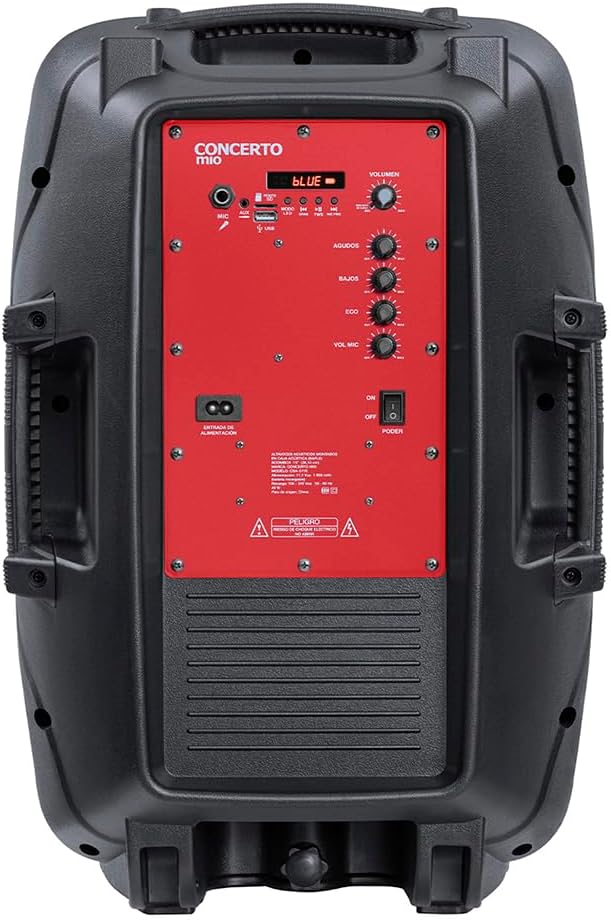
Locate the POWER switch on the rear control panel. Flip it to the "ON" position to power on the speaker. Flip to "OFF" to power off.
4.2 Valg af tilstand
Press the "MODE" button on the control panel to cycle through available input modes: Bluetooth, USB, AUX, FM Radio (if applicable).
4.3 Bluetooth-forbindelse
- Ensure the speaker is in Bluetooth mode (indicated by a "BLUE" light or display).
- Aktiver Bluetooth på din mobilenhed, og søg efter tilgængelige enheder.
- Select "Mitzu CSA-5715" (or similar name) from the list.
- Once paired, a confirmation sound will be heard, and you can now stream audio wirelessly.
4.4 USB/AUX-afspilning
- USB: Insert a USB flash drive with compatible audio files i USB-porten. Højttaleren skifter automatisk til USB-tilstand og begynder afspilning.
- AUX: Connect an external audio device (e.g., MP3 player, smartphone) to the AUX input using a 3.5mm audio cable. Select AUX mode on the speaker.
4.5 Brug af mikrofon
Connect a microphone to the MIC input on the rear panel. Adjust the "MIC VOL" and "ECHO" knobs to control microphone volume and echo effect, respectively.
4.6 Lydkontroller
- BIND: Rotate the main VOLUME knob to adjust the overall sound output.
- AGUDOS (Treble): Adjust for higher frequency sounds.
- BAJOS (Bass): Adjust for lower frequency sounds.
4.7 LED-lystilstande
The speaker features integrated LED lights. Use the dedicated light button (if available) or cycle through modes via the control panel to change light patterns or turn them off.
5. Vedligeholdelse
- Rensning: Brug en blød, tør klud til at rengøre højttalerens yderside. Brug ikke flydende rengøringsmidler eller slibende kemikalier.
- Opbevaring: Når højttaleren ikke er i brug i længere perioder, skal den opbevares køligt og tørt, væk fra direkte sollys og ekstreme temperaturer.
- Batteripleje: If the speaker has an internal rechargeable battery, avoid fully discharging it frequently. For long-term storage, charge the battery to approximately 50-70% every few months to maintain its lifespan.
6. Fejlfinding
| Problem | Mulig årsag | Løsning |
|---|---|---|
| Ingen strøm | Power cable not connected; Power switch off; Battery depleted. | Ensure power cable is securely connected and outlet is active. Turn power switch to ON. Charge the battery. |
| Ingen lyd | Lydstyrken er for lav; Forkert inputtilstand; Enheden er ikke tilsluttet korrekt. | Increase volume. Select correct input mode (Bluetooth, USB, AUX). Reconnect audio source. |
| Bluetooth ikke parring | Højttaler ikke i parringstilstand; Enhed for langt væk; Interferens. | Ensure speaker is in Bluetooth mode. Move device closer to speaker. Turn off other Bluetooth devices. |
| Forvrænget lyd | Volume too high; Audio source issue; EQ settings. | Lower volume on speaker and/or source device. Check audio source. Adjust BASS/TREBLE knobs. |
7. Specifikationer
| Feature | Detalje |
|---|---|
| Model | CSA-5715 |
| Højttaler type | Bashøjttaler |
| Monteringstype | Floor (with included tripod) |
| Materiale | Plast |
| Forbindelsesteknologi | Auxiliary, Bluetooth, USB |
| Særlige funktioner | High-resolution audio, LED Light, USB Port |
| Maksimal højttalerudgangseffekt | 40 watt |
| Frekvensrespons | 20 KHz |
| Batterilevetid | 6 timer |
| Opladningstid | 3 timer |
| Produktdimensioner | 20 cm (D) x 32 cm (B) x 60.5 cm (H) |
| Vægt | 10.96 kilo |
8. Garanti og support
This Mitzu product comes with a limited warranty. Please refer to the warranty card included in your packaging for specific terms and conditions. For technical support, service, or warranty claims, please contact Mitzu customer service.
You can find more information and support on the official Mitzu store page: Mitzu Official Store
Ask a question about this manual
Ask about setup, troubleshooting, compatibility, parts, safety, or missing instructions. Manuals+ will review the question and use this page’s manual context to help answer it.