
Andoer 111
Andoer 4K Compact Digital Camera User Manual
Model: 111
Indledning
Tak for købetasing the Andoer 4K Compact Digital Camera. This camera is designed for ease of use, offering high-quality photo and video capture in a portable form factor. It features a 48-megapixel image resolution, 4K video recording capabilities, a 2.4-inch IPS screen, 16X digital zoom, anti-shake technology, and a built-in flash. This manual provides detailed instructions to help you get the most out of your new camera.

Billede: Overview of the Andoer Digital Camera, highlighting features such as strong battery life, 4K video, micro size, 2.4-inch IPS screen, and 16X digital zoom.
Hvad er der i æsken
Kontroller venligst pakkens indhold for at sikre, at alle varer er til stede:
- Andoer 4K Compact Digital Camera
- Håndledsrem
- Bæretaske
- USB kabel
- 32 GB hukommelseskort (TF-kort)
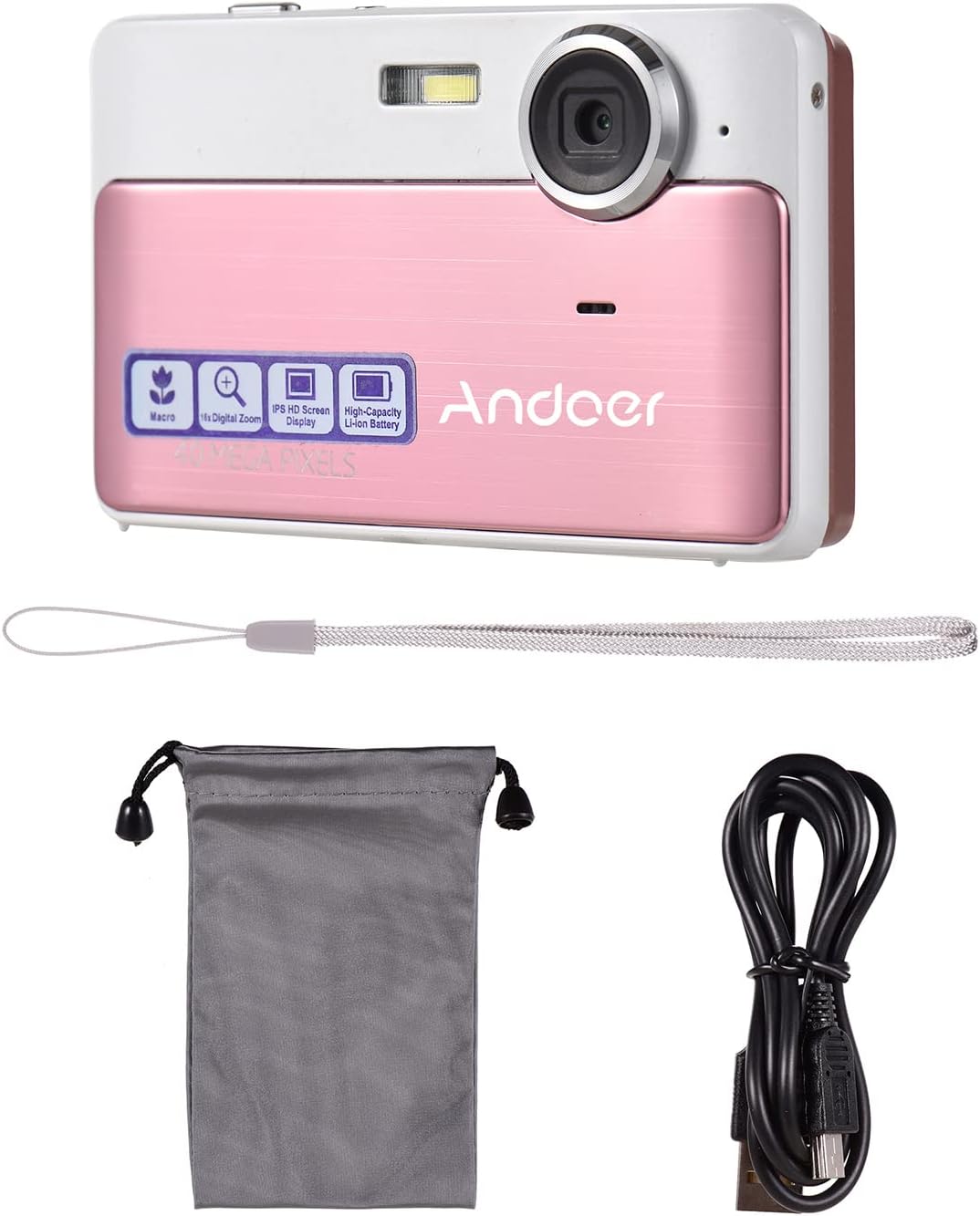
Image: The package contents including the pink digital camera, a grey carrying bag, a white wrist strap, a black USB cable, and a 32GB memory card.
Produkt overview
Familiarize yourself with the various parts and controls of your Andoer Digital Camera.

Image: Labeled diagrams of the camera's top, back, and bottom views, indicating buttons and ports such as ON/OFF, OK, indicator light, zoom, macro, mode, flash/up, delete/right, self-timer/down, scene/left, flash, lens, plastic cover, tripod nut, and card slot.
Nøglekomponenter:
- Linse: Optager billeder og videoer.
- Blitz: Giver belysning under forhold med svagt lys.
- 2.4-tommer IPS-skærm: Viser live view, menuer og afspilning.
- Kontrolknapper: Navigate menus, adjust settings, and operate camera functions.
- USB-port: Til opladning og dataoverførsel.
- Kortplads: For inserting the TF (Micro SD) memory card.
- Tripod Nut: For mounting the camera on a tripod.
Opsætning
1. Opladning af batteriet
The camera has a built-in 600mAh lithium battery. Before first use, ensure the battery is fully charged.
- Connect the included USB cable to the camera's USB port.
- Tilslut den anden ende af USB-kablet til en USB-strømadapter (medfølger ikke) eller en computers USB-port.
- Indikatorlampen viser opladningsstatus. Når den er fuldt opladet, skifter eller slukker lampen.
2. Indsættelse af hukommelseskortet
The camera requires a TF (Micro SD) memory card for storing photos and videos. A 32GB memory card is included.
- Locate the card slot on the side or bottom of the camera (refer to Product Overview diagram).
- Gently insert the TF card into the slot with the metal contacts facing the correct direction (usually towards the front of the camera or as indicated by a small icon).
- Skub kortet ind, indtil det klikker på plads. For at fjerne det skal du skubbe det ind igen, indtil det springer ud.
Note: Ensure the camera is turned off before inserting or removing the memory card to prevent data corruption.
Betjeningsvejledning
1. Tænd/sluk
- To turn on the camera, press and hold the ON/OFF knap.
- To turn off the camera, press and hold the ON/OFF knappen igen.
2. Tage billeder
- Ensure the camera is in photo mode (indicated on the screen). If not, press the MODE knappen for at skifte.
- Komponer dit billede med den 2.4-tommer IPS-skærm.
- Brug W/T buttons (Zoom In/Out) to adjust the 16X digital zoom.
- Tryk på OK button (shutter button) to capture the photo.

Image: A visual representation of the 16X digital zoom function, showing how the camera can enlarge images to capture details.
3. Optagelse af videoer
- Tryk på MODE button to switch to video recording mode.
- Tryk på OK button to start recording. A timer or indicator will appear on the screen.
- Tryk på OK knappen igen for at stoppe optagelsen.
4. Brug af blitzen
The camera has a built-in flash for low-light conditions.
- I fototilstand skal du trykke på Flash/Up button to cycle through flash modes (e.g., Auto Flash, Fill-in Flash, Red-eye Reduction, Flash Off).
- Select the appropriate mode for your shooting environment.
5. Scene Settings
Optimize your photos for different environments using scene settings.
- Tryk på Scene/Left button to access scene modes.
- Available modes include: Auto, Landscape, Macro, Night Scenery, Portrait, Night Portrait, Beach, Sport, Dinner.
- Use the navigation buttons to select a mode and press OK for at bekræfte.

Image: A graphic illustrating various scene settings available on the camera, including Auto, Landscape, Night Scenery, Portrait, Night Portrait, Beach, Sport, and Dinner, alongside an image showcasing maximum 48MP photo resolution.
6. Macro and Long Distance Switching
Adjust focus for close-up or distant subjects.
- Tryk på Makro button (often integrated with other navigation buttons) to toggle between Macro mode (for close-up shots, typically within 10cm) and normal/long distance mode.
- When Macro mode is active, a macro icon will appear on the screen.

Image: A diagram showing how to switch between Macro and Long Distance focus modes. It explains that in Macro mode, objects within 10cm of the camera appear clearer.
7. Afspilningstilstand
- Tryk på MODE button until you enter playback mode.
- Use the navigation buttons (Left/Right) to browse through your captured photos and videos.
- Trykke OK til view en video.
8. Tilslutning til en computer
- Tænd kameraet.
- Tilslut kameraet til din computer ved hjælp af det medfølgende USB-kabel.
- The camera should appear as a removable disk drive on your computer, allowing you to transfer files.
Opretholdelse
Rengøring af kameraet
- Brug en blød, tør klud til at rengøre kamerahuset.
- For the lens and screen, use a specialized lens cleaning cloth and solution if necessary. Avoid abrasive materials.
- Do not use organic solvents or strong chemicals to clean the camera.
Batteripleje
- Recharge the battery regularly, even if the camera is not in use, to maintain battery health.
- Avoid exposing the camera to extreme temperatures, which can affect battery performance.
Håndtering af hukommelseskort
- Always format a new memory card in the camera before first use.
- Do not remove the memory card while the camera is writing data (e.g., during recording or saving).
- Hold hukommelseskort væk fra stærke magnetfelter.
Fejlfinding
| Problem | Mulig årsag/løsning |
|---|---|
| Kameraet tænder ikke. | Batteriet er afladet. Oplad batteriet helt. |
| Kan ikke tage billeder/optage videoer. | Memory card is full or not inserted correctly. Insert/replace memory card or delete files. Ensure camera is in correct mode. |
| Billeder er slørede. | Lens is dirty. Clean the lens. Insufficient light (use flash). Camera shake (hold steady or use anti-shake feature). Incorrect focus mode (adjust Macro/Long Distance). |
| Kameraet fryser. | Remove and reinsert the memory card. If issue persists, turn off and on again. |
| Kan ikke oprette forbindelse til computer. | Ensure USB cable is properly connected. Try a different USB port or cable. Ensure camera is powered on. |
Specifikationer
| Feature | Detalje |
|---|---|
| Modelnavn | 111 |
| Billedopløsning | Up to 48 Megapixels (40MP, 30MP, 24MP, 18MP, 12MP, 8MP, 5MP) |
| Video opløsning | 4K, 1080P, 720P |
| Skærm | 2.4 tommer IPS-skærm |
| Digital Zoom | 16X |
| Billedstabilisering | Digital Anti-Shake |
| Batteritype | Indbygget 600mAh lithiumbatteri |
| Opbevaring | External, supports up to 32GB TF (Micro SD) Memory Card |
| Fotoformat | JPG |
| Videoformat | AVI |
| Havn | USB 2.0 |
| Varestørrelse | 9.5 * 5.8 * 2.2cm / 3.7 * 2.3 * 0.9inch |
| Varens vægt | 90 g / 3.2 oz |
| Understøttede sprog | English, French, Spanish, German, Italian, Portuguese, Japanese, Arabic, Simple Chinese, etc. |

Image: The physical dimensions of the camera, showing a length of 9.5cm, height of 5.8cm, and thickness of 2.2cm.
Garanti og support
Andoer products are manufactured to high quality standards. For any issues or support inquiries, please refer to the seller's return policy or contact Andoer customer service through their official channels. Please retain your proof of purchase for warranty claims.
For yderligere hjælp kan du besøge Andoer Store on Amazon.
Ask a question about this manual
Ask about setup, troubleshooting, compatibility, parts, safety, or missing instructions. Manuals+ will review the question and use this page’s manual context to help answer it.