
1. Introduktion
Thank you for choosing the Gembird USB-C Gigabit Network Adapter with 3-Port USB 3.1 Hub. This device is designed to expand the connectivity of your USB-C enabled laptop, tablet, or computer, providing both high-speed Gigabit Ethernet and additional USB 3.1 ports. This manual provides essential information for setting up, operating, and maintaining your device.
2. Produktfunktioner
- USB-C tilslutning: Connects to your host device via a reversible USB-C port.
- Gigabit Ethernet-port: Provides a stable and fast wired network connection up to 1000 Mbps.
- 3-Port USB 3.1 Hub: Adds three USB 3.1 ports for connecting peripherals such as external hard drives, flash drives, keyboards, and mice.
- Højhastighedsdataoverførsel: USB 3.1 ports support data transfer rates up to 5 Gbps.
- Plug and Play: No driver installation required for most modern operating systems.
3. Pakkens indhold
Please ensure the following items are included in your package:
- Gembird USB-C Gigabit Network Adapter with 3-Port USB 3.1 Hub (Model A-CMU3-LAN-01)
4. Produktet er slutview
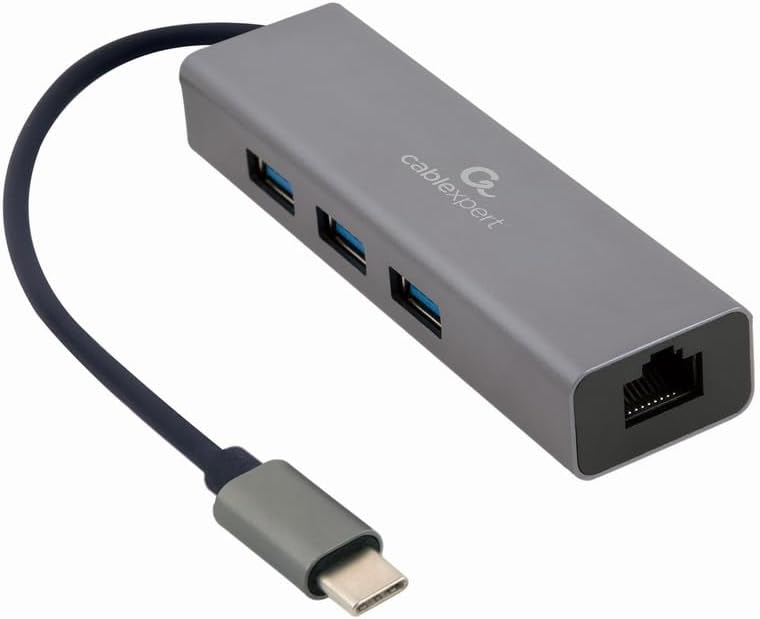
Figur 1: Front view of the Gembird USB-C Gigabit Network Adapter, showing the USB-C cable, three USB 3.1 ports, and the RJ45 Gigabit Ethernet port.

Figur 2: Retail packaging for the Gembird USB-C Gigabit Network Adapter, highlighting key features like USB Type-C, USB 3.1 x 3, RJ45, Gigabit, 1000 Mbps, and Plug & Play.
5. Opsætning
Follow these steps to set up your Gembird USB-C Gigabit Network Adapter:
- Opret forbindelse til værtsenhed: Plug the USB-C connector of the adapter into an available USB-C port on your laptop, tablet, or computer.
- Opret forbindelse til netværk: Insert an Ethernet cable (RJ45) from your router or modem into the Gigabit Ethernet port on the adapter.
- Tilslut USB-tilbehør: Plug your USB devices (e.g., flash drives, external hard drives, mouse, keyboard) into the three available USB 3.1 ports on the adapter.
- Driver installation: The adapter is typically plug-and-play. Your operating system (Windows, macOS, Linux, Chrome OS) should automatically detect and install the necessary drivers. If prompted, allow the system to install drivers.
6. Betjeningsvejledning
Once connected, the adapter functions automatically:
- Netværksadgang: Your host device should now have a wired network connection. You can verify this in your operating system's network settings.
- USB Device Access: Connected USB peripherals will be recognized by your host device and function as if directly connected.
7. Fejlfinding
Hvis du støder på problemer, kan du se følgende almindelige problemer og løsninger:
- Ingen netværksforbindelse:
- Sørg for, at Ethernet-kablet er korrekt tilsluttet til både adapteren og din router/modem.
- Kontroller, at din router/modem fungerer korrekt.
- Bekræft netværksindstillingerne på din værtsenhed.
- Try connecting the adapter to a different USB-C port on your host device.
- USB-enheder genkendes ikke:
- Ensure USB devices are properly plugged into the adapter's USB 3.1 ports.
- Try connecting the USB device directly to your host computer to confirm it is functional.
- Some high-power USB devices may require an external power source if your host device's USB-C port does not provide sufficient power (this adapter does not have a dedicated power input).
- Langsom netværkshastighed:
- Ensure your Ethernet cable is rated for Gigabit speeds (Cat5e or higher).
- Kontroller din internetudbyders hastighed og din routers kapacitet.
- Ensure your host device's USB-C port supports USB 3.0/3.1 speeds.
8. Specifikationer
| Modelnummer | A-CMU3-LAN-01 |
| Hardware-interface | USB-C (Host), USB 3.1 (Hub), RJ45 (Ethernet) |
| Samlet USB-porte | 3 (USB 3.1) |
| Ethernet-porte | 1 (Gigabit RJ45) |
| Dataoverførselshastighed (USB) | Op til 5 Gbps (USB 3.1) |
| Data Transfer Rate (Ethernet) | 10/100/1000 Mbps |
| Produktdimensioner | 10 x 2 x 2.7 tommer |
| Varens vægt | 2.46 ounce |
9. Vedligeholdelse
For at sikre din adapters levetid og optimale ydeevne:
- Rensning: Brug en blød, tør klud til at rengøre enhedens yderside. Undgå flydende rengøringsmidler eller opløsningsmidler.
- Opbevaring: Opbevar adapteren et køligt, tørt sted væk fra direkte sollys og ekstreme temperaturer, når den ikke er i brug.
- Håndtering: Avoid dropping or subjecting the device to strong impacts. Do not attempt to disassemble the adapter.
10. Garanti og support
This Gembird product comes with a to års garanti mod fabrikationsfejlGem venligst din købsbevis i tilfælde af garantikrav.
For technical support or warranty inquiries, please contact your retailer or visit the official Gembird webwebsted for kontaktoplysninger.