
1. Introduktion
Thank you for choosing the ZEYUAN PR3000 Trail Camera. This multifunctional camera is designed for outdoor hunting, home monitoring, farm surveillance, and wildlife observation. It features 36MP image resolution, 1080P video recording, IP66 waterproofing, and 34 infrared lights for clear day and night vision. Please read this manual carefully before using the camera to ensure proper operation and to maximize its performance.
2. Produktet er slutview og komponenter
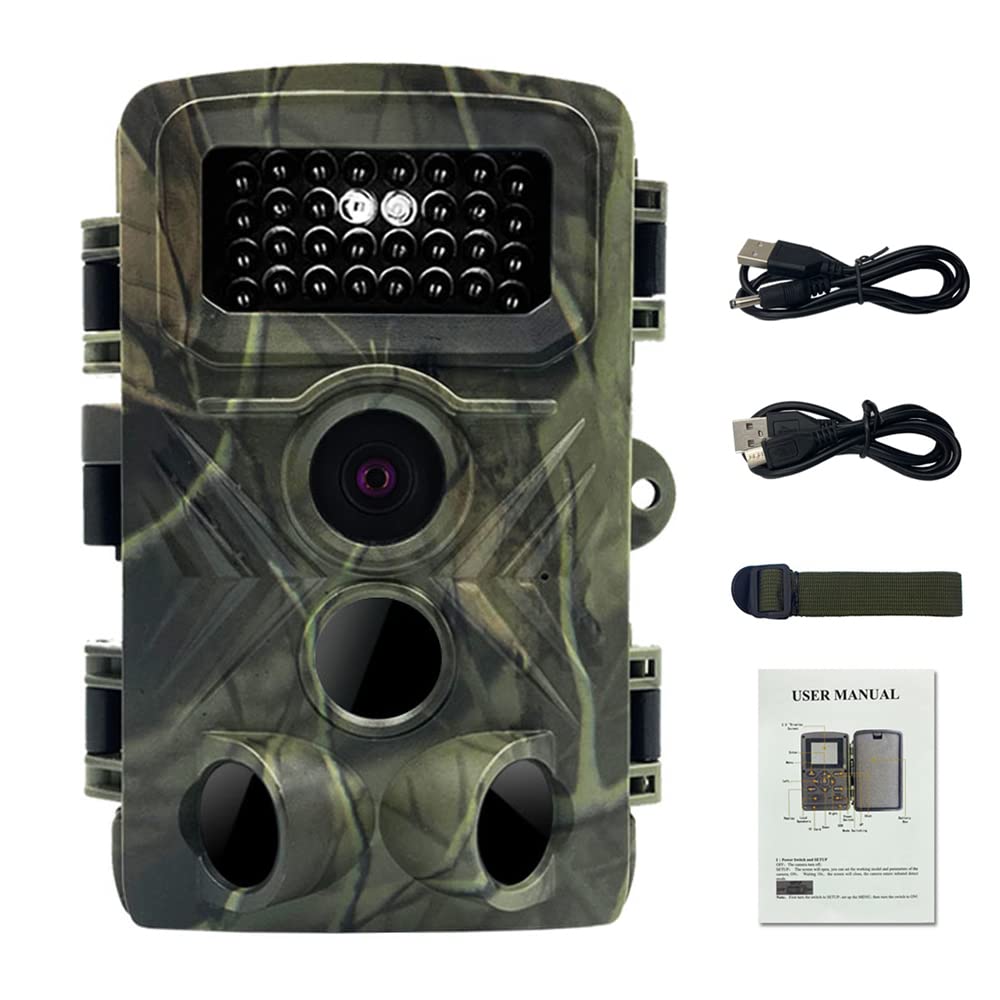
The ZEYUAN PR3000 Trail Camera is built for durability and performance in various environments. Familiarize yourself with its main components:

Figur 2.1: Product Component Analysis. This diagram highlights key parts such as the Infrared Lights, Lens, PIR Sensors, and the Working Indicator Light, essential for understanding the camera's functionality.
Nøglekomponenter:
- Infrarøde lys: 34 units for night vision.
- Linse: Optager billeder og videoer.
- PIR sensorer: Passive Infrared Sensors detect motion to trigger recording.
- Arbejdsindikatorlys: Angiver kameraets status.
- 2.0 tommer skærm: For viewing settings and playback.
Pakkeindhold:

Figur 2.2: Package Contents. The box includes the ZEYUAN PR3000 camera, a power cable, this user manual, mounting straps, and a USB cable for data transfer.
- 1 x ZEYUAN PR3000 Trail Camera
- 1 x strømkabel
- 1 x Brugermanual (dette dokument)
- 1 x stropper til montering
- 1 x USB-kabel
3. Opsætning
Følg disse trin for at forberede dit kamera til brug:
- Installer batterier: Open the battery compartment and insert 8 AA batteries (not included), ensuring correct polarity. Alternatively, connect a 5V DC power source using the provided power cable.
- Indsæt hukommelseskort: Insert a compatible SD card (not included) into the designated slot. Ensure the card is formatted before first use (refer to the "Operating" section for formatting instructions).
- Tænd: Switch the camera to the "ON" position. The indicator light will illuminate briefly.
- Indledende indstillinger: Access the camera's menu via the 2.0-inch screen to set the date, time, language, and desired operating mode (Image, Video, or Image+Video).
- Montering: Use the included straps to securely mount the camera to a tree or pole. Ensure the camera is positioned to capture the desired area without obstructions.
Figur 3.1: Camera Setup Example. The image shows the ZEYUAN PR3000 camera securely attached to a tree, ready for outdoor monitoring.
4. Betjeningsvejledning
The ZEYUAN PR3000 offers various modes and settings for optimal performance.
4.1. Driftstilstande
- Billedtilstand: Captures still photographs. Image sizes can be set to 36MP, 12MP, 8MP, 5MP, or 3.0MP.
- Videotilstand: Records video clips at 1080P/30FPS resolution.
- Image + Video Mode: Optager et stillbillede efterfulgt af et videoklip, når den udløses.
4.2. Trigger Time and Detection
The camera features a rapid trigger time of 0.2 to 0.6 seconds, ensuring that fast-moving subjects are captured effectively.

Figur 4.1: Short Trigger Time. The camera's quick response ensures that no interesting moments are missed, capturing images or videos within 0.2 to 0.6 seconds of detection.
4.3. Dag- og nattesyn
Equipped with 34 infrared lights, the camera provides clear images and videos both during the day and at night, even in completely dark environments.

Figur 4.2: Day & Night Use. This image demonstrates the camera's ability to capture vibrant color photos and videos during the day and clear monochrome footage at night using its infrared illumination.

Figur 4.3: 34 IR Lights. The camera's 34 infrared LEDs ensure that clear images can be captured even in environments with no ambient light.
4.4. Ansøgninger
The ZEYUAN PR3000 is versatile and suitable for a wide range of applications:
- Outdoor hunting activities
- Villa house monitoring
- Orchard farm monitoring
- Wildlife photography and observation

Figur 4.4: Suitable for Many Occasions. This collage illustrates the diverse uses of the trail camera, from security monitoring to wildlife observation.
5. Vedligeholdelse
Korrekt vedligeholdelse sikrer dit kameras levetid og optimale ydeevne.
- Rensning: Use a soft, dry cloth to clean the camera body and lens. Avoid abrasive cleaners or solvents.
- Vandtætning: The camera is IP66 waterproof, meaning it is protected against powerful water jets. However, avoid submerging the camera in water. Ensure all covers and seals are properly closed before exposing it to rain or moisture.
- Batteripleje: Fjern batterierne, hvis kameraet ikke skal bruges i længere tid, for at forhindre lækage.
- Opbevaring: Opbevar kameraet et køligt, tørt sted væk fra direkte sollys, når det ikke er i brug.
6. Fejlfinding
If you encounter issues with your ZEYUAN PR3000 camera, refer to the following common problems and solutions:
| Problem | Mulig årsag/løsning |
|---|---|
| Kameraet tænder ikke | Check battery installation and charge level. Ensure 8 AA batteries are correctly inserted or 5V DC power is connected. |
| Poor image/video quality at night | Ensure the infrared lights are not obstructed. Check the camera's night vision settings. |
| Camera not triggering | Verify PIR sensor sensitivity settings. Ensure there are no obstructions in front of the sensors. Check battery level. |
| Glemt adgangskode | If you have set a password and forgotten it, please refer to the full user manual for reset procedures or contact customer support. |
| SD-kortfejl | Ensure the SD card is correctly inserted and formatted. Try a different compatible SD card. |
7. Specifikationer
| Feature | Detalje |
|---|---|
| Mærke | ZEYUAN |
| Model | PR3000 |
| Billedopløsning | 36 MP / 12 MP / 8 MP / 5 MP / 3.0 MP |
| Video opløsning | 1080P / 30FPS |
| Vandtæt vurdering | IP66 |
| Infrarøde lysdioder | 34 stk |
| Trigger Time | 0.2 - 0.6 sekunder |
| Skærmstørrelse | 2.0 tommer |
| Strømforsyning | 8 x AA batteries (not included) or 5V DC |
| Materiale | Acrylonitril Butadien Styren (ABS) |
| Night Vision Range | 10 meter |
| Dimensioner | 16 x 11.8 x 10 cm (6.3 x 4.6 x 3.9 tommer) |
8. Garanti og support
ZEYUAN products are manufactured to high-quality standards. For warranty information, please refer to the documentation provided at the time of purchase or contact your retailer. Extended protection plans may be available separately.
For technical support, troubleshooting assistance beyond this manual, or inquiries regarding your product, please contact ZEYUAN customer service through your purchase platform or the official ZEYUAN webwebsted.