
Logicool M550MGR
Logicool Signature M550MGR Silent Wireless Mouse User Manual
Model: M550MGR
1. Introduktion
The Logicool Signature M550MGR is a silent wireless mouse designed for comfort and productivity. It features the unique SmartWheel for versatile scrolling and SilentTouch technology for reduced click noise. This mouse offers dual connectivity options: Bluetooth Low Energy and the Logi Bolt USB receiver, ensuring stable performance across various operating systems.

Image: The Logicool Signature M550MGR mouse, highlighting its ergonomic design and advanced scrolling capabilities.
2. Pakkens indhold
- Logicool Signature M550MGR Wireless Mouse
- Logi Bolt USB-modtager
- 1 AA-batteri (forudinstalleret)
- Brugerdokumentation (denne manual)
3. Opsætning
3.1. Batteriinstallation
- Find batterirummet på undersiden af musen.
- Åbn batterirummets dæksel.
- Ensure the AA battery is correctly oriented according to the polarity indicators (+/-).
- Luk batterirummets dæksel.
3.2. Tilslutning af din mus
The M550MGR offers two connection methods: Logi Bolt USB receiver or Bluetooth Low Energy.
3.2.1. Tilslutning af Logi Bolt USB-modtager
- Remove the Logi Bolt USB receiver from the battery compartment or packaging.
- Sæt Logi Bolt USB-modtageren i en ledig USB-port på din computer.
- The mouse should automatically connect. If not, ensure the mouse is powered on.
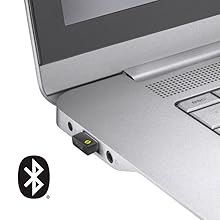
Image: The Logi Bolt USB receiver connected to a laptop, illustrating the wireless connection method.
3.2.2. Bluetooth Low Energy Connection
- Sørg for, at din enheds Bluetooth er aktiveret.
- Tænd for musen.
- Press and hold the connect button on the underside of the mouse for 3 seconds until the LED indicator starts blinking rapidly.
- On your device, go to Bluetooth settings and select "Logicool M550MGR" from the list of available devices to pair.
- The LED indicator will turn solid for a few seconds, then turn off, indicating a successful connection.

Image: Visual representation of the two connectivity options: Bluetooth and the Logi Bolt USB receiver.
4. Betjeningsvejledning
4.1. Grundlæggende funktioner
- Venstre klik: Primær handling, valg.
- Højreklik: Sekundær handling, kontekstmenuer.
- Scrollhjul: Rul op eller ned gennem dokumenter og web sider.
4.2. SmartWheel-rulning
The SmartWheel automatically switches between two scrolling modes:
- Line-by-line Scrolling: For precise navigation, ideal for detailed work.
- Hyper-fast Scrolling: Spin the wheel quickly to effortlessly glide through long documents and web pages. The wheel will automatically switch to this mode when spun with momentum.

Billede: Et nærbillede view of the SmartWheel, demonstrating its design for efficient scrolling.
4.3. SilentTouch-teknologi
The M550MGR incorporates SilentTouch technology, which reduces click noise by 90% compared to traditional mice, while maintaining the familiar click feel. This creates a quieter work environment without compromising tactile feedback.

Image: A user operating the silent mouse in a calm environment, illustrating the benefit of SilentTouch technology.
5. Funktioner
- SmartWheel: Automatic switching between precise line-by-line and hyper-fast scrolling.
- SilentTouch-teknologi: 90% reduced click noise with retained click feel.
- Dobbelt tilslutning: Connect via Logi Bolt USB receiver or Bluetooth Low Energy.
- Ergonomisk design: Comfortable shape with rubber side grips for extended use.
- Lang batterilevetid: Op til 24 måneder på et enkelt AA-batteri.
- Multi-OS kompatibilitet: Supports Windows, macOS, Chrome OS, iPadOS, and Android.
6. Batterioplysninger
- Batteritype: 1 x AA alkaline battery.
- Batterilevetid: Up to 24 months, depending on usage.
- Udskiftning af batteri: Replace the AA battery when the LED indicator on the mouse turns red or when performance degrades. Follow the installation steps in Section 3.1.
7. Kompatibilitet
The Logicool Signature M550MGR mouse is compatible with the following operating systems:
- Logi Bolt Connection:
- Windows 10, 11 eller nyere
- macOS 10.10 eller nyere
- Chrome OS
- Bluetooth lavenergiforbindelse:
- Windows 10, 11 eller nyere
- macOS 10.15 eller nyere
- Chrome OS
- iPadOS 13.4 eller nyere
- Android 5.0 eller nyere
Note: This mouse is not compatible with Logitech Unifying receivers.
8. Vedligeholdelse
- Rensning: Use a soft, lint-free cloth to clean the mouse surface. For stubborn dirt, slightly dampSkyl kluden med vand. Undgå skrappe kemikalier eller slibende materialer.
- Sensor: Hold den optiske sensor på undersiden af musen ren og fri for støv eller snavs for optimal sporingsydelse.
- Opbevaring: When not in use for extended periods, turn off the mouse to conserve battery life. Store in a dry, cool place.
9. Fejlfinding
9.1. Musen reagerer ikke
- Sørg for, at musen er tændt.
- Kontroller batteriniveauet og udskift om nødvendigt.
- For Logi Bolt connection: Ensure the receiver is securely plugged into a working USB port. Try a different USB port.
- For Bluetooth connection: Ensure Bluetooth is enabled on your device and the mouse is paired. Try re-pairing the mouse (refer to Section 3.2.2).
- Genstart din computer eller enhed.
9.2. Uregelmæssig markørbevægelse
- Rengør den optiske sensor på undersiden af musen.
- Sørg for at bruge musen på en passende overflade. Undgå meget reflekterende eller gennemsigtige overflader.
- Move the mouse closer to the Logi Bolt receiver or your Bluetooth-enabled device to reduce interference.
9.3. SmartWheel Not Switching Modes
- Ensure the wheel is spun with enough momentum to activate hyper-fast scrolling.
- Check for any debris around the scroll wheel that might impede its movement.
10. Specifikationer
| Mærke | Logicool |
| Modelnummer | M550MGR |
| Farve | Grafit |
| Forbindelsesteknologi | Bluetooth, Logi Bolt (USB) |
| Bevægelsesdetekteringsteknologi | Optisk |
| Særlige funktioner | SilentTouch, Wireless |
| Produktdimensioner | 6.1 x 10.82 x 3.88 cm |
| Varens vægt | 97.4 g |
| Batteritype | 1 x AA batteri |
| Kontinuerlig brugstid | Op til 24 måneder |
11. Garanti og support
The Logicool Signature M550MGR Wireless Mouse comes with a 2 års producentgaranti fra købsdatoen.
For technical support, warranty claims, or additional information, please visit the official Logicool support webwebstedet eller kontakt deres kundeservice. Gem dit købsbevis af garantihensyn.
Official Logicool Support: www.logicool.co.jp
Ask a question about this manual
Ask about setup, troubleshooting, compatibility, parts, safety, or missing instructions. Manuals+ will review the question and use this page’s manual context to help answer it.