
1. Introduktion
Tak for købetasing the MAGIC-REFINER x ZIYOU LANG K68 Wireless Mechanical Keyboard. This compact 68-key keyboard offers versatile connectivity options and a customizable typing experience. It features dual-mode wireless connectivity (2.4GHz and Bluetooth 5.0), hot-swappable mechanical switches, and a durable design. This manual provides detailed instructions for setup, operation, and maintenance to ensure optimal performance.
Technical Standard Compliance Certification Number: 219-239327
Nøglefunktioner:
- Dobbelttilstandsforbindelse: Seamlessly switch between 2.4GHz wireless and Bluetooth 5.0 for connection to multiple devices.
- Hot-swap-kontakter: Customize your typing feel by easily changing 3-pin mechanical switches without soldering.
- Kompakt layout med 68 tangenter: Space-saving design with essential keys, including dedicated arrow keys.
- Røde mekaniske kontakter: Linear and smooth keystrokes suitable for both typing and gaming.
- Smart strømbesparelse: Automatic sleep mode after 30 minutes of inactivity to conserve battery life.
- Bred kompatibilitet: Supports Windows, Mac, iPad, iOS, Android, and Surface devices.
2. Sikkerhedsoplysninger
- Do not expose the keyboard to water or excessive humidity.
- Undgå at tabe tastaturet eller udsætte det for hårde stød.
- Opbevares utilgængeligt for børn.
- Use only AAA batteries as specified. Ensure correct polarity during installation.
- Do not attempt to disassemble or repair the keyboard yourself. Contact support if issues arise.
- This product does not feature backlighting to optimize power consumption for extended battery life.
3. Pakkens indhold
- MAGIC-REFINER x ZIYOU LANG K68 Wireless Mechanical Keyboard
- 2.4GHz USB Receiver (integrated into the keyboard)
- USB Cable (for wired connection/charging, if applicable)
- Keycap Puller / Switch Puller (for hot-swappable models)
- Brugermanual
4. Produktet er slutview
The K68 keyboard features a compact 68-key layout, providing essential functionality while saving desk space. It supports both 2.4GHz wireless and Bluetooth connectivity.
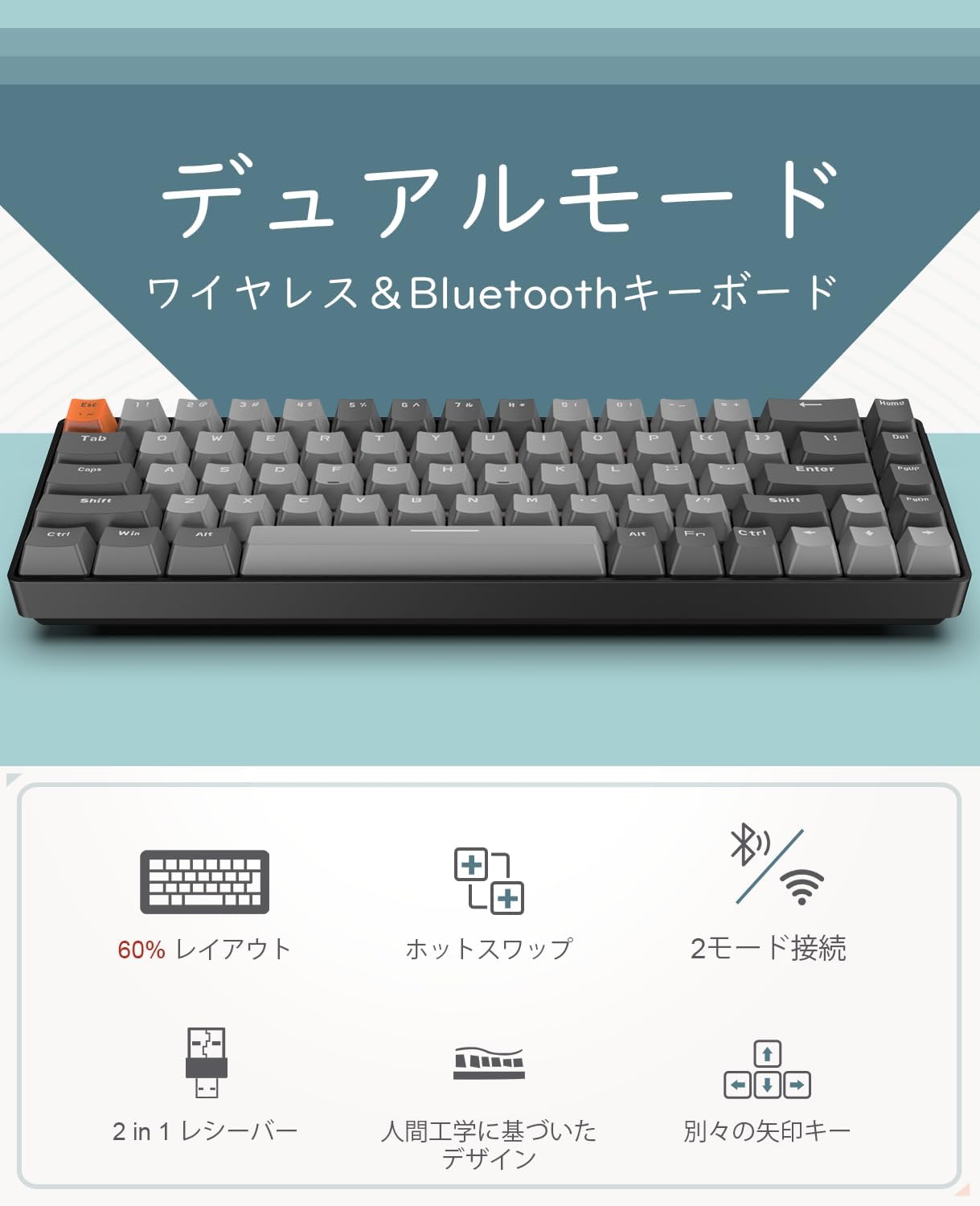
Billede: Overview of the K68 keyboard highlighting its dual-mode wireless and Bluetooth capabilities.

Image: Diagram showing the 60% layout, hot-swappable feature, 2-mode connection, 2-in-1 receiver, ergonomic design, and separate arrow keys.
5. Opsætning
5.1 Batteriinstallation
The K68 keyboard requires two AAA batteries (not included). Locate the battery compartment on the underside of the keyboard, open it, insert the batteries according to the polarity indicators, and close the compartment.

Image: Underside of the K68 keyboard showing the battery compartment for two AAA batteries.
5.2 Tænd/sluk
Locate the power switch on the keyboard and slide it to the 'ON' position to power on the device.
5.3 2.4 GHz trådløs forbindelse
- Sørg for, at tastaturet er tændt.
- Tryk og hold FN + Q for 3 seconds. The Q key indicator light will flash rapidly, indicating pairing mode.
- Insert the 2.4GHz USB receiver into an available USB port on your computer or mobile device (using a Type-C or USB adapter if necessary).
- Once connected, the Q key indicator light will turn off, and the keyboard is ready for use.
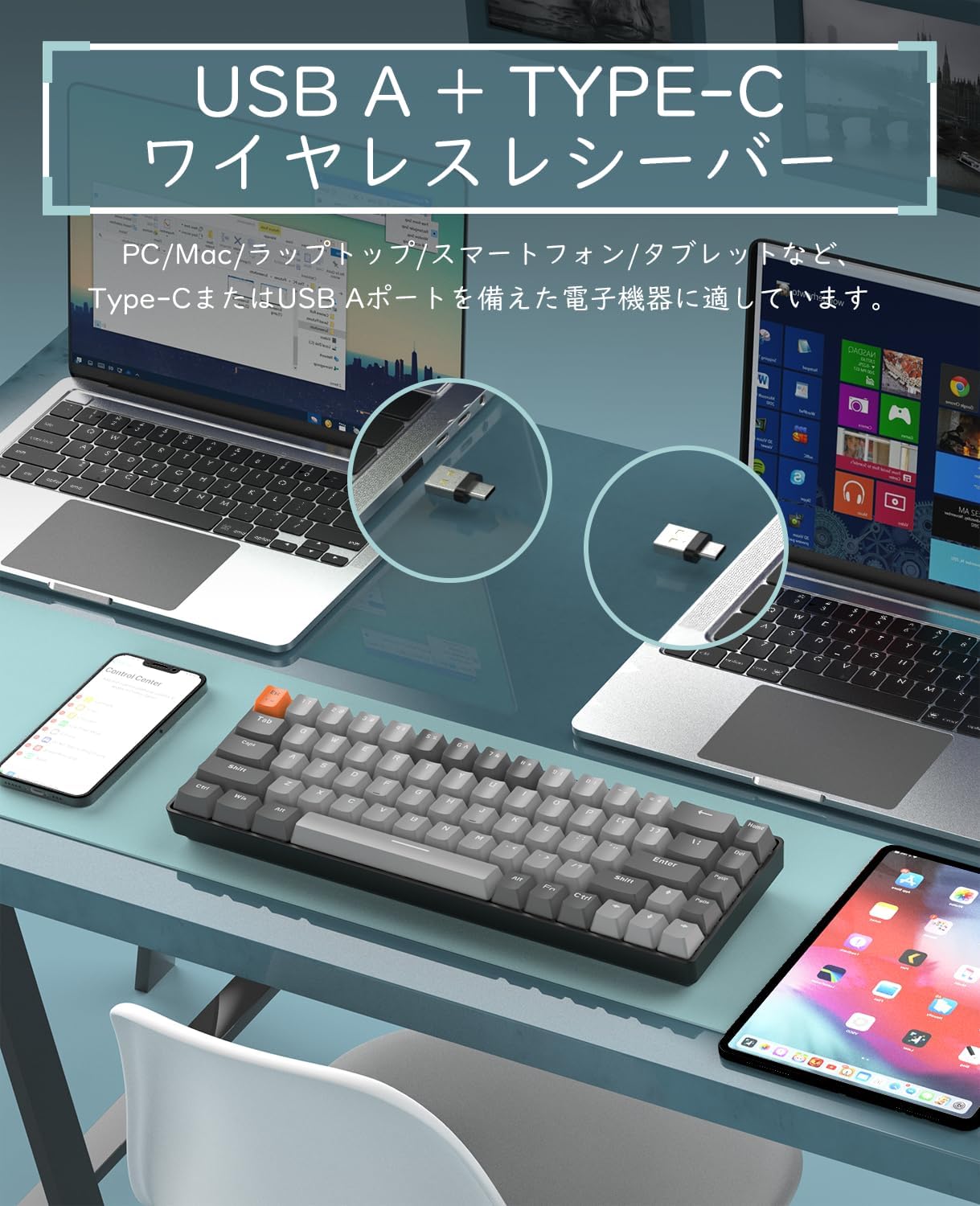
Image: The K68 keyboard with its USB A and Type-C compatible wireless receiver, shown connected to a laptop and a smartphone.
5.4 Bluetooth-forbindelse
The keyboard supports connecting to two Bluetooth devices simultaneously (BT1 and BT2).
- Sørg for, at tastaturet er tændt.
- Tryk og hold FN + W. (for BT1) eller FN + E (for BT2) for 3 seconds. The W or E key indicator light will flash rapidly, indicating Bluetooth pairing mode.
- On your device (e.g., smartphone, tablet, PC), enable Bluetooth and search for available devices.
- Select "K68 BT5.0" or "K68 BT3.0" from the list to pair.
- Once connected, the W or E key indicator light will turn off, and the keyboard is ready for use.
Video: Demonstration of the K68 keyboard's dual-mode connectivity, hot-swappable switches, and connection methods. This video illustrates the process of connecting via Bluetooth and 2.4GHz wireless, as well as customizing switches.
6. Betjeningsvejledning
6.1 Skift mellem enheder
Sådan skifter du mellem tilsluttede enheder:
- Trykke FN + Q for at skifte til den trådløse 2.4 GHz-forbindelse.
- Trykke FN + W. for at skifte til Bluetooth-enhed 1.
- Trykke FN + E for at skifte til Bluetooth-enhed 2.
6.2 Smart Power Saving Mode
The K68 keyboard features an intelligent power-saving function. If there is no operation for 30 minutes, the keyboard will enter sleep mode. Press any key to wake it up.
6.3 Udskiftning af taster og knapper (kan udskiftes direkte)
The keyboard's hot-swappable PCB allows you to freely replace 3-pin switches without soldering. This enables customization of your typing experience.
- Brug den medfølgende tastaftrækker til forsigtigt at fjerne den ønskede tast.
- Use the included switch puller to gently remove the mechanical switch from the PCB.
- Align the pins of the new 3-pin switch with the holes on the PCB and press firmly until it clicks into place.
- Sæt tastaturdækslet på igen.
Note: Be careful when inserting new switches to avoid bending the pins. The PCB is compatible with 99% of 3-pin switches.

Image: A hand demonstrating the removal and insertion of a mechanical switch on the K68 keyboard, highlighting its hot-swappable feature.
6.4 Input Method Switching (US Layout)
This product uses a US layout keyboard. If you need to switch input methods on your operating system, you can typically do so using:
- Ctrl + Mellemrum
- or Ctrl + Shift
Refer to your operating system's documentation for specific input method settings.
7. Vedligeholdelse
7.1 Rengøring
Sådan renser du tastaturet:
- Disconnect the keyboard from all devices and power sources.
- Brug en blød, fnugfri klud lidt damprengøres med vand eller en mild rengøringsopløsning til at tørre tasterne og overfladen af.
- For deeper cleaning, remove keycaps using the keycap puller and clean underneath with compressed air or a small brush.
- Ensure the keyboard is completely dry before re-connecting or powering on.
7.2 Opbevaring
When not in use for extended periods, store the keyboard in a cool, dry place away from direct sunlight and extreme temperatures. Remove batteries if storing for several months.
8. Fejlfinding
8.1 Forbindelsesproblemer
- Keyboard not connecting via 2.4GHz: Ensure the USB receiver is properly inserted and the keyboard is in 2.4GHz mode (FN+Q). Try a different USB port.
- Tastatur opretter ikke forbindelse via Bluetooth: Ensure Bluetooth is enabled on your device and the keyboard is in the correct Bluetooth pairing mode (FN+W or FN+E). Forget the device on your system and try pairing again.
- Intermitterende forbindelse: Check battery levels. Ensure no strong interference sources (e.g., other wireless devices) are nearby.
8.2 Taster reagerer ikke
- Specifikke taster virker ikke: If you have replaced switches, ensure the new switch is properly seated and its pins are not bent. Try swapping the problematic switch with a known working one.
- Alle nøgler virker ikke: Check battery levels and replace if necessary. Ensure the keyboard is properly connected to your device.
8.3 Batterilevetid
Under normal usage, batteries can last 3 to 6 months. If battery life is significantly shorter, ensure you are using quality AAA batteries. The keyboard does not have backlighting, which helps extend battery life.
If you encounter any other issues, please contact our customer service for assistance.
9. Specifikationer
| Feature | Beskrivelse |
|---|---|
| Mærke | MAGI-RAFFINER |
| Model | K68 |
| Forbindelsesteknologi | Bluetooth (BT5.0/BT3.0), 2.4GHz Wireless |
| Switch Type | Mekaniske (røde kontakter) |
| Nøgleantal | 68 nøgler |
| Tastaturlayout | US QWERTY |
| Hot-swappable | Yes (3-pin switches) |
| Strømkilde | 2 x AAA batterier (medfølger ikke) |
| Strømbesparelse | Automatisk dvaletilstand efter 30 minutters inaktivitet |
| Kompatibilitet | Windows, Mac, iPad, iOS, Android, Surface |
| Dimensioner (L x B x H) | 30.9 cm x 10 cm x 83.8 cm |
| Technical Standard Certification Number | 219-239327 |
10. Garanti og support
10.1 Kvalitetsgaranti
This product comes with a 12-month quality guarantee from the date of purchase. We conduct product inspections before shipment to ensure quality.
10.2 Kundesupport
If you encounter any product defects or connection issues, please contact our customer service. We are committed to actively resolving any inconveniences you may experience.
Kontaktoplysninger: Please refer to the contact details provided with your purchase or on the official MAGIC-REFINER webwebsted.