
1. Introduktion
Tak for købetasing the PrimeCables AlienPro StagePro G300 Bluetooth Soundbar with Subwoofer. This manual provides essential information for the safe and efficient operation of your new audio system. Please read this manual thoroughly before use and retain it for future reference.
2. Sikkerhedsoplysninger
- Strømkilde: Sørg for, at strømforsyningen voltage matcher kravene specificeret på enheden.
- Ventilation: Bloker ikke ventilationsåbninger. Installer i overensstemmelse med producentens anvisninger.
- Vand og fugt: Udsæt ikke dette apparat for regn eller fugt. Placer ikke genstande fyldt med væsker, såsom vaser, oven på apparatet.
- Varme: Må ikke installeres i nærheden af varmekilder såsom radiatorer, varmeapparater, komfurer eller andre apparater (inklusive ampløftere), der producerer varme.
- Rensning: Rengør kun med en tør klud.
- Service: Overlad al service til kvalificeret servicepersonale. Service er påkrævet, når apparatet er blevet beskadiget på nogen måde.
3. Pakkens indhold
Bekræft, at alle nedenstående varer er inkluderet i din pakke:
- Soundbar
- Subwoofer
- Strømkabel
- Fjernbetjening
- Brugervejledning (dette dokument)
4. Produktet er slutview
Familiarize yourself with the components of your sound system.

Figur 4.1: Forside view of the soundbar, showcasing its sleek black design and speaker grille.

Figur 4.2: Bagside view of the soundbar, showing the recessed panel containing various input ports.

Figure 4.3: The included subwoofer, a black cube-shaped unit with a front-facing port for enhanced bass.
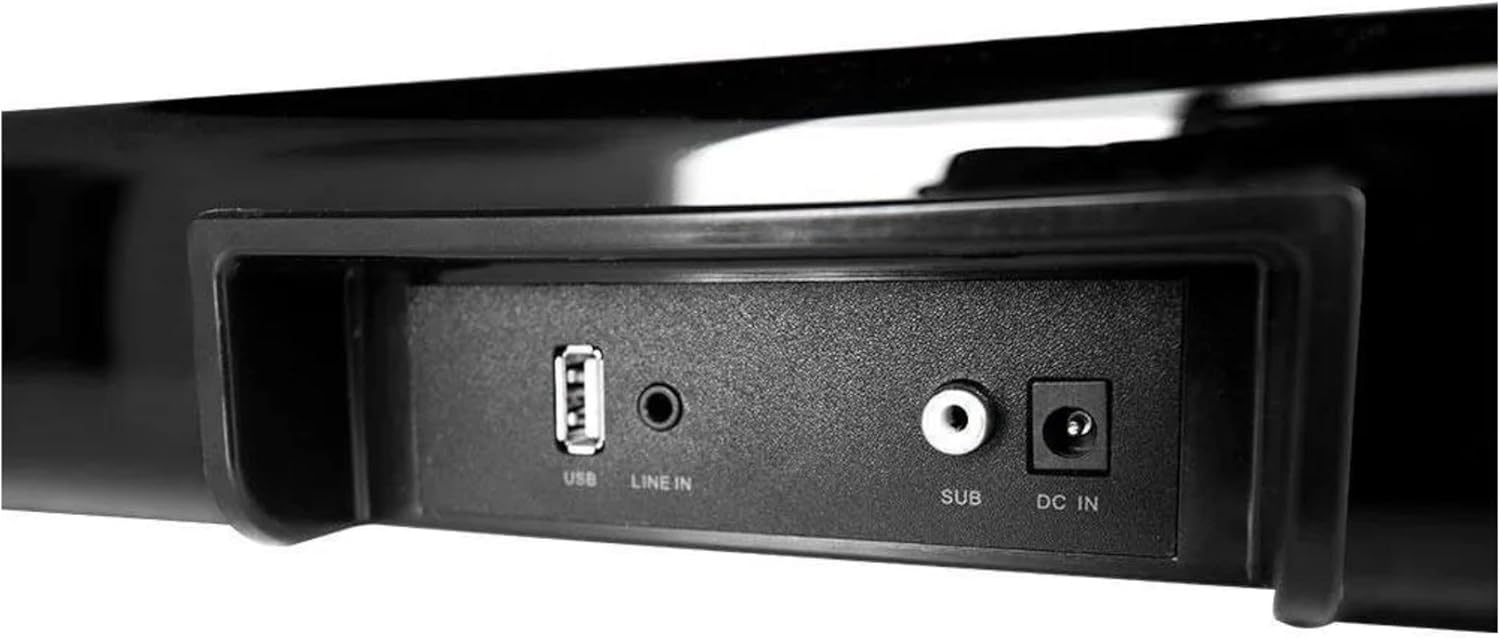
Figur 4.4: Detaljeret view of the soundbar's input panel, featuring USB, Line In, Subwoofer Out, and DC In ports.

Figure 4.5: Side panel controls on the soundbar, including Power/Mode, Play/Mute, Volume Up/Next, and Volume Down/Previous buttons.

Figure 4.6: The included remote control, featuring buttons for power, mute, EQ, volume, playback, and mode selection.
5. Opsætning
5.1 Placering
- Place the soundbar on a stable, flat surface directly in front of your television or monitor.
- Position the subwoofer on the floor, ideally near the soundbar, to optimize bass response. Ensure it has adequate ventilation.
5.2 Forbindelser
- Connect the subwoofer to the soundbar using the dedicated 'SUB' output port on the soundbar and the corresponding input on the subwoofer.
- Connect the power cable to the 'DC IN' port on the soundbar and then plug it into a wall outlet.
- Connect your audio source (TV, smartphone, etc.) to the soundbar using one of the available input methods (Bluetooth, Line In, USB). Refer to Section 7 for detailed connection instructions.
6. Betjeningsvejledning
6.1 Tænd/sluk
- Tryk på Strøm/tilstand button on the soundbar (Figure 4.5) or the Magt button on the remote control (Figure 4.6) to turn the unit on or off.
6.2 Valg af tilstand
- Tryk på Mode button on the soundbar or remote control repeatedly to cycle through available input modes: Bluetooth, Line In, USB.
6.3 Lydstyrkekontrol
- Brug VOL+ og VOL- buttons on the soundbar or remote control to adjust the volume.
6.4 Mute-funktion
- Tryk på Stum knappen på fjernbetjeningen for midlertidigt at slå lyden fra. Tryk på den igen for at genoprette lyden.
6.5 Playback Controls (Bluetooth/USB Mode)
- Afspil/pause: Tryk på Play/Mute knappen på soundbaren eller Afspil/pause knappen på fjernbetjeningen.
- Næste nummer: Tryk på VOL+/Næste knappen på soundbaren eller Næste spor knappen på fjernbetjeningen.
- Forrige nummer: Tryk på VOL-/Forrige knappen på soundbaren eller Forrige spor knappen på fjernbetjeningen.
7. Forbindelser
7.1 Bluetooth -parring
- Tænd for soundbaren.
- Tryk på Mode button until 'BT' or 'Bluetooth' is indicated (if applicable, via LED or display). The soundbar will enter pairing mode.
- Søg efter tilgængelige Bluetooth-enheder på din Bluetooth-aktiverede enhed (f.eks. smartphone, tablet).
- Select 'AlienPro G300' (or similar name) from the list.
- Once paired, the soundbar will confirm the connection, and you can now play audio wirelessly.
7.2 Line In (AUX) Connection
- Connect one end of a 3.5mm audio cable (not included) to the 'LINE IN' port on the soundbar (Figure 4.4).
- Connect the other end of the 3.5mm audio cable to the headphone jack or audio output port of your external device.
- Tryk på Mode button on the soundbar or remote until 'LINE IN' or 'AUX' mode is selected.
7.3 USB-forbindelse
- Indsæt et USB-flashdrev med lyd files into the 'USB' port on the soundbar (Figure 4.4).
- Tryk på Mode button on the soundbar or remote until 'USB' mode is selected.
- Soundbaren begynder automatisk at afspille lyd files from the USB drive. Use the playback controls to navigate.
8. Vedligeholdelse
8.1 Rengøring
- Tag altid stikket til soundbaren og subwooferen ud af stikkontakten inden rengøring.
- Brug en blød, tør klud til at tørre overfladerne på soundbaren og subwooferen af.
- Brug ikke flydende rengøringsmidler, aerosolspray eller opløsningsmidler, da disse kan beskadige overfladen eller de indvendige komponenter.
8.2 Opbevaring
- If storing the unit for an extended period, unplug it from the power source and store it in a cool, dry place away from direct sunlight and extreme temperatures.
9. Fejlfinding
Hvis du støder på problemer med din soundbar, kan du se følgende almindelige problemer og løsninger:
| Problem | Mulig årsag | Løsning |
|---|---|---|
| Ingen strøm | Strømkabel ikke tilsluttet; Strømudtag ikke aktivt | Sørg for, at strømkablet er korrekt tilsluttet soundbaren og en fungerende stikkontakt. |
| Ingen lyd | Volume too low; Incorrect input mode; Audio cable not connected; Device not paired (Bluetooth) | Increase volume. Select correct input mode. Check audio cable connections. Re-pair Bluetooth device. |
| Bluetooth-parring mislykkes | Soundbaren er ikke i parringstilstand; Enheden er for langt væk; Interferens | Ensure soundbar is in Bluetooth pairing mode. Move device closer to soundbar. Avoid strong interference sources. |
| Fjernbetjening virker ikke | Batterierne er opbrugt; Blokering mellem fjernbetjening og soundbar | Replace remote control batteries. Ensure clear line of sight to the soundbar's IR receiver. |
10. Specifikationer
| Feature | Specifikation |
|---|---|
| Modelnummer | G300 |
| Mærke | PrimeCables (AlienPro) |
| Forbindelsesteknologi | Bluetooth |
| Lydudgangstilstand | Omgive |
| Højttaler type | Soundbar |
| Speciel funktion | Bluetooth |
| Anbefalet brug | For surround sound systems |
| Surround Sound Kanalkonfiguration | 2.0 |
| Farve | Sort |
| Produktdimensioner | 30 x 24 x 65 cm; 3.3 kg |
| Højttaler størrelse | 5 tommer (subwoofer) |
| Strømkilde | Elektrisk med ledning |
| Kontrolmetode | Fjern |
11. Garanti og support
This product comes with a standard manufacturer's warranty. For specific warranty terms and conditions, please refer to the documentation provided at the time of purchase or contact PrimeCables customer support.
For technical assistance, troubleshooting not covered in this manual, or service inquiries, please contact PrimeCables customer support through their official webwebsted eller kontaktkanaler.