
1. Introduktion
The Everest EWR-674N is a versatile 2.4GHz Wireless-N router designed to provide reliable internet connectivity and network expansion. It supports multiple operating modes including Router, Repeater, Access Point (AP), and Wireless Internet Service Provider (WISP), making it suitable for various networking needs. With 300Mbps wireless speed and three 5dBi external antennas, it offers enhanced coverage and performance for your home or office network.
2. Pakkens indhold
Kontroller venligst, at alle varer er til stede i din pakke:
- Everest EWR-674N Wireless Router
- Strømadapter
- Ethernet kabel
- Quick Installation Guide (This Manual)
3. Produktet er slutview
Familiarize yourself with the physical components of your Everest EWR-674N router.
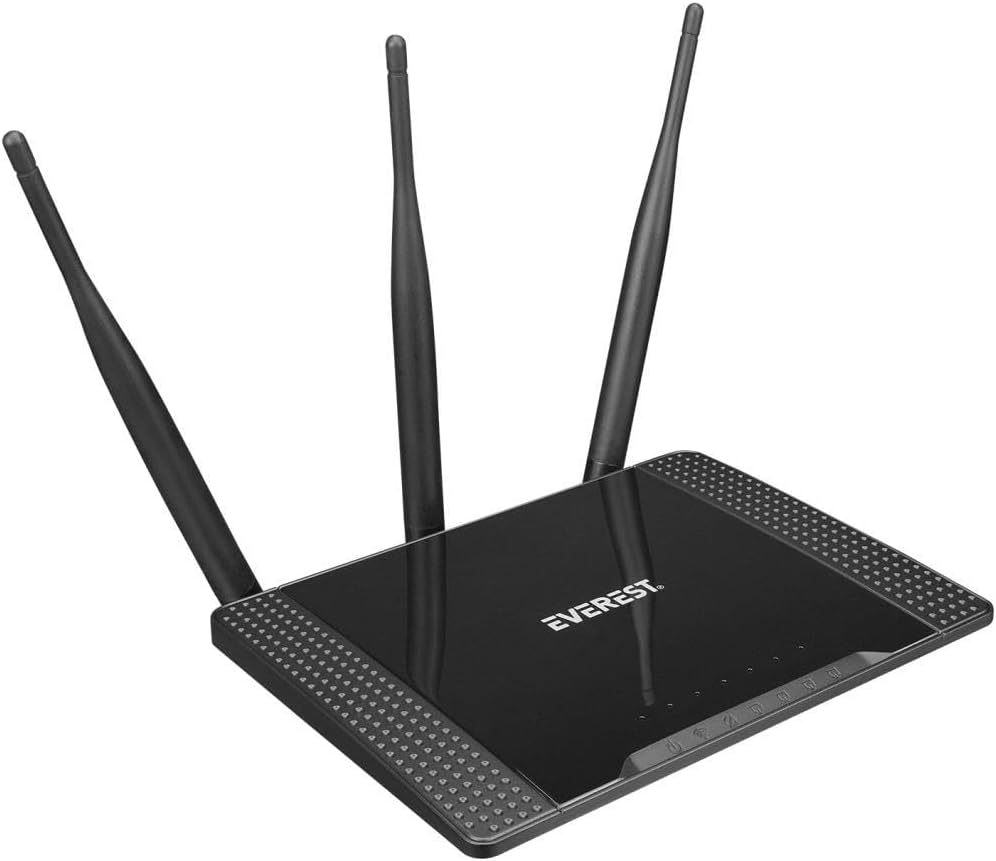
Figur 3.1: Vinklet view of the Everest EWR-674N Wireless Router, showcasing its top panel with the 'EVEREST' logo and three external antennas.

Figur 3.2: Frontal view of the Everest EWR-674N Wireless Router with antennas in an upright position, highlighting the brand logo and LED indicators for power, internet, and LAN activity.

Figur 3.3: Bagud vinklet view of the Everest EWR-674N Wireless Router, clearly displaying the WAN port, LAN ports, power input, and reset button.
3.1. LED-indikatorer
- Power LED: Angiver enhedens strømstatus.
- WAN LED: Indicates activity on the WAN (Internet) port.
- LAN LED'er: Indicate activity on the LAN ports.
- WLAN LED: Angiver aktivitet på trådløst netværk.
3.2. Porte og knapper
- WAN -port: Connects to your modem or internet service provider's network.
- LAN-porte: Connect to wired devices such as computers, smart TVs, or gaming consoles.
- Strømindgang: Tilsluttes den medfølgende strømadapter.
- Nulstil knap: Used to restore the router to factory default settings. Press and hold for 5-10 seconds while the device is powered on.
4. Opsætning
Follow these steps to set up your Everest EWR-674N router.
4.1. Hardwareforbindelse
- Placer routeren: Place the router in a central location to maximize wireless coverage. Avoid placing it near obstructions or electronic devices that may cause interference.
- Tilslut antennerne: Sørg for, at de tre eksterne antenner er sikkert fastgjort og orienteret lodret for optimalt signal.
- Tilslut til strøm: Plug the power adapter into the router's power input and then into a wall outlet. The Power LED should illuminate.
- Connect to Modem (Router Mode): Tilslut den ene ende af Ethernet-kablet til modemets LAN-port og den anden ende til routerens WAN-port.
- Tilslut til computer (valgfrit): For initial configuration, you may connect your computer directly to one of the router's LAN ports using an Ethernet cable.
4.2. Indledende konfiguration
- Få adgang til Web Interface: Åbn a web browser on a computer connected to the router (either wired or wirelessly). In the address bar, type the default IP address (usually
192.168.1.1or192.168.0.1) and press Enter. Refer to the label on the bottom of your router for the exact IP address. - Log ind: Enter the default username and password. These are typically
adminfor both. Refer to the router's label if different. - Kør hurtig opsætningsguide: Upon successful login, you will likely be prompted to run a Quick Setup Wizard. Follow the on-screen instructions to configure your internet connection and wireless network settings.
- Set Wireless Network Name (SSID) and Password: Choose a unique name for your Wi-Fi network and a strong password to secure it.
- Change Admin Password: For security, it is highly recommended to change the default administrator password for the router's web interface.
5. Driftstilstande
The Everest EWR-674N supports four main operating modes:
5.1. Routertilstand
In Router Mode, the device acts as a central hub for your network, connecting to your modem to provide internet access to all connected wired and wireless devices. It creates a private local area network (LAN).
5.2. Repeater-tilstand
Repeater Mode extends the coverage of an existing wireless network. The EWR-674N connects wirelessly to your main router and re-broadcasts the signal, eliminating Wi-Fi dead zones.
5.3. Adgangspunktstilstand (AP)
In AP Mode, the router converts a wired network connection into a wireless one. It connects to an existing wired network via an Ethernet cable and broadcasts a Wi-Fi signal, allowing wireless devices to connect.
5.4. WISP Mode
WISP (Wireless Internet Service Provider) Mode allows the router to connect to a wireless ISP network and share that internet connection with multiple devices, both wired and wireless, within your local network.
6. Vedligeholdelse
Regular maintenance helps ensure optimal performance and security of your router.
6.1. Firmwareopdateringer
Periodically check the Everest official website for firmware updates. Firmware updates can improve performance, add new features, and fix security vulnerabilities. Follow the instructions provided with the firmware update carefully.
6.2. Fabriksindstilling
If you encounter persistent issues or forget your login credentials, you can perform a factory reset. With the router powered on, press and hold the Reset button (typically located on the rear panel) for 5-10 seconds until the LEDs flash. The router will restart with default settings.
6.3. Rensning
Clean the router periodically with a soft, dry cloth. Do not use liquid cleaners or aerosols. Ensure ventilation openings are free from dust to prevent overheating.
7. Fejlfinding
Dette afsnit omhandler almindelige problemer, du kan støde på.
- Ingen internetadgang:
- Check if the WAN LED is lit. If not, ensure the Ethernet cable from your modem is securely connected to the router's WAN port.
- Restart your modem and then your router.
- Bekræft dine internetforbindelsesindstillinger i routerens web interface.
- Kontakt din internetudbyder (ISP) for at bekræfte tjenestens status.
- Svagt eller ustabilt Wi-Fi-signal:
- Flyt routeren til en mere central placering, væk fra vægge, metalgenstande og andre elektroniske enheder.
- Sørg for, at antennerne er korrekt orienteret.
- Kontroller for interferens fra andre 2.4 GHz-enheder (f.eks. trådløse telefoner, mikrobølgeovne).
- Consider changing the wireless channel in the router's settings.
- Kan ikke få adgang til routerens Web Interface:
- Sørg for, at din enhed er forbundet til routeren (kablet eller trådløst).
- Bekræft at du bruger den korrekte IP-adresse (f.eks.
192.168.1.1). - Ryd din browsers cache, eller prøv en anden browser.
- Hvis du har glemt adgangskoden, skal du udføre en fabriksnulstilling (se afsnit 6.2).
8. Specifikationer
| Mærke | Everest |
| Model | EWR-674N |
| Trådløs Standard | Wireless-N (2.4GHz) |
| Trådløs hastighed | 300 Mbps |
| Antenner | 3 x 5dBi External Antennas |
| Driftstilstande | Router, Repeater, AP, WISP |
| Sikkerhedsprotokol | WEP |
| Kompatible enheder | Router |
| Pakkedimensioner | 30.4 x 22.8 x 6.2 cm |
| Produktets vægt | 580 g (0.58 Kilogram) |
| Farve | Grå |
| ASIN | B0BGYD3B8C |
9. Garanti og support
For warranty information and technical support, please refer to the warranty card included with your product or visit the official Everest webDu kan også kontakte din forhandler for at få hjælp.
Gem venligst dit købsbevis for garantikrav.