
Indledning
Tak for købetasing the Thomson MIC401BT Stereo CD/Bluetooth Micro-Chain System. This manual provides essential information for the safe and efficient operation of your new audio system. Please read these instructions thoroughly before use and retain them for future reference.
Sikkerhedsoplysninger
- Strømkilde: Sørg for, at strømforsyningen voltage stemmer overens med klassificeringsmærkatet på enheden.
- Ventilation: Bloker ikke ventilationsåbningerne. Sørg for tilstrækkelig plads omkring enheden til korrekt luftgennemstrømning.
- Vand og fugt: Do not expose the unit to rain, moisture, or dripping/splashing liquids. Keep objects filled with liquids, such as vases, away from the unit.
- Varme: Placer ikke enheden i nærheden af varmekilder såsom radiatorer, varmeapparater, komfurer eller andre apparater (herunder ampløftere), der producerer varme.
- Rensning: Tag stikket ud af stikkontakten før rengøring. Brug kun en blød, tør klud.
- Service: Forsøg ikke selv at servicere dette produkt. Overlad al service til kvalificeret servicepersonale.
Pakkens indhold
Carefully unpack your micro-chain system and check that all items are present and in good condition. The package should contain:
- Thomson MIC401BT Stereo Micro-Chain System
- Fjernbetjening
- Strømadapter
- Brugermanual
Packaging box of the Thomson MIC401BT Stereo CD/Bluetooth Micro-Chain System, showing the product and its features.
Produkt overview
Familiarize yourself with the main components and controls of your Thomson MIC401BT system.
Front View

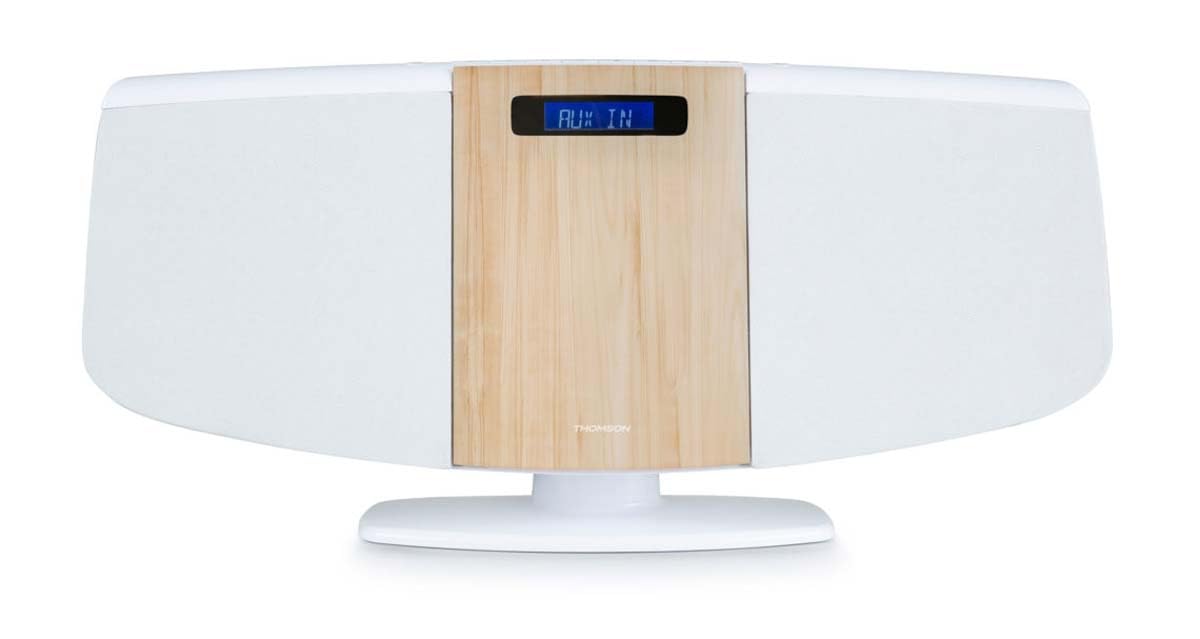
Front view of the Thomson MIC401BT micro-chain system, showcasing its white and wood-grain design with a digital display.
The front panel features the central digital display, the CD loading slot (behind the wood-grain panel), and integrated stereo speakers on either side.
Top Panel Controls and Ports

Close-up of the top panel controls of the Thomson MIC401BT, including the USB charge port, AUX-IN jack, and various function buttons for playback and settings.
The top panel includes:
- SOURCE knap: To switch between input modes (CD, Bluetooth, FM, AUX).
- SLEEP knap: To set the sleep timer.
- TIME-knap: For at indstille uret.
- ALARM knap: To set the alarm function.
- ENTER knap: For at bekræfte valg.
- Afspilningskontrolknapper: Afspil/pause, stop, spring frem/tilbage.
- USB CHARGE Port (5V === 1000mA): Til opladning af eksterne enheder.
- AUX-indgang (3.5 mm): Til tilslutning af eksterne lydkilder.
- Hovedtelefonstik: Til privat lytning.
Opsætning
1. Strømtilslutning
- Connect the power adapter to the DC IN port on the back of the unit.
- Sæt strømadapteren i en almindelig stikkontakt.
2. FM-antenne
Extend the FM wire antenna fully for optimal radio reception. Position it away from other electronic devices to minimize interference.
3. Placeringsmuligheder
The MIC401BT can be placed on a flat surface using its integrated stand or mounted on a wall.
- Desktopplacering: Sørg for, at enheden er placeret på en stabil, plan overflade.
- Vægmontering: Use appropriate screws and wall plugs (not supplied) for your wall type. Consult a professional if unsure. Ensure the unit is securely fastened to prevent falling.

The Thomson MIC401BT micro-chain system mounted on a wall shelf, demonstrating its versatile placement options.
Betjeningsvejledning
1. Tænd/sluk
Tryk på KILDE button once to turn the unit on. Press and hold the KILDE knappen for at slukke den.
2. Kildevalg
Tryk på KILDE button repeatedly to cycle through available modes: CD, Bluetooth, FM Radio, AUX-IN.
3. CD-afspilning
- Vælg CD-tilstand ved hjælp af KILDE knap.
- Gently open the CD door (the wood-grain panel) and insert a CD with the label side facing forward.
- Close the CD door. The system will automatically begin playing the CD.
- Use the Play/Pause, Stop, and Skip buttons on the unit or remote control to manage playback.

Detaljeret view of the Thomson MIC401BT CD player mechanism with the disc tray open, ready for CD insertion.
4. Bluetooth-parring
- Vælg Bluetooth-tilstand ved hjælp af KILDE button. The display will show "BLUETOOTH" and flash, indicating it's in pairing mode.
- Aktiver Bluetooth på din mobile enhed (smartphone, tablet osv.).
- Søg efter "MIC401BT" in your device's Bluetooth settings and select it to pair.
- Once paired, the display will stop flashing, and you can play audio from your device through the micro-chain system.
5. FM Radio
- Vælg FM-radiotilstand ved hjælp af KILDE knap.
- Use the Skip Forward/Backward buttons to manually tune to a station or press and hold them for automatic scanning.
- To save a station, refer to the detailed instructions in the full manual for memory presets.
6. AUX-IN-tilslutning
- Tilslut en ekstern lydenhed (f.eks. MP3-afspiller) til AUX IN port using a 3.5mm audio cable (not supplied).
- Select AUX-IN mode using the KILDE knap.
- Afspil lyd fra din tilsluttede enhed.
7. USB-opladning
Connect your USB-powered device to the USB OPLADNING port (5V === 1000mA) on the top panel to charge it. This port is for charging only and does not support media playback.
8. Alarm funktion
Tryk på ALARM button to enter alarm setting mode. Use the navigation buttons to set the desired alarm time and source (e.g., FM radio, CD). Press ENTER to confirm each setting. Refer to the full manual for detailed alarm setup instructions.
Opretholdelse
- Rengøring af enheden: Brug en blød, tør klud til at rengøre enhedens yderside. Brug ikke slibende rengøringsmidler, voks eller opløsningsmidler.
- Vedligeholdelse af CD-afspiller: Keep the CD compartment clean. Avoid touching the lens. If a CD is dirty, wipe it with a soft, lint-free cloth from the center outwards.
- Opbevaring: Hvis enheden ikke skal bruges i længere tid, skal du tage stikket ud af stikkontakten og opbevare den et køligt og tørt sted.
Fejlfinding
| Problem | Mulig årsag | Løsning |
|---|---|---|
| Ingen strøm | Strømkabel ikke tilsluttet; stikkontakt defekt | Kontroller strømkablets forbindelse; prøv en anden stikkontakt |
| Ingen lyd | Volume too low; Incorrect source selected; Headphones connected | Increase volume; Select correct source; Disconnect headphones |
| CD'en afspiller ikke | CD inserted incorrectly; CD is dirty or scratched; Incorrect mode | Re-insert CD correctly; Clean or replace CD; Select CD mode |
| Bluetooth ikke parring | Device too far; Bluetooth not enabled on device; Incorrect mode | Move device closer; Enable Bluetooth on device; Select Bluetooth mode |
| Dårlig FM -modtagelse | Antenne ikke strakt ud; Interferens | Extend and adjust antenna; Move unit away from other electronics |
Specifikationer
- Model: MIC401BT
- Mærke: Thomson (Manufactured by Big Ben)
- Forbindelse: Auxiliary, Bluetooth, USB
- Farve: Hvid
- Højttalertype: Stereoanlæg
- Strømkilde: Elektrisk kabel
- Kompatible enheder: MP3 player, Personal computer, Tablet, Television, Smartphone
- Stil: CD Boombox
- Lydeffekt: 60 watt
- Understøttede standarder: Bluetooth, FM
- Audio Format Support: CD, MP3
- Antal højttalere: 2
- USB Charge Output: 5V, 1000mA
Garanti og support
This Thomson MIC401BT Stereo CD/Bluetooth Micro-Chain System comes with a 2 års garanti fra købsdatoen. Gem venligst din købsbevis i tilfælde af garantikrav.
For technical support, troubleshooting assistance beyond this manual, or warranty service, please contact your retailer or the official Thomson customer support channel. Contact information can typically be found on the product packaging or the manufacturer's webwebsted.