
1. Introduktion
This manual provides essential information for the installation, operation, and maintenance of the Tiandy TC-H326S Pro Series 2MP IR POE AI PTZ Camera. Please read this manual thoroughly before using the product to ensure proper setup and functionality. Keep this manual for future reference.
2. Produktet er slutview
The Tiandy TC-H326S is a high-performance 2-megapixel PTZ (Pan-Tilt-Zoom) camera designed for advanced surveillance applications. It features intelligent monitoring capabilities, auto-tracking, and robust infrared night vision.
Nøglefunktioner:
- Up to 1920x1080 resolution at 60 frames per second
- 33x optical zoom and 16x digital zoom
- Smart IR technology with an IR range of up to 200 meters (656 feet)
- Intelligent monitoring and Face Capture modes
- Support for Auto-Tracking functionality
- Plugin-Free operation
Kamerakomponenter:
Familiarize yourself with the main components of your PTZ camera.
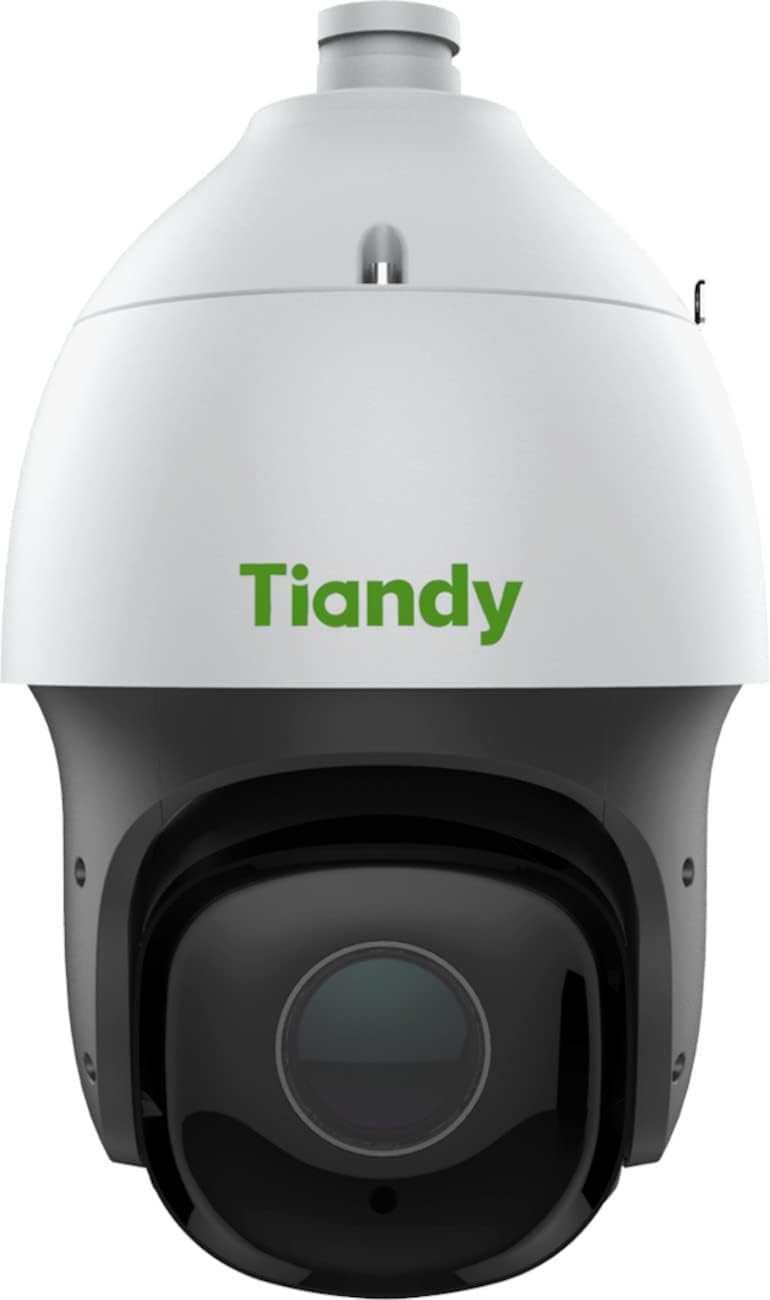
Figur 2.1: Front view of the Tiandy TC-H326S PTZ camera. This image shows the camera's dome housing, the main lens assembly, and the Tiandy brand logo.

Figur 2.2: Vinklet view of the Tiandy TC-H326S PTZ camera. This image provides a side-front perspective, highlighting the camera's pan and tilt capabilities and the robust construction of the dome.
3. Opsætning og installation
Proper installation is crucial for the camera's performance and longevity. Ensure all safety precautions are followed.
3.1 Montering
- The camera is designed for Loftmontering installation.
- Ensure the mounting surface is strong enough to support the camera's weight (approximately 11.6 pounds).
- Use appropriate screws and anchors for secure attachment.
3.2 Strømtilslutning
The camera supports multiple power options:
- Power over Ethernet Plus (POE+): Connect the camera to a POE+ enabled network switch or injector using an Ethernet cable. This provides both power and data.
- AC24V ±25%
- DC 24V ± 10%
Ensure the power source meets the camera's requirements to prevent damage.
3.3 Netværksforbindelse
Connect the camera to your network using a standard RJ45 Ethernet cable. The camera features a 10M/100M self-adaptive Ethernet port.
3.4 Installation af Micro SD-kort
The camera has a built-in Micro SD card slot, supporting up to 256 GB for on-board storage. Refer to the camera's physical diagram for the exact location of the SD card slot. Ensure the camera is powered off before inserting or removing the Micro SD card.
4. Betjeningsvejledning
This section outlines the basic and advanced operational features of your Tiandy PTZ camera.
4.1 Indledende adgang og konfiguration
- Få adgang til kameraets web interface via its IP address using a web browser.
- Follow the on-screen prompts for initial setup, including setting a strong password.
- Configure network settings as required by your network environment.
4.2 Panorering, vipning og zoomkontrol
- Pan -rækkevidde: 360° continuous rotation. Manual speed: 0.1°~180°/s. Preset speed: 240°/s.
- Hældningsområde: -16°~90° (with auto flip). Manual speed: 0.1°~120°/s. Preset speed: 180°/s.
- Optisk zoom: 33x. Digital zoom: 16x. Zoom speed: less than 4 seconds.
- Use the camera's web interface or compatible VMS (Video Management Software) to control PTZ functions.
4.3 Intelligent Monitoring Features
- Automatisk sporing: Enable this feature to allow the camera to automatically follow detected moving objects within its field of view.
- Face Capture Mode: The camera can detect and capture up to 16 faces simultaneously in a scene. This mode can be enabled or disabled as needed.
- Smart IR: The camera automatically adjusts IR intensity to prevent overexposure of objects close to the camera, ensuring clear night vision up to 200m.
- Alarmudløsere: Configure various alarm triggers such as motion detection, harsh voice alarm, mask alarm, port alarm, network disable alarm, IP conflict, and MAC conflict detection.
4.4 Videoindstillinger
- Maks. Opløsning: 2.0MP (1920x1080).
- Billedhastighed: Up to 60fps (NTSC) or 50fps (PAL) at 1920x1080 resolution.
- Videokomprimering: Supports S+265/H.265/H.264/M-JPEG for efficient storage and bandwidth usage.
- Bredt dynamisk område (WDR): 140dB for clear images in scenes with strong contrast.
5. Vedligeholdelse
Regular maintenance ensures optimal performance and extends the lifespan of your camera.
- Rensning: Gently clean the camera lens and housing with a soft, dry cloth. For stubborn dirt, use a cloth lightly dampskylles med vand. Undgå slibende rengøringsmidler eller opløsningsmidler.
- Firmwareopdateringer: Kontroller jævnligt producentens webwebsted for firmwareopdateringer. At holde firmwaren opdateret kan forbedre ydeevnen, tilføje nye funktioner og forbedre sikkerheden.
- Miljøtjek: Ensure the camera's environment remains within its operating temperature and humidity specifications. Regularly inspect cables and connections for wear or damage.
- Data backup: If using local storage, regularly back up important footage from the Micro SD card.
6. Fejlfinding
Dette afsnit omhandler almindelige problemer, du kan støde på med dit kamera.
6.1 Ingen strøm
- Verify that the power adapter or POE+ switch is functioning correctly and providing the specified voltage (AC24V/DC24V or POE+).
- Check all power cable connections for secure fit.
6.2 Ingen netværksforbindelse
- Ensure the Ethernet cable is securely connected to both the camera and the network device (router/switch).
- Check network indicator lights on the camera and switch.
- Verify the camera's IP address and network settings are correct and not conflicting with other devices.
- Try restarting the camera and the network switch.
6.3 Dårlig billedkvalitet
- Clean the camera lens for any dirt or smudges.
- Check video resolution settings in the camera's web interface.
- Ensure sufficient lighting in the surveillance area.
- Adjust focus settings if available (Manual Focus).
6.4 PTZ-styring reagerer ikke
- Bekræft netværksforbindelsen.
- Ensure the control software or VMS is compatible and properly configured.
- Genstart kameraet.
7. Specifikationer
| Feature | Specifikation |
|---|---|
| Modelnavn | TC-H326S Spec: 33X/I/E+/A/V3.0 |
| Billedsensor | 1/2.8" CMOS |
| Maks. Opløsning | 1920x1080 (2.0MP) |
| Billedhastighed | Up to 60fps (NTSC), 50fps (PAL) |
| Optisk zoom | 33x |
| Digital Zoom | 16x |
| Brændvidde | 4.6 mm~152 mm |
| Pan Range | 360° |
| Tilt rækkevidde | -16°~90° (Auto flip) |
| IR Range | Op til 200 m (656 fod) |
| Videokomprimering | S+265/H.265/H.264/M-JPEG |
| Bredt dynamisk område (WDR) | 140dB |
| Minimum belysning | Color: 0.001lux@ (F1.5, ACG ON), BW: 0lux with IR |
| Opbevaring | Indbygget Micro SD-kortslot, op til 256 GB |
| Kommunikationsgrænseflade | 1 RJ45 10M / 100M selvadaptiv Ethernet-port |
| Strømforsyning | AC24V±25% / DC 24V±10% / POE+ |
| Strømforbrug | (Not specified in provided data) |
| Dimensioner | 8.74 x 8.74 x 14.65 tommer |
| Vægt | 11.6 pund |
| Ingress Protection (IP) Rating | IP54 (vandtæt) |
| Driftstilstand | Face capture, intelligent monitoring (default) |
| Autosporing | Ja |
| Anbefalede anvendelser | Monitoring, Surveillance |
| Indendørs/Udendørs brug | Indendørs, Udendørs |
8. Garanti og support
For warranty information, please refer to the specific terms and conditions provided by your retailer or the manufacturer, Tiandy. Typically, warranty details are included with your purchase documentation or available on the official Tiandy webwebsted.
For technical support, product inquiries, or service requests, please contact your authorized Tiandy dealer or visit the official Tiandy support portal.


