
Indledning
This manual provides detailed instructions for the installation, operation, and maintenance of your Tiandy TC-C38XS 8MP IR Turret Camera. Please read this manual thoroughly before using the product to ensure correct usage and to prevent damage.
Sikkerhedsoplysninger
- Ensure the power supply meets the camera's requirements (DC 12V or PoE).
- Udsæt ikke kameraet for ekstreme temperaturer, fugtighed eller ætsende miljøer.
- Undgå at rette kameraet direkte mod stærke lyskilder i længere tid ad gangen.
- Håndter kameraet forsigtigt for at undgå fysisk skade.
- Installationen skal udføres af kvalificeret personale i overensstemmelse med lokale el-forskrifter.
Pakkens indhold
Bekræft at alle komponenter er til stede i pakken:
- Tiandy TC-C38XS IR Turret Camera
- Monteringsskruer og vægdyvler
- Vandtæt stik til Ethernet-kabel
- Hurtigstartguide (hvis relevant)
- Boreskabelon (hvis relevant)
Produkt overview
The Tiandy TC-C38XS is an 8MP IR Turret Camera designed for outdoor surveillance, featuring a full metal housing and advanced imaging capabilities.
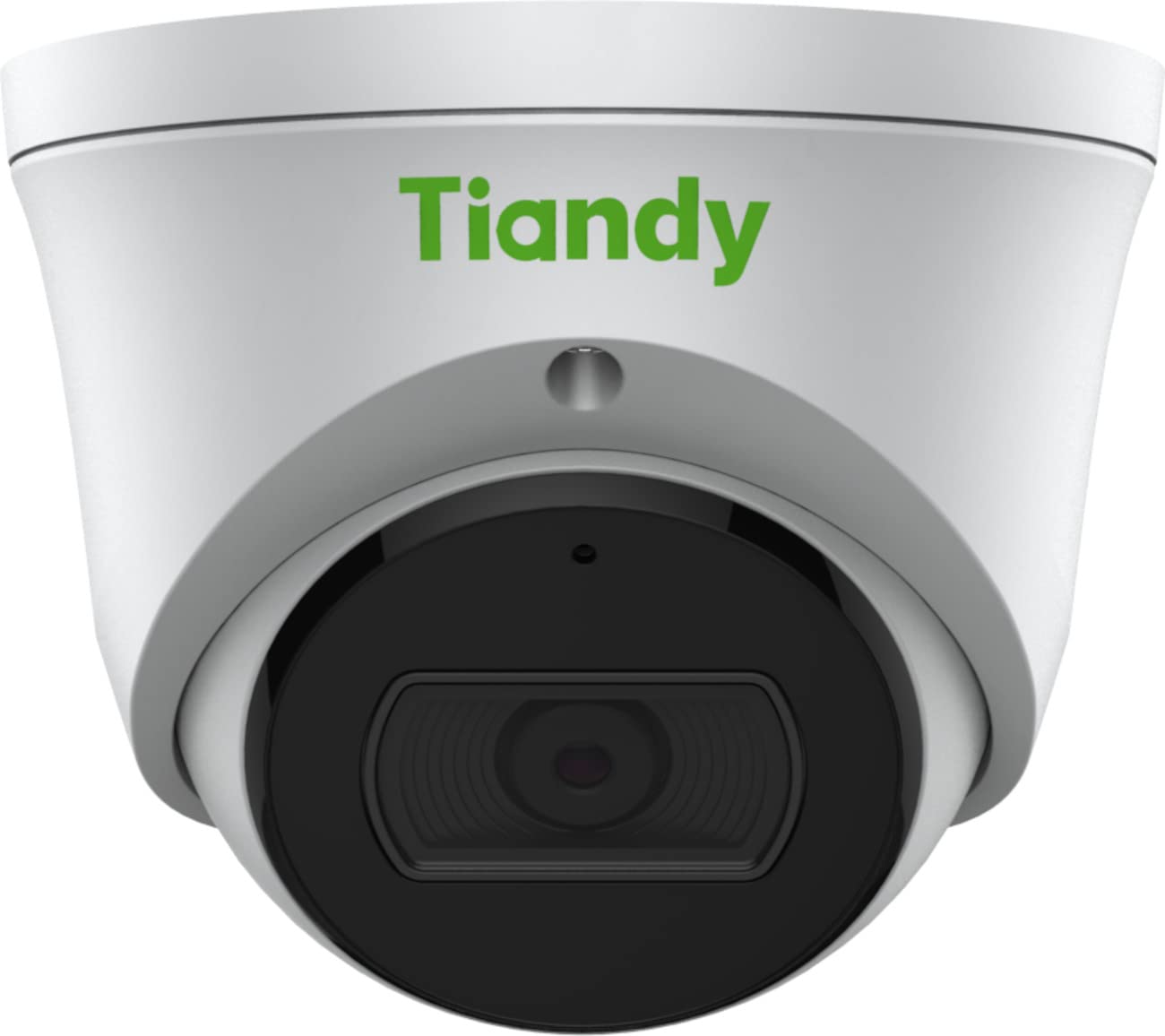
Figur 1: Front view of the Tiandy TC-C38XS IR Turret Camera, showing the lens and IR illuminators.

Figur 2: Vinklet view of the Tiandy TC-C38XS IR Turret Camera, highlighting its compact turret design.

Figur 3: Technical drawing showing the dimensions of the Tiandy TC-C38XS IR Turret Camera (approx. 116.6mm diameter, 96mm height).
Nøglefunktioner:
- 8 megapixel opløsning: Captures video at up to 3840x2160 at 20fps.
- 1/2.8" CMOS-sensor: Provides clear images even in low-light conditions.
- Smart IR: Infrared illumination up to 30 meters (98.42 feet) for night vision.
- 120dB WDR: Wide Dynamic Range for balanced images in high-contrast scenes.
- Indbygget mikrofon: Til lydovervågning.
- Opbevaring om bord: Supports MicroSD cards up to 512 GB.
- Fuld metalhus: Holdbar konstruktion til udendørs brug.
Opsætning
1. Montering af kameraet
The TC-C38XS is designed for wall mounting. Choose a suitable location that provides the desired field of view and is within reach of network and power cables.
- Use the provided drill template (if included) to mark the screw holes on the mounting surface.
- Drill pilot holes and insert wall plugs if mounting on masonry or drywall.
- Fastgør kamerabasen til monteringsfladen med de medfølgende skruer.
- Adjust the camera's angle: The camera supports pan 0 to 340°, tilt 0 to 75°, and rotate 0 to 360° for optimal positioning. Loosen the adjustment screws, position the camera, and then tighten the screws to secure it.
2. Lednings- og strømtilslutning
Kameraet understøtter Power over Ethernet (PoE) eller en DC 12V strømforsyning.
- PoE-forbindelse: Connect a standard Ethernet cable from a PoE-enabled switch or NVR to the camera's RJ45 port. This provides both power and data connectivity. Ensure the waterproof connector is properly installed to protect the Ethernet port from moisture.
- DC 12V-tilslutning: If PoE is not used, connect a DC 12V power adapter (not included) to the camera's power input port. Then, connect a standard Ethernet cable from your network to the camera's RJ45 port for data.
After connecting, the camera will power on and begin its startup sequence.
Drift
1. Indledende netværkskonfiguration
To access the camera's web interface for configuration, you will need to find its IP address on your network. This can typically be done using a manufacturer-provided IP search tool or by checking your router's connected devices list.
- Tilslut din computer til det samme netværk som kameraet.
- Åbn a web browseren og indtast kameraets IP-adresse.
- Log in using the default username and password (refer to the Quick Start Guide or manufacturer's documentation for default credentials). It is highly recommended to change the default password immediately for security.
2. Grundlæggende funktioner
- Levende View: Få adgang til live-videofeedet via web interface or compatible NVR/VMS software.
- Indspilning: Configure recording schedules and methods (continuous, motion-triggered) to the on-board MicroSD card (up to 512 GB) or a connected NVR.
- Bevægelsesdetektion: Set up motion detection zones and sensitivity. The camera can trigger alarms (e.g., email notifications) upon detection.
- Smart IR: The camera automatically adjusts IR intensity to prevent overexposure in night vision, ensuring clear images up to 30 meters.
- Billedindstillinger: Adjust saturation, brightness, contrast, and sharpness via the client software or web browser to optimize image quality.
- Lyd: Utilize the built-in microphone for audio monitoring.
Opretholdelse
1. Rensning
Regelmæssig rengøring hjælper med at opretholde optimal billedkvalitet.
- Gently wipe the camera lens with a soft, clean cloth. If necessary, use a mild lens cleaning solution.
- Do not use harsh chemicals or abrasive materials, as they can damage the lens coating or housing.
- Periodically clean the camera housing to remove dust and debris.
2. Firmwareopdateringer
Kontroller jævnligt producentens webwebsted for firmwareopdateringer. Firmwareopdateringer kan forbedre ydeevnen, tilføje nye funktioner og forbedre sikkerheden. Følg vejledningen, der følger med firmwareopdateringspakken, omhyggeligt.
3. Administration af microSD-kort
If using on-board storage, regularly check the status of the MicroSD card. Format the card periodically to maintain performance and prevent data corruption. Back up important recordings before formatting.
Fejlfinding
| Problem | Mulig årsag | Løsning |
|---|---|---|
| Intet billede/Ingen strøm | Incorrect power supply; Loose cable connection; PoE issue. | Check power adapter (DC 12V) or PoE switch. Ensure all cables are securely connected. |
| Kan ikke få adgang til kameraet via netværket | Incorrect IP address; Network configuration error; Firewall blocking. | Verify IP address. Check network cable. Disable temporary firewall for testing. Ensure camera and computer are on the same subnet. |
| Dårlig billedkvalitet | Dirty lens; Insufficient lighting; Incorrect image settings. | Clean the lens. Adjust image settings (brightness, contrast, WDR). Ensure IR is functioning correctly at night. |
| Bevægelsesdetektion virker ikke | Forkerte følsomhedsindstillinger; Detektionszone ikke konfigureret; Forhindringer. | Review motion detection settings in the web interface. Adjust sensitivity and redraw detection zones. Clear any obstructions in the camera's view. |
| MicroSD-kort optager ikke | Card full; Card not formatted; Card faulty; Recording schedule not set. | Check card capacity. Format the MicroSD card via the camera's interface. Replace card if faulty. Verify recording schedule. |
Specifikationer
| Feature | Detalje |
|---|---|
| Model | TC-C38XS |
| Billedsensor | 1/2.8" CMOS |
| Maks. Opløsning | 3840x2160 (8MP) |
| Billedhastighed | Up to 20fps (3840x2160), 30fps (1080p) |
| Min. Belysning | Farve: 0.003 Lux@ (F1.6, AGC TIL), S/H: 0 Lux med IR |
| Linse | Fast 2.8 mm |
| Felt af View (FOV) | Vandret: 100.1° |
| IR Range | Op til 30 m (98.42 fod) med Smart IR |
| Bredt dynamisk område (WDR) | 120dB |
| Videokomprimering | S+265/H.265/H.264/M-JPEG |
| Lyd | Indbygget mikrofon |
| Opbevaring om bord | MicroSD-kort op til 512 GB |
| Network interface | 1 RJ45 10M / 100M selvadaptiv Ethernet-port |
| Strømforsyning | DC 12V, PoE (802.3af) |
| Materiale | Fuldt metalhus |
| Dimensioner | Approx. 4.59 x 4.59 x 3.77 inches (116.6mm diameter, 96mm height) |
| Vægt | Ca. 0.88 pund (0.4 kg) |
| Driftsbetingelser | Udendørs brug |
| Protokoller | TCP/IP, HTTP, HTTPS, DHCP, DNS, RTP, RTSP, etc. |
| Alarmudløser | Motion Detection, Mask Alarm, Disk Full, etc. |
| Videoanalyse | Tripwire, Perimeter |
Garantioplysninger
Tiandy products typically come with a limited manufacturer's warranty. For specific warranty terms and conditions, please refer to the warranty card included with your product or visit the official Tiandy webwebsted. Behold din købskvittering som købsbevis i tilfælde af garantikrav.
Støtte
If you encounter any issues or have questions regarding your Tiandy TC-C38XS camera that are not covered in this manual, please contact your authorized Tiandy reseller or visit the official Tiandy support website for further assistance. You may also find FAQs and additional resources online.
- Fabrikant: Tiandy
- Modelnummer: TC-C38XS
- UPC: 785249841675