1. Introduktion
This manual provides detailed instructions for the safe and effective use of your BTMETER BT-5800G Ammonia Gas Detector and BT-981D Industrial Thermometer. Please read this manual thoroughly before operation and retain it for future reference.
The BTMETER BT-5800G Ammonia Gas Detector is designed to monitor ammonia (NH3) concentration in real-time. It is suitable for various applications including poultry farms, horse stables, and livestock environments to help manage air quality.
The BTMETER BT-981D Industrial Infrared Laser Thermometer is an industrial device for measuring surface temperatures. It is not intended for measuring human or animal body temperature.
2. Hvad er der i æsken
- 1x BTMETER 5800G Ammonia Gas Detector
- 1x BTMETER 981D Digital Infrared Laser Thermometer
- 1x User Manual (for 5800G)
- 1x User Manual (for 981D)
- Charging Cable (for 5800G)
- Carrying Pouch (for 5800G)
- Battery (for 981D)

Figur 2.1: Pakkens indhold
3. Produktet er slutview
3.1 BTMETER BT-5800G Ammonia Gas Detector
The BT-5800G is a handheld device designed for accurate ammonia gas detection. It features a large digital display showing NH3 concentration in parts per million (ppm), ambient temperature, and humidity. The device includes an audible alarm for high ammonia levels and a tripod mountable port for continuous monitoring.

Figure 3.1: BT-5800G Ammonia Gas Detector with Technical Parameters
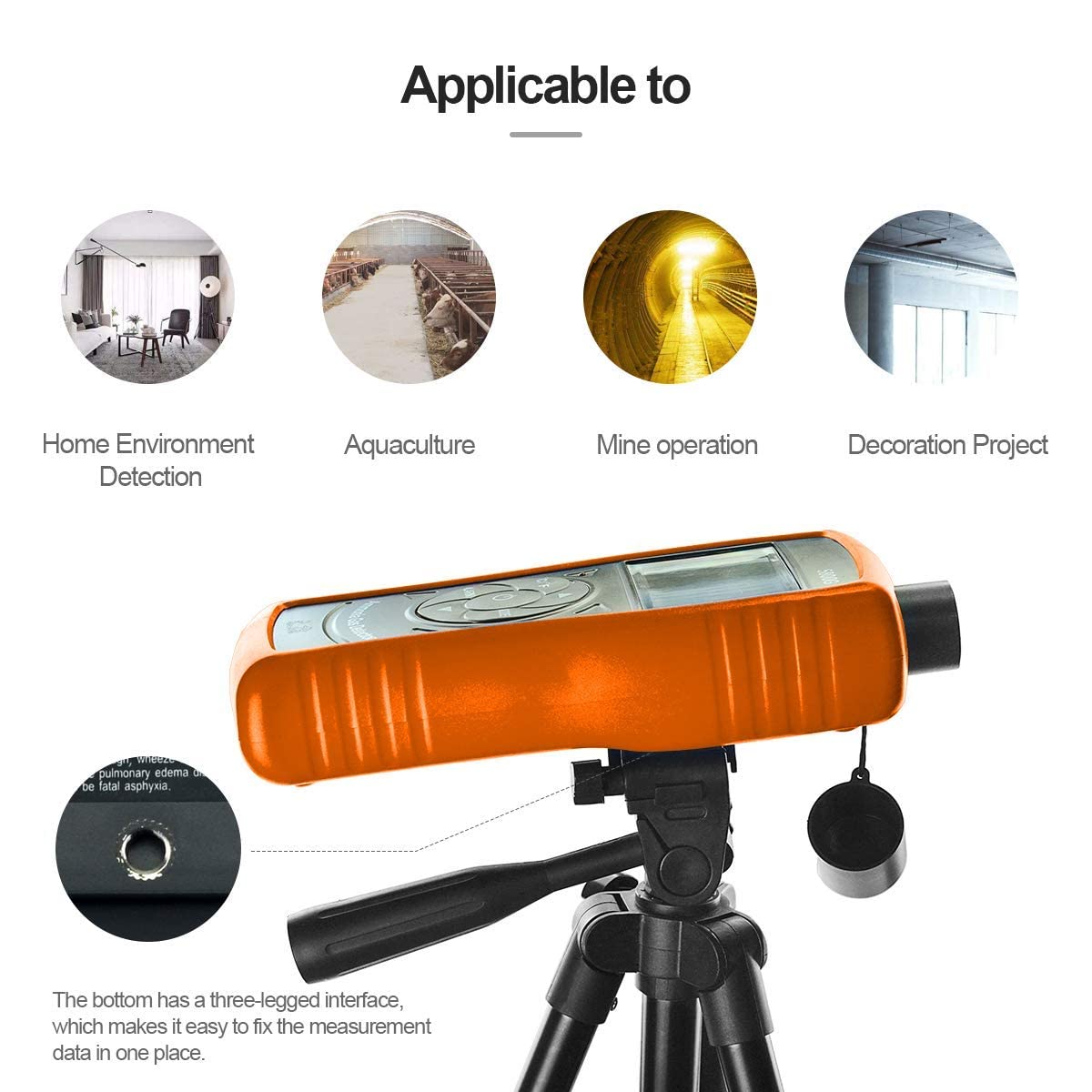
Figure 3.2: BT-5800G Tripod Mount
3.2 BTMETER BT-981D Industrial Thermometer
The BT-981D is a non-contact infrared thermometer for industrial surface temperature measurements. It offers a wide temperature range and a 12:1 distance-to-spot ratio for accurate readings from a safe distance. The device features adjustable emissivity and a clear digital display.

Figure 3.3: BT-981D Industrial Thermometer Features

Figure 3.4: BT-981D Distance to Spot Ratio
4. Opsætning
4.1 BT-5800G Ammonia Gas Detector
Opladning: The BT-5800G uses a Nickel metal hydride battery. Connect the device to a 5V DC power source using the provided USB charging cable. A red light indicates charging, and a green light indicates a full charge.

Figure 4.1: BT-5800G USB Charging
4.2 BT-981D Industrial Thermometer
Batteri installation: Open the battery compartment and insert the included battery, ensuring correct polarity. Close the compartment securely.
5. Betjening
5.1 BT-5800G Ammonia Gas Detector
- Tænd/sluk: Press and hold the power button (usually the center button with a power symbol) to turn the device on or off.
- Måling: Once powered on, the device will automatically begin detecting ammonia (NH3) concentration, ambient temperature, and humidity. Readings are displayed on the screen.
- Enhedsskift (°C/°F): Press the °C/°F button to switch between Celsius and Fahrenheit temperature units.
- Alarmindstillinger: Press the 'ALARM' button to access or adjust alarm thresholds. Refer to the device's specific menu for detailed alarm configuration.
- Mode knap: Use the 'MODE' button to cycle through different display modes or settings as available.
Video 5.1: Demonstration of the BTMETER BT-5800G Ammonia Gas Detector's display and button functions, including switching temperature units and viewaflæsninger.
5.2 BT-981D Industrial Thermometer
- Tænd/sluk: Press the trigger to turn the device on. It will automatically power off after a period of inactivity.
- Måling: Aim the thermometer at the target surface and press the trigger. The temperature reading will appear on the display. Ensure the target spot is within the device's distance-to-spot ratio for accurate measurement.
- Enhedsskift (°C/°F): Use the dedicated button on the device to switch between Celsius and Fahrenheit.
- Emissivitetsjustering: If applicable, adjust the emissivity setting to match the material being measured for improved accuracy. Refer to the BT-981D's specific manual for details on emissivity settings.
6. Vedligeholdelse
6.1 Rengøring
- Wipe the device surfaces with a soft, damp klæde. Brug ikke slibende rengøringsmidler eller opløsningsmidler.
- Keep the sensor area of the BT-5800G and the lens of the BT-981D clean and free from dust or debris.
6.2 Opbevaring
- Opbevar enhederne et køligt, tørt sted væk fra direkte sollys og ekstreme temperaturer.
- If storing for extended periods, remove batteries from the BT-981D.
6.3 Sensor Lifespan (BT-5800G)
The electrochemical principle sensor in the BT-5800G has an expected lifespan of approximately two years. Regular calibration may be required to maintain accuracy over time.
7. Fejlfinding
| Problem | Mulig årsag | Løsning |
|---|---|---|
| Enheden tænder ikke | Low battery (BT-5800G), dead battery (BT-981D), incorrect battery installation | Charge BT-5800G, replace battery in BT-981D, check battery polarity. |
| Unøjagtige aflæsninger | Sensor/lens obstruction, environmental interference, incorrect emissivity (BT-981D) | Clean sensor/lens, ensure stable environment, adjust emissivity for BT-981D. |
| Alarmen udløses ikke | Alarm threshold set too high, alarm disabled | Adjust alarm threshold to a lower value, ensure alarm is enabled in settings. |
| Display fungerer ikke | Low battery, device malfunction | Charge/replace battery. If issue persists, contact customer support. |
8. Specifikationer
8.1 BTMETER BT-5800G Ammonia Gas Detector
- Detektionsgas: Ammoniak (NH3)
- Måleområde: 0-100 ppm
- Measuring Resolution: 0.1 ppm
- Gentagelighed: < ± 1 %
- Basic Error: < ± 5% (F.S)
- Svartid: < 60 sekunder
- Restitutionstid: < 60 sekunder
- Principle of Sensor: Electrochemical, lifespan approx. 2 years
- Batteri: Nickel metal hydride battery
- Vise: Storskærm med flydende krystal
- Alarm: Acoustic optical double alarm, adjustable threshold, alarm sound > 80dB
- Arbejdstemperatur: -10 °C til 50 °C (14 °F til 122 °F)
- Arbejdsfugtighed: 0-95% RH (Non-Gel)
- Produktdimensioner: 11" D x 2.4" B x 6.3" H
- Varens vægt: 0.66 pund
8.2 BTMETER BT-981D Industrial Thermometer
- Målområde: -50 °C til 550 °C (-58 °F til 1022 °F)
- Nøjagtighed: ±3% for -50 °C to 0 °C; ±2% for 0 °C to 100 °C; ±3% for ≥100 °C
- Afstand til spot-forhold: 12:1
- Strålingsevne: 0.95 (fixed or adjustable, refer to specific manual)
- Strømkilde: Batteridrevet
9. Garanti og support
BTMETER products are manufactured to high-quality standards. For warranty information, technical support, or service inquiries, please refer to the contact information provided with your product packaging or visit the official BTMETER webwebsted. Gem venligst din købsbevis til garantikrav.