
Indledning
Thank you for choosing the Yenkee YMS 5030 Wireless Ergonomic Vertical Mouse. This manual provides detailed instructions for setting up, operating, and maintaining your new mouse. Designed for comfort and precision, this vertical mouse helps promote a natural wrist posture, reducing strain during extended use.
Læs venligst denne manual grundigt, inden du bruger produktet, for at sikre korrekt funktion og levetid.
Pakkens indhold
Bekræft at alle varer er til stede i pakken:
- 1 x Yenkee 1000/1600 DPI Wireless Ergonomic Vertical Mouse
- 1 x USB Nano-modtager
- 1 x Brugermanual (dette dokument)
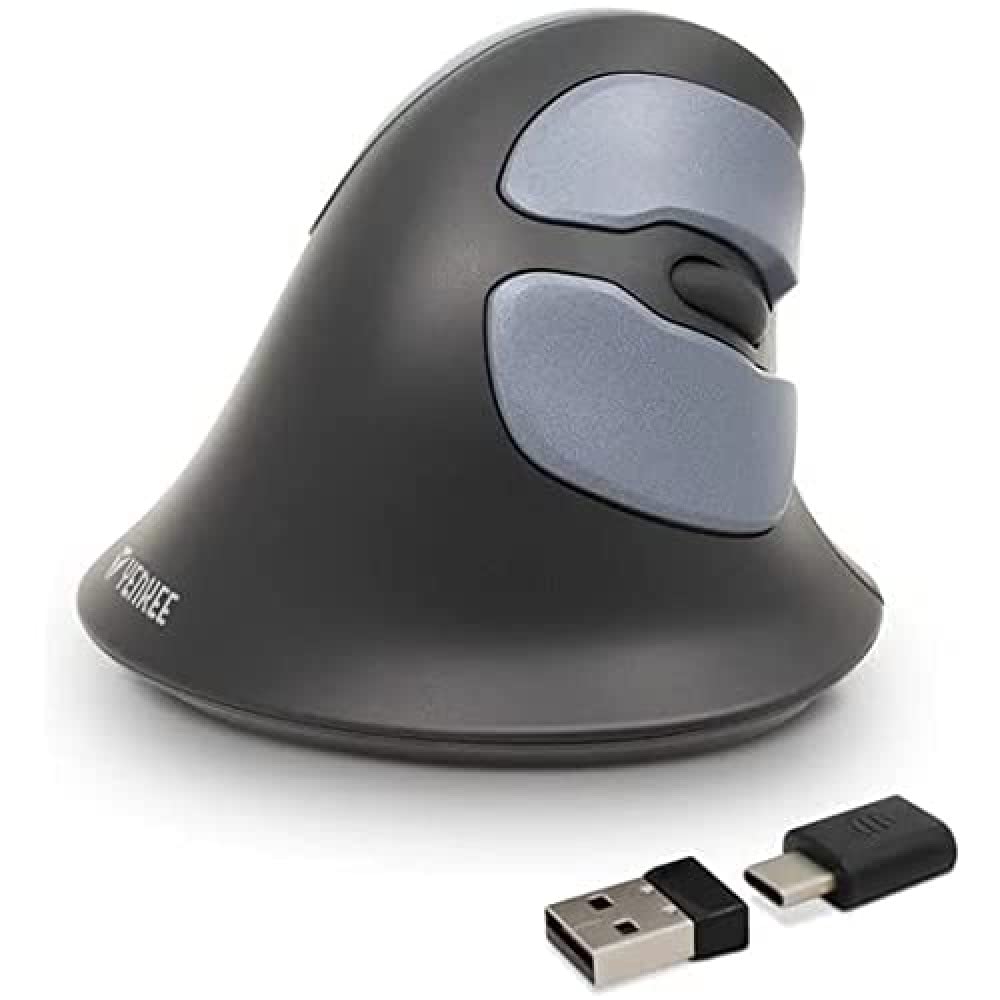
Image: Yenkee YMS 5030 Wireless Ergonomic Vertical Mouse with its USB nano receiver. The mouse is black, featuring a vertical design with multiple buttons.
Opsætning
- Installer batterier:
Locate the battery compartment on the underside of the mouse. Open the cover and insert the required batteries (not included), ensuring correct polarity (+/-). Close the battery compartment cover securely.
Billede: Underside view of the Yenkee YMS 5030 mouse, highlighting the battery compartment and the on/off switch.
- Tilslut USB Nano-modtager:
Plug the USB nano receiver into an available USB port on your computer. Your operating system should automatically detect and install the necessary drivers. This process may take a few moments.
- Tænd musen:
Slide the ON/OFF switch, located on the underside of the mouse, to the "ON" position. The mouse should now be active and ready for use.
Betjeningsvejledning
The Yenkee YMS 5030 mouse features 6 buttons and adjustable DPI settings for precise control.
- Venstreklikknap: Standard primær klikfunktion.
- Højreklik-knap: Standard sekundær klikfunktion.
- Scrollhjul: Rul op eller ned gennem dokumenter og web sider. Kan også trykkes ned for at bruge midterklikfunktionen.
- Frem/Tilbage-knapper: Located on the side, these buttons allow for quick navigation in web browsere eller file opdagelsesrejsende.
- DPI-justeringsknap: Located near the scroll wheel, press this button to cycle between DPI settings (1000 DPI and 1600 DPI). Adjust the sensitivity to suit your preference and task.
Billede: Top-down view of the Yenkee YMS 5030 mouse, indicating the positions of the left/right click, scroll wheel, forward/backward, and DPI adjustment buttons.
Ergonomisk design
The vertical design of the YMS 5030 mouse positions your hand in a natural handshake posture, which can help alleviate wrist strain and discomfort often associated with traditional horizontal mice. This design is particularly beneficial for users seeking to reduce the risk of repetitive strain injuries like Carpal Tunnel Syndrome.
Opretholdelse
- Rensning: Brug en blød, tør klud til at rengøre musens overflade. Ved genstridigt snavs, tør letampRengør kluden med vand. Undgå at bruge skrappe kemikalier eller slibende rengøringsmidler.
- Udskiftning af batteri: When the mouse performance degrades or it stops responding, it's time to replace the batteries. Follow the "Install Batteries" steps in the Setup section. Dispose of old batteries responsibly according to local regulations.
- Opbevaring: When not in use for extended periods, turn off the mouse using the ON/OFF switch to conserve battery life. Store the mouse and receiver in a dry, cool place.
Fejlfinding
| Problem | Mulig årsag | Løsning |
|---|---|---|
| Musen svarer ikke. |
|
|
| Markørbevægelsen er uregelmæssig eller hoppende. |
|
|
| DPI setting does not change. | DPI button not pressed correctly or mouse not powered on. | Ensure the mouse is on and press the DPI button firmly. Observe if cursor speed changes. |
Specifikationer
| Feature | Detalje |
|---|---|
| Mærke | Yenkee |
| Modelnummer | YMS 5030 |
| Farve | Sort |
| Forbindelsesteknologi | Trådløs (Wi-Fi) |
| Bevægelsesdetekteringsteknologi | Optisk |
| DPI-indstillinger | 1000 DPI / 1600 DPI |
| Antal knapper | 6 |
| Arbejdsafstand | Op til 10 meter |
| Strømkilde | Batteridrevet (batterier medfølger ikke) |
| Hardware platform | PC |
| Operativsystemkompatibilitet | Windows 7, Windows 8, Windows Vista, Windows XP |
| Produktdimensioner | 14.1 x 7.8 x 23 cm |
| Varens vægt | 125 g |
Garanti og support
Yenkee products are manufactured to high-quality standards. For information regarding warranty terms and conditions, please refer to the warranty card included with your purchase or visit the official Yenkee website. For technical support or service inquiries, please contact your local retailer or the Yenkee customer support team.