
1. Introduktion
Thank you for choosing the YENKEE YMS 3030BK RGB Gaming Mouse Ultra Light Shotgun. This manual provides detailed instructions for setting up, operating, and maintaining your new gaming mouse. Please read this manual carefully before use to ensure optimal performance and longevity of your device.
The YENKEE YMS 3030BK RGB Gaming Mouse features an ergonomic design for comfortable use. Its unique ultra-light perforated construction promotes airflow, helping to keep your palm cool during extended use. Equipped with an accurate IC 6651 sensor, it offers precise tracking with a resolution of up to 6400 DPI, and includes customizable RGB backlighting.
2. Pakkens indhold
Tjek venligst pakken for følgende varer:
- 1 x YENKEE YMS 3030BK RGB Gaming Mouse Ultra Light Shotgun
- Brugervejledning (dette dokument)
3. Produktet er slutview
3.1 Nøglefunktioner
- Unique ultra-light perforated construction for improved airflow
- Ergonomic design for comfortable grip and to prevent palm sweat
- Customizable RGB backlight
- Accurate IC 6651 sensor with up to 6400 DPI resolution
- Kablet USB-forbindelse
3.2 Musens komponenter
The YMS 3030BK mouse typically includes the following components:
- Venstre klik knap
- Højreklik knap
- Scrollehjul / midterste klikknap
- DPI-justeringsknap (normalt placeret bag scrollhjulet)
- Forward/Backward Side Buttons (typically on the left side)
- Optical Sensor (on the underside)
- USB kabel
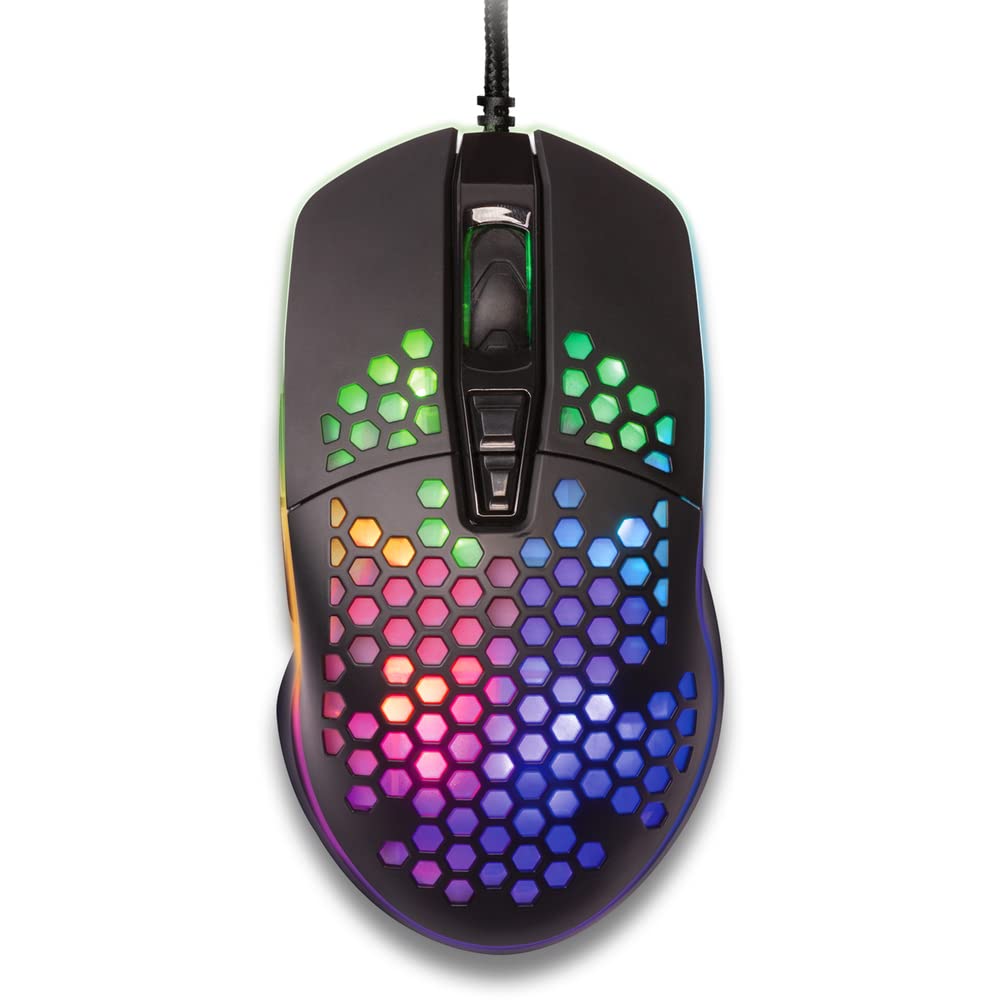
Figur 1: Top-down view of the YENKEE YMS 3030BK RGB Gaming Mouse, highlighting its ultra-light perforated design and ergonomic contours.
4. Opsætning
Follow these steps to set up your YENKEE YMS 3030BK gaming mouse:
- Tilslut musen: Sæt USB-stikket på musen i en ledig USB-port på din computer.
- Driver installation: Your operating system (Windows 7, 8, Vista, XP) should automatically detect and install the necessary drivers. No additional software installation is typically required for basic functionality.
- Valgfri software: For advanced customization of RGB lighting and button assignments, please visit the official YENKEE website to check for any dedicated software for the YMS 3030BK model.
5. Betjeningsvejledning
5.1 Grundlæggende betjening
- Venstre klik: Primær handling, valg.
- Højreklik: Kontekstmenu, sekundær handling.
- Scrollhjul: Scroll up/down, middle click for specific functions (e.g., opening links in new tabs).
- Sideknapper: Default functions are typically 'Forward' and 'Backward' in web browsere eller file explorers. These can often be customized via software.
5.2 DPI-justering
The YMS 3030BK mouse features an IC 6651 sensor with a maximum resolution of 6400 DPI. You can adjust the DPI (Dots Per Inch) sensitivity on-the-fly using the dedicated DPI button, usually located behind the scroll wheel. Pressing this button will cycle through preset DPI levels, indicated by changes in the mouse's RGB lighting color or pattern. Refer to the optional software for precise DPI level configuration and customization.
5.3 Tilpasning af RGB-belysning
The RGB backlight of your mouse can be customized to match your preferences. While some mice offer onboard controls for basic lighting effects, full customization of colors, patterns, and brightness is typically achieved through the dedicated YENKEE software (if available). Please download and install the software from the official YENKEE website for advanced lighting options.
6. Vedligeholdelse
To ensure the longevity and optimal performance of your gaming mouse, follow these maintenance guidelines:
- Rensning: Use a soft, dry cloth to wipe the surface of the mouse. For perforated areas, a soft brush or compressed air can help remove dust. Avoid using harsh chemicals or abrasive materials.
- Sensorrensning: Rengør den optiske sensor på undersiden af musen let med en vatpind af og til.amprenset med isopropylalkohol. Sørg for, at den er helt tør før brug.
- Kabelpleje: Undgå skarpe bøjninger eller for meget træk i USB-kablet for at forhindre skader.
- Opbevaring: Opbevar musen et rent og tørt sted, når den ikke er i brug.
7. Fejlfinding
If you encounter issues with your YENKEE YMS 3030BK mouse, refer to the table below for common problems and solutions:
| Problem | Mulig årsag | Løsning |
|---|---|---|
| Musen reagerer ikke | Løs USB-forbindelse, defekt USB-port, driverproblem. | Sørg for, at USB-kablet er korrekt tilsluttet. Prøv en anden USB-port. Genstart computeren. Kontroller Enhedshåndtering for driverstatus. |
| Markørbevægelsen er uregelmæssig eller hoppende | Beskidt optisk sensor, uegnet overflade på musemåtten. | Clean the optical sensor. Use a clean, uniform mouse pad. |
| DPI-justering virker ikke | Softwarekonflikt, knapfejl. | Ensure no conflicting software is running. If using custom software, check its settings. |
| RGB-belysning virker ikke eller sidder fast | Softwareproblem, strømproblem. | Check the YENKEE software settings. Unplug and replug the mouse. Restart your computer. |
8. Specifikationer
| Feature | Detalje |
|---|---|
| Mærke | YENKEE |
| Modelnummer | YMS 3030BK |
| Forbindelsesteknologi | USB (Kablet elektrisk) |
| Bevægelsesdetekteringsteknologi | Optical (IC 6651 Sensor) |
| Max DPI | 6400 DPI |
| Særlige funktioner | Ergonomic Design, Lightweight, Perforated Construction, RGB Backlight |
| Farve | Sort |
| Varens vægt | 4.2 ounce (ca. 119 gram) |
| Produktmål (LxBxH) | 5.43 x 2.44 x 9.06 tommer (ca. 13.8 x 6.2 x 23 cm) |
| Hardware platform | Spil |
| Operativsystemkompatibilitet | Windows 7, Windows 8, Windows Vista, Windows XP |
9. Garanti og support
Garantioplysninger: For detailed warranty terms and conditions, please refer to the warranty card included with your product or visit the official YENKEE website. Warranty periods may vary by region and retailer.
Kundesupport: If you require technical assistance or have questions regarding your YENKEE YMS 3030BK gaming mouse, please contact your retailer or visit the support section of the official YENKEE webhjemmeside for kontaktoplysninger og ofte stillede spørgsmål.