
1. Introduktion
The Black Box Boxilla KVM Manager, model BXAMGR-R2-ULT, is a robust and TAA-compliant KVM management solution designed to streamline network operations. This device allows for efficient management and control of an unlimited number of devices within your KVM infrastructure, eliminating the need for multiple licenses. It ensures compliance with government and public sector standards, providing a secure and reliable platform for KVM management.
This manual provides comprehensive instructions for the setup, operation, maintenance, and troubleshooting of your Boxilla KVM Manager.
2. Sikkerhedsoplysninger
Please read and understand all safety instructions before operating this device. Failure to follow these instructions may result in electric shock, fire, or damage to the product.
- Sørg for, at enheden er tilsluttet en jordet stikkontakt.
- Udsæt ikke enheden for vand eller overdreven fugt.
- Åbn ikke enheden casing. Overlad al service til kvalificeret personale.
- Brug enheden inden for de angivne temperatur- og luftfugtighedsområder.
- Afbryd strømmen, før du rengør eller flytter enheden.
3. Pakkens indhold
Bekræft at alle varer er til stede i pakken:
- Black Box Boxilla KVM Manager (BXAMGR-R2-ULT)
- Strømadapter
- Hurtig startvejledning
- Monteringsudstyr (hvis relevant)
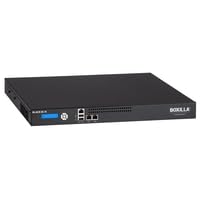
Image of the Black Box Boxilla KVM Manager, model BXAMGR-R2-ULT, showing its front panel and compact design.
4. Opsætning
Follow these steps for initial setup of your Boxilla KVM Manager:
- Pak enheden ud: Carefully remove the KVM manager and all accessories from its packaging.
- Placering: Place the device on a stable, flat surface or mount it in a rack using the provided hardware. Ensure adequate ventilation around the unit.
- Tilslut netværkskabler: Connect the KVM manager to your network infrastructure using standard Ethernet cables. Refer to your network topology for specific port connections.
- Tilslut strøm: Plug the power adapter into the KVM manager's power input, then connect it to a grounded electrical outlet. The device will power on automatically.
- Indledende konfiguration: Få adgang til enhedens web grænseflade via en web browser using its default IP address (refer to the Quick Start Guide for default IP and login credentials). Follow the on-screen prompts to configure network settings, user accounts, and initial KVM device discovery.
5. Betjeningsvejledning
Once the Boxilla KVM Manager is set up, you can begin managing your KVM devices. The primary interface for operation is the web-based management console.
- Log ind: Åbn a web browser and navigate to the IP address or hostname of your Boxilla KVM Manager. Enter your username and password.
- Enhedsopdagelse: Use the discovery tools within the interface to find and add KVM transmitters and receivers to your management system.
- Brugeradministration: Create and manage user accounts, assigning appropriate access levels and permissions for KVM control.
- Session Management: Initiate, monitor, and terminate KVM sessions to connected devices.
- Systemovervågning: Review system logs, device status, and network performance metrics through the dashboard.
- Firmwareopdateringer: Søg regelmæssigt efter og installer firmwareopdateringer for at sikre optimal ydeevne og sikkerhed.
6. Vedligeholdelse
Regular maintenance ensures the longevity and optimal performance of your Boxilla KVM Manager.
- Rensning: Brug en blød, tør klud til at rengøre enhedens yderside. Brug ikke flydende rengøringsmidler eller aerosoler.
- Ventilation: Sørg for, at ventilationsåbningerne er fri for støv og forhindringer for at forhindre overophedning.
- Firmware: Keep the device firmware updated to the latest version. Refer to the Black Box support website for updates and instructions.
- Backupkonfiguration: Periodically back up your device configuration settings to prevent data loss in case of an unforeseen issue.
7. Fejlfinding
This section addresses common issues you might encounter with the Boxilla KVM Manager.
| Problem | Mulig årsag | Løsning |
|---|---|---|
| Enheden tænder ikke. | No power supply, faulty power adapter, or power outlet issue. | Check power cable connection. Verify power outlet functionality. Try a different power adapter if available. |
| Kan ikke få adgang web interface. | Forkert IP-adresse, problem med netværksforbindelse eller firewall, der blokerer adgang. | Verify the device's IP address. Check network cable connections. Ensure your computer is on the same network segment. Temporarily disable firewall for testing. |
| KVM devices not discovered. | Network configuration issues, KVM devices not powered on, or incorrect discovery settings. | Ensure KVM transmitters/receivers are powered and connected. Verify network settings on Boxilla and KVM devices. Check discovery range settings in the web interface. |
| Langsom ydeevne. | Network congestion, outdated firmware, or high CPU/memory usage. | Check network bandwidth. Update firmware to the latest version. Monitor system resources via the web interface. |
8. Specifikationer
Detailed specifications for the Black Box Boxilla KVM Manager BXAMGR-R2-ULT:
- Modelnummer: BXAMGR-R2-ULT
- ASIN: B0BCX8GNRR
- Produktdimensioner: 11 x 10 x 6 tommer
- Fabrikant: Black Box Network
- Første tilgængelige: 30. maj 2023
- Licens: Unlimited Device License
- Overholdelse: TAA-kompatibel
9. Garanti og support
For warranty information and technical support, please refer to the official Black Box Network webwebstedet eller kontakt deres kundeserviceafdeling. Gem din købskvittering til garantikrav.
Black Box Network Official Webwebsted: www.blackbox.com