
1. Introduktion
The FLYDIGI Apex 3 Elite Gaming Controller is a high-performance, multi-platform controller designed to enhance your gaming experience across various devices including Windows PC, Nintendo Switch, Android, iOS, and TV. It features advanced technologies such as force feedback triggers, a full-color LED display, and precise motion sensing, offering a new level of immersion and control.
Video: Overståetview of the Flydigi Apex 3 Wireless Controller, showcasindens design og nøglefunktioner.
2. Produktfunktioner
2.1. Force Feedback Triggers
Experience enhanced realism with the Apex 3's force feedback triggers. These triggers provide dynamic resistance and vibration, simulating in-game actions like gun recoil or accelerator pressure. The trigger mechanism features a built-in steering gear that amplifies torque, creating a maximum 6N stall effect and responding up to 200 times per second for precise tactile feedback.

Image: The FLYDIGI Apex 3 controller, highlighting the force feedback trigger mechanism.
Video: Demonstration of the Apex 3's force feedback trigger in action, showing its responsive and immersive capabilities.
2.2. Full-Color LED Display
The integrated full-color LED display simplifies multi-mode switching and offers visual operation for settings. Users can customize the display with their own pictures or GIFs, adding a personal touch to their controller. This screen provides convenient access to various settings and modes.

Image: Close-up of the Apex 3's full-color LED display, showing various menu options and customization possibilities.
Video: A detailed look at the full-color LED screen on the Flydigi Apex 3, demonstrating its interactive features and customization options.
2.3. ABXY Mecha-Tactile Buttons
The ABXY buttons are designed with mecha-tactile switches, providing quick response and a satisfying mechanical feel. Flexible wall silicone enhances comfort and softness during prolonged use.

Billede: Detaljeret view of the ABXY mecha-tactile buttons and their internal structure, emphasizing their responsive design.
2.4. Hybrid D-Pad
The 8-way D-Pad offers accurate and reliable input, crucial for fighting games and precise directional movements. Its hybrid design ensures optimal performance.

Image: The Apex 3 controller with a clear view of its 8-way Hybrid D-Pad.
2.5. Built-in 6-axis Motion Sensing Function
The controller incorporates a 6-axis motion sensing function, allowing for precise aiming and control in games. This feature maps somatosensory data directly to mouse movement, enabling accurate positioning at the mouse level for an immersive experience.
Video: Demonstration of the motion sensing function of the Flydigi Apex 3, showing how it enhances aiming precision in games.
2.6. ALPS Joysticks
Equipped with Japanese ALPS steel ring joysticks, the Apex 3 offers an ultimate lifespan and responsive, precise gaming control.
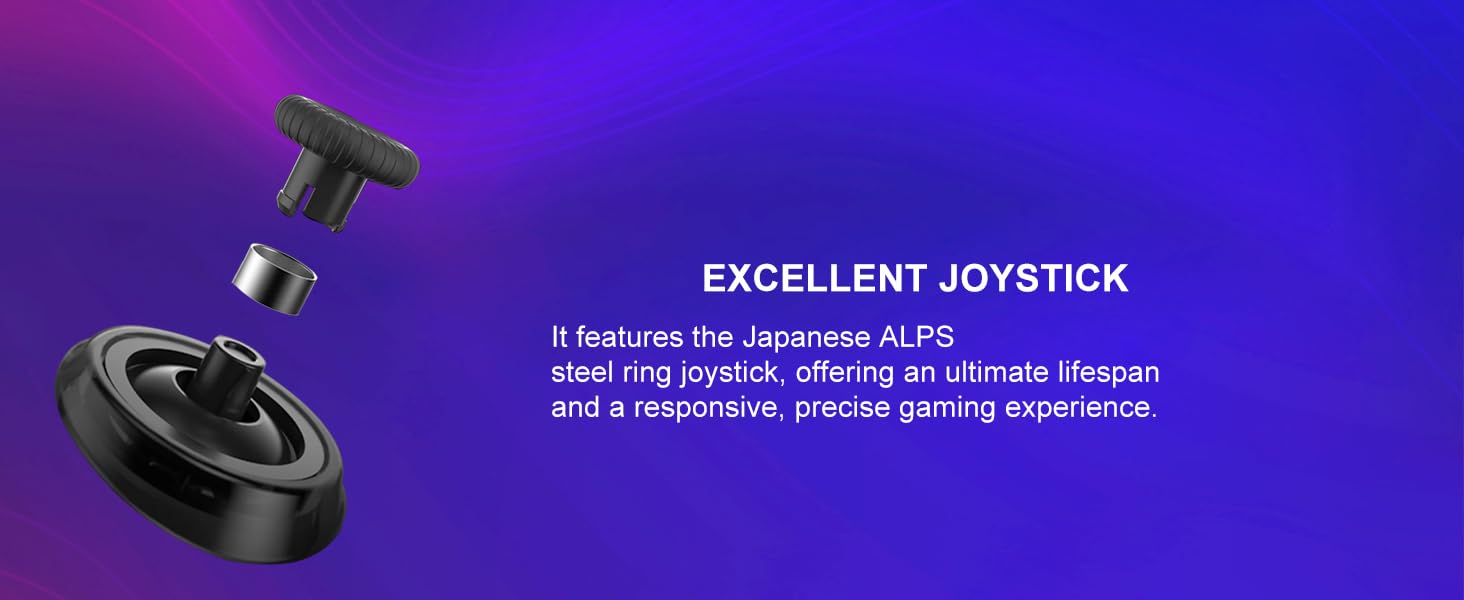
Billede: Eksploderet view of the ALPS joystick, highlighting its durable and responsive design.
2.7. Yderligere funktioner
- 4 Additional Remappable Back Buttons: Customize your gameplay with extra buttons conveniently placed for quick access.
- Large Area of Grip Adhesive: Provides a comfortable and secure hold during intense gaming sessions.
- Dobbeltmotorvibration: Asymmetric vibrating dual-motors with multiple speed levels enhance immersion.
- Batteri med høj kapacitet: A 1500mAh battery provides over 8 hours of runtime on a single charge.
- Æstetik, der kan tilpasses: Features a translucent magnetic snap-on case, silver electroplated inner shell, and colorful replaceable light panels for personalization.
3. Opsætning
3.1. Forbindelsestilstande
The FLYDIGI Apex 3 supports multiple connectivity options:
- wired: Connect directly via USB cable.
- Bluetooth: Wireless connection for compatible devices.
- 2.4GHz Wireless Adapter: For enhanced stability and low-latency wireless transmission (dongle required).
3.2. Initial Pairing and Software Installation
- Download FLYDIGI Game Space: For full customization and firmware updates, download the 'FLYDIGI Game Space' application on your PC or mobile device (Android/iOS). The app is available in English.
- Tilslut controller: Connect your Apex 3 controller to your device using your preferred method (USB cable, Bluetooth, or 2.4GHz adapter).
- Følg instruktionerne på skærmen: The FLYDIGI Game Space application will guide you through the initial setup and pairing process for your specific platform (PC, Nintendo Switch, Android, iOS).
- Firmwareopdateringer: Ensure your controller's firmware is up to date through the FLYDIGI Game Space app for optimal performance and access to the latest features. Note that PC software may not always show the latest firmware; use the mobile app for reliable updates.
4. Betjening
4.1. Using the Full-Color LED Display
The LED display on the controller allows for quick adjustments and mode switching:
- Modeskift: Press and hold the Home button to enter the menu and select your desired connection mode (PC, Switch, Android, iOS).
- Force Feedback Adjustment: Navigate through the display to choose from various force feedback effects.
- Skærmens lysstyrke: Adjust the display brightness directly from the controller's menu.
- Firmwareoplysninger: Check the controller's firmware version.
4.2. Force Feedback Trigger Modes
The Apex 3 offers customizable force feedback modes via the FLYDIGI Game Space software:
- Automatisk tilstand: Provides continuous rapid recoil vibration, ideal for machine guns. You can adjust the vibration starting position, initial vibration force, strength, and frequency.
- Semi Mode: Offers a clear sense of paragraphs, suitable for sniper rifles. Adjust parameters like depth of press, breakthrough duration, and resistance to simulate different trigger feels.
- Racing tilstand: Simulates the damping feeling of an accelerator pedal, providing resistance when pressing the trigger. This mode is perfect for racing games, mimicking the roar of an engine and the feel of acceleration.
4.3. Somatosensory Mapping for Aiming
The high-precision somatosensory mapping allows you to aim with the controller as if it were a mouse. This feature maps your physical movements to precise in-game aiming, offering a more immersive and accurate shooting experience, especially in FPS games. This can be configured within the FLYDIGI Game Space application under 'Somatosensory Adjustment'.
5. Vedligeholdelse
- Rensning: Brug en blød, tør klud til at rengøre controllerens overflade. Undgå at bruge skrappe kemikalier eller slibende materialer.
- Opbevaring: Opbevar controlleren et køligt, tørt sted væk fra direkte sollys og ekstreme temperaturer.
- Batteripleje: For at forlænge batteriets levetid bør du undgå at aflade controlleren helt ofte. Oplad den regelmæssigt, især hvis den opbevares i længere perioder.
6. Fejlfinding
6.1. Button Layout Issues (Nintendo Switch)
If the button layout feels incorrect when playing on Nintendo Switch, you can remap the buttons using the FLYDIGI Game Space application to match the standard Switch controller layout.
6.2. Aiming Inaccuracy
If you experience aiming inaccuracy, ensure the somatosensory mapping settings in the FLYDIGI Game Space app are correctly configured and calibrated. Adjust sensitivity settings to your preference. Practice with aim training software like Aimlab to improve precision.
6.3. Software/Firmware Updates
Always ensure both the controller's firmware and the FLYDIGI Game Space application are updated to their latest versions. Some features or bug fixes may require the most recent software. If the PC app indicates firmware is up-to-date but issues persist, try checking for updates via the mobile app.
6.4. Forbindelsesproblemer
If experiencing connection drops or instability, try the following:
- Sørg for, at controlleren er fuldt opladet.
- Move closer to the receiver (for 2.4GHz adapter) or device (for Bluetooth).
- Minimér interferens fra andre trådløse enheder.
- Genparr controlleren med din enhed.
7. Specifikationer
| Feature | Detalje |
|---|---|
| Mærkenavn | FLYDIGI |
| Modelnavn | Apex 3 |
| Controller type | Gamepad |
| Kompatible enheder | Android, IOS, Nintendo Switch, PC, TV |
| Forbindelsesteknologi | USB, Bluetooth, 2.4GHz Wireless |
| Knap Antal | 8 (plus 4 remappable back buttons) |
| Hardware platform | PC/NS/Phone/TV/Android/IOS/Laptop/MAC |
| Strømkilde | Wireless (1500mAh battery) |
| Farve | Sort |
8. Garanti og support
For warranty information, technical support, or further assistance, please refer to the official FLYDIGI webwebstedet eller kontakt deres kundeservice. Gem din købskvittering til garantikrav.