1. Produktet er slutview
This document provides instructions for the SZHKHXD replacement infrared (IR) remote control, designed to operate various Toshiba DVD player models. This remote is a direct replacement and does not require programming. It functions by sending infrared signals to your DVD player.
Note: As a replacement remote, some advanced or specific functions present on the original remote may not be fully supported or may operate differently. Please refer to your DVD player's original manual for detailed functionality of your specific model.

Billede 1.1: Vinklet view of the SZHKHXD replacement remote control. This image displays the overall design and button layout of the remote, including the main control buttons and the flip-down numeric keypad section.
2. Vigtige sikkerhedsoplysninger
- Bland ikke gamle og nye batterier.
- Bland ikke alkaliske, standard (kul-zink) eller genopladelige (nikkel-cadmium) batterier.
- Fjern altid brugte batterier med det samme for at forhindre lækage og skader.
- Opbevar batterier utilgængeligt for børn.
- Udsæt ikke fjernbetjeningen for direkte sollys, varmekilder eller fugt.
3. Opsætning
3.1 Batteriinstallation
The remote control requires two (2) AA batteries (not included). Follow these steps to install them:
- Find batterirummet på bagsiden af fjernbetjeningen.
- Tryk ned på tappen, og skub batteridækslet nedad for at åbne det.
- Isæt to AA-batterier, og sørg for, at de positive (+) og negative (-) poler er justeret korrekt med markeringerne inde i batterirummet.
- Skub batteridækslet tilbage på plads, indtil det klikker sikkert.
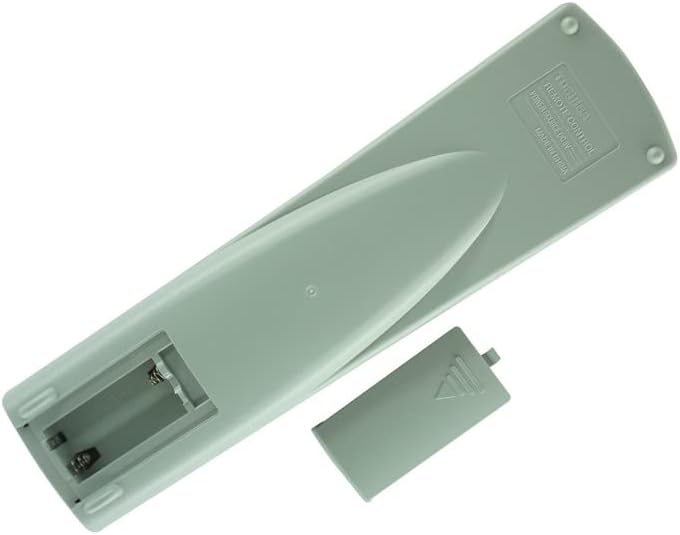
Billede 3.1: Bagside view of the remote control with the battery compartment open. This image illustrates the correct orientation for inserting two AA batteries.
3.2 Førstegangsbrug
Once batteries are installed, the remote control is ready for use. No programming or pairing is required. Point the remote directly at your Toshiba DVD player and press the desired function button.
4. Betjeningsvejledning
The remote control features standard buttons for DVD player operation. Below is a general guide to common functions:

Billede 4.1: Forside view of the remote control, displaying the layout of all operational buttons.
- Strøm (I/O): Tænder eller slukker for DVD-afspilleren.
- Åben luk: Åbner eller lukker diskskuffen.
- Afspil (►): Starts disc playback.
- Pause (▐▐): Pauserer afspilningen. Tryk igen for at genoptage.
- Stop (■): Stopper diskafspilning.
- Spol frem (►►): Går hurtigt frem i afspilningen.
- Spol tilbage (◄◄): Spoler hurtigt tilbage i afspilningen.
- Skip (●►► / ◄◄●): Springer til næste eller forrige kapitel/spor.
- Navigationsknapper (op, ned, venstre, højre, enter): Used to navigate menus and make selections.
- Menu: Accesses the disc menu or system menu.
- Topmenu: Vender tilbage til diskens topmenu.
- Undertekst: Cycles through available subtitle languages.
- Lyd: Cycles through available audio tracks/languages.
- Vinkel: Changes the camera angle if available on the disc.
- Opsætning: Giver adgang til DVD-afspillerens opsætningsmenu.
- Zoom: Zoomer ind eller ud på billedet.
- Numeric Keypad (0-9, +10): Used for direct track/chapter selection or inputting numbers.
5. Vedligeholdelse
- Rensning: Tør fjernbetjeningen af med en blød, tør klud. Brug ikke flydende rengøringsmidler eller slibende materialer.
- Udskiftning af batteri: Udskift batterierne, når fjernbetjeningen reagerer langsomt eller holder op med at virke. Udskift altid begge batterier på samme tid.
- Opbevaring: If the remote control will not be used for an extended period, remove the batteries to prevent leakage. Store in a cool, dry place.
6. Fejlfinding
- Fjernbetjeningen svarer ikke:
- Sørg for, at batterierne er korrekt installeret og ikke er afladede. Udskift dem om nødvendigt.
- Check for any obstructions between the remote control and the DVD player's IR sensor.
- Ensure you are within the effective range and pointing the remote directly at the DVD player.
- Visse funktioner virker ikke:
- This replacement remote is designed to cover primary functions. Some highly specific or advanced features of your original DVD player remote may not be replicated.
- Verify that the function you are trying to use is supported by your specific Toshiba DVD player model.
7. Specifikationer
- Forbindelse teknologi: Infrarød (IR)
- Strømkilde: 2 x AA batterier (medfølger ikke)
- Kompatibilitet: Toshiba DVD Player Models SD-1008U, SD-2008U, SD-2108U, SE-R002, SD-3108C, SD-310SU, SD-9000U, SD-9100U, SE-R0013, SD-2150U
- Speciel funktion: IR remote, cannot be programmed.
8. Garanti og support
This product is a replacement remote control. Specific warranty and support details are typically provided by the seller at the time of purchase. Please refer to your purchase documentation or contact the seller (SZHKHXD) for information regarding warranty coverage or technical support.


