
Indledning
This manual provides instructions for the ROOFULL RF40-SU External CD/DVD Drive. This device is an 8-in-1 external optical drive featuring USB 3.0 and USB-C connectivity, a CD/DVD reader/writer, and an integrated USB hub with SD/Micro-SD card slots. It is designed for use with various operating systems including Windows and Mac OS.

Image: The ROOFULL RF40-SU External CD/DVD Drive, showcasing its compact design and multiple ports including USB 3.0, USB-C, and card slots.
Opsætning
Tilslutning af drevet
The ROOFULL RF40-SU is a plug-and-play device, requiring no additional driver installation. It features a 2-in-1 data cable with both USB 3.0 Type-A and USB-C connectors for broad compatibility.
- Locate the integrated data cable on the back of the drive.
- Connect the appropriate connector (USB-A or USB-C) to an available port on your laptop or desktop PC.
- The drive will be automatically detected by your computer.

Image: The external CD/DVD drive connected to a laptop, illustrating the dual USB-A and USB-C cable for versatile connectivity.
Strømforsyning (valgfrit)
For some ultrathin laptops (e.g., MacBook Air, Surface Pro) that may not supply sufficient power through a single data cable, an extra power supply cord is included. This cord provides additional power but does not transmit data.
- If the drive is not functioning correctly or is unstable, connect the extra power supply cord to the USB-C power port on the drive.
- Plug the other end of the power supply cord into a USB power adapter (not included) or a powered USB port.
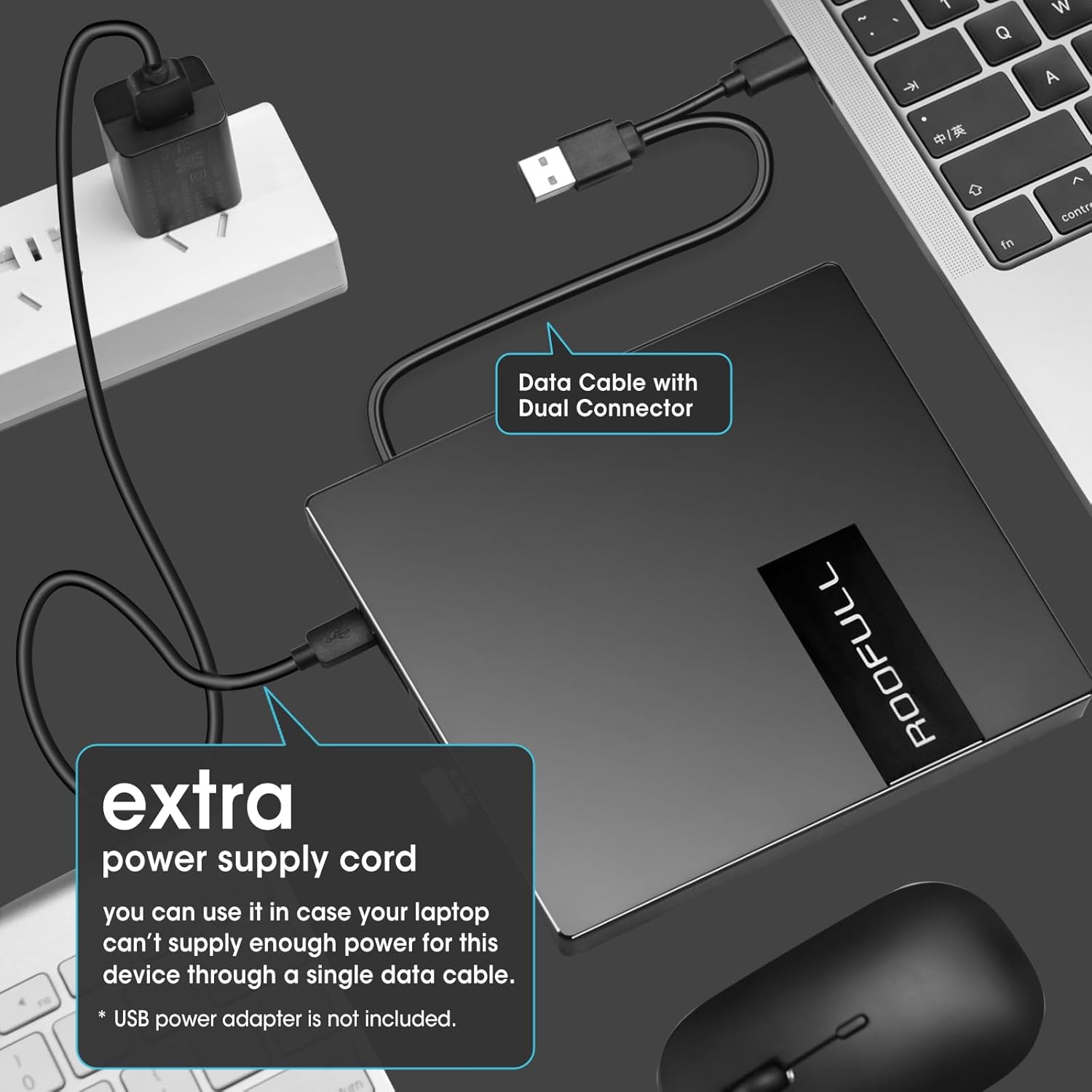
Image: The external drive connected to a power source via its extra power supply cord, ensuring stable operation for devices with limited USB power output.
Video Guide: Connecting and Using the Drive
Video: This video demonstrates the connection process of the ROOFULL External CD DVD Drive to a laptop, disc insertion, and the use of its integrated USB ports and SD/TF card slots.
Betjening af drevet
Disc Functions
The drive supports various disc functions including reading, writing, re-writing, and burning. It is compatible with CD-ROM, CD-R, CD +/-RW, DVD-ROM, DVD-R, DVD+/-RW, DVD-R DL, and VCD-ROM discs.
- Tryk på udskubningsknappen på forsiden af drevet for at åbne diskbakken.
- Carefully place your CD or DVD onto the tray, ensuring it is centered on the spindle.
- Skub forsigtigt bakken tilbage i drevet, indtil den klikker på plads.
- Your computer's media player, burning, or ripping software can now be used to interact with the disc.

Image: The ROOFULL RF40-SU drive with a CD/DVD inserted, demonstrating its primary function, alongside connected USB devices and an SD card.
Integrated USB Hub and Card Reader
The drive also functions as a USB hub and card reader, expanding your computer's connectivity options.
- USB-porte: It includes one USB 3.0 port and three USB 2.0 ports. These can be used to connect external hard drives, wired mice, keyboards, flash drives, or other USB accessories.
- SD/Micro-SD Card Slots: The integrated SD and Micro-SD card slots are ideal for transferring photos and video files from camera memory cards to your computer. Note: The SD and Micro-SD (TF) slots cannot be used simultaneously.

Billede: Et nærbillede view of the ROOFULL RF40-SU's side panel, highlighting the USB 3.0 port, three USB 2.0 ports, USB-C power input, SD card slot, and Micro-SD card slot.
Kompatibilitet
The drive is compatible with multiple operating systems, including Windows 11/10/8.1/7/XP, Linux, and all versions of Mac OS. It works with most computers, including HP, DELL, ASUS, MSI, Acer, Lenovo, Thinkpad, Microsoft Surface Windows laptops/desktops, Apple MacBook Pro, MacBook Air, iMac, and Mac Mini.
Note: Det gør denne enhed IKKE support Chromebook, TV, iPad, iPhone, Truck, and Car systems.

Image: Visual representation of the ROOFULL RF40-SU's broad compatibility with Windows (11, 10, 8/8.1, 7), Mac OS, and Linux, indicating its suitability for various laptops and desktops.
DVD Region Code Information
DVDs are region-coded and will only play on DVD drives that use the same region country codes. CDs are not region-coded.
- Region 1: Canada, USA
- Region 2: Japan, Europa, Sydafrika, Mellemøsten
- Region 3: Sydøstasien, Østasien (inklusive Hongkong)
- Region 4: Australien, New Zealand, Stillehavsøerne, Mellemamerika, Mexico, Sydamerika
- Region 5: Østeuropa, Rusland, Det indiske subkontinent, Afrika, Nordkorea og Mongoliet
- Region 6: Kina
- Region 7: Reserveret til uspecificeret særlig brug
- Region 8: Luft- og havrejser
Each external optical drive allows you to change the region code approximately 4-5 times.

Image: An illustrative diagram detailing the various DVD region codes and their corresponding geographical areas, emphasizing the importance of matching region codes for DVD playback.
Opretholdelse
To ensure the longevity and optimal performance of your ROOFULL RF40-SU External CD/DVD Drive, follow these maintenance guidelines:
- Rensning: Use a soft, dry cloth to wipe the exterior of the drive. Avoid using liquid cleaners or abrasive materials, as they can damage the surface.
- Diskhåndtering: Always handle discs by their edges to prevent fingerprints and scratches. Store discs in protective cases when not in use.
- Støvforebyggelse: Keep the drive in a clean, dust-free environment. When not in use, ensure the disc tray is closed to prevent dust accumulation inside the mechanism.
- Opbevaring: Store the drive in a cool, dry place away from direct sunlight and extreme temperatures. Its slim and portable design allows for easy storage in a laptop bag.

Image: The ROOFULL RF40-SU external drive being easily slipped into a laptop bag, highlighting its compact and portable design for convenient transport and storage.
Fejlfinding
If you encounter issues with your ROOFULL RF40-SU drive, consider the following common solutions:
- Drev ikke fundet:
- Sørg for, at USB-datakablet er korrekt tilsluttet til både drevet og din computer.
- Prøv at tilslutte til en anden USB-port på din computer.
- If using an ultrathin laptop, connect the extra power supply cord to ensure adequate power.
- Genstart din computer.
- Disc Not Reading/Writing:
- Check if the disc is clean and free of scratches or smudges.
- Ensure the disc is correctly seated in the tray.
- Verify that your media player or burning software is up-to-date and compatible with the disc type.
- For DVDs, confirm that the region code of the DVD matches the drive's current region setting.
- Langsom ydeevne:
- Ensure you are connected to a USB 3.0 port on your computer for optimal speed.
- Luk alle unødvendige programmer, der kører i baggrunden.
- Støj under drift:
- Some noise is normal during disc rotation, especially at higher speeds.
- Sørg for, at drevet er placeret på en stabil, plan overflade for at minimere vibrationer.
Hvis disse trin ikke løser problemet, henvises der til supportafsnittet for yderligere hjælp.
Specifikationer
| Feature | Detalje |
|---|---|
| Mærke | TAGFULD |
| Modelnummer | RF40-SU |
| Hardware-interface | USB 3.0 Type A, USB 3.0 Type C |
| Forbindelsesteknologi | USB |
| Optisk lagrings skrivehastighed | Max 24xCD / 8xDVD |
| Optisk lagrings læsehastighed | Max 24xCD / 8xDVD |
| Cache Memory Installed Size | 2 MB |
| Kompatible enheder | Stationær, bærbar |
| Hardware platform | Laptop, PC |
| Operativsystem | Windows 11/10/8.1/7/XP, Mac OS, Linux |
| Særlige funktioner | Extra 4 USB Input Ports, SD & micro-SD Card Reader, Slim & Portable, Support Reading & Burning & Ripping, USB 3.0 & USB-C Dual Connectors |
Garanti og support
Garantioplysninger
The ROOFULL RF40-SU External CD/DVD Drive comes with an 18 måneders garanti fra købsdatoen.
Kundesupport
ROOFULL is committed to providing quality products and excellent customer service. If you have any questions regarding the use of your device, encounter any issues, or if the device was damaged during shipment, please contact ROOFULL customer support for assistance or a free replacement.
For support, please visit the official ROOFULL store or contact their customer service channels as provided with your product packaging.


