
Indledning
The Docooler Bone Conduction Speaker is a compact, portable audio device designed to transform various surfaces into sound-producing diaphragms. Utilizing bone conduction technology, it offers a unique audio experience with enhanced bass and volume depending on the surface it is placed upon. This manual provides essential information for the safe and effective use of your speaker.
Sikkerhedsoplysninger
Læs og følg disse sikkerhedsretningslinjer for at forhindre skader på enheden eller personskade:
- Udsæt ikke højttaleren for ekstreme temperaturer eller direkte sollys.
- Undgå at tabe eller udsætte enheden for kraftige stød.
- Keep the speaker away from water and liquids, as it is not waterproof.
- Forsøg ikke at skille ad, reparere eller ændre enheden. Dette vil ugyldiggøre garantien.
- Brug kun det medfølgende opladningskabel og en kompatibel strømadapter.
- Undgå langvarig lytning ved høj lydstyrke for at forhindre høreskader.
Pakkens indhold
Bekræft at alle varer er til stede i din pakke:
- Docooler Bone Conduction Speaker (1 unit)
- USB Type-C opladningskabel (1 enhed)
- Brugervejledning (dette dokument)
- Adhesive Pads / Suction Cup (for mounting)
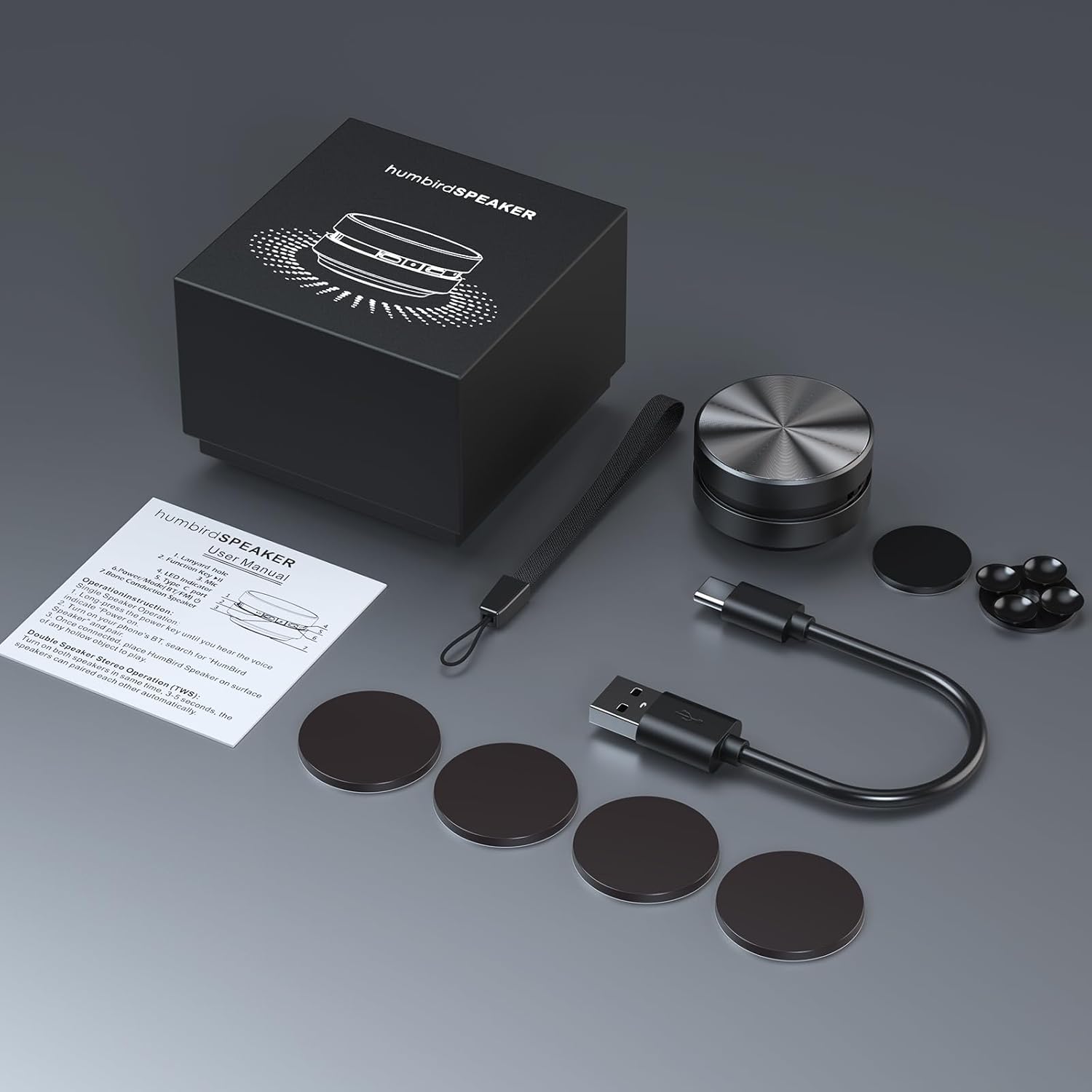
Image: Contents of the Docooler Bone Conduction Speaker package, showing the speaker, charging cable, and various adhesive pads for mounting.
Produkt overview
The Docooler Bone Conduction Speaker is a compact device with a minimalist design. It features a durable aluminum alloy casing and a Type-C charging port. The speaker utilizes Bluetooth 5.0 for wireless connectivity and supports True Wireless Stereo (TWS) pairing for an enhanced audio experience.

Billede: Forside view of the Docooler Bone Conduction Speaker, highlighting its key features such as Bone Conduction technology, Bluetooth 5.0, TWS, Type-C Charging Port, Fast Charge, and Aviation Aluminum Alloy construction.
Opsætning
1. Opladning af højttaleren
- Tilslut det medfølgende USB Type-C-kabel til højttalerens opladningsport.
- Sæt den anden ende af kablet i en kompatibel USB-strømkilde (f.eks. en vægadapter eller en computers USB-port).
- Indikatorlampen viser opladningsstatus (se afsnittet om LED-indikator for detaljer).
- En fuld opladning tager typisk cirka 1-2 timer.
2. Bluetooth-parring (enkelt højttaler)
- Press and hold the power button on the speaker until the indicator light flashes, indicating pairing mode.
- Aktiver Bluetooth på din smartphone eller anden Bluetooth-aktiveret enhed, og søg efter tilgængelige enheder.
- Select "Humbird Speaker" (or similar name) from the list of devices.
- Når der er oprettet forbindelse, vil indikatorlampen lyse konstant, og du vil høre en bekræftelsestone.
3. Parring af ægte trådløs stereo (TWS) (to højttalere)
For a stereo sound experience, you can pair two Docooler Bone Conduction Speakers together:
- Sørg for, at begge højttalere er fuldt opladede og slukkede.
- Power on both speakers simultaneously. They will automatically attempt to pair with each other within 3-5 seconds.
- Once successfully paired, one speaker will act as the master (left channel) and the other as the slave (right channel). The indicator lights will reflect their connected status.
- Now, connect your smartphone or Bluetooth device to the master speaker as described in the "Bluetooth Pairing (Single Speaker)" section.

Image: Two Docooler Bone Conduction Speakers positioned for True Wireless Stereo (TWS) pairing, demonstrating their ability to create a wider soundstage.
Betjeningsvejledning
1. Tænd/sluk
- Tænd: Tryk og hold tænd/sluk-knappen nede i cirka 3 sekunder.
- Sluk: Tryk og hold tænd/sluk-knappen nede i cirka 3 sekunder.
2. Afspilningskontrol
- Afspil/pause: Tryk kort på tænd/sluk-knappen én gang.
- Næste nummer: Dobbelttryk på tænd/sluk-knappen.
- Forrige nummer: Triple-press the power button.
3. Lydstyrkejustering
Volume is primarily controlled via your connected Bluetooth device (smartphone, tablet, etc.). The speaker itself does not have dedicated volume buttons.
4. Using with Different Surfaces
The unique feature of this bone conduction speaker is its ability to use various surfaces as sound amplifiers. Experiment with different materials to discover unique sound profiles:
- Hollow Objects: Cardboard boxes, plastic containers, or hollow wooden surfaces often produce a fuller sound with enhanced bass.
- Glasoverflader: Windows or glass tables can create a clear, crisp sound.
- Træoverflader: Desks, guitars, or wooden panels can offer a warm, resonant tone.
- Car Dashboards: Can provide an immersive in-car audio experience.
Use the included adhesive pads or suction cup to securely attach the speaker to your chosen surface. The sound quality will vary significantly based on the material, size, and hollowness of the surface.

Image: The bone conduction speaker demonstrated on different surfaces, including a guitar, a kitchen countertop, a mirror, and a car dashboard, illustrating its versatility in sound production.
Opretholdelse
To ensure the longevity and optimal performance of your Docooler Bone Conduction Speaker, follow these maintenance tips:
- Rensning: Tør højttaleren af med en blød, tør klud. Brug ikke slibende rengøringsmidler, alkohol eller opløsningsmidler.
- Opbevaring: Opbevar højttaleren et køligt, tørt sted væk fra direkte sollys og ekstreme temperaturer, når den ikke er i brug.
- Batteripleje: For best battery life, avoid fully discharging the speaker frequently. Charge it regularly, even if not used for extended periods.
Fejlfinding
| Problem | Mulig løsning |
|---|---|
| Højttaleren tænder ikke. | Sørg for, at højttaleren er fuldt opladet. Tilslut den til en strømkilde, og prøv igen. |
| Kan ikke parres via Bluetooth. | Make sure the speaker is in pairing mode (flashing indicator light). Turn off and on Bluetooth on your device. Ensure the speaker is within range (up to 10 meters). |
| Ingen lyd eller lav lydstyrke. | Increase the volume on your connected device. Ensure the speaker is placed on a suitable surface. Try a different surface. Check if the speaker is properly connected. |
| TWS-parring mislykkedes. | Ensure both speakers are powered off before attempting TWS pairing. Power them on simultaneously and wait for automatic pairing. Disconnect any existing Bluetooth connections before TWS pairing. |
| Lydkvaliteten er dårlig. | Experiment with different surfaces. Hollow and resonant surfaces generally yield better results. Ensure the speaker is securely attached to the surface. |
Specifikationer
| Feature | Detalje |
|---|---|
| Modelnavn | Knogleledningshøjttaler |
| Modelnummer | RM |
| Mærke | Docooler |
| Materiale | Aluminium |
| Produktdimensioner | 2.76" D x 2.76" B x 1.97" H |
| Varens vægt | 4.6 ounce (0.13 kilo) |
| Forbindelsesteknologi | Bluetooth |
| Bluetooth rækkevidde | 10 meter |
| Lydudgangstilstand | Stereo (med TWS-parring) |
| Højttaler Maksimal udgangseffekt | 3 watt |
| Frekvensrespons | 20 KHz |
| Signal-støjforhold | 70 dB |
| Strømkilde | Batteridrevet |
| Batterikapacitet | 400 mioamp Timer |
| Kontrolmetode | App (implied by product data, but primary control is physical buttons) |
| Er vandtæt | FALSK |
Garanti og support
The Docooler Bone Conduction Speaker comes with a limited warranty. For specific warranty details, please refer to the documentation included with your purchase or contact Docooler customer service.
If you encounter any issues or have questions not covered in this manual, please contact Docooler customer support through their official channels. Contact information can typically be found on the product packaging or the official Docooler webwebsted.