
1. Introduktion
This manual provides detailed instructions for the installation, operation, and maintenance of your Aideepen LCD Digital AC Power Meter, model PZEM-022. This 6-in-1 device is designed to accurately measure and display various electrical parameters for household and industrial applications. Please read this manual thoroughly before use to ensure safe and correct operation.
2. Nøglefunktioner
The Aideepen PZEM-022 power meter offers comprehensive monitoring capabilities:
- 6-i-1-måling: Viser samtidig lydstyrketage (AC 80-260V), Current (0-100A), Power (0-22000W), Energy Consumption (0-999kWh), Frequency (45-65 Hz), and Power Factor (0-1PF).
- Baggrundslys kontrol: Easily toggle the LCD backlight on or off with a short button press. Data is automatically saved when the backlight is off.
- Overload Alarm Function: Set a current alarm threshold. The backlight will flash to indicate an overload condition. The alarm stops when the current drops below the threshold.
- Energy Data Reset: A dedicated function allows for clearing accumulated energy consumption data.
- Datalagring: Automatically stores measurement data even when power is off.

Figur 2.1: Overview of the meter's display showing all 6 measurement parameters and their ranges.
3. Sikkerhedsoplysninger
Overhold følgende sikkerhedsforanstaltninger for at forhindre skader på enheden eller personskade:
- Nominel belastning: Ensure that the electrical load connected to the circuit does not exceed the rated power capacity of the meter (22000W) or the current transformer (100A).
- Korrekt ledningsføring: Always follow the provided wiring diagram precisely. Incorrect wiring can lead to device malfunction, electrical shock, or fire.
- Kun indendørs brug: This product is designed for indoor use in dry environments. Do not install or operate this device outdoors or in damp forhold.
- Professionel installation: If you are not familiar with electrical wiring, seek assistance from a qualified electrician for installation.
- Strømafbrydelse: Afbryd altid strømmen til kredsløbet, før du udfører installation, ledningsføring eller vedligeholdelse.
4. Pakkens indhold
Bekræft at alle varer er til stede i pakken:
- 1 x Aideepen LCD Digital AC Power Meter (PZEM-022)
- 1 x Current Transformer (CT)
- 1 x brugermanual

Figure 4.1: The power meter unit and the current transformer.
5. Opsætning og installation
Follow these steps for proper installation of the power meter:
- Afbryd strømmen: Before starting any wiring, ensure that the main power supply to the circuit is completely disconnected to prevent electrical shock.
- Mount the Meter: Choose a suitable indoor location for the meter. The meter is designed for panel mounting.
- Tilslut strømforsyning: Connect the AC 80-260V power supply to the meter's input terminals as shown in the wiring diagram. Ensure correct polarity if applicable, though for AC, line and neutral are typically interchangeable for the meter's power input.
- Installer strømtransformator (CT):
- Identify the load wire (live wire) of the circuit you wish to monitor.
- Open the CT clamp and pass only the load wire through the center hole of the CT. Ensure the arrow on the CT points in the direction of current flow (from source to load).
- Connect the two wires from the CT clamp to the CT input terminals on the meter.
- Bekræft forbindelser: Double-check all wiring connections against the diagram to ensure they are secure and correct.
- Gendan strøm: Once all connections are verified, restore power to the circuit. The meter display should light up.

Figure 5.1: Wiring Diagram. Disconnect power before wiring.
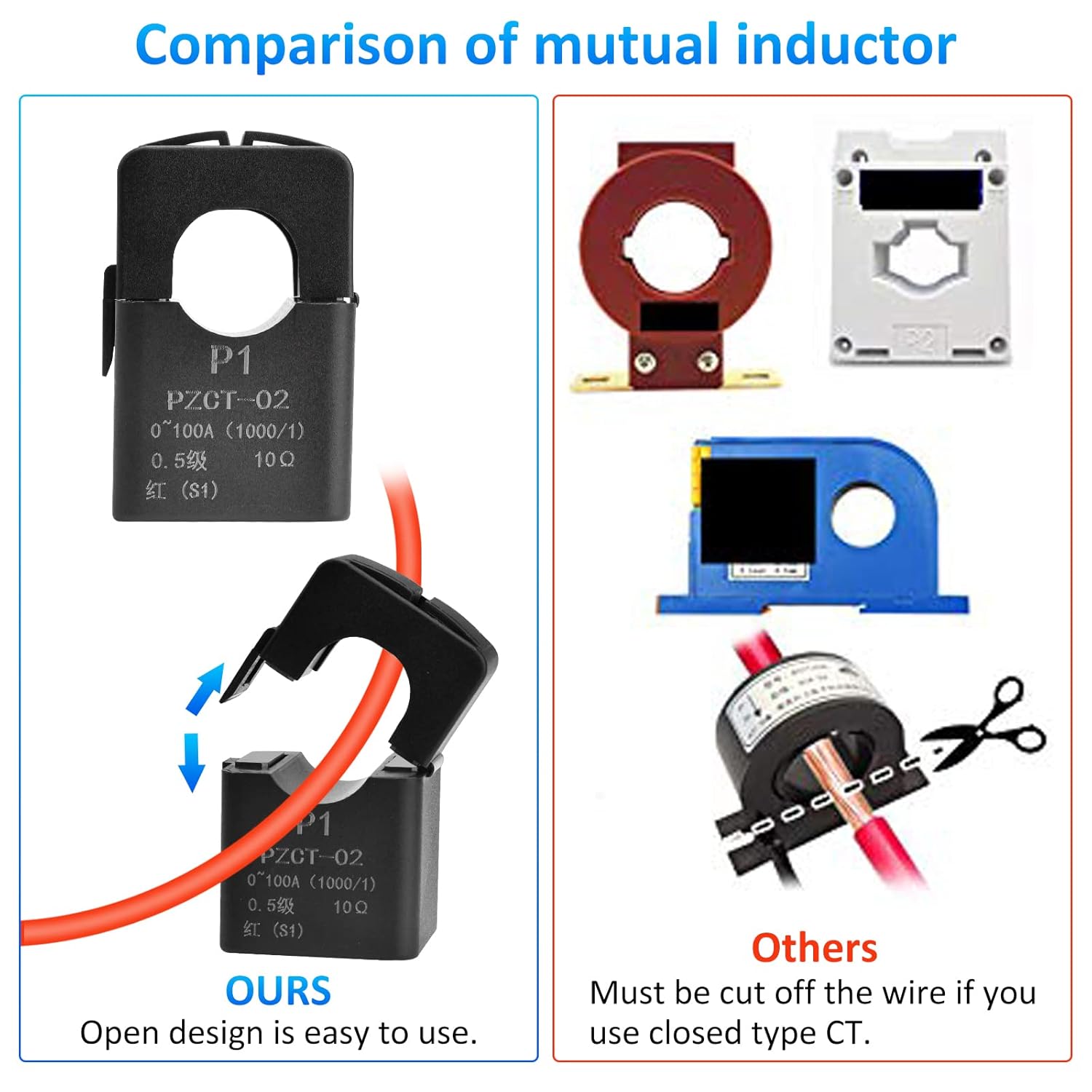
Figure 5.2: The open-design current transformer allows for easy installation without cutting the main wire.
6. Betjeningsvejledning
The meter is designed for straightforward operation. Once powered on, it will immediately begin displaying real-time measurements.
6.1. Baggrundslysstyring
To control the display backlight:
- Tænd/sluk: Briefly press the button located on the front panel. Each press will toggle the backlight state.
- Databesparelse: The meter automatically saves measurement data regardless of the backlight status.
6.2. Overload Alarm Setting
To set or adjust the current overload alarm threshold:
- Gå ind i indstillingstilstand: Press and hold the button for approximately 3 seconds until the current alarm threshold value starts flashing on the display.
- Adjust Threshold: While the value is flashing, briefly press the button to increase the threshold value. The value will cycle through available settings.
- Gem indstilling: Stop pressing the button. After 3 seconds of inactivity, the meter will automatically save the new threshold and exit the setting mode.
When the measured current exceeds the set threshold, the backlight will flash to alert you of an overload condition. The flashing will stop once the current drops below the threshold.
6.3. Energy Data Reset
To clear the accumulated energy consumption (kWh) data:
- Start nulstilling: Press and hold the button for 5 seconds until the energy consumption number starts flashing. Then release the button.
- Bekræft nulstilling: Briefly press the button again. This action will clear the energy data and stop the flashing.
- Cancel Reset: If no button operation occurs within 5 seconds after the number starts flashing, the reset will be canceled, and the energy data will remain unchanged.

Figure 6.1: Icons illustrating key functions of the meter.
7. Vedligeholdelse
The Aideepen PZEM-022 power meter requires minimal maintenance:
- Rensning: Brug en blød, tør klud til at rengøre displayet ogasing. Brug ikke slibende rengøringsmidler eller opløsningsmidler.
- Miljø: Ensure the meter is kept in a dry, dust-free environment within its specified operating temperature range.
- Inspektion: Kontroller regelmæssigt ledningsforbindelserne for tæthed og tegn på slid eller beskadigelse.
8. Fejlfinding
If you encounter issues with your power meter, refer to the following common problems and solutions:
| Problem | Mulig årsag | Løsning |
|---|---|---|
| Skærmen er tom | Ingen strømforsyning eller forkert ledningsføring. | Check the AC 80-260V power connections to the meter. Ensure power is supplied to the circuit. |
| Current/Power readings are zero or incorrect | CT clamp not installed correctly or connected to the wrong wire. | Ensure the load wire passes through the CT clamp and the CT is connected to the meter. Verify the arrow on the CT points from source to load. |
| Backlight flashing continuously | Overload alarm triggered. | Reduce the load on the circuit or adjust the overload alarm threshold if necessary (refer to Section 6.2). |
| Energy consumption resets unexpectedly | Energy consumption exceeded 999kWh, or accidental reset. | The meter automatically resets if 999kWh is exceeded. Be careful when using the reset function (Section 6.3). |
9. Specifikationer
| Parameter | Værdi |
|---|---|
| Modelnummer | PZEM-022 |
| Operation Voltage | AC 80-260V |
| Nuværende rækkevidde | 0-100A |
| Effekt rækkevidde | 0-22000W |
| Energy Consumption Range | 0-999kWh (resets after 999kWh) |
| Frekvensområde | 45-65 Hz |
| Power Factor Range | 0-1PF |
| Display Type | LCD med baggrundsbelysning |
| Produktmål (L x B x H) | 11 x 7 x 3.5 cm |
| Varens vægt | 160 gram |
| Certificeringer | CE |
| Inkluderede komponenter | Ammeter *1, User Manual *1 |

Figur 9.1: Produktdimensioner.
10. Garanti og support
Aideepen products are designed for reliability and performance. For warranty information or technical support, please refer to the contact details provided with your purchase or visit the official Aideepen webwebsted. Behold din købskvittering som købsbevis i tilfælde af garantikrav.