
Edifier MF200
Edifier MF200 USB Powered Multimedia Bluetooth Soundbar User Manual
Model: MF200
Indledning
Tak for købetasing the Edifier MF200 USB Powered Multimedia Bluetooth Soundbar. This manual provides detailed instructions for setting up, operating, and maintaining your new soundbar. Please read this manual thoroughly before use to ensure proper functionality and to maximize your listening experience.

Figur 1: Forside view of the Edifier MF200 Soundbar, showcasing its sleek design and integrated controls on the right side.
Pakkens indhold
Kontroller venligst indholdet af din pakke for at sikre, at alle varer er til stede:
- Edifier MF200 Soundbar
- Bær pose
- USB-C til USB-C kabel
- Brugervejledning (dette dokument)
Opsætning
Follow these steps to set up your Edifier MF200 Soundbar:
- Placering: Place the soundbar on a stable, flat surface, such as a desk or shelf, preferably in front of your monitor or TV for optimal sound projection.
- Strømtilslutning: Connect the provided USB-C to USB-C cable to the USB-C port on the back of the soundbar. Connect the other end to a USB power source (e.g., computer USB port, USB wall adapter 5V 1A). The soundbar will power on automatically.
- Lydforbindelse:
- Bluetooth: The soundbar will enter Bluetooth pairing mode automatically upon first power-on. The indicator light will flash.
- AUX-indgang: For wired connection, connect an audio device (e.g., MP3 player, laptop) to the 3.5mm AUX input port on the soundbar using a 3.5mm audio cable (not included).
- USB -lyd: Connect the soundbar to your computer via the USB-C cable for digital audio playback.

Figur 2: Bagside view of the Edifier MF200 Soundbar, showing the USB-C power/audio input and the 3.5mm AUX input port.
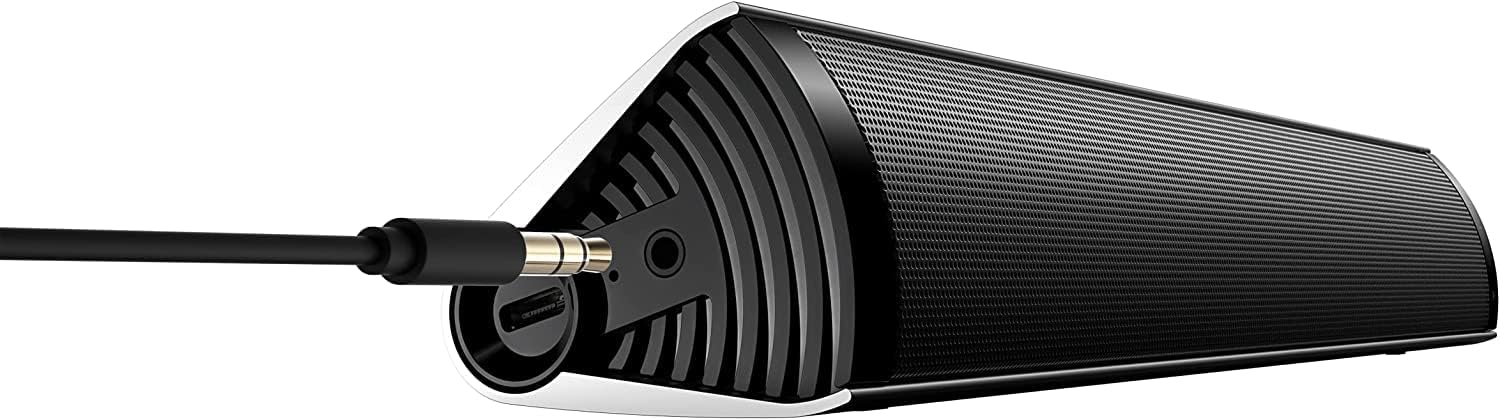
Figure 3: The Edifier MF200 Soundbar with a 3.5mm AUX cable connected to its input port, demonstrating a wired audio connection.
Betjeningsvejledning
The Edifier MF200 features intuitive controls for easy operation.
Kontrol overview

Figure 4: A hand demonstrating the touch control functionality on the Edifier MF200, highlighting the multi-function knob.
- Tænd/sluk-knap (øverst til venstre): Tryk og hold for at tænde/slukke.
- Lydstyrke op (+): Tryk for at øge lydstyrken.
- Skrue ned for lyden (-): Tryk for at reducere lydstyrken.
- Multi-function Knob (Right Side):
- Trykke: Play/Pause (in Bluetooth mode), Answer/End Call.
- Tryk og hold: Enter Bluetooth pairing mode (when not connected), Reject Call.
- Rotere: Juster lydstyrken.
- Forrige nummer (|<): Press to go to the previous track (in Bluetooth mode).
- Næste nummer (>|): Press to go to the next track (in Bluetooth mode).
Bluetooth-parring
- Ensure the soundbar is powered on. The indicator light on the multi-function knob will flash blue, indicating it's in pairing mode.
- Aktiver Bluetooth på din enhed (smartphone, tablet, computer) og søg efter nye enheder.
- Select "EDIFIER MF200" from the list of available devices.
- Once paired, the indicator light will turn solid blue. You can now play audio through the soundbar.
- To disconnect or pair with a new device, press and hold the multi-function knob until the indicator light flashes again.
AUX-indgangstilstand
When a 3.5mm audio cable is connected to the AUX input, the soundbar will automatically switch to AUX mode. Disconnect the AUX cable to return to Bluetooth or USB audio mode.
USB-lydtilstand
Connect the soundbar to your computer via the USB-C cable. The computer should recognize the MF200 as an audio output device. Select it from your computer's sound settings.
Batteri og opladning
The Edifier MF200 features a built-in rechargeable battery for portable use.
- Batterilevetid: The soundbar provides up to 10 hours of music playtime on a full charge.
- Opladning: Connect the soundbar to a USB power source using the provided USB-C cable. The indicator light will show charging status (e.g., red for charging, off or green for fully charged, depending on model specifics).
- Lavt batteri: When the battery is low, the indicator light may flash or change color to alert you.

Figure 5: Visual representation of the Edifier MF200's battery life, indicating up to 10 hours of music playback on a single charge.
Opretholdelse
To ensure the longevity and optimal performance of your Edifier MF200 Soundbar, follow these maintenance guidelines:
- Rensning: Use a soft, dry cloth to wipe the surface of the soundbar. Do not use liquid cleaners, aerosols, or abrasive solvents.
- Opbevaring: When not in use for extended periods, store the soundbar in a cool, dry place, away from direct sunlight and extreme temperatures. Use the provided carry pouch for protection.
- Undgå fugt: Keep the soundbar away from water and high humidity. It is not waterproof.
- Håndteres med forsigtighed: Undgå at tabe soundbaren eller udsætte den for kraftige stød.
Fejlfinding
If you encounter any issues with your Edifier MF200 Soundbar, please refer to the following common problems and solutions:
| Problem | Mulig årsag/løsning |
|---|---|
| Ingen strøm |
|
| Ingen lyd |
|
| Bluetooth connection unstable or unable to pair |
|
| Lydforvrængning |
|
Specifikationer
Detailed technical specifications for the Edifier MF200 Soundbar:

Figure 6: A detailed list of technical specifications for the Edifier MF200 Soundbar, including input types, Bluetooth version, driver units, and dimensions.
| Feature | Detalje |
|---|---|
| Modelnavn | MF200 |
| Inputtyper | Bluetooth / USB-C sound card / 3.5mm AUX |
| Bluetooth version | 5.0 |
| Driver enheder | 36mm full-range × 2 |
| Frekvensrespons | 100Hz-20KHz |
| Udgangseffekt | 4W+4W (RMS) |
| Signal-til-støjhastighed | ≥85dB (A) |
| Støjniveau | ≤25dB (A) |
| Batterikapacitet | 2200mAh |
| Bluetooth spilletid | 10 timer |
| Strømindgang | DC 5V 1A |
| Produktmål (B×H×D) | 293mm × 45mm × 53mm (11.54"D x 1.77"W x 2.09"H) |
| Nettovægt | 0.5 kg (1.1 lbs) |
| Forbindelsesteknologi | Bluetooth, USB |
| Højttaler type | Tweeter |
| Surround Sound Kanalkonfiguration | 2.1 |
Garanti og support
The Edifier MF200 Soundbar comes with a limited warranty. For detailed warranty terms and conditions, please refer to the warranty card included in your package or visit the official Edifier webwebsted.
For teknisk support, hjælp til fejlfinding eller serviceforespørgsler, kontakt venligst Edifiers kundesupport via deres officielle webwebstedet eller kontaktoplysningerne i din produktdokumentation.
Online ressourcer: www.edifier.com
Ask a question about this manual
Ask about setup, troubleshooting, compatibility, parts, safety, or missing instructions. Manuals+ will review the question and use this page’s manual context to help answer it.