
1. Introduktion
This manual provides essential information for the safe and efficient use of your Westinghouse 27-inch Full HD Monitor (Model: Wes-Wh27fx9222-B). Please read this manual thoroughly before operating the monitor and retain it for future reference.
The Westinghouse Wes-Wh27fx9222-B monitor features a 27-inch Full HD (1920x1080) display with a 75Hz refresh rate and 3ms response time, designed for clear visuals and smooth performance. It includes Adaptive Sync technology to reduce screen tearing and stuttering, and EyeRest Technology for enhanced viewing comfort by minimizing eye strain.
2. Sikkerhedsoplysninger
Overhold følgende sikkerhedsforanstaltninger for at forhindre beskadigelse af skærmen og sikre din personlige sikkerhed:
- Udsæt ikke skærmen for regn, fugt eller ekstreme temperaturer.
- Ensure the monitor is placed on a stable, level surface to prevent it from falling.
- Brug kun den strømadapter, der følger med skærmen.
- Bloker ikke ventilationsåbninger.
- Undgå at placere tunge genstande på netledningen.
- Tag stikket ud af stikkontakten, hvis skærmen ikke skal bruges i længere tid.
- Forsøg ikke selv at udføre service på skærmen. Overlad al service til kvalificeret personale.
3. Pakkens indhold
Bekræft at alle varer er til stede i din pakke:
- Westinghouse 27-inch Full HD Monitor
- Monitorstativ (base og hals)
- Strømadapter
- HDMI kabel
- Brugermanual
4. Opsætning
4.1 Samling af skærmstativet
- Tag forsigtigt skærmen ud af emballagen, og beskyt skærmen.
- Fastgør stativets hals til skærmpanelet.
- Fastgør stativets base til stativets hals.
- Placer den samlede skærm på en stabil, plan overflade.
The monitor offers a flexible tilt screen, allowing adjustment from -5° to +15° for optimal viewkomfort.

Image: The monitor can be tilted from -5 degrees to +15 degrees for ergonomic viewing. It also features a wide 178-degree viewvinkel.
4.2 Tilslutning af skærmen
The monitor supports HDMI and VGA connections. Ensure your computer's output matches one of these inputs.
- Strømtilslutning: Connect the power adapter to the monitor's DC input port, then plug the adapter into a power outlet (110 Volts).
- Videoforbindelse (HDMI): Tilslut den ene ende af HDMI-kablet til HDMI-porten på computerens grafikkort og den anden ende til HDMI-indgangsporten på skærmen.
- Videoforbindelse (VGA): Connect one end of the VGA cable to the VGA port on your computer's graphics card and the other end to the VGA input port on the monitor.
- Lydforbindelse (valgfrit): If desired, connect headphones or external speakers to the headphone output port on the monitor.

Billede: Bagside view of the monitor showing the available input ports: HDMI, VGA, Audio Out, and DC power input. The monitor also supports VESA wall mounting.
5. Betjening af monitoren
5.1 Tænd/sluk
Tryk på tænd/sluk-knappen på skærmen for at tænde eller slukke den. Strømindikatorlampen lyser, når skærmen er aktiv.
5.2 On-Screen Display (OSD) menu
Use the control buttons on the monitor to navigate and adjust settings within the OSD menu. Common settings include:
- Lysstyrke/kontrast: Juster skærmens luminans- og kontrastniveauer.
- Farveindstillinger: Modify color temperature, hue, and saturation. The monitor features a wider color gamut, covering 98% sRGB and 83% NTSC, displaying over 16.7 million colors for accurate image reproduction.
- Indgangsvalg: Skift manuelt mellem HDMI- og VGA-indgangskilder.
- Billedtilstand: Select from various preset display modes (e.g., Standard, Game, Movie).
- EyeRest-teknologi: Access settings for flicker-free operation, anti-glare, low blue light modes, and warm/cool viewing options to reduce eye strain.
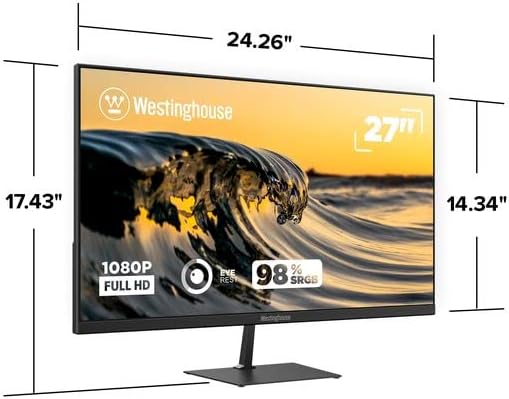
Image: Illustration of the monitor's wider color gamut, indicating 98% sRGB and 83% NTSC coverage for outstanding color accuracy and 16.7 million colors.

Image: Depiction of Innovative EyeRest Technology, which reduces digital eye strain and fatigue through flicker-free, anti-glare, low blue light settings, and warm & cool mode viewing.
5.3 Adaptiv synkronisering
The monitor supports Adaptive Sync technology, which synchronizes the monitor's refresh rate with your graphics card's frame rate. This feature helps eliminate motion blur, screen tearing, and stuttering during fast-paced video playback or gaming. Ensure Adaptive Sync is enabled in your graphics card settings and on the monitor's OSD menu for optimal performance.

Image: Visual representation of Adaptive-Sync technology and 75Hz refresh rate, which work together to eliminate motion blur, tearing, or stuttering during video playback or competitive gameplay.
6. Vedligeholdelse
6.1 Rengøring af monitoren
- Tag altid stikket ud af stikkontakten før rengøring.
- Brug let en blød, fnugfri klud damprengøres med vand eller et mildt, ikke-slibende skærmrensemiddel.
- Sprøjt ikke rengøringsmiddel direkte på skærmen.
- Undgå at bruge skrappe kemikalier, opløsningsmidler eller slibende materialer, da disse kan beskadige skærmen ellerasing.
7. Fejlfinding
| Problem | Mulig årsag | Løsning |
|---|---|---|
| Intet billede på skærmen |
|
|
| Billedet er sløret eller forvrænget |
|
|
| Skærmflimmer eller -rivning |
|
|
| Ingen lyd fra hovedtelefonstikket |
|
|
8. Specifikationer

Billede: Forside view of the Westinghouse 27-inch Full HD Monitor, showing its physical dimensions: approximately 24.26 inches wide, 17.43 inches high (with stand), and 2.48 inches deep.
| Modelnummer | Wes-Wh27fx9222-B |
| Skærmstørrelse | 27 tommer |
| Opløsning | Fuld HD (1920 x 1080 pixels) |
| Aspektforhold | 16:9 |
| Opdateringshastighed | 75 Hz |
| Svartid | 3 millisekunder |
| Paneltype | LCD with LED Technology |
| Viewi vinkel | 178 grader |
| Farveskala | 98% sRGB, 83% NTSC, 16.7 Million Colors |
| Forbindelse | HDMI, VGA |
| Lydudgang | 1x hovedtelefonstik |
| Monteringstype | Wall Mount (VESA Compatible) |
| Tilt justering | -5° til +15° |
| Strømindgang | 110 volt |
| Dimensioner (B x H x D) | Approx. 24.26" x 17.43" x 2.48" (with stand) |
| Vægt | 3.8 kilo |
| Farve | Sort |
9. Garanti og support
9.1 Garantioplysninger
This Westinghouse monitor comes with a 3-month limited warranty from the date of purchase. This warranty covers manufacturing defects and malfunctions under normal use. It does not cover damage caused by misuse, accidents, unauthorized modifications, or external factors.
Gem venligst dit købsbevis for garantikrav.
9.2 Kundesupport
For technical assistance, troubleshooting, or warranty inquiries, please contact Westinghouse customer support. Refer to the contact information provided on the Westinghouse official webwebstedet eller dit produktregistreringskort.
