
Indledning
Tak for købetasing the RCA 32V-type FHD Tunerless Smart TV, model RCA-32D1. This television is designed for seamless access to online streaming content without the need for traditional terrestrial broadcast tuners. It features a Full HD display, built-in Wi-Fi, Chromecast functionality, and voice control for an enhanced viewing experience. This manual provides essential information for setting up, operating, maintaining, and troubleshooting your new TV.

Figur 1: Forside view of the RCA 32V-type FHD Tunerless Smart TV.
Sikkerhedsoplysninger
Læs venligst alle sikkerhedsinstruktioner omhyggeligt, inden produktet tages i brug. Gem denne manual til senere brug.
- Udsæt ikke tv'et for regn eller fugt for at undgå brand eller elektrisk stød.
- Sørg for tilstrækkelig ventilation. Bloker ikke ventilationsåbningerne.
- Brug kun den netledning, der følger med tv'et.
- Åbn ikke tv'etasing. Overlad al service til kvalificeret personale.
- Opbevar batterier utilgængeligt for børn. Bortskaf brugte batterier ansvarligt.
- Undgå at placere tv'et på ustabile overflader.
Pakkens indhold
Bekræft at alle varer er til stede i pakken:
- RCA 32V-type FHD Tunerless Smart TV Unit
- Fjernbetjening
- AAA batterier (x2)
- TV-stativ (base og skruer)
- Strømkabel
- Brugervejledning (dette dokument)
Opsætning
1. Fysisk opsætning
Attach the TV stand or mount the TV to a wall. For wall mounting, ensure you use a VESA-compatible bracket (40 x 40mm) and appropriate screws (M6 10mm x 2 for upper two points, screws for lower two points are included with the TV). Always ensure the TV is securely mounted to prevent accidents.

Figure 2: TV dimensions and connection terminal layout.
2. Forbindelser
Connect the power cable to the TV and then to a power outlet. This TV requires only a power connection and Wi-Fi for internet streaming.

Figure 3: Power and Wi-Fi connectivity for the tunerless TV.
For external devices, use the available ports:
- HDMI-porte (x3): Connect game consoles, Blu-ray players, or other HDMI-compatible devices.
- USB 2.0-porte (x2): Tilslut USB-lagerenheder til medieafspilning.
- LAN-port: For wired internet connection (optional, Wi-Fi is also available).
- Lydudgang: Til tilslutning af eksterne lydsystemer.

Figure 4: Connecting external devices via HDMI ports.
3. Første opstart
After connecting the power, press the power button on the remote control. Follow the on-screen instructions to complete the initial setup, including connecting to your Wi-Fi network and logging into your Google account to access smart TV features.
Drift
1. Fjernbetjening
The included remote control allows for easy navigation and features voice control capabilities. Dedicated buttons provide quick access to popular streaming services.
- Stemmestyring: Press the voice assistant button and speak commands like "Play cat videos on YouTube" or "Increase volume."
- Dedikerede app-knapper: Quickly launch NETFLIX, YouTube, and Prime Video with a single press.
- Navigation: Brug retningsknappen og OK-knappen til at navigere i menuer og vælge muligheder.
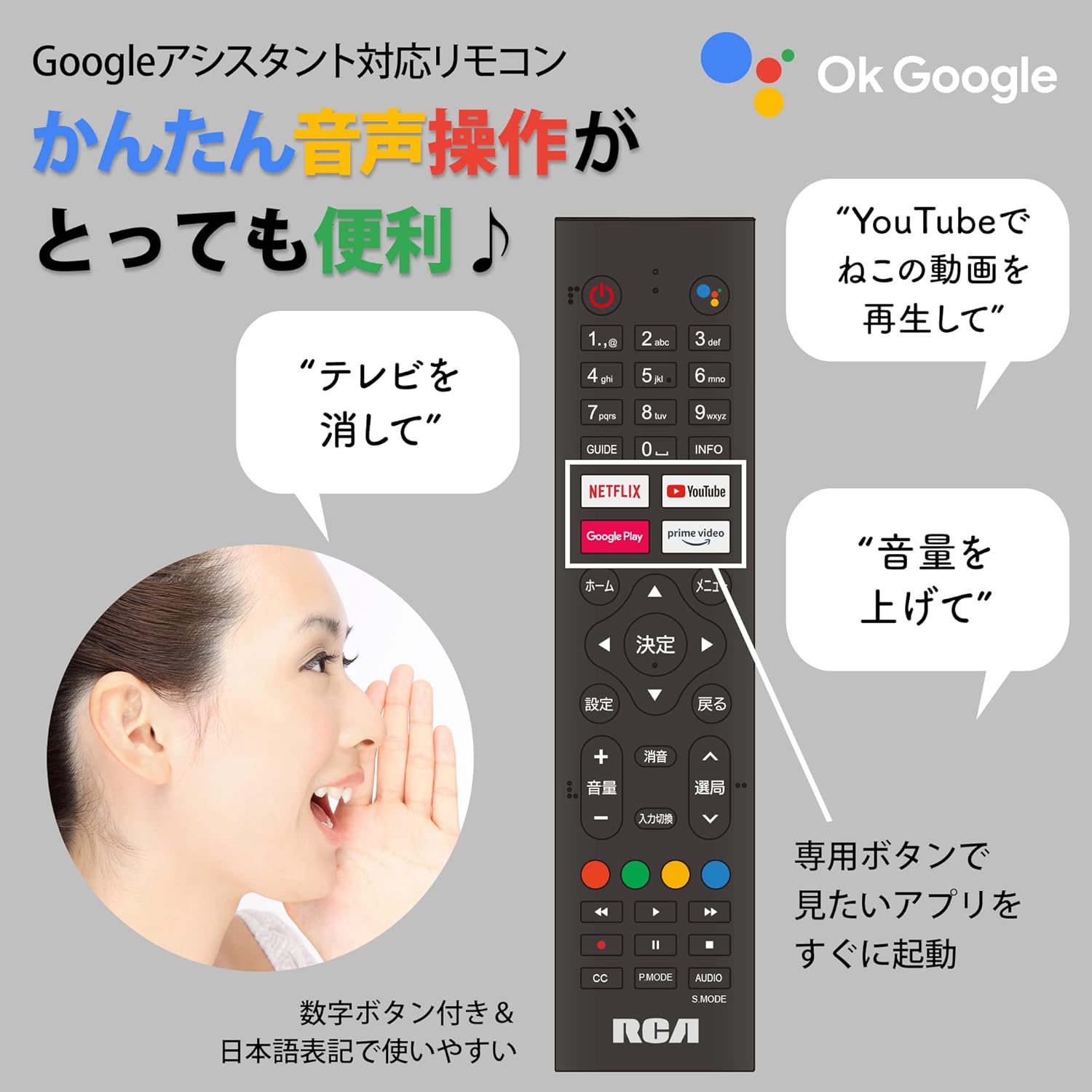
Figure 5: Remote control with voice command functionality and dedicated app buttons.
2. Smart TV-funktioner
This tunerless TV provides access to a wide range of online video distribution services and features:
- Streamingtjenester: Enjoy content from NETFLIX, YouTube, Prime Video, Tver, U-NEXT, AbemaTV, and more.
- Chromecast indbygget: Cast content directly from your smartphone or tablet to the TV screen.
- Android OS: Access a variety of apps from the Google Play Store.

Figure 6: Using Chromecast to cast content from a smartphone to the TV.
Video 1: Demonstration of the Google TV interface and voice control for content discovery.
3. Grundlæggende betjening
- Tænd/sluk: Tryk på tænd/sluk-knappen på fjernbetjeningen.
- Lydstyrkekontrol: Brug knapperne for lydstyrke op/ned på fjernbetjeningen.
- Valg af input: Press the Input button to switch between HDMI and other connected sources.
Opretholdelse
1. Rensning
For at rengøre tv-skærmen skal du forsigtigt tørre den af med en blød, fnugfri klud. Ved genstridige pletter kan du gnide den let.ampen the cloth with water or a screen-cleaning solution. Do not spray liquid directly onto the screen. Clean the TV casinmed en blød, tør klud.
2. Opbevaring
If storing the TV for an extended period, disconnect it from the power outlet and store it in a cool, dry place away from direct sunlight and extreme temperatures.
Fejlfinding
Hvis du støder på problemer med dit tv, kan du se følgende almindelige problemer og løsninger:
| Problem | Løsning |
|---|---|
| Ingen strøm | Sørg for, at strømkablet er korrekt tilsluttet til både tv'et og stikkontakten. Prøv en anden stikkontakt. |
| No picture/Sound but no picture | Kontrollér inputkilden. Sørg for, at eksterne enheder er tændt og tilsluttet korrekt. |
| Fjernbetjening virker ikke | Udskift batterierne. Sørg for, at der ikke er nogen forhindringer mellem fjernbetjeningen og tv'ets IR-sensor. |
| Kan ikke oprette forbindelse til Wi-Fi | Check your router and internet connection. Re-enter the Wi-Fi password. Move the TV closer to the router. |
| App is slow or freezes | Restart the TV. Clear the app's cache in the TV settings. Ensure your internet connection is stable. |
Hvis problemet fortsætter, bedes du kontakte kundesupport.
Specifikationer
The following are the technical specifications for the RCA-32D1 Tunerless Smart TV:
| Feature | Detalje |
|---|---|
| Modelnummer | RCA-32D1 |
| Skærmstørrelse | 31.5 inches (32V-type) |
| Displayteknologi | LCD, VA Panel, LED Backlight |
| Opløsning | Fuld HD (1920 x 1080) |
| Opdateringshastighed | 60 Hz |
| Kontrastforhold | 3000:1 |
| Operativsystem | Android |
| Forbindelse | Wi-Fi, HDMI (x3), USB 2.0 (x2), LAN, Audio Output |
| Særlige funktioner | Chromecast Built-in, Voice Control |
| Supported Streaming Services | Netflix, YouTube, Prime Video, Tver, U-NEXT, AbemaTV |
| Produktmål (D x B x H) | 16.1 x 73.1 x 47 cm |
| Varens vægt | 4.9 kg |
| VESA-monteringsstandard | 40 x 40 mm |
| Medfølgende batterier | 2 AAA batterier |

Figure 7: High-definition VA panel for vivid image quality.
Garanti og support
This product is covered by the manufacturer's warranty. Please refer to the warranty card included in your package for specific terms and conditions.
Kundesupport
For technical assistance or inquiries, please contact the KEIYO Support Center:
- Telefon: 050-8880-2812
- Receptionens åbningstider: Weekdays 10:00-12:00, 13:00-17:00 (Excluding summer holidays, year-end/New Year holidays, Golden Week, and public holidays).