
1. Introduktion
Thank you for choosing the ARREGUI Forma Evolution 150080 Electronic Code and Key Safe. This safe is designed to provide robust security for your valuables, featuring a dual-locking mechanism with both an electronic keypad and a key. Please read this manual carefully before installation and use to ensure proper operation and maximum security.
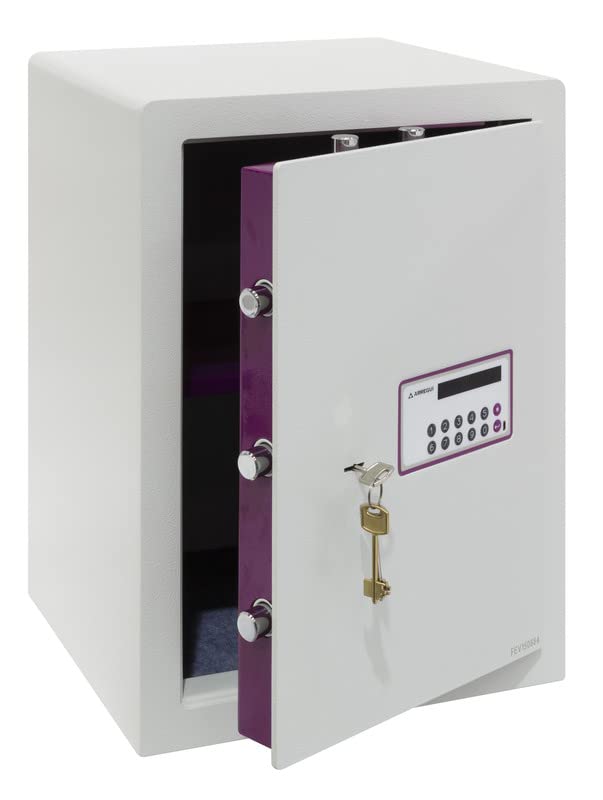
Figur 1: Forside view of the ARREGUI Forma Evolution 150080 electronic safe.
2. Sikkerhedsoplysninger
- Keep the emergency keys in a secure location away from the safe and out of reach of unauthorized persons. Do not store them inside the safe.
- Sørg for, at pengeskabet er sikkert monteret på en væg eller et gulv for at forhindre uautoriseret fjernelse.
- Udsæt ikke pengeskabet for ekstreme temperaturer eller fugtighed.
- Udskift batterierne med det samme, når indikatoren for lavt batteri vises, for at undgå at blive låst ude.
- Do not attempt to force the safe open if you forget the code or if the batteries are completely drained. Use the emergency key or external power supply as instructed.
3. Pakkens indhold
Bekræft at alle komponenter er til stede i pakken:
- 1 x ARREGUI Forma Evolution 150080 Safe
- 1 x brugsanvisning
- 2 x User Keys (for daily operation)
- 1 x Emergency Key (for emergency opening)
- 4 x 1.5 V AA-batterier
- 1 x External Micro-USB Power Supply
- Monteringsudstyr (skruer og ankre)
4. Produktet er slutview
The ARREGUI Forma Evolution 150080 safe features a robust design with key components for security and ease of use.

Figure 2: Key features and dimensions of the Forma Evolution 150080 safe.
Nøglekomponenter:
- Elektronisk tastatur: For entering your personal access code. Features an 8-digit display.
- Nøglehul: For use with the user key during normal operation and the emergency key for override.
- Låsebolte: 7 nickel-plated steel bolts with a diameter of 22 mm provide strong locking.
- Internt LED lys: Illuminates the safe interior for better visibility.
- Aftagelig hylde: Allows for organized storage of items.
- Ekstern strømport: Micro-USB port for connecting the external power supply in case of drained batteries.

Figure 3: Locking bolts.

Figure 4: Internal LED light.

Figure 5: Removable shelf.
5. Opsætning
5.1. Batteriinstallation
- Open the safe door using the emergency key (if not already open). The emergency keyhole is usually located behind a small cover near the keypad.
- Find batterirummet på indersiden af døren til pengeskabet.
- Isæt 4 x 1.5V AA-batterier, og sørg for korrekt polaritet (+/-).
- Close the battery compartment cover. The safe is now powered.
5.2. Montering af pengeskabet
The safe can be securely mounted to a wall or floor using the pre-drilled holes at the bottom and back. This is highly recommended for maximum security.
- Choose a suitable location for the safe, ensuring it is on a solid surface (e.g., concrete wall or floor, wooden stud).
- Marker borepunkterne gennem de forborede huller på bagsiden eller bunden af pengeskabet.
- Drill holes in the wall or floor using an appropriate drill bit for the mounting surface and anchors.
- Indsæt de medfølgende ankre i de borede huller.
- Placer pengeskabet og fastgør det med de medfølgende skruer. Spænd godt til.
6. Betjeningsvejledning
6.1. Indstilling af din personlige kode
When you first use the safe, you will need to set your personal access code.
- With the safe door open, press the internal red or green reset button (location may vary, usually on the inside of the door near the hinge). You will hear a beep and the display will show "----" or similar.
- On the keypad, enter your desired code (3 to 8 digits).
- Press the "#" or "ENTER" button to confirm. The display will show "GOOD" and beep, indicating the code is set.
- Test the new code with the door open first for at sikre, at det fungerer korrekt, før du lukker pengeskabet.

Figure 6: Digital display of the electronic keypad.
6.2. Opening the Safe (Code + Key)
The Forma Evolution safe requires both the correct code and the user key for opening.
- Enter your personal code on the electronic keypad. The display will show "OPEN" if the code is correct.
- Within 5 seconds of entering the correct code, insert one of the user keys into the keyhole and turn it clockwise (or counter-clockwise, depending on the model) to retract the bolts.
- Træk døren op.

Figure 7: Keypad and keyhole for dual security access.
6.3. Lukning af pengeskabet
- Luk pengeskabsdøren.
- Turn the user key counter-clockwise (or clockwise) to extend the bolts and lock the safe.
- Fjern nøglen. Pengeskabet er nu låst.
6.4. Ændring af din personlige kode
To change your code, follow the same steps as setting the initial code:
- Åbn pengeskabsdøren.
- Press the internal reset button.
- Enter your new desired code (3 to 8 digits).
- Press the "#" or "ENTER" button to confirm.
- Test the new code with the door open before closing.
6.5. Nødåbning
In case of forgotten code or completely drained batteries, you can use the emergency key or external power supply.
Using the Emergency Key:
- Locate the emergency keyhole (often hidden behind a small removable cover on the keypad panel).
- Insert the emergency key and turn it to unlock the safe.
- Åbn døren.

Figure 8: Emergency key.
Using the External Power Supply:
- Connect the external micro-USB power supply to the micro-USB port on the keypad panel.
- Once connected, the keypad will power on.
- Enter your personal code and use the user key as described in section 6.2 to open the safe.
- Udskift de interne batterier umiddelbart efter åbning.

Figure 9: Connecting the external micro-USB power supply.
7. Vedligeholdelse
- Udskiftning af batteri: Replace the 4 x 1.5V AA batteries annually or when the low battery indicator appears on the display. Always use new, high-quality alkaline batteries.
- Rensning: Rengør pengeskabets yderside med en blød, tør kludamp klæde. Brug ikke slibende rengøringsmidler eller opløsningsmidler.
- Smøring: Periodically check the locking bolts and hinges for smooth operation. If necessary, apply a small amount of silicone-based lubricant.
8. Fejlfinding
| Problem | Mulig årsag | Løsning |
|---|---|---|
| Pengeskabet åbner ikke med kode. | Incorrect code entered. Batteries are low or dead. | Re-enter the code carefully. Replace batteries or use external power supply. |
| Tastaturet reagerer ikke. | Batterierne er helt døde. | Use the external micro-USB power supply to power the keypad, then open with code and key. Replace internal batteries immediately. |
| Door does not open after entering code. | User key not turned within 5 seconds. Bolts are jammed. | Ensure the user key is turned immediately after the "OPEN" signal. Check for obstructions around the door or bolts. |
| Safe beeps continuously. | Advarsel om lavt batteri. | Replace all 4 x 1.5V AA batteries. |
9. Specifikationer
| Feature | Detalje |
|---|---|
| Modelnummer | Forma Evolution 150080 |
| Mærke | ARREGUI |
| Udvendige mål (H x B x D) | 52 x 38.5 x 36 cm |
| Indvendige mål (H x B x D) | Approximately 51.4 x 37.9 x 30.5 cm (excluding door mechanism) |
| Kapacitet | 59 liter |
| Vægt | 38.5 kg |
| Materiale | Legeret stål |
| Front Door Thickness | 6 mm + 3 mm reinforced steel (drill protection) |
| Låsemekanisme | Electronic Keypad (3-8 digit code) and Key |
| Låsebolte | 7 x 22 mm diameter nickel-plated steel bolts |
| Strømkilde | 4 x 1.5V AA alkaliske batterier (inkluderet) |
| Nødstrøm | External Micro-USB Power Supply |
| Særlige funktioner | Internal LED light, Removable shelf, Anti-pry system, Floor/Wall mountable |

Figur 10: Interiør view with dimensions and removable shelf.
10. Support
If you encounter any issues not covered in this manual or require further assistance, please contact ARREGUI customer support. Refer to the contact information provided with your purchase or visit the official ARREGUI webwebsted for supportdetaljer.