
Andoer e417fe28-cba1-49bd-8acb-ddcd73b41592
Andoer 4K Digital Video Camera User Manual
Model: e417fe28-cba1-49bd-8acb-ddcd73b41592
1. Introduktion
This user manual provides detailed instructions for operating your Andoer 4K Digital Video Camera. Please read this manual thoroughly before using the camera to ensure proper operation and to maximize its performance. Keep this manual for future reference.
1.1 Pakkens indhold
Når du åbner pakken, skal du kontrollere, at alle nedenstående varer er til stede og i god stand:
- 1 x Andoer 4K Digital Video Camera
- 2 x NP-40 Li-ion Battery (one pre-installed)
- 1 x USB-kabel
- 1 x videokabel
- 1 x fjernbetjening
- 1 x kamerataske
- 1 x Brugermanual (engelsk)

Image: The Andoer 4K Digital Video Camera, remote control, and two NP-40 Li-ion batteries, illustrating the main components included in the package.
2. Produktfunktioner
The Andoer 4K Digital Video Camera is equipped with a range of features designed to enhance your video recording and photography experience:
- 4K Ultra HD Video Recording: Capture stunning videos at 4K/30fps and 2.7K/30fps resolutions.
- 56MP Still Image Capture: Produce high-resolution photos up to 56 megapixels (interpolation).
- 3.0 Inch IPS Touchscreen: A rotatable 270° touchscreen for intuitive control and versatile viewing vinkler.
- 18X digital zoom: Bring distant subjects closer without compromising image quality.
- IR nattesyn: Record clear and natural footage in low-light or dark environments.
- WiFi-forbindelse: Easily connect to your smartphone or tablet via the DV-CAM APP for remote control, live view, og file overførsel.
- Face Detection & Anti-Shake: Enhance focus and stability for clearer shots.
- Ekstern mikrofonunderstøttelse: Hot shoe mount for connecting an external microphone for improved audio quality.
- Standard stativmontering: 1/4 inch thread for mounting on a tripod or other accessories.

Image: An infographic highlighting the camera's main features including 4K 56MP resolution, 18X Digital Zoom, Face Detection, Night Vision, Dual Outputs, Digital Anti-shake, IPS Touchscreen, WiFi Connection, and Built-in Microphone.
3. Kom godt i gang
3.1 Batteriinstallation og opladning
The camera uses NP-40 Li-ion batteries. One battery is typically pre-installed. Ensure batteries are fully charged before first use.
- Åbn batteridækslet, der er placeret i bunden af kameraet.
- Insert the NP-40 battery, ensuring the correct polarity.
- Luk batterirummets dæksel forsvarligt.
- To charge, connect the camera to a power source using the provided USB cable. The charging indicator light will illuminate.
- Opladningen er færdig, når indikatorlyset slukker.
3.2 Installation af SD-kort
The camera supports SD/SDHC cards up to 128GB (Class 6 or above recommended, not included).
- Find SD-kortstikket, normalt på siden eller undersiden af kameraet.
- Insert the SD card with the metal contacts facing the correct direction (refer to the diagram near the slot). Push until it clicks into place.
- For at fjerne det skal du forsigtigt skubbe kortet ind igen, indtil det springer ud.
4. Grundlæggende betjening
4.1 Tænd/sluk
- Tænd: Open the LCD screen or press the Power button.
- Sluk: Close the LCD screen or press and hold the Power button.
4.2 Optagelse af video
- Tænd kameraet.
- Ensure the camera is in video recording mode (indicated by an icon on the screen). If not, use the Mode button to switch.
- Press the Record button (usually a red circle) to start recording.
- Tryk på optageknappen igen for at stoppe optagelsen.
4.3 Optagelse af billeder
- Tænd kameraet.
- Sørg for, at kameraet er i fototilstand.
- Komponer dit billede ved hjælp af LCD-skærmen.
- Press the Photo button (often a camera icon or shutter button) to take a picture.
4.4 Zoomfunktion
The camera features 18X digital zoom.
- Use the T (Telephoto) button to zoom in.
- Use the W (Wide) button to zoom out.

Image: A visual demonstration of the 18X digital zoom capability, showing how the camera can magnify distant subjects.
4.5 Afspilning
- In standby mode, press the Playback button (often an arrow icon) to enter playback mode.
- Use the navigation buttons to browse through your recorded videos and photos.
- Tryk på OK-knappen for at afspille en video eller view et foto i fuldskærm.
- Press the Playback button again to exit playback mode.
5. Avancerede funktioner
5.1 WiFi-forbindelse
The camera supports WiFi connectivity for remote control and file transfer via the DV-CAM APP.
- Download and install the "DV-CAM" APP on your smartphone or tablet from your device's app store.
- On the camera, navigate to the WiFi settings and enable WiFi. The camera's WiFi network name (SSID) and password will be displayed.
- On your smartphone/tablet, go to WiFi settings and connect to the camera's WiFi network using the provided password.
- Open the DV-CAM APP. You can now view live footage, control recording, take photos, and download files directly to your mobile device.

Image: A visual representation of the camera's WiFi function, showing a smartphone connected to the camera to view live footage or transfer files.
5.2 IR-nattesyn
The IR Night Vision feature allows you to record in low-light conditions.
- To activate IR Night Vision, locate the IR button or setting in the camera menu.
- When activated, the camera will use infrared light to illuminate the scene, capturing clear black and white footage in darkness.

Image: A side-by-side comparison demonstrating the effectiveness of IR Night Vision, showing a scene in normal light versus the same scene captured in darkness using infrared.
5.3 3.0 Inch IPS Touchscreen
The 3.0-inch IPS touchscreen offers intuitive control and can be rotated 270 degrees for various shooting angles, including self-recording.
- Tap the screen to access menu options or focus.
- Swipe to navigate through playback or menu pages.
- Rotate the screen to face forward for vlogging or self-portraits.
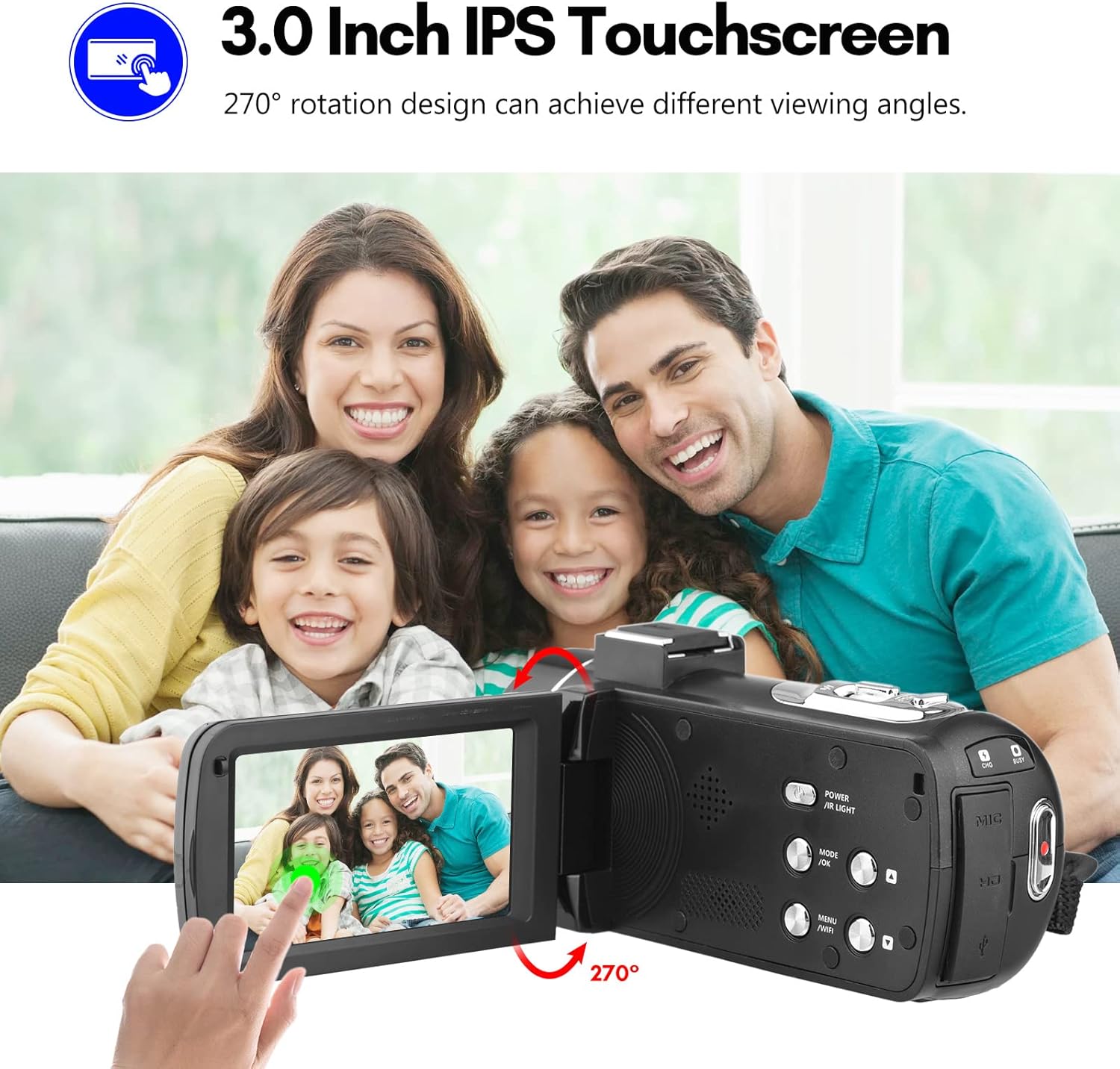
Image: The Andoer camera with its 3.0-inch IPS touchscreen rotated, demonstrating its 270-degree rotation capability for flexible viewing og selvoptagelse.
5.4 Menuindstillinger
Access the camera's menu to adjust various settings such as video resolution, photo resolution, white balance, exposure, self-timer, and auto power off.
- Tryk på knappen MENU for at åbne indstillingsmenuen.
- Use the navigation buttons or touchscreen to select options.
- Tryk på OK for at bekræfte valg.
- Tryk på MENU igen for at afslutte.
6. Forbindelse
The camera offers multiple connectivity options for viewing and transferring your media.
6.1 Connecting to a TV (HD Multimedia Interface)
- Sørg for, at kameraet er slukket.
- Connect one end of the HD multimedia interface cable (not explicitly listed in package contents, but mentioned in description) to the camera's HD port and the other end to an HD input on your TV.
- Turn on the TV and select the correct HD input source.
- Turn on the camera. The camera's display will be mirrored on the TV screen, allowing you to view fotos og videoer.
6.2 Tilslutning til en computer (USB)
- Sørg for, at kameraet er slukket.
- Tilslut kameraet til din computer ved hjælp af det medfølgende USB-kabel.
- Turn on the camera. It will typically enter "Mass Storage" or "PC Camera" mode. Select "Mass Storage" to access files.
- The camera will appear as a removable disk drive on your computer, allowing you to transfer files.

Image: An illustration detailing how to connect the Andoer camera to a television via HD multimedia interface and to a computer via USB for viewing and transferring media.
7. Vedligeholdelse
7.1 Rengøring af kameraet
- Brug en blød, tør klud til at rengøre kamerahuset.
- For the lens, use a specialized lens cleaning cloth and lens cleaning solution. Avoid touching the lens with your fingers.
- Do not use strong detergents or solvents, as they may damage the camera's finish.
7.2 Opbevaring
- When not in use for extended periods, remove the battery from the camera.
- Opbevar kameraet et køligt, tørt sted, væk fra direkte sollys og ekstreme temperaturer.
- Use the provided camera bag to protect it from dust and scratches.
8. Fejlfinding
| Problem | Mulig årsag | Løsning |
|---|---|---|
| Kameraet tænder ikke. | Batteriet er dødt eller isat forkert. | Oplad batteriet, eller sæt det korrekt i igen. |
| Kan ikke optage video/tage billeder. | SD-kortet er fuldt, låst eller ikke isat. | Slet files, unlock the SD card, or insert an SD card. |
| Dårlig billed-/videokvalitet. | Linsen er snavset; utilstrækkelig belysning; forkerte indstillinger. | Clean the lens; use IR Night Vision in low light; adjust resolution/exposure settings. |
| Problemer med WiFi-forbindelse. | Incorrect password; APP not installed; distance too far. | Verify password; install DV-CAM APP; move closer to camera. |
9. Specifikationer
| Feature | Detalje |
|---|---|
| Billedsensor | CMOS |
| ISO | Auto, 100, 200, 400, 800, 1600 |
| Opbevaring | SD/SDHC Card, max. 128GB (Class 6 or above) |
| Linse | Fixed, f/2.6, f=7.0mm |
| Fokus afstand | 0.5m til uendeligt |
| Skærm | 3.0 Inch IPS Touchscreen (270° rotation) |
| Photo Format & Resolution | JPG, 56M/ 48M/ 30M/ 24M/ 20M/ 16M/ 12M/ 8M/ 5M |
| Video Format & Resolution | MP4, 4K/30fps, 2.7K/30fps, 1080P/60fps, 1080P/30fps, 720P/60fps, 720P/30fps |
| Digital Zoom | 18X |
| IR lys | <1.0 mio |
| Hvidbalance | Auto/ Daylight/ Cloudy/ Tungsten/ Fluorescent |
| Eksponering | ± 3.0 EV |
| Selvudløser | OFF/2s/ 5s/ 10s |
| Auto sluk | OFF/ 1min/3min/ 5min/ 10min |
| Mikrofon | Built-in, supports external microphone |
| Strømforsyning | 1 x NP-40 Li-ion Battery |
| Fjernbetjenings batteri | 2 x AAA-batterier (medfølger ikke) |
| Kamera størrelse | 12.6 x 5.8 x 5.9 cm / 5 x 2.3 x 2.3in |
| Kameravægt | 318 g / 11.2 oz |
10. Garanti og support
For warranty information and technical support, please refer to the official Andoer webwebstedet eller kontakt deres kundeservice. Behold din købskvittering som købsbevis.
You can visit the official Andoer store on Amazon for more information: Andoer Store
11. Sikkerhedsoplysninger
Overhold venligst følgende sikkerhedsforanstaltninger for at forhindre personskade eller beskadigelse af produktet:
- Udsæt ikke kameraet for ekstreme temperaturer, direkte sollys eller høj luftfugtighed.
- Hold kameraet væk fra vand og andre væsker.
- Forsøg ikke at skille kameraet ad eller ændre det. Reparationer bør kun udføres af autoriseret servicepersonale.
- Keep plastic bags and packaging materials away from babies and children to avoid suffocation hazards.

Image: A multi-language warning label emphasizing the importance of keeping plastic bags away from children to prevent suffocation.
Ask a question about this manual
Ask about setup, troubleshooting, compatibility, parts, safety, or missing instructions. Manuals+ will review the question and use this page’s manual context to help answer it.