
1. Introduktion
Tak fordi du valgte den sorteview K1 Bluetooth Keyboard with Touchpad. This manual provides detailed instructions on how to set up, operate, and maintain your keyboard to ensure optimal performance and longevity. Please read this manual thoroughly before using the product.
Sikkerhedsoplysninger
- Keep the keyboard away from water, moisture, and extreme temperatures.
- Do not attempt to disassemble or repair the keyboard yourself. Contact qualified service personnel if needed.
- Brug kun det medfølgende USB-kabel til opladning.
- Undgå at tabe tastaturet eller udsætte det for hårde stød.
2. Produktet er slutview
Pakkens indhold
- Sortview K1 Bluetooth Keyboard with Touchpad
- USB kabel
- Brugervejledning (dette dokument)
Tastaturlayout
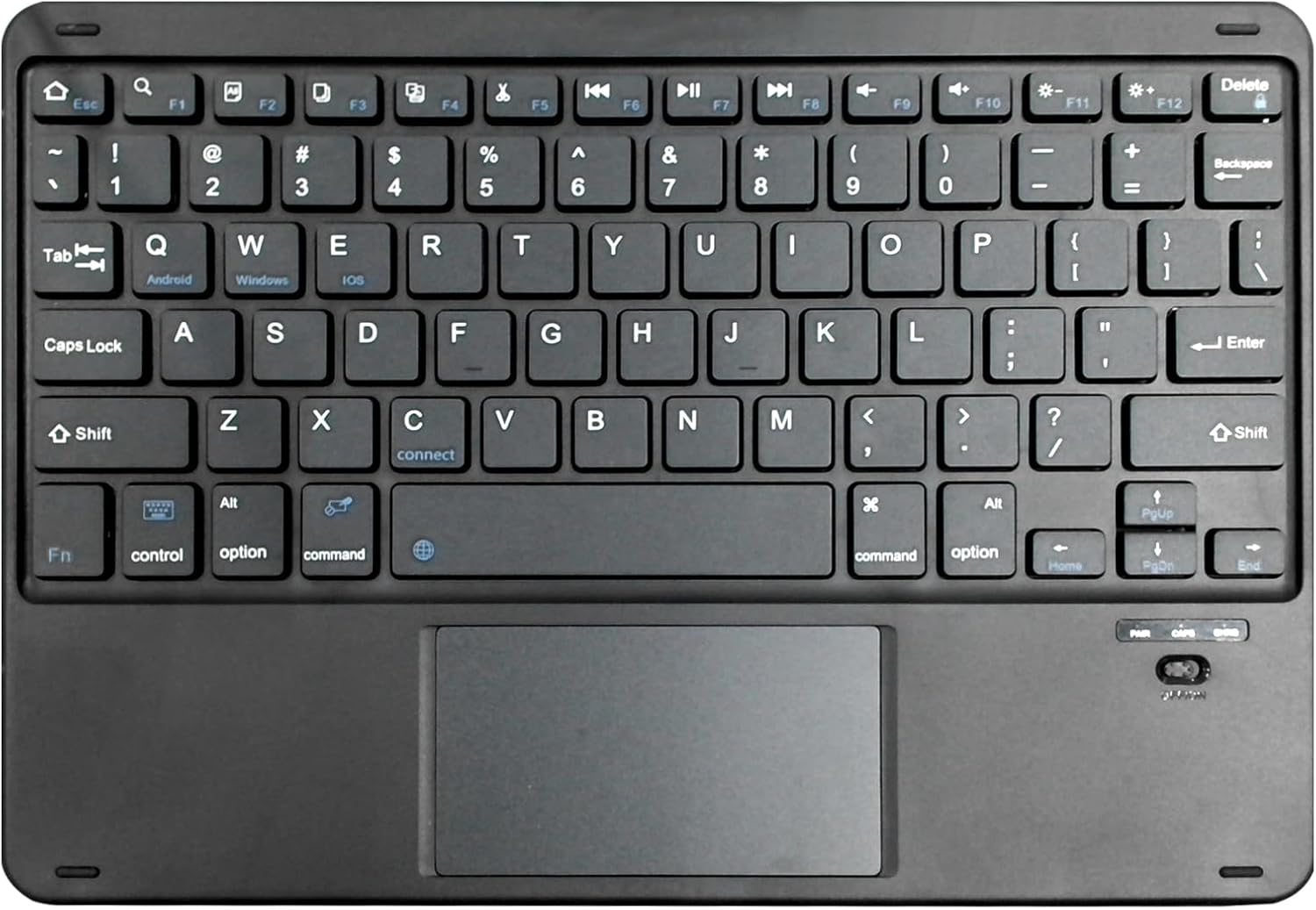
Figur 2.1: Sortview K1 Bluetooth Keyboard Layout. This image displays the full keyboard with its QWERTY layout, dedicated function keys (F1-F12), and the integrated multi-touch touchpad located below the spacebar. Key labels for Android, Windows, and iOS are visible on the Q, W, and E keys respectively, indicating multi-OS compatibility. The power switch and indicator lights are visible on the top right.
Nøglefunktioner
- Slim and ergonomic design for comfortable typing.
- Integrated touchpad for precise navigation.
- Universal compatibility with iOS, Android, and Windows operating systems.
- Trådløs Bluetooth-forbindelse.
- Genopladeligt batteri.
3. Opsætning
Opladning af tastaturet
- Connect the small end of the provided USB cable to the charging port on the keyboard (usually located on the top edge).
- Tilslut den anden ende af USB-kablet til en USB-strømadapter (medfølger ikke) eller en computers USB-port.
- The charging indicator light will illuminate (e.g., red) during charging and turn off or change color when fully charged.
- En fuld opladning tager typisk 2-3 timer.
Bluetooth-parring
- Sørg for, at tastaturet er fuldt opladet.
- Turn on the keyboard by sliding the power switch (located on the top right of the keyboard). The power indicator light will briefly flash.
- Press the 'Connect' button (often located near the 'C' key or a dedicated Bluetooth pairing button) to put the keyboard into pairing mode. The Bluetooth indicator light will start blinking rapidly.
- On your device (tablet, smartphone, computer), go to the Bluetooth settings.
- Aktiver Bluetooth og søg efter tilgængelige enheder.
- Select "Blackview K1" or a similar name from the list of found devices.
- If prompted, enter the pairing code displayed on your device using the keyboard and press Enter.
- Once paired, the Bluetooth indicator light on the keyboard will stop blinking and remain solid or turn off, indicating a successful connection.
4. Betjeningsvejledning
Grundlæggende tastaturfunktioner
Den sorteview K1 keyboard functions like a standard QWERTY keyboard. Simply type as you normally would. The integrated touchpad allows for mouse-like cursor control and gesture input.
Skift af operativsystem
The keyboard supports multiple operating systems. Use the following key combinations to switch modes for optimal compatibility:
- Fn + Q: Switch to Android system mode.
- Fn + W: Switch to Windows system mode.
- Fn + E: Switch to iOS system mode.
Touchpad -funktioner
The touchpad supports various gestures for enhanced navigation:
- Tryk med en enkelt finger: Venstre klik.
- To-finger tryk: Højreklik (kontekstmenu).
- To-finger rulning: Rul op/ned eller venstre/højre.
- Knib for at zoome: Zoom in/out (supported by some applications).
- Tre-finger swipe opad: Show all open applications (Windows/Android).
- Stryg ned med tre fingre: Show desktop (Windows/Android).
Funktionstaster (Fn-kombinationer)
The top row of keys (F1-F12) can be used as standard function keys or multimedia/shortcut keys when combined with the 'Fn' key.
| Nøglekombination | Fungere |
|---|---|
| Fn + Esc | Hjem |
| Fn + F1 | Lysstyrke ned |
| Fn + F2 | Lysstyrke op |
| Fn + F3 | Åbn Søg |
| Fn + F4 | Åbn Browser |
| Fn + F5 | Forrige spor |
| Fn + F6 | Afspil/pause |
| Fn + F7 | Næste spor |
| Fn + F8 | Dæmp lydstyrke |
| Fn + F9 | Lydstyrke ned |
| Fn + F10 | Lydstyrke op |
| Fn + F11 | Lås skærm |
| Fn + F12 | Skærmbillede |
5. Vedligeholdelse
Rensning
- Sluk tastaturet før rengøring.
- Brug en blød, fnugfri klud lidt dampskylles med vand eller en mild rengøringsopløsning til at tørre overfladen af.
- Brug ikke skrappe kemikalier, slibemidler eller opløsningsmidler.
- Brug trykluft til at fjerne støv og snavs mellem tasterne.
Opbevaring
- Store the keyboard in a cool, dry place away from direct sunlight.
- If storing for an extended period, ensure the keyboard is fully charged before storage and recharge it every few months to maintain battery health.
6. Fejlfinding
Hvis du støder på problemer med din Blackview K1 keyboard, please refer to the following table for common problems and solutions:
| Problem | Mulig årsag | Løsning |
|---|---|---|
| Tastaturet tænder ikke. | Batteriet er lavt eller dødt. | Oplad tastaturet i mindst 30 minutter. |
| Tastaturet parres ikke med enheden. | Keyboard not in pairing mode; Bluetooth off on device; device too far. | Ensure keyboard is in pairing mode (blinking light). Turn on device's Bluetooth. Move keyboard closer to device (within 10 meters). Try unpairing and re-pairing. |
| Taster reagerer ikke. | Loose connection; incorrect OS mode; low battery. | Ensure keyboard is paired. Switch to the correct OS mode (Fn+Q/W/E). Recharge the keyboard. |
| Touchpad is not working. | Touchpad disabled; software issue. | Ensure touchpad is enabled (if there's a toggle). Restart the keyboard and device. Check device settings for touchpad options. |
| Inputforsinkelse eller afbrydelser. | Interference; low battery; distance. | Move away from other wireless devices. Recharge keyboard. Reduce distance between keyboard and device. |
7. Specifikationer
| Feature | Detalje |
|---|---|
| Mærke | Sortview |
| Modelnummer | K1 |
| Forbindelsesteknologi | Bluetooth |
| Kompatible enheder | Tablet (iOS, Android, Windows) |
| Tastaturbeskrivelse | Trådløs |
| Særlige funktioner | Ergonomic, Rechargeable, Integrated Touchpad |
| Farve | Sort |
| Antal nøgler | 78 |
| Materiale | Plast |
| Varens vægt | 300 g |
| Pakkedimensioner | 27.2 x 18.6 x 1.4 cm |
| Strømkilde | Batteridrevet (1 Lithium Polymer batteri påkrævet) |
| Lithium batteri energiindhold | 1000 wattimer |
8. Garanti og support
Sortview products are designed and manufactured to the highest quality standards. This product is covered by a limited warranty from the date of purchase. Please refer to the warranty card included with your product for specific terms and conditions.
For technical support, warranty claims, or further assistance, please visit the official Blackview store or contact their customer service through the details provided on their official webwebstedet eller produktemballagen.
Du kan også besøge Sortview Butik på Amazon for yderligere information og produktopdateringer.


