
1. Introduktion
Thank you for choosing the ICON Morpheus GX 66 Wired Gaming Mouse. This manual provides essential information for setting up, operating, and maintaining your new gaming mouse. Please read this guide thoroughly to ensure optimal performance and longevity of your device.
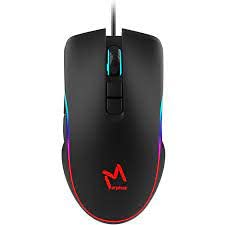
The ICON Morpheus GX 66 is a high-performance wired gaming mouse featuring customizable LED lighting and a precise 7200 DPI optical sensor, designed for an optimal gaming experience. It offers a modern style and ambidextrous design, compatible with Windows 7, Windows XP, and Linux operating systems.
2. Produktfunktioner
- Høj præcision sensor: Equipped with a 7200 DPI optical sensor for accurate tracking and responsiveness.
- Tilpasset LED-belysning: Dynamic LED illumination enhances your gaming setup.
- 7 programmerbare knapper: Offers extensive customization for various gaming commands.
- Kabelforbindelse: Ensures a stable and lag-free connection.
- Ambidextrous design: Komfortabel for både venstre- og højrehåndede brugere.
- Holdbar konstruktion: Designed for long-lasting use in intense gaming sessions.
- Bred kompatibilitet: Supports Windows 7, Windows XP, and Linux operating systems.

3. Opsætning
- Pak musen ud: Carefully remove the ICON Morpheus GX 66 mouse from its packaging.
- Tilslut til computer: Locate an available USB port on your computer. Plug the USB connector of the mouse firmly into the USB port.
- Driver installation: The mouse is plug-and-play. Your operating system (Windows 7, Windows XP, or Linux) should automatically detect and install the necessary drivers. This process may take a few moments.
- Test funktionalitet: Once installed, move the mouse and click the buttons to ensure it is working correctly.
4. Betjeningsvejledning
4.1 Grundlæggende funktioner
- Venstre klik: Primær handling, selektion, aktivering.
- Højreklik: Kontekstmenu, sekundære handlinger.
- Scrollhjul: Scroll up/down, middle click for specific functions.
4.2 DPI-justering
The mouse features a dedicated DPI button (often located behind the scroll wheel) to cycle through different sensitivity levels. Press this button to adjust the DPI (Dots Per Inch) to your preferred setting for various tasks or games. The LED lighting may change color to indicate the current DPI level.
4.3 LED belysning
The ICON Morpheus GX 66 features dynamic LED lighting. The lighting patterns and colors are typically pre-programmed and may change based on the selected DPI setting or cycle automatically. There are no user-configurable software controls for the LED lighting on this model.

5. Vedligeholdelse
- Rensning: Brug en blød, tør klud til at tørre musens overflade af. Ved genstridigt snavs, tør let afampRengør kluden med vand. Undgå at bruge skrappe kemikalier eller slibende materialer.
- Sensorrensning: Occasionally, dust or debris may accumulate around the optical sensor. Use a cotton swab or compressed air to gently clean the sensor area on the underside of the mouse.
- Kabelpleje: Avoid sharp bends or excessive pulling on the mouse cable to prevent damage. Store the cable neatly when not in use.
- Opbevaring: Når musen ikke er i brug i længere perioder, skal den opbevares et rent, tørt sted væk fra direkte sollys og ekstreme temperaturer.

6. Fejlfinding
- Musen reagerer ikke:
- Sørg for, at USB-kablet er korrekt tilsluttet computerens USB-port.
- Prøv at tilslutte musen til en anden USB-port.
- Genstart din computer.
- Uregelmæssig markørbevægelse:
- Rengør den optiske sensor på undersiden af musen.
- Sørg for at bruge musen på en ren, ikke-reflekterende og ensartet overflade. Undgå glas eller meget reflekterende overflader.
- LED Lighting Not Working:
- Kontroller USB-forbindelsen.
- The LED lighting is typically powered directly via USB. If the mouse functions but LEDs do not, contact support.
- Knapper virker ikke:
- Sørg for, at musen er korrekt tilsluttet.
- Test musen på en anden computer for at udelukke softwareproblemer.
7. Specifikationer
| Fabrikant | IKON |
| Model | Morpheus GX 66 |
| ASIN | B0B5PLWQXC |
| Særlige funktioner | LED belysning |
| Bevægelsesdetekteringsteknologi | Optisk |
| DPI | 7200 |
| Håndorientering | Ambidekstrøs |
| Anbefalede anvendelser | Spil |
| Operativsystemkompatibilitet | Linux, Windows 7, Windows XP |
| Stil | Moderne |
| Finish Type | Mat |
| Strømkilde | Elektrisk ledning (USB) |
| Farve | Flerfarvet |
8. Garanti og support
The ICON Morpheus GX 66 Wired Gaming Mouse comes with a standard manufacturer's warranty. For specific warranty terms and conditions, please refer to the warranty card included with your product or visit the official ICON webwebsted.
For technical support, troubleshooting assistance, or to inquire about replacement parts, please contact ICON customer service through their official support channels. Keep your purchase receipt and product model information (GX 66) handy when contacting support.