1. Produktet er slutview
This manual provides instructions for the SZHKHXD replacement remote control designed for various GREE AC Air Conditioner models. This remote offers essential functions for controlling your air conditioning unit.

Figur 1: Forside view of the SZHKHXD remote control, showing the LCD screen and various function buttons.

Figur 2: Tilbage view of the SZHKHXD remote control, displaying battery type information and a QC Pass sticker.
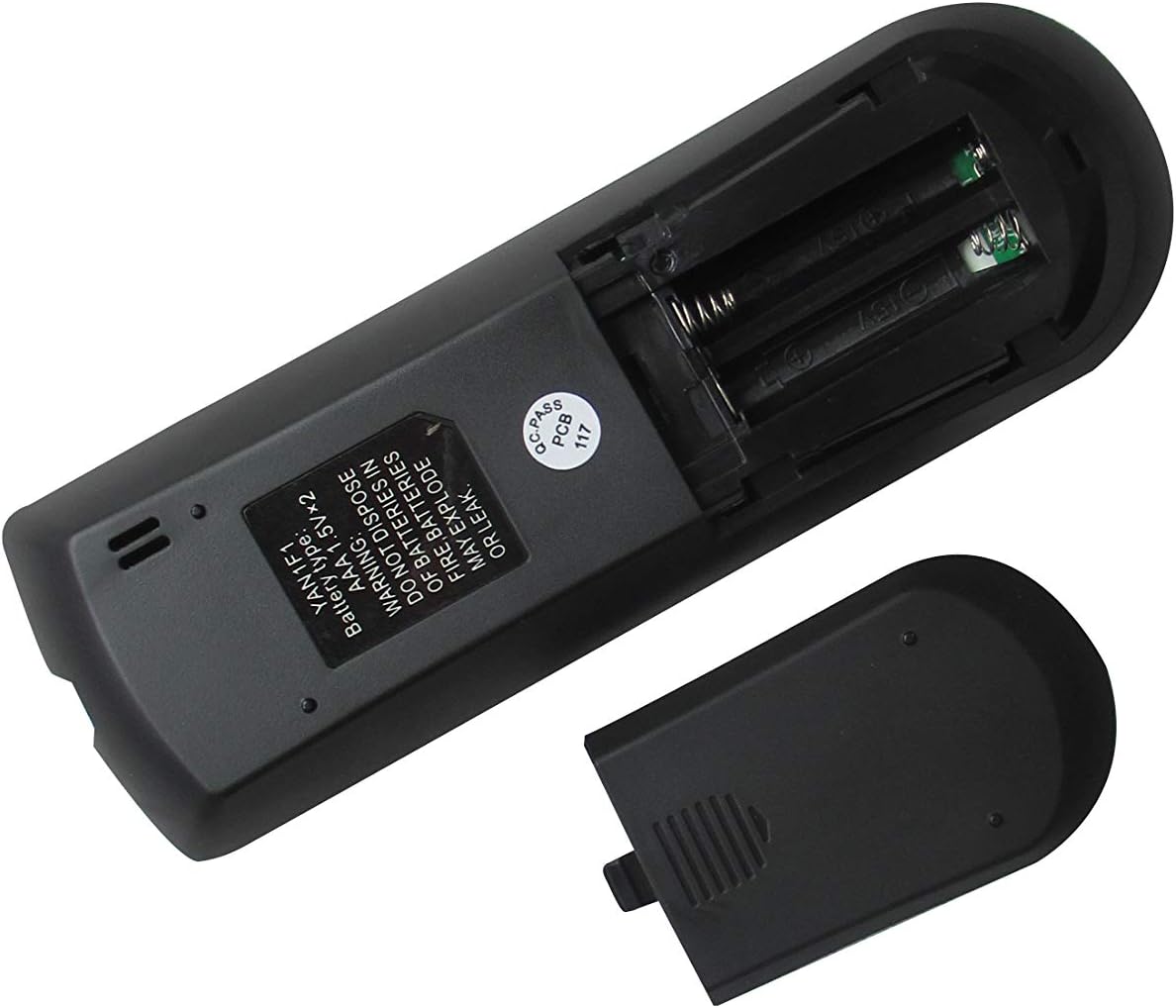
Figure 3: The remote control with its battery compartment open, revealing slots for two AAA batteries.

Figur 4: Tilbage view of the remote control with the battery cover securely in place.
Kompatible modeller:
- GREE GWH12QC-K3DNA5G
- GREE GWH12QC-K3DNB2G
- GREE GWH09QB-K3DNA1G
- GREE GWH09QB-K3DNA5G
- GREE GWH09QB-K3DNB2G
- GREE GWH09QB-K3DNB4G
- GREE GWH09QB-K3DNB6G
- GREE GWH12QC-K3DNA1G
- GREE GWH12QC-K3DNA2G
2. Opsætning
Installation af batteri
Fjernbetjeningen kræver to (2) AAA 1.5V-batterier (medfølger ikke). Følg disse trin for at installere dem:
- Find batterirummet på bagsiden af fjernbetjeningen.
- Slide the battery cover downwards to open it (refer to Figure 3).
- Isæt to AAA-batterier, og sørg for, at de positive (+) og negative (-) poler er justeret korrekt med markeringerne inde i batterirummet.
- Slide the battery cover back into place until it clicks securely (refer to Figure 4).
Warning: Do not dispose of batteries in fire. Batteries may explode or leak if mishandled.
3. Betjeningsvejledning
Familiarize yourself with the buttons on your remote control to operate your GREE AC unit effectively.
Knap funktioner:
| Knap | Fungere |
|---|---|
| MODE | Skifter mellem driftstilstande (f.eks. Køling, Varme, Ventilator, Tørring, Auto). |
| Strøm (⏻) | Turns the AC unit On or Off. |
| FAN | Justerer ventilatorhastigheden (f.eks. Lav, Mellem, Høj, Auto). |
| SWING | Activates or deactivates the vertical louver swing function. |
| Pil op (▲) | Øger temperaturindstillingen eller navigerer i menupunkter. |
| Pil ned (▼) | Sænker temperaturindstillingen eller navigerer i menupunkter. |
| TURBO | Aktiverer hurtig afkøling eller opvarmning til hurtige temperaturændringer. |
| SOVE | Aktiverer dvaletilstand, som justerer temperatur og ventilatorhastighed for en behagelig søvn. |
| TEMP | Displays or cycles through temperature settings. |
| UR | Sets or displays the current time. |
| JEG FØLER | Activates the iFeel function, which senses the temperature at the remote's location. |
| LYS | Tænder eller slukker displaylyset på indendørsenheden. |
| TIMER TIL | Sets a timer for the AC unit to turn on automatically. |
| TIMER FRA | Sets a timer for the AC unit to turn off automatically. |
Grundlæggende betjening:
- Tænd/sluk: Press the red Power button (⏻) for at tænde eller slukke for enheden.
- Vælg tilstand: Tryk på MODE button repeatedly to cycle through available operating modes (e.g., Cool, Heat, Fan, Dry, Auto). The selected mode will typically be displayed on the remote's LCD screen.
- Juster temperatur: Use the Up (▲) and Down (▼) arrow buttons to set your desired temperature.
- Juster blæserhastighed: Tryk på FAN button to cycle through different fan speeds (e.g., Auto, Low, Medium, High).
4. Vedligeholdelse
Rengøring af fjernbetjeningen:
- Tør overfladen af fjernbetjeningen af med en blød, tør klud.
- Do not use liquid cleaners, abrasive cleaners, or chemical sprays, as these may damage the remote.
Udskiftning af batteri:
- Replace batteries when the remote's display becomes dim or the remote no longer responds to commands.
- Always replace both batteries at the same time with new AAA 1.5V batteries.
- Ensure correct polarity (+/-) when inserting new batteries.
- Fjern batterierne, hvis fjernbetjeningen ikke skal bruges i længere tid, for at forhindre lækage.
5. Fejlfinding
Hvis du støder på problemer med din fjernbetjening, kan du se følgende almindelige problemer og løsninger:
- Fjernbetjeningen svarer ikke:
- Kontroller, om batterierne er isat korrekt med den korrekte polaritet.
- Udskift gamle batterier med nye.
- Ensure there are no obstructions between the remote control and the AC unit's receiver.
- Confirm you are within the effective operating range of the AC unit.
- Display shows Celsius instead of Fahrenheit (or vice-versa):
- Some replacement remotes may default to Celsius. To switch, try pressing and holding the TEMP button for 3-5 seconds. If this does not work, try holding the MODE button or a combination of TEMP and an arrow key. Refer to your specific AC unit's manual for remote control temperature unit conversion if this remote does not have a direct function for it.
- Visse funktioner virker ikke:
- This is a replacement remote. While designed to be compatible, some advanced or specific functions present on your original remote may not be supported by this universal replacement. Refer to the "Special Feature" note in the product specifications.
6. Specifikationer
| Feature | Detalje |
|---|---|
| Produktdimensioner | 6.3 x 3.15 x 1.18 tommer |
| Varens vægt | 3.52 ounce |
| Batterier påkrævet | 2 AAA batterier (medfølger ikke) |
| Forbindelsesteknologi | Infrarød |
| Kompatible enheder | AC Air Conditioner (Specific GREE models listed in Product Overview) |
| Maks. antal understøttede enheder | 1 |
| Fabrikant | SZHKHXD |
| Oprindelsesland | Kina |
| Special Feature Note | Replacement item may not work with all functions as original. |
7. Garanti og support
This product is manufactured by SZHKHXD. For specific warranty information or technical support, please contact the seller directly through the platform where the purchase was made. As this is a replacement remote, specific warranty details are typically handled by the seller rather than the original equipment manufacturer (GREE).
Please note that the product description indicates "Selling without batteries or instruction, No configuration." This manual serves as the primary instruction guide for basic operation and troubleshooting.


