
1. Introduktion
The Novastar TB40 is a next-generation multimedia player designed for LED displays. It integrates playback and sending functions, allowing users to manage programs and control LED screens via various terminals such as PCs, mobile phones, and tablets. The TB40 also supports cloud publishing and monitoring platforms for efficient cross-regional cluster management of LED displays. This device is engineered for safety, stability, simplicity, and intelligent control, making it suitable for a wide range of commercial LED display applications.
2. Sikkerhedsoplysninger
Læs og forstå alle sikkerhedsinstruktioner, før du bruger enheden. Manglende overholdelse af disse instruktioner kan resultere i elektrisk stød, brand eller beskadigelse af produktet.
- Sørg for, at strømforsyningen voltage matches the device's requirements (100-240V, 50/60Hz).
- Udsæt ikke enheden for vand eller overdreven fugt.
- Undgå at placere enheden i nærheden af varmekilder eller i direkte sollys.
- Åbn ikke enheden casing. Overlad al service til kvalificeret personale.
- Brug kun tilbehør specificeret af producenten.
- Afbryd strømmen under tordenvejr eller når den ikke bruges i længere perioder.
3. Pakkens indhold
Bekræft at alle varer er til stede i pakken:
- Novastar TB40 Multimedia Player Unit
- Strømadapter
- Brugervejledning (dette dokument)

Figure 3.1: Contents of the Novastar TB40 package, showing the main unit, power adapter, and documentation.
4. Produktet er slutview
4.1 Frontpanel
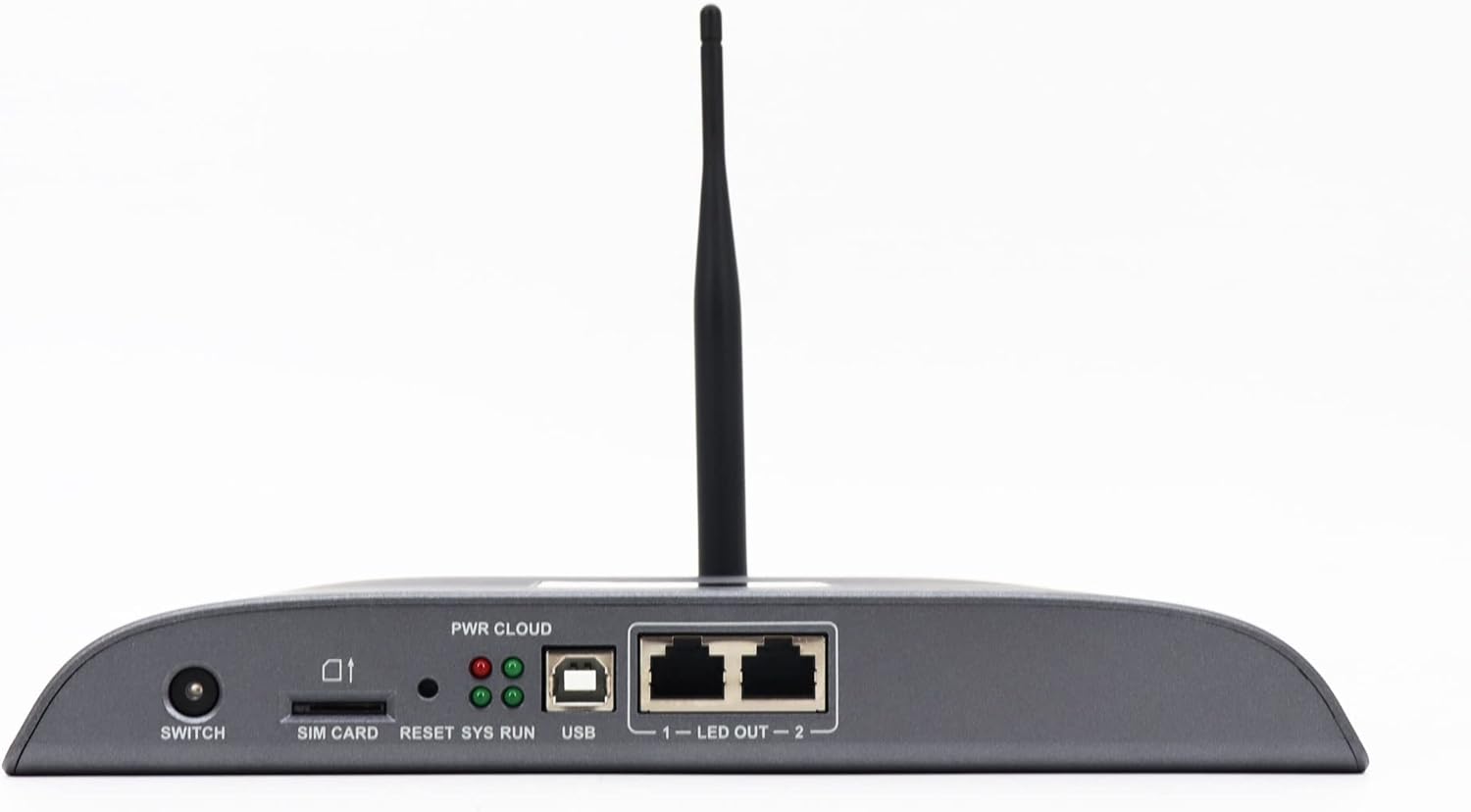
Figure 4.1: Front panel of the Novastar TB40, detailing the various ports and indicator lights.
- KONTAKT: Tænd/sluk-knap til enheden.
- SIM-KORT: Slot for inserting a 4G SIM card (if 4G module is installed).
- NULSTIL: Knap til at nulstille enheden.
- SYS RUN: System running indicator light.
- PWR CLOUD: Power and Cloud connection indicator light.
- USB: USB port for connecting external devices or for system updates.
- LED OUT 1-2: Two Gigabit Ethernet output ports for connecting to LED display receiving cards.
4.2 Bagpanel

Figure 4.2: Rear panel of the Novastar TB40, showing the power input, audio, USB, and network ports.
- 12V 2A: Strømindgangsport.
- LYD UD: 3.5mm audio output jack.
- COM 1, COM 2: Serial communication ports.
- USB 3.0: High-speed USB 3.0 port.
- ETHERNET: Gigabit Ethernet input port for network connection.
- HDMI IN: HDMI indgangsport.
- HDMI OUT: HDMI udgangsport.
- UD: Additional output ports (likely for specific control signals).
5. Opsætning
5.1 Tilslutning af strøm
- Tilslut den medfølgende strømadapter til 12V 2A power input port on the rear panel of the TB40.
- Sæt strømadapteren i en passende stikkontakt.
- Tryk på SKIFTE button on the front panel to power on the device. The PWR CLOUD indicator should light up.
5.2 Netværksforbindelse
The TB40 supports both wired Ethernet and optional 4G connectivity.
- Kabelforbundet Ethernet: Connect an Ethernet cable from your network router or switch to the Ethernet port på bagpanelet.
- 4G (valgfrit): If a 4G module is installed, insert a valid SIM card into the SIM-KORT slot on the front panel. Ensure the antenna is securely attached.
5.3 Connecting to LED Display
- Connect one or two Ethernet cables from the LED OUT 1 og LED OUT 2 ports on the front panel to the receiving cards of your LED display.
- Ensure the LED display is powered on and configured correctly to receive signals from the TB40.
5.4 Tilslutning af eksterne enheder
- Lyd: Connect speakers or an audio system to the LYD UD havn.
- USB-enheder: Connect USB storage devices or other peripherals to the USB or USB 3.0 havne.
- HDMI -indgang: If using an external video source, connect it to the HDMI-IN havn.
6. Betjeningsvejledning
The Novastar TB40 can be controlled and managed through various user terminals and cloud platforms.
6.1 Indledende konfiguration
Upon first power-on or after a factory reset, the device may require initial network and display configuration. Refer to the Novastar software documentation (e.g., NovaLCT-Mars or ViPlex Express) for detailed steps on setting up network parameters, screen resolution, and display mapping.
6.2 Program Release and Playback
Content for your LED display can be created and scheduled using Novastar's dedicated software applications. These applications allow you to upload videos, images, text, and other media to the TB40 for playback.
- Lokal kontrol: Connect a PC to the same network as the TB40 or directly via USB for local program management and updates.
- Mobile/Tablet Control: Use the Novastar mobile application (e.g., ViPlex Handy) to manage content and settings wirelessly.
- Cloud-platform: For cross-regional management, connect the TB40 to the Novastar cloud publishing and monitoring platform. This enables remote content updates, scheduling, and device status monitoring.
The TB40 supports 1080P video hardware decoding and 4K*2 output, ensuring high-quality content delivery to your LED display.
6.3 Justering af lysstyrke
The device includes a brightness sensor interface, supporting automatic and timed dual-mode intelligent brightness adjustment. This feature helps optimize display visibility and power consumption based on ambient light conditions or predefined schedules.
7. Vedligeholdelse
- Rensning: Brug en blød, tør klud til at rengøre enhedens yderside. Brug ikke flydende rengøringsmidler eller aerosoler.
- Ventilation: Sørg for tilstrækkelig ventilation omkring enheden for at forhindre overophedning. Bloker ikke ventilationsåbningerne.
- Firmwareopdateringer: Periodically check the Novastar official website for firmware updates to ensure optimal performance and access to new features. Follow the provided instructions carefully during updates.
- Opbevaring: If storing the device for an extended period, disconnect power and store it in a cool, dry place away from direct sunlight.
8. Fejlfinding
| Problem | Mulig årsag | Løsning |
|---|---|---|
| Enheden tænder ikke. | Strømadapteren er ikke tilsluttet eller defekt; problem med stikkontakten. | Check power adapter connection. Try a different power outlet. Ensure the power switch is ON. |
| No display on LED screen. | LED OUT cables disconnected; incorrect display configuration; LED screen not powered. | Verify Ethernet cable connections to LED display. Check display settings in Novastar software. Ensure LED screen is powered and functional. |
| Network connection drops frequently (Wi-Fi/4G). | Weak signal; interference; incorrect network settings; faulty module. | Ensure the device is within range of the Wi-Fi router or has good 4G signal. Check network settings. If using 4G, verify SIM card is active. Consider a wired Ethernet connection for stability. |
| Content not playing or updating. | Network connectivity issue; incorrect content schedule; insufficient storage. | Verify network connection. Check content schedule and upload status in the control software. Ensure sufficient storage space on the device. |
If the problem persists after attempting these solutions, please contact Novastar technical support.
9. Specifikationer
| Modelnavn | TB40 |
| Processor | 1.8GHz A55 Four-core Processor |
| Video afkodning | Support for 1080P Video Hardware decoding |
| Operating Memory | 1 GB |
| Lagringshukommelse | 16 GB |
| Output opløsning | 4K*2 output |
| Lastekapacitet | 1,300,000 pixels (max width 4096, max height 4096) |
| Netværksporte | 2 x 1000M Ethernet output, 1 x 1000M Ethernet input |
| Forbindelsesteknologi | USB, Ethernet, 4G (optional module) |
| Strømindgang | 100-240V AC, 50/60Hz |
| Max strømforbrug | 18W |
| Dimensioner (L*B*H) | 274mm * 139mm * 40mm |
| Vægt | 1250 g |
| Særlige funktioner | Brightness sensor interface, automatic/timed brightness adjustment, multi-screen synchronous playback |
10. Garanti og support
For warranty information and technical support, please refer to the official Novastar webwebstedet eller kontakt din autoriserede forhandler. Gem din købskvittering som købsbevis i tilfælde af garantikrav.
Novastar Official Webwebsted: www.novastar.tech