
1. Introduktion
Thank you for choosing the COMAOGO T002-W Mini Projector. This manual provides essential information for setting up, operating, and maintaining your projector to ensure optimal performance and longevity. The T002-W is a versatile projector featuring 9500 Lumens brightness, 1080P support, 5G WiFi, and Bluetooth 5.1 connectivity, designed for an immersive viewoplevelse op til 220 tommer.
2. Pakkens indhold
Tjek venligst pakken for følgende varer:
- 1 x COMAOGO T002-W Mini Projector
- 1 x fjernbetjening
- 1 x strømkabel
- 1 x HDMI kabel
- 1 x AV-kabel
- 1 x brugermanual
3. Produktet er slutview
Gør dig bekendt med projektorens komponenter og grænseflader.

Image: COMAOGO T002-W Projector with 5G and 2.4G WiFi capabilities, showing wireless screen synchronization with a tablet and smartphone.
The projector features various ports for connectivity, including HDMI, USB, VGA, AV, and a TF card slot, along with a 3.5mm audio output. It also supports dual-band 5G and 2.4G WiFi for stable wireless connections and Bluetooth 5.1 for audio devices.

Image: COMAOGO T002-W Projector connected to various devices including a laptop, game console, and streaming stick, highlighting its multiple input ports (AV, HDMI, USB, TF, VGA).
4. Opsætning
4.1 Placering
Position the projector on a stable, flat surface or mount it on a tripod. Ensure there are no obstructions to the ventilation vents. For optimal viewing, the projection distance should be between 1.5 meters and 5.5 meters, yielding a screen size from 45 inches to 220 inches.
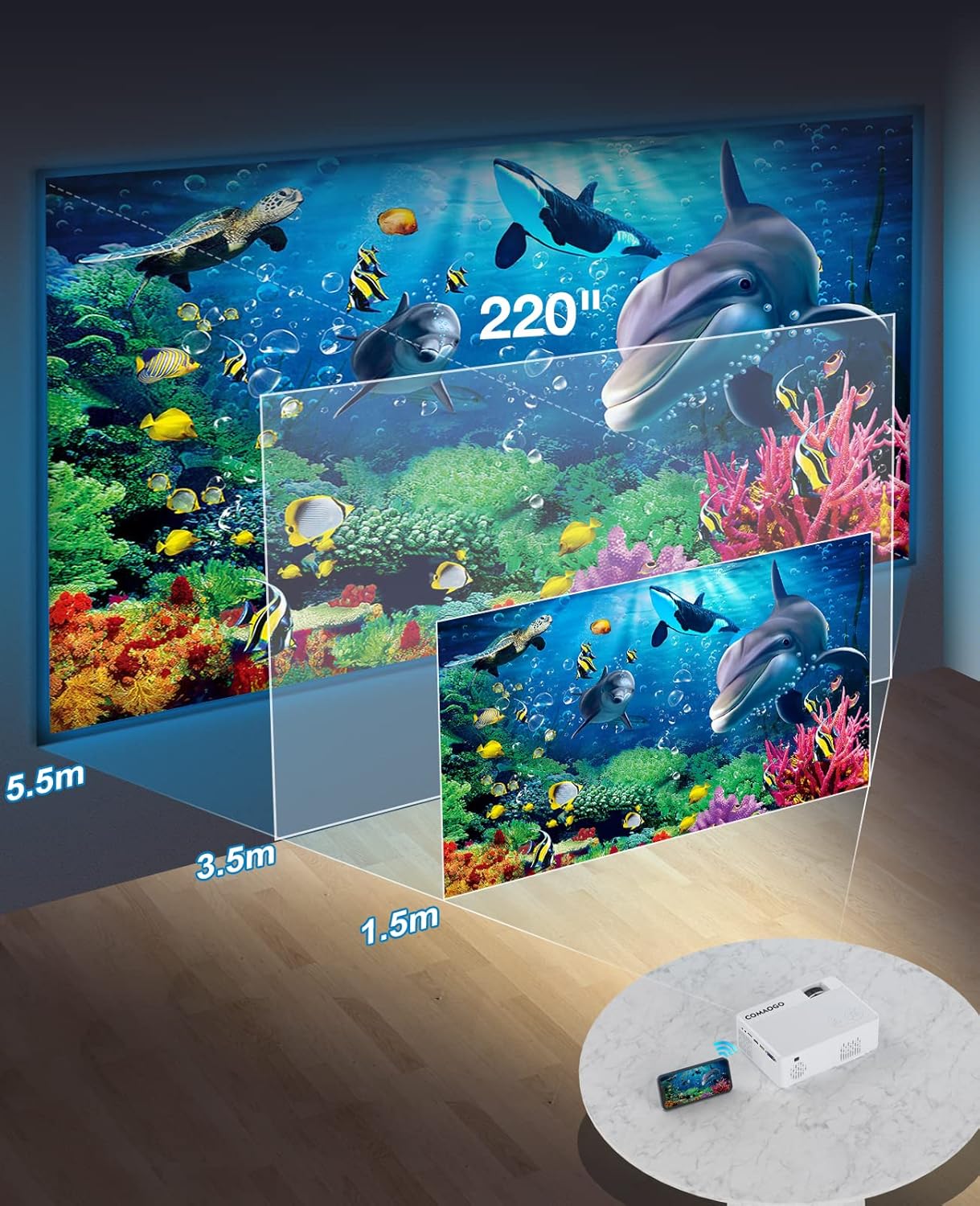
Image: Diagram illustrating the projection distances (1.5m to 5.5m) and corresponding screen sizes (45 to 220 inches) for the COMAOGO T002-W Projector.
4.2 Strømtilslutning
Connect the power cable to the projector's power input and then plug it into a power outlet (AC 220V).
4.3 Fokus- og Keystone-korrektion
For at opnå et klart og rektangulært billede:
- Fokusjustering: Drej fokusringen på projektorlinsen, indtil billedet ser skarpt ud.
- Keystone-korrektion: Adjust the keystone correction dial (if available, or via menu settings) to correct trapezoidal distortion, ensuring the image is rectangular. The projector supports ±15° keystone correction.

Image: Illustration of keystone correction and focus adjustment for the COMAOGO T002-W Projector, showing how to achieve a clear, rectangular image.
5. Betjeningsvejledning
5.1 Tænd/sluk
- Tænd: Tryk på tænd/sluk-knappen på projektoren eller fjernbetjeningen.
- Sluk: Tryk på tænd/sluk-knappen igen for at slukke projektoren.
5.2 Valg af indgangskilde
Use the "Source" button on the remote control or the projector's control panel to select the desired input source (e.g., HDMI, USB, VGA, AV).
5.3 Trådløs forbindelse (WiFi)
The projector supports dual-band 5G and 2.4G WiFi for stable screen mirroring.
- Navigate to the WiFi settings on the projector's menu.
- Select your desired WiFi network (5G for faster, more stable connection; 2.4G for longer range and better penetration).
- Indtast adgangskoden for at oprette forbindelse.
- For screen mirroring, select the appropriate option (e.g., "iOS Cast" or "Android Cast") on the projector and follow the on-screen instructions to connect your smartphone or tablet.
5.4 Bluetooth-forbindelse
Connect external Bluetooth audio devices like speakers or headphones.

Image: COMAOGO T002-W Projector demonstrating Bluetooth 5.1 connection with a speaker and headphones.
- Gå til Bluetooth-indstillingerne i projektorens menu.
- Sørg for, at din Bluetooth-enhed er i parringstilstand.
- Vælg din enhed fra listen for at parre.
- Note: The projector's Bluetooth function is for connecting output devices (speakers, headphones) only.
5.5 Kabelbaserede forbindelser
Tilslut forskellige enheder ved hjælp af de tilgængelige porte:
- HDMI: Connect laptops, PCs, game consoles (Xbox), TV sticks (Roku, Chromecast), DVD players.
- USB: Afspil medier filedirekte fra USB-drev.
- VGA: Tilslut ældre computere eller bærbare computere.
- AV: Tilslut ældre videoenheder.
- TF-kort: Insert a TF card to play media files.
- Important: Copyright-protected content from services like Netflix or Disney+ is not directly supported via screen mirroring. For these services, use an HDMI connection with a compatible adapter (e.g., Lightning Digital AV Adapter for iOS devices) or a streaming stick.
6. Vedligeholdelse
6.1 Rengøring af linsen
Use a soft, lint-free cloth or lens cleaning paper to gently wipe the projector lens. Avoid using abrasive materials or harsh chemicals that could damage the lens coating.
6.2 Kølesystem
The projector features an updated cooling system designed to reduce noise and maintain optimal operating temperature. Ensure the ventilation vents are clear of dust and obstructions to prevent overheating. Regular cleaning of the vents with a soft brush or compressed air is recommended.
7. Fejlfinding
Hvis du støder på problemer med din projektor, kan du bruge følgende almindelige løsninger:
- Intet billede:
- Kontroller strømforbindelsen, og sørg for, at projektoren er tændt.
- Verify the input source selection matches your connected device.
- Ensure all cables (HDMI, VGA, etc.) are securely connected.
- Juster fokus og keystone-korrektion.
- Ingen lyd:
- Adjust the projector's volume.
- Hvis du bruger eksterne højttalere, skal du sørge for, at de er korrekt tilsluttet og tændt.
- Check Bluetooth connection for external audio devices.
- Ensure the audio output from your source device is enabled.
- WiFi/Screen Mirroring Issues:
- Sørg for, at både projektoren og din enhed er forbundet til det samme WiFi-netværk.
- Check for strong WiFi signal.
- Restart both the projector and your source device.
- For Android devices, ensure "Wireless Projection" or "Screen Mirroring" is enabled. For iOS, use "Screen Mirroring" from Control Center.
- Billedet er sløret:
- Juster fokusringen på objektivet.
- Sørg for, at projektionsafstanden er inden for det anbefalede område.
- Billedet er trapezformet:
- Adjust the keystone correction dial or setting.
For further assistance or software updates, please contact COMAOGO customer support.
8. Specifikationer
| Feature | Specifikation |
|---|---|
| Mærke | COMAOGO |
| Model | T002-W |
| Lysstyrke | 9500 Lumen (220 ANSI) |
| Kontrastforhold | 6000:1 |
| Indfødt opløsning | 1280 x 720 |
| Understøttet opløsning | 1080P |
| Projektionsstørrelse | 45" - 220" |
| Projektionsafstand | 1.5 m - 5.5 m |
| Keystone korrektion | ±15° |
| WiFi-forbindelse | Dual-band (5G + 2.4G) |
| Bluetooth | Bluetooth 5.1 |
| Hardware-interface | 3.5mm Audio, TF Card, USB 2.0, VGA, HDMI |
| Indbygget højttaler | Ja |
| Støjniveau | 45 decibel |
| Strømforbrug | 48 watt |
| Dimensioner | 20.32 x 15.24 x 7.62 cm |
| Vægt | 1 kilo |
9. Officiel produktvideo
Watch this video for a visual guide on the COMAOGO T002-W Mini Projector's features and operation.
Video: An official product video demonstrating the features and usage of the COMAOGO T002-W Mini Projector, including connectivity and display capabilities.
10. Garanti og support
The COMAOGO T002-W Mini Projector comes with a standard manufacturer's warranty. For warranty claims, technical support, or inquiries regarding software updates, please contact COMAOGO customer service through the retailer where you purchased the product or visit the official COMAOGO webwebsted.
SOFTWARE UPDATES can be provided; please contact us if needed.