
1. Introduktion
Thank you for choosing the Rollei DF-S 1600 SE Film and Slide Scanner. This device is designed to digitize your precious film negatives and slides with high resolution, preserving your memories for years to come. This manual provides detailed instructions for the proper setup, operation, and maintenance of your scanner. Please read this manual thoroughly before using the device to ensure optimal performance and safety.
2. Sikkerhedsinstruktioner
- Brug altid den medfølgende strømadapter. Brug af en forkert adapter kan beskadige enheden og ugyldiggøre garantien.
- Udsæt ikke scanneren for vand eller overdreven fugt.
- Undgå at placere scanneren i direkte sollys eller i nærheden af varmekilder.
- Hold scanneren væk fra stærke magnetfelter.
- Forsøg ikke selv at skille eller reparere scanneren. Kontakt kvalificeret servicepersonale.
- Clean the scanner with a soft, dry cloth. Do not use liquid cleaners or solvents.
- Sørg for tilstrækkelig ventilation omkring enheden under drift.
3. Pakkens indhold
Please check the contents of your package upon unpacking. If any items are missing or damaged, contact your retailer.
- Rollei DF-S 1600 SE Film and Slide Scanner
- Strømadapter
- USB kabel
- Film Holder for 135/126/110 mm Negatives
- Slide Holder for 135/126/110/8 mm Slides
- Rengøringsbørste
- Brugervejledning (dette dokument)

Image: Included film and slide holders for different media types.
4. Produktet er slutview
Familiarize yourself with the main components of your Rollei DF-S 1600 SE scanner.

Billede: Vinklet view of the Rollei DF-S 1600 SE scanner, highlighting the display and film input.

Billede: Forside view of the scanner, showing the power button and film output slot.
- LCD-skærm: 3.5-inch TFT LCD color screen for previewing images and navigating menus.
- Kontrolknapper: Buttons for navigation, capture, and menu access.
- Film/Slide Input Slot: Where film holders are inserted.
- Power knap: For at tænde/slukke enheden.
- SD-kortplads: For inserting an SD/SDHC/MMC memory card to save scanned images.
- USB-port: For connecting to a computer or power adapter.
- HDMI/TV Out Port: For connecting to an external display or TV.
5. Opsætning
Follow these steps to set up your scanner for first use.
- Tilslut strøm: Connect the provided power adapter to the scanner's USB port and then to a power outlet. The scanner can also be powered via a computer's USB port.
- Indsæt hukommelseskort: Insert an SD/SDHC/MMC memory card (not included) into the designated slot on the scanner. Ensure it is inserted correctly until it clicks into place.
- Tænd: Press and hold the Power button until the LCD display turns on.
- Vælg sprog: If prompted, use the navigation buttons to select your preferred language and confirm.
- Prepare Film/Slide: Choose the appropriate film or slide holder for your media type. Carefully insert your negatives or slides into the holder. Ensure they are clean and free of dust.

Image: Preparing a film strip for insertion into the scanner using a film holder.
6. Betjeningsvejledning
6.1 Scanning Negatives (135, 126, 110 mm)
- Insert the negative film strip into the appropriate negative film holder. Ensure the film is flat and correctly aligned.
- Insert the loaded film holder into the scanner's film input slot. Push it gently until it locks into position.
- On the scanner's LCD, select "Negative Film" as the media type.
- Use the navigation buttons to preview the image. Adjust exposure and color settings if necessary (refer to Section 6.3).
- Press the "Capture" button to scan the image. The scanned image will be saved to the memory card.
- Remove the film holder and advance the film to the next frame, or replace with a new film strip.
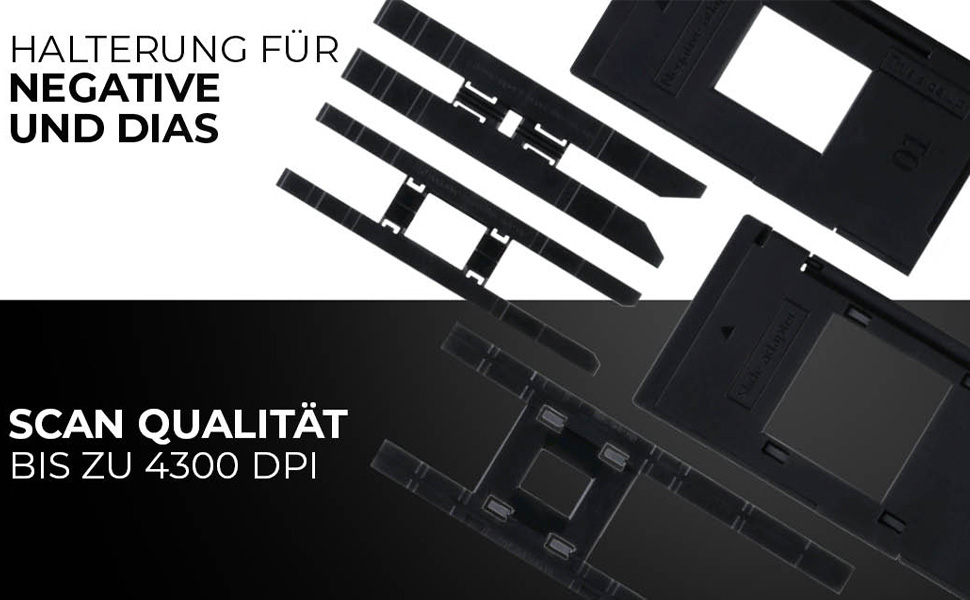
Image: Scanning a negative film strip with the Rollei DF-S 1600 SE.
6.2 Scanning Slides (135, 126, 110, 8 mm)
- Place your mounted slide into the appropriate slide holder. Ensure the slide is clean and correctly oriented.
- Insert the loaded slide holder into the scanner's film input slot.
- On the scanner's LCD, select "Slide" as the media type.
- Preview the image on the display. Adjust settings as needed (refer to Section 6.3).
- Press the "Capture" button to scan the image. The scanned image will be saved to the memory card.
- Remove the slide holder and replace with the next slide.

Image: Scanning a mounted slide with the Rollei DF-S 1600 SE.
6.3 Justering af indstillinger
The Rollei DF-S 1600 SE offers 7 manual adjustment levels for optimal image results. Access the menu to adjust settings such as:
- Eksponering: Lysstyrkejustering.
- Farvebalance: Adjust red, green, and blue channels.
- Opløsning: Select scanning resolution (up to 16 MP interpolated, 4300 DPI optical).
- Filmtype: Ensure the correct film type (color negative, black & white negative, slide) is selected for accurate color reproduction.
6.4 Connecting to PC/TV
- USB-forbindelse (PC): Connect the scanner to your computer using the USB cable. The scanner will appear as a mass storage device, allowing you to transfer scanned images.
- HDMI/TV Connection: Use an HDMI cable (not included) to connect the scanner to a TV or external monitor. This allows for a larger view of your images during scanning or playback.
7. Vedligeholdelse
Regular maintenance ensures the longevity and performance of your scanner.
- Rengøring af scanneren: Use the provided cleaning brush to gently remove dust from the film input slot and the internal light source. Do not use compressed air, as it may push dust further inside.
- Cleaning Film/Slide Holders: Wipe the holders with a soft, dry, lint-free cloth. Ensure they are free of dust and debris before inserting film or slides.
- Opbevaring: When not in use, store the scanner in a cool, dry place, away from direct sunlight and dust.
8. Fejlfinding
Hvis du støder på problemer, kan du se tabellen nedenfor for almindelige problemer og løsninger.
| Problem | Mulig løsning |
|---|---|
| Scanneren tænder ikke. | Ensure the power adapter is securely connected to both the scanner and a working power outlet. Try a different USB port or power outlet. |
| Images appear blurry or dusty. | Clean the film/slides and the scanner's internal light source using the provided brush. Ensure film/slides are inserted correctly and flat. |
| Farverne er forkerte. | Verify that the correct film type (negative, slide) is selected in the scanner's menu. Adjust color balance settings manually. |
| Fejl på hukommelseskort / Kan ikke gemme billeder. | Ensure the memory card is inserted correctly and is not full. Try formatting the card (this will erase all data) or use a different card. Check if the card is locked (write-protected). |
| Scanner freezes or is unresponsive. | Turn off the scanner, disconnect the power, wait a few seconds, then reconnect and power on again. |
9. Specifikationer
| Feature | Værdi |
|---|---|
| Mærke | Rollei |
| Modelnavn | Rollei DF-S 1600 SE |
| Varemodelnummer | 20699 |
| Scanner type | Film scanner |
| Opløsning | 4300 DPI (optisk) |
| Forbindelsesteknologi | HDMI, USB |
| Varens vægt | 513 gram |
| Farvedybde | 2.8 megabit |
| Optisk sensorteknologi | CCD, CMOS |
| Minimum systemkrav | Windows, macOS |
| Medietype | Negative, Slide, 110 mm Film, 8 mm/Super8 Film |
| Lyskildetype | LED |
| International artikelkode | 04048805206995 |
10. Garanti og support
Rollei is committed to providing high-quality products and customer satisfaction.
- Exchange Guarantee: Your Rollei DF-S 1600 SE scanner comes with an exchange guarantee for a full 24 months from the date of purchase.
- Free Return Shipping: Enjoy free return shipping within 14 days of purchase.
- Hjælp og support: Our expert team is available to assist you with any questions or issues.
- Kontaktoplysninger: You can reach us Monday-Friday from 10:00 AM to 4:00 PM at +49 40 270 750 277.