
Zunate KX-T2035CID Wired Landline Phone User Manual
Model: KX-T2035CID
Indledning
Welcome to your new Zunate KX-T2035CID wired landline phone. This manual provides comprehensive instructions for the setup, operation, maintenance, and troubleshooting of your device to ensure optimal performance and a clear communication experience.
Pakkens indhold
Kontroller venligst, at alle nedenstående varer er inkluderet i din pakke:
- 1 x Wired Landline Phone Base
- 1 x håndsæt
- 1 x Coiled Handset Cord
- 1 x RJ11 Telephone Line Cord (Standard)
- 1 x RJ11 Telephone Line Cord (UK Plug, if applicable)
- 1 x brugermanual

This image displays all items included in the package: the phone base, handset, coiled cord, standard telephone line cord, and a UK-specific telephone line cord.
Opsætning
Tilslutning af telefonen
- Connect one end of the coiled cord to the handset and the other end to the handset port on the phone base.
- Connect one end of the telephone line cord to the LINE port on the phone base.
- Tilslut den anden ende af telefonledningen til dit telefonstik i væggen.
- If using the dual port feature, connect a second device (e.g., fax machine, another phone) to the EXT port on the phone base using an additional telephone line cord.

This image shows the side of the phone base with two RJ11 ports labeled "LINE" and "EXT" for connecting to the wall jack and an additional device, respectively.
Vægmontering (valgfrit)
The phone base is designed with keyholes on the bottom for optional wall mounting.
- Install two screws (not included) into the wall, spaced appropriately for the keyholes on the phone's base.
- Align the keyholes with the screw heads and slide the phone downwards to secure it.
- Ensure the handset cradle is reversed to hold the handset securely when wall-mounted.
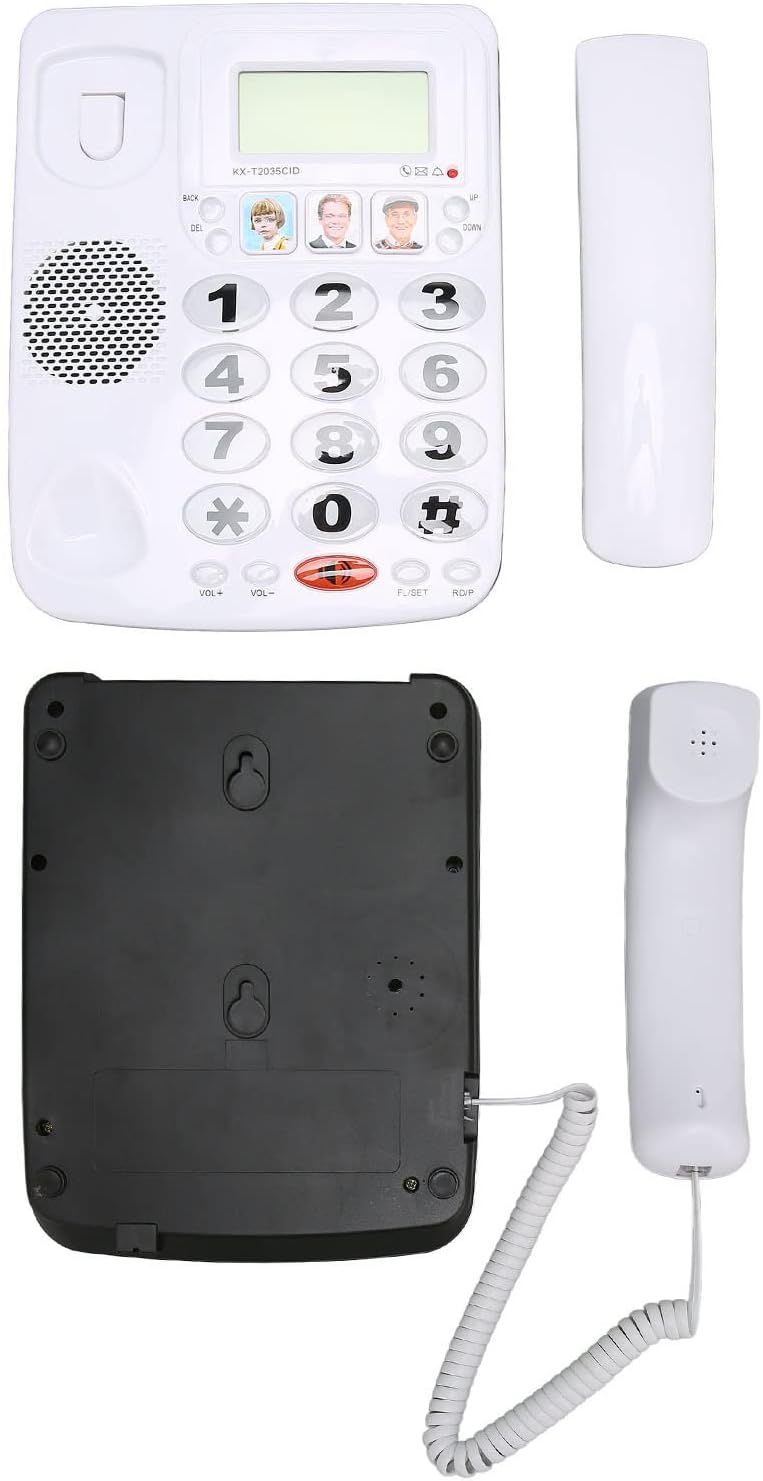
This image displays the underside of the phone base, highlighting the keyhole slots for wall mounting and the overall construction.
Betjeningsvejledning
Foretag et opkald
- Løft håndsættet.
- Indtast det ønskede telefonnummer ved hjælp af tastaturet.
- Vent på, at opkaldet forbindes.
- To end the call, place the handset back on the cradle.
Modtagelse af et opkald
- Når telefonen ringer, løft røret for at besvare.
- To end the call, place the handset back on the cradle.
Genopkaldsfunktion
Sådan genopkalder du det sidst opkaldte nummer:
- Løft håndsættet.
- Press the "RDP" (Redial) button. The phone will automatically dial the last number.
Mute-funktion
During a call, you can temporarily mute your microphone:
- Press the "MUTE" button. The other party will not hear you, but you can still hear them.
- Press the "MUTE" button again to unmute your microphone.
Lydstyrkejustering
To adjust the handset volume during a call:
- Use the "VOL+" and "VOL-" buttons located on the phone base.

This close-up image shows the large, easy-to-read buttons on the phone's keypad, including the "VOL+", "VOL-", "MUTE", and "RDP" (Redial) buttons.
Speed Dial / Memory Dial
The phone allows you to store up to 3 frequently used numbers for quick dialing using the dedicated memory buttons.
- Sådan gemmer du et nummer: Lift the handset, dial the number, then press and hold one of the three picture memory buttons until a confirmation tone is heard.
- Sådan ringer du til et gemt nummer: Lift the handset, then press the desired picture memory button. The phone will automatically dial the stored number.

This image shows the phone's main interface, highlighting the large numeric keypad and the three dedicated memory buttons, which can be customized with pictures for quick dialing.
Nøglefunktioner
Klar lydteknologi
This phone incorporates noise reduction technology to ensure clear audio quality during calls, minimizing background interference for enhanced communication.

A person is shown using the Zunate KX-T2035CID phone in a professional environment, illustrating its use for clear communication.
Dual Port Design
The phone features a dual RJ11 port design, allowing you to connect both the phone line from the wall and an additional device (such as a fax machine, answering machine, or another telephone) simultaneously.
This image highlights the two RJ11 ports on the side of the phone, enabling connection to both the main telephone line and an extension device.
Opretholdelse
To ensure the longevity and proper functioning of your Zunate KX-T2035CID phone, follow these simple maintenance guidelines:
- Clean the phone's surface regularly with a soft, damp klud. Undgå slibende rengøringsmidler eller opløsningsmidler.
- Keep the phone away from excessive moisture, dust, and direct sunlight.
- Do not attempt to disassemble the phone. Refer to qualified service personnel for repairs.
- Sørg for, at ledningerne ikke er viklet ind eller klemt for at forhindre skader.
Fejlfinding
If you encounter any issues with your phone, please refer to the table below for common problems and their solutions.
| Problem | Løsning |
|---|---|
| Ingen klartone | Check all cable connections. Ensure the telephone line cord is securely plugged into both the phone and the wall jack. Test with another phone if possible to rule out line issues. |
| Kan ikke høre den, der ringer op / Den, der ringer op, kan ikke høre mig | Adjust the volume using the "VOL+" and "VOL-" buttons. Ensure the "MUTE" function is not active. Check handset cord connection. |
| Telefonen ringer ikke | Ensure the ringer volume is not set to minimum or off (if applicable). Check line connection. |
| Last number redial not working | Ensure a number was successfully dialed prior to attempting redial. |
Specifikationer
| Feature | Detalje |
|---|---|
| Mærke | Zunate |
| Model | KX-T2035CID |
| Type | Wired Landline Phone |
| Materiale | Acrylonitril Butadien Styren (ABS) |
| Farve | Hvid |
| Vis nummer | Ja |
| Flerlinjedrift | Ja |
| Støjreduktion | Ja |
| Producentens varenummer | Zunateizbc48u9mx1404-12 |
Garanti og support
For warranty information and technical support, please refer to the documentation provided with your purchase or contact Zunate customer service directly. Specific warranty details are not available in this manual.
For further assistance, please visit the Zunate official webwebstedet eller kontakt deres supportkanaler.