
Indledning
This manual provides essential instructions for the safe installation, operation, and maintenance of your Jupiter Zphyr 5-Blade BLDC Ceiling Fan. Please read this manual thoroughly before installation and use, and retain it for future reference.
The Jupiter Zphyr fan features a Brushless Direct Current (BLDC) motor, designed for high energy efficiency and quiet operation. It includes a remote control for convenient operation and advanced features.
Sikkerhedsoplysninger
- Professionel installation anbefales: Installationen skal udføres af en kvalificeret elektriker i overensstemmelse med lokale el-forskrifter.
- Afbryd strømmen: Always ensure the main power supply is disconnected before attempting any installation, maintenance, or cleaning.
- Remove Regulator: It is crucial to remove or disconnect any existing fan regulator before installing this BLDC fan. Failure to do so may damage the fan's motor.
- Sikker montering: Ensure the fan is securely mounted to a ceiling joist or a structure capable of supporting its weight.
- Klingeafstand: Hold tilstrækkelig afstand mellem ventilatorbladene og eventuelle forhindringer.
- Kun indendørs brug: Denne ventilator er kun designet til indendørs brug.
- Voltage: Operate the fan only within the specified voltage range (230 Volts AC).

Vigtig: Disconnect the regulator before installation to prevent damage.
Pakkens indhold
Kontroller, at alle komponenter er til stede, før installationen påbegyndes:
- Motorsamling
- 5 knive
- Nedstang
- Clamp Forsamling
- Fjernbetjening

Image: Jupiter Zphyr 5-Blade BLDC Ceiling Fan with its remote control.
Opsætning og installation
For detailed installation steps, refer to the separate installation guide provided with your fan. The following is a general overview:
- Forbered til installation: Turn off power at the circuit breaker. Ensure the existing fan regulator is removed or bypassed.
- Monter beslaget: Securely attach the mounting bracket to the ceiling junction box or a suitable support structure.
- Assemble Down Rod and Motor: Insert the down rod through the canopy and connect it to the motor assembly.
- Tilslut blæseren: Connect the fan's electrical wires to the household wiring according to the wiring diagram in the detailed installation guide. Ensure all connections are secure.
- Fastgør knive: Securely attach the five blades to the motor housing.
- Endelig kontrol: Dobbelttjek alle forbindelser, og sørg for, at ventilatoren er sikkert monteret, før du genopretter strømmen.

Image: An illustration of the Jupiter BLDC Ceiling Fan components, highlighting its energy efficiency and inverter compatibility.
Betjeningsvejledning
Fjernbetjeningsfunktioner
The Jupiter Zphyr fan is operated using the included smart remote control. Ensure the remote has working batteries.

Image: The smart remote control for the Jupiter Zphyr fan, detailing its various functions.
- Til/fra: Tryk på tænd/sluk-knappen for at tænde eller slukke for ventilatoren.
- LED: Toggles the integrated LED light on or off.
- Hastighedskontrol: Buttons labeled 1-5 (or similar) adjust the fan speed.
- Boosthastighed: Activates maximum fan speed for rapid cooling.
- Sove mode: Gradually reduces fan speed by 10 RPM every hour for comfortable sleep.
- Timertilstand: Set the fan to automatically switch off after 2, 4, 6, or 8 hours.
- Reverse Rotation (REV): Changes the direction of blade rotation. Useful for different seasons.
Tovejsrotation
The fan offers bi-directional rotation for year-round comfort:
- Sommertilstand (mod uret): Presser luften nedad og skaber en kølende brise.
- Vintertilstand (med uret): Draws cool air up, circulating warm air near the ceiling downwards, helping to distribute heat more evenly.
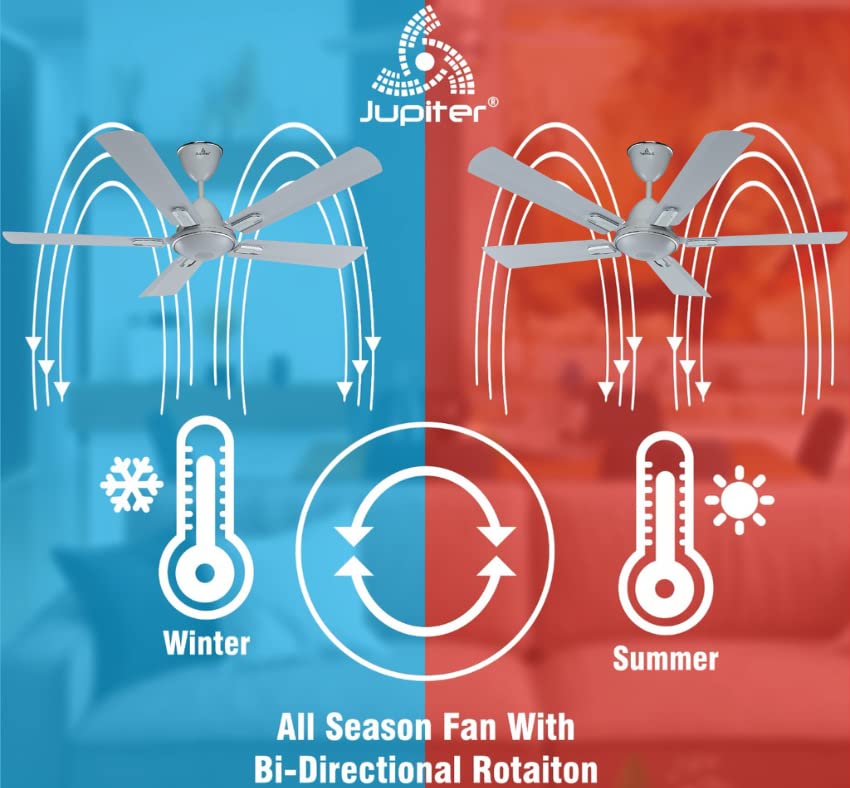
Image: Illustration demonstrating the fan's bi-directional rotation for effective air circulation in both winter and summer.
Jupiter Fan Controller App (for Android with IR Blaster)
For Android phones equipped with an IR Blaster, the Jupiter Fan Controller App can be used to manage the fan. The app functions identically to the physical remote control, allowing you to:
- Switch the fan ON/OFF.
- Juster blæserhastigheden.
- Set a timer and switch ON Sleep mode.
- Switch the LED light ON/OFF.
- Activate Boost Mode.

Image: A smartphone displaying the Jupiter Fan Controller App interface, compatible with Android phones featuring an IR Blaster.
Energy Efficiency and Performance
The Jupiter Zphyr fan is designed with a Super Energy Efficient BLDC Motor, offering significant power savings and consistent performance.
- BLDC-motor: Consumes significantly less power compared to traditional induction fans.
- Inverter Stabilization Technology: Maintains consistent speed even during low input voltage or power fluctuations, and runs longer on inverter batteries.
- Høj lufttilførsel: Provides air delivery comparable to standard ceiling fans while consuming less energy.
- LED-indikation: The fan's LED can also serve as a subtle night lamp.

Image: The BEE 5-star energy rating label for the Jupiter Zphyr fan, indicating high energy efficiency.
Power Savings Comparison
The image below illustrates the potential energy savings of the Jupiter 5 BLDC Fan compared to other fan types, based on specific usage and electricity cost assumptions:

Image: A comparative table showing wattage consumption, warranty, air delivery, units consumed, electricity cost, and savings for Jupiter 5 BLDC Fan, BEE 1 Star Rated Fan, and Regular Fan.
Note: Calculations are based on 15 hours usage per day, 365 days a year, and electricity charges of ₹7 per unit. Savings are calculated against a regular fan.
Opretholdelse
- Rensning: Regularly clean the fan blades and motor housing with a soft, damp klud. Brug ikke slibende rengøringsmidler eller opløsningsmidler. Sørg for, at strømmen er slukket, før rengøring.
- Knivbalance: If the fan wobbles, check that all blades are securely attached and balanced.
- Ingen smøring nødvendig: BLDC-motoren er designet til vedligeholdelsesfri drift og kræver ikke smøring.
Fejlfinding
| Problem | Mulig årsag | Løsning |
|---|---|---|
| Ventilator starter ikke | No power supply; Remote control batteries low/dead; Incorrect wiring; Existing regulator not removed. | Check power supply; Replace remote batteries; Verify wiring connections (consult electrician); Ensure regulator is removed. |
| Fjernbetjening virker ikke | Batteries low/dead; Obstruction between remote and fan; Remote out of range. | Replace batteries; Ensure clear line of sight; Operate within 20ft distance. |
| Blæseren slingrer | Løse knive; Ubalancerede knive; Løs montering. | Tighten blade screws; Check blade balance; Ensure mounting bracket is secure. |
| Ventilatoren laver usædvanlig lyd | Loose screws; Internal component issue. | Check and tighten all screws; If noise persists, contact customer service. |
Specifikationer
| Feature | Detalje |
|---|---|
| Mærke | Jupiter |
| Model | Zphyr |
| Elektrisk ventilator design | Loft Fan |
| Farve | Hvid |
| Strømkilde | Elektrisk med ledning |
| Produktdimensioner | 45D x 30B x 20H Centimeter |
| Særlige funktioner | Automatic Shut-Off, High Velocity, Remote Controlled, Reverse Rotation |
| Anbefalede anvendelser | Kun indendørs brug |
| Støjniveau | 60 decibel |
| Wattage | 35 watt |
| Antal blade | 5 |
| Bladlængde | 1200 millimeter |
| Voltage | 230 volt (AC) |
| Varens vægt | 4.5 kilo |
| Kontrolmetode | Fjern |
| Specifikation Met | CE |
| Oprindelsesland | Indien |
Garanti og support
The Jupiter Zphyr fan comes with a 3 års begrænset garanti. For warranty claims, the product must be returned to the manufacturer's plant at Hyderabad, with all freight charges paid by the customer.
For queries, returns, or technical support, please contact:
- Kundeservicenummer: +91-9440285167
- E-mail-id: support@jupiterfans.com
- Webwebsted: www.jupiterfans.com
Please register your warranty on the official webwebsted: www.jupiterfans.com