
1.Overview
The Hoco ES61 Manner Sports Wireless Bluetooth Headset is designed for active lifestyles, offering a blend of comfort, long battery life, and versatile connectivity. This manual provides detailed instructions to help you get the most out of your headset.
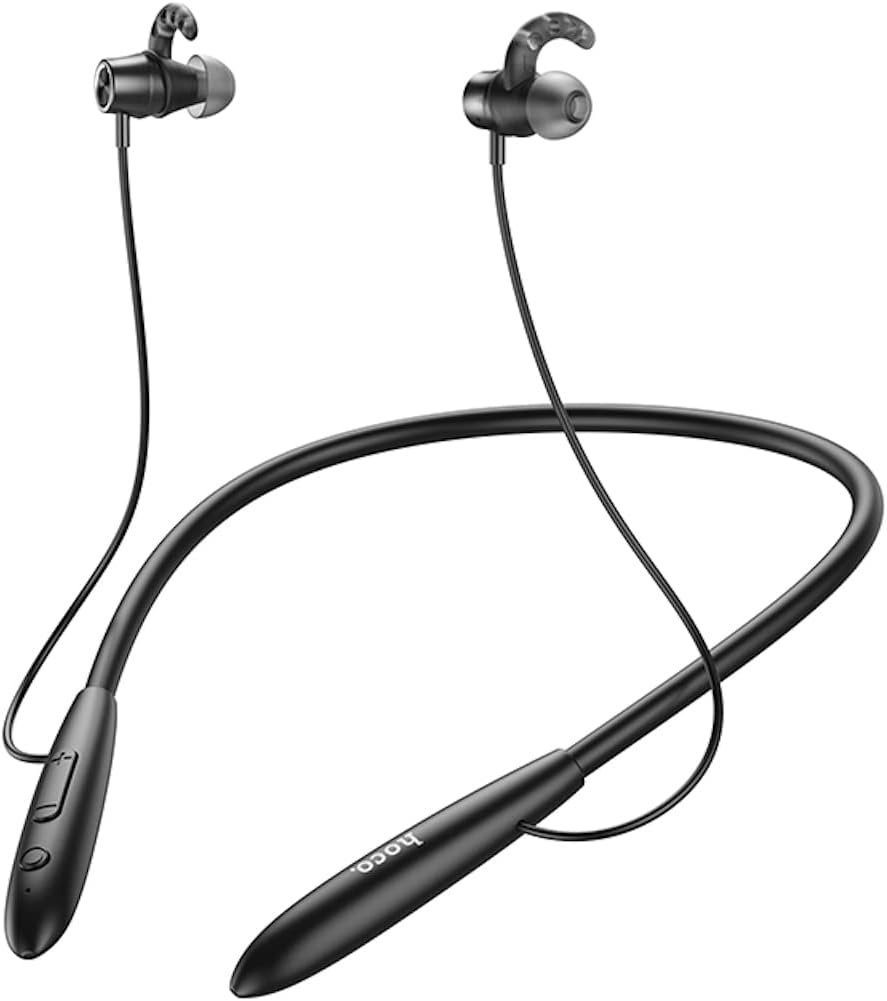
Billede: Forside view of the Hoco ES61 headset, showcasing its neckband design and in-ear earbuds.
2. Produktfunktioner
- Bluetooth 5.1-forbindelse: Equipped with JL AC7006 chip for stable and efficient wireless connection.
- Forlænget batterilevetid: Features a 200mAh battery, providing up to 20 hours of music/talk time and an impressive 330 hours of standby time.
- Hurtig opladning: Fuldt opladet på cirka 2 timer.
- Let og behageligt design: The earphone cord measures 85cm in length, and the headset weighs only 22g, ensuring comfort during extended wear.
- Alsidige afspilningsmuligheder: Supports Bluetooth audio streaming and TF card playback (up to 32GB) for direct music listening.
- Multi-language Voice Prompts: Offers voice prompts in both Chinese and English for user convenience.
- Bred kompatibilitet: Compatible with a broad range of devices including iPhone, Samsung, OnePlus, Huawei, Xiaomi, and Oppo smartphones.

Billede: Nærbillede view of the Hoco ES61 headset, highlighting the integrated TF card slot for direct music playback.
Video: En officiel produktvideoasing the Hoco ES61 Bluetooth Headset's features, including its 20-hour battery life, voice prompts, and compatibility with iOS and Android devices.
3. Opsætningsvejledning
3.1 Opladning af headsettet
Before first use, fully charge the headset. Use a standard USB charger (not included) to connect the charging port on the headset to a power source.
- LED-indikatoren vil typisk lyse rødt under opladning.
- Once fully charged (approximately 2 hours), the LED indicator will turn blue or off.
3.2 Bluetooth -parring
To connect your Hoco ES61 headset to a Bluetooth-enabled device:
- Sørg for, at headsettet er slukket.
- Press and hold the multi-function button (usually the power button) for approximately 3-5 seconds until the LED indicator flashes red and blue alternately. This indicates pairing mode.
- Aktiver Bluetooth på din enhed (smartphone, tablet osv.) og søg efter tilgængelige enheder.
- Select "Hoco ES61" from the list of found devices.
- Once connected, the LED indicator on the headset will typically flash blue slowly or turn off, and you will hear a voice prompt confirming the connection.
3.3 TF-kortafspilning
The Hoco ES61 supports direct music playback from a TF (MicroSD) card.
- Carefully insert a TF card (up to 32GB) with your music files into the designated TF card slot on the headset.
- The headset will automatically switch to TF card playback mode if a card is detected and contains playable audio files.
- Use the headset controls to manage playback (play, pause, skip tracks).
4. Betjeningsvejledning
4.1 Grundlæggende kontroller
| Knap/handling | Fungere |
|---|---|
| Multifunktionsknap (MFB) | Tænd/sluk, afspil/pause, besvar/afslut opkald |
| Lydstyrke op (+) | Øg lydstyrken, næste nummer (langt tryk) |
| Skrue ned (-) | Skru ned for lydstyrken, forrige nummer (langt tryk) |
4.2 Musikafspilning
- Afspil/pause: Tryk kort på MFB.
- Næste nummer: Tryk længe på knappen Lydstyrke op (+).
- Forrige nummer: Tryk længe på lydstyrke ned-knappen (-).
- Lydstyrkejustering: Short press Volume Up (+) or Volume Down (-) buttons.
4.3 Opkaldshåndtering
- Besvar/afslut opkald: Tryk kort på MFB-knappen under et indgående opkald.
- Afvis opkald: Tryk længe på MFB-knappen under et indgående opkald.
- Genopkald sidste nummer: Double-click the MFB when not on a call.

Image: The Hoco ES61 headset resting on a smartphone, illustrating its use with mobile devices for music and calls.
5. Vedligeholdelse og pleje
- Keep the headset dry. Do not expose it to extreme temperatures or humidity.
- Clean the earbuds and charging port regularly with a soft, dry cloth to prevent dust and debris buildup.
- Undgå at bruge skrappe kemikalier eller slibende rengøringsmidler.
- Opbevar headsettet et køligt og tørt sted, når det ikke er i brug.
- Forsøg ikke at skille headsettet ad eller ændre det, da dette vil ugyldiggøre garantien og kan forårsage skade.

Image: The Hoco ES61 headset shown with different sizes of silicone ear tips, emphasizing the importance of proper fit for comfort and sound quality.
6. Fejlfinding
6.1 Headset Not Turning On
- Ensure the headset is fully charged. Connect it to a charger and check the LED indicator.
- Press and hold the multi-function button for a few seconds to power on.
6.2 Kan ikke parres med enhed
- Make sure the headset is in pairing mode (LED flashing red and blue alternately).
- Sørg for, at Bluetooth er aktiveret på din enhed, og at den er inden for rækkevidde (typisk 10 meter).
- Forget/delete "Hoco ES61" from your device's Bluetooth list and try pairing again.
- Genstart både headsettet og din enhed.
6.3 Ingen lyd eller lav lydstyrke
- Skru op for lydstyrken på både headsettet og din tilsluttede enhed.
- Sørg for, at headsettet er korrekt tilsluttet din enhed.
- Hvis du bruger et TF-kort, skal du sørge for, at kortet er isat korrekt og indeholder afspilningsbar lyd. files.
- Check for any obstructions in the earbud nozzles and clean if necessary.
6.4 Kort batterilevetid
- Sørg for, at headsettet er fuldt opladet før brug.
- Battery life can vary based on volume level and usage patterns.
- Undgå at udsætte batteriet for ekstreme temperaturer.
7. Specifikationer
| Feature | Detalje |
|---|---|
| Bluetooth version | 5.1 |
| Bluetooth-chip | JL AC7006 |
| Batterikapacitet | 200mAh |
| Opladningstid | Ca. 2 timer |
| Musik/taletid | Op til 20 timer |
| Standby tid | Op til 330 timer |
| Earphone Cord Length | 85 cm |
| Vægt | 22 g |
| TF-kortstøtte | Ja, op til 32 GB |
| Stemmemeddelelser | kinesisk og engelsk |
| Kompatibilitet | iPhone, Samsung, OnePlus, Huawei, Xiaomi, Oppo |
8. Garanti og support
For warranty information and customer support, please refer to the product packaging or contact your retailer. Keep your purchase receipt as proof of purchase for any warranty claims.