
1. Introduktion
Thank you for choosing the OSAKI iPLAYr Side-Firing Sound Table Top Home Audio System. This device is designed to provide continuous background music for homes and offices, featuring Bluetooth connectivity, FM radio, and a unique side-firing sound experience. Please read this manual carefully before using the product to ensure proper operation and to maximize your listening enjoyment.
2. Sikkerhedsoplysninger
- Strømkilde: Brug kun den medfølgende strømadapter. Sørg for, at lydstyrkentage opfylder de krav, der er angivet på adapteren.
- Placering: Place the unit on a stable, flat surface. Avoid placing it in direct sunlight, near heat sources, or in areas with high humidity or dust. Ensure adequate ventilation around the unit.
- Vand og fugt: Udsæt ikke enheden for regn, fugt eller dryppende/sprøjtende væsker. Placer ikke genstande fyldt med væsker, såsom vaser, på enheden.
- Rensning: Disconnect the power before cleaning. Use a soft, dry cloth. Do not use liquid cleaners or aerosol sprays.
- Service: Forsøg ikke selv at udføre service på enheden. Overlad al service til kvalificeret servicepersonale.
- Børn: Opbevar enheden og dens tilbehør utilgængeligt for børn.
3. Pakkens indhold
Kontroller venligst, at alle nedenstående varer er inkluderet i din pakke:
- OSAKI iPLAYr Main Unit
- Strømadapter
- Fjernbetjening
- Bluetooth Adaptor (if included as a separate accessory)
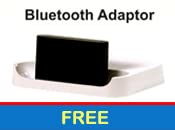
Billede 3.1: Included Bluetooth Adaptor, if provided as a separate component.
4. Produktfunktioner
The OSAKI iPLAYr is equipped with several features designed to enhance your audio experience:
- Side-Firing Sound Technology: This unique design projects sound sideways, allowing it to reflect off walls and surfaces, creating a natural, immersive sound field similar to how sound is perceived in a live environment.
- Bluetooth-forbindelse: Wirelessly connect your smartphone or other Bluetooth-enabled devices for audio streaming.
- Integreret FM-radio: Enjoy your favorite radio stations directly from the unit.
- Hjælpeindgang: Connect non-Bluetooth devices via a standard 3.5mm audio cable.
- Fjernbetjening: Conveniently manage playback, volume, and modes from a distance.
- 10 Watts Audio Output: Delivers clear and consistent sound for continuous background music.

Billede 4.1: Diagram illustrating how side-firing sound reflects off surfaces to create a natural sound experience.
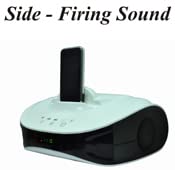
Billede 4.2: The OSAKI iPLAYr unit with a smartphone docked, highlighting its side-firing speaker design.

Billede 4.3: Øverst foran view of the OSAKI iPLAYr, displaying the integrated control buttons for power, playback, and volume.
5. Opsætningsvejledning
5.1 Udpakning og placering
- Carefully remove the OSAKI iPLAYr unit and all accessories from the packaging.
- Place the unit on a stable, flat surface, such as a table or bedside cabinet. For optimal side-firing sound, ensure there are clear surfaces (like walls) nearby for sound reflection.
5.2 Tilslutning af strøm
- Locate the DC 12V IN port on the back of the unit.
- Tilslut den medfølgende strømadapter til denne port.
- Sæt strømadapteren i en almindelig stikkontakt.
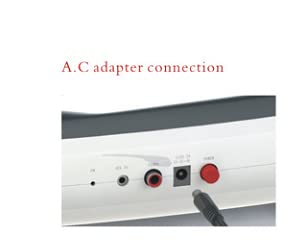
Billede 5.1: Nærbillede view of the AC adapter connection port on the rear panel of the OSAKI iPLAYr.
5.3 Tilslutning af lydkilder
The back panel of the OSAKI iPLAYr features various input ports:
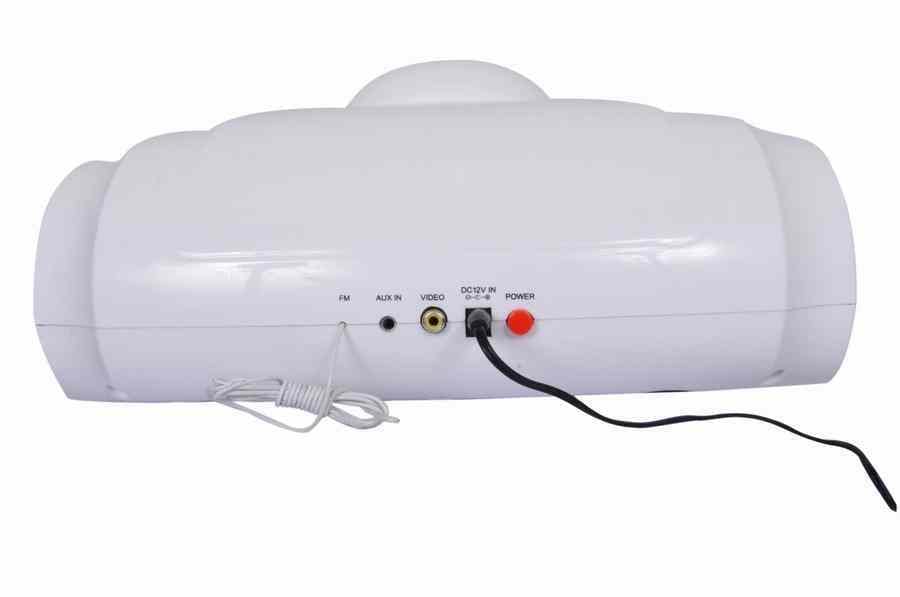
Billede 5.2: Rear panel connections including FM antenna, Aux In, Video Out, DC 12V In, and Power button.
- Hjælpeindgang: Connect external audio devices (e.g., MP3 players, computers) using a 3.5mm audio cable to the 'AUX IN' port.
- FM-antenne: Connect the provided FM antenna (if applicable) to the 'FM' port for improved radio reception.
- Video output: The 'VIDEO' port allows connection to a display for video playback from a docked device (if supported by the docked device and cable).
6. Betjeningsvejledning
6.1 Tænd/sluk
Tryk på Magt button on the unit or the remote control to turn the device on or off.
6.2 Valg af tilstand
Tryk på Mode button on the unit or remote to cycle through available input sources: Bluetooth, AUX, and FM Radio.
6.3 Bluetooth -parring
- Switch the unit to Bluetooth mode. The Bluetooth indicator light will flash, indicating it is ready for pairing.
- Søg efter tilgængelige Bluetooth-enheder på din smartphone eller Bluetooth-aktiverede enhed.
- Select "OSAKI iPLAYr" from the list. Once connected, the indicator light will become solid.
- Du kan nu streame lyd trådløst fra din enhed.
6.4 FM-radiofunktion
- Skift enheden til FM-radiotilstand.
- Brug Forrige/Næste nummer buttons on the unit or remote to scan for radio stations.
- Juster FM-antennens position for bedre modtagelse.
6.5 Lydstyrkekontrol
Juster lydstyrken ved hjælp af Lydstyrke op (+) og Skrue ned (-) buttons on the unit or the remote control.
6.6 Using as a Home Cinema System
The side-firing sound design of the OSAKI iPLAYr can enhance your home cinema experience. Place the unit in front of your television or display, ensuring its side speakers are not obstructed. Connect your TV's audio output to the iPLAYr's AUX IN port. The reflected sound will create a wider soundstage, making movies and shows more immersive.

Billede 6.1: The OSAKI iPLAYr positioned below a television, demonstrating its use as a compact home cinema audio solution.

Billede 6.2: A user enjoying music from the OSAKI iPLAYr, illustrating its suitability for continuous background music.
7. Vedligeholdelse
7.1 Rengøring
To clean the unit, first disconnect it from the power source. Use a soft, dry, lint-free cloth to wipe the exterior surfaces. Do not use abrasive cleaners, waxes, or solvents as they may damage the finish.
7.2 Opbevaring
Hvis enheden opbevares i længere tid, skal den afbrydes til strømmen og opbevares et køligt, tørt sted, væk fra direkte sollys og ekstreme temperaturer.
8. Fejlfinding
| Problem | Mulig årsag | Løsning |
|---|---|---|
| Ingen strøm | Strømadapteren er ikke tilsluttet, eller der er en defekt stikkontakt. | Sørg for, at strømadapteren er korrekt tilsluttet enheden og en fungerende stikkontakt. |
| Ingen lyd | Volume too low; incorrect input mode; audio cable not connected properly. | Increase volume. Select the correct input mode (Bluetooth, AUX, FM). Check audio cable connections. |
| Bluetooth ikke parring | Enheden er ikke i parringstilstand; enheden er for langt væk; enheden er tidligere parret og tilsluttet. | Sørg for, at enheden er i Bluetooth-parringstilstand. Flyt enheden tættere på. Afbryd forbindelsen til andre Bluetooth-enheder. |
| Dårlig FM -modtagelse | Antennen er ikke tilsluttet eller placeret forkert. | Connect the FM antenna. Adjust its position for better signal. |
9. Specifikationer
| Feature | Specifikation |
|---|---|
| Modelnummer | iPLAYR (BT) |
| Højttaler type | Surround Sound (Side-Firing) |
| Højttaler Maksimal udgangseffekt | 10 watt |
| Forbindelsesteknologi | Hjælpefunktion, Bluetooth |
| Særlige funktioner | Radio, fjernbetjening |
| Kompatible enheder | Smartphone |
| Kontrolmetode | Fjern |
| Strømkilde | Ledningsbaseret elektrisk (DC 12V) |
| Materiale | Plast |
| Produktmål (LxBxH) | 22.7 x 30.6 x 12.5 cm |
| Varens vægt | 1 kg |
| Oprindelsesland | Kina |
10. Garanti og support
OSAKI mini Audio products are designed for reliability. In the event that your product requires service, please note the following:
- Customers should send the product to the centralized service center located in Mumbai or to the nearest available associate service center.
- After repair, the product will be sent back to the customer.
For further assistance or to locate a service center, please refer to the official OSAKI mini Audio webwebsted eller kontakt kundesupport.
Du kan også besøge OSAKI Store on Amazon for mere information.