
1. Introduktion
Thank you for choosing the DIHOOM 4K POE Security Camera System. This system provides advanced surveillance capabilities with 8-megapixel resolution, AI-powered features, and robust weather resistance. This manual will guide you through the setup, operation, and maintenance of your new security system to ensure optimal performance and peace of mind.
2. Produktfunktioner
- 4K Ultra HD & Full-Color Night Vision: Captures crystal-clear 3840*2160 pixel UHD video. Equipped with a 1/2.7" black light CMOS sensor and high-sensitivity IR-CUT for vivid images even in complete darkness.
- Advanced AI Face Recognition & Intelligent Alarm System: Detects and analyzes human faces for quick identification of intruders. Offers app notifications, siren alarms, and two-way audio alerts. Features flashing deterrents for night-time detection.
- Easy POE Setup & Convenient Two-Way Audio: Simplified installation with a single LAN cable for power, video, and audio transmission. Built-in microphone and high-quality speaker enable clear two-way communication.
- Customizable Area Alarm & H.265+ Compression Technology: Supports flexible polygonal alarm zones and direct warning line settings. H.265+ compression saves storage space, allowing over 20 days of continuous recording with the included 2TB HDD.
- User Sharing & Clip Playback Function: Tillader flere brugere at view live footage simultaneously from various devices. Supports precise clip backup and playback for easy evidence retrieval.
3. Pakkens indhold
Kontroller venligst pakkens indhold i forhold til listen nedenfor:

Billede: Overview of all items included in the DIHOOM 4K POE Security Camera System package.
- NVR Recorder Body (x1)
- 8MP Cameras (x4)
- NVR-strømadapter (x1)
- Mus (x1)
- LAN Cable for Router (x1)
- 20m LAN Cables with Waterproof Joints (x4)
- 2 TB harddisk (forudinstalleret)
- Simple and Detailed User Manuals
- Screws and Security Stickers
4. Produktstruktur
Familiarize yourself with the components of the camera and NVR unit.

Image: Detailed diagram showing the various parts of the DIHOOM camera and NVR, including LEDs, lens, microphone, RJ45 port, power terminal, and NVR ports.
Kamerakomponenter:
- Illumination LEDs (x2)
- 3.6 mm objektiv
- Mikrofon
- Infrared LEDs (x2)
- RJ45-Ethernet Port
- Strømterminal
NVR Components:
- Tænd/sluk-tast
- Camera Ports (POE)
- Display Connection (VGA/HDMI)
- Router Port (LAN)
- Lydudgang
- USB-porte
5. Opsætningsvejledning
5.1 Fysisk installation
The DIHOOM system is designed for easy installation. The cameras are IP66 rated, making them suitable for outdoor use. Ensure you mount the cameras in desired locations, considering optimal viewing angles and power cable routing.

Image: Illustrates the IP66 waterproof and dustproof metal casing of the camera, and how a single LAN cable provides power, video, and audio data transmission. Also shows the expandability of the system up to 8 cameras.
5.2 NVR-forbindelse
- Tilslut NVR'en til en skærm eller et tv med et HDMI- eller VGA-kabel.
- Tilslut den medfølgende mus til en USB-port på NVR'en.
- Connect the NVR to your router using the provided LAN cable for network access and remote viewing.
- Connect each camera to the POE ports on the NVR using the 20m LAN cables. The POE (Power over Ethernet) technology provides both power and data through a single cable.
- Plug in the NVR power adapter to a power outlet.
6. Betjeningsvejledning
6.1 Remote Monitoring (App/PC)
Install the dedicated app on your smartphone or PC to remotely monitor your property, view live footage, and manage recordings from anywhere.

Image: Shows the real-time viewing capability of the DIHOOM system on both a computer monitor and a smartphone, displaying multiple camera feeds.
6.2 Optagelsestilstande
The system supports various recording modes to suit your needs:

Image: Displays different recording modes (Continuous, Scheduled, Human Detection, Manual) and highlights the efficiency of H.265+ compression compared to H.264.
- Kontinuerlig optagelse: Optagelser 24/7.
- Planlagt optagelse: Records during specific times or days.
- Human Detection Recording: Records only when human motion is detected, saving storage space.
- Manuel optagelse: Start and stop recording manually as needed.
6.3 Afspilning og søgning
Nemt omview optaget footage og søg efter specifikke begivenheder.

Image: Shows the two-way audio feature in action with a delivery person, and a timeline for classifying and playing back recorded audio and video data, including automatic overwrite functionality.
- Timeline Playback: Navigate through recorded footage using the timeline, which can be color-coded for different event types (e.g., alarm, manual).
- Face Search: Utilize the AI face recognition feature to quickly find and play back videos associated with detected faces.
6.4 Tovejslyd
The built-in microphone and speaker allow for real-time two-way communication through the camera.
- Use the app to speak through the camera, for example, to communicate with visitors or deter intruders.
- The 3D noise filter technology ensures stable and clear call quality.
6.5 Alarmfunktioner
The system provides multiple alarm methods for enhanced security.
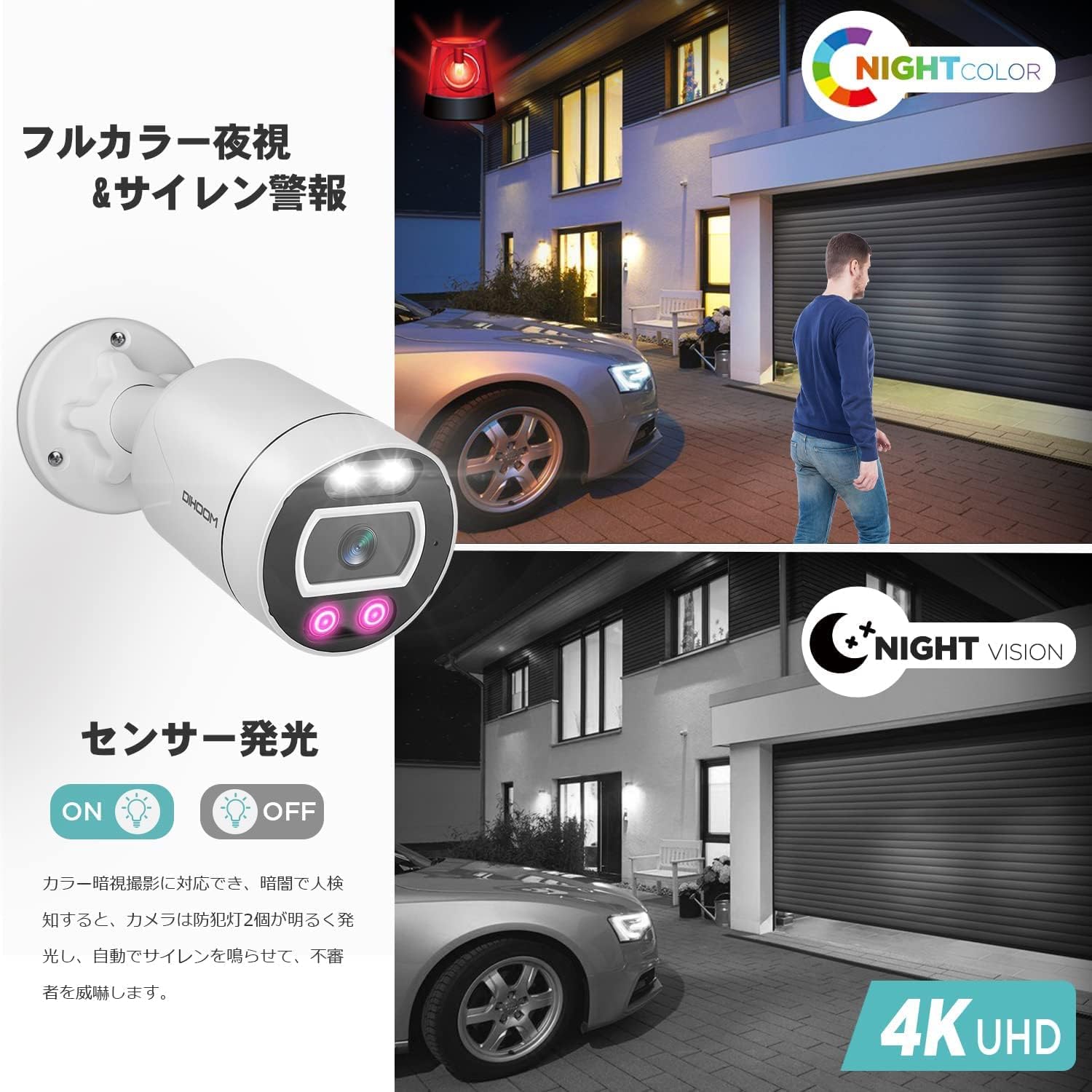
Image: Demonstrates the camera's full-color night vision capability and how its sensor-activated flashing lights and siren alarm can deter intruders at night.
- App-notifikationer: Modtag øjeblikkelige advarsler på din smartphone, når der registreres en hændelse.
- Sirene alarm: The camera can emit a loud siren sound to scare off intruders.
- Flashing Deterrent: At night, if an unknown human body is detected, the camera automatically activates its flashing lights.
7. Vedligeholdelse
- Regelmæssig rengøring: Periodically clean the camera lenses with a soft, dry cloth to ensure clear image quality.
- Firmwareopdateringer: Tjek producentens website or app for any available firmware updates to ensure your system has the latest features and security enhancements.
- HDD-styring: The system features an automatic overwrite function. When the HDD is full, the system will automatically delete the oldest video data to continue recording, ensuring 24/7/365 surveillance.
- Kabelinspektion: Periodically inspect all cables for any signs of wear or damage, especially outdoor cables, to maintain reliable connection and power.
8. Fejlfinding
Hvis du støder på problemer, bedes du følge følgende almindelige fejlfindingstrin:
- Ingen billedvisning:
- Check if the NVR is powered on and connected to the monitor correctly.
- Ensure all camera LAN cables are securely connected to the NVR's POE ports.
- Verify the camera's power indicator (if available) is on.
- Dårlig billedkvalitet:
- Rengør kameralinsen.
- Sørg for, at der ikke er nogen forhindringer foran kameraet.
- Check the resolution settings in the NVR or app.
- Ingen fjernadgang:
- Sørg for, at NVR'en er tilsluttet din router og har internetadgang.
- Check your network settings and firewall configurations.
- Verify your app login credentials and network permissions.
- Alarm udløses ikke:
- Check the alarm detection settings (e.g., motion detection sensitivity, alarm zones).
- Ensure the alarm output (siren, flashing light) is enabled.
If the problem persists after trying these steps, please contact DIHOOM customer support.
9. Specifikationer
| Feature | Specifikation |
|---|---|
| Mærke | DIHOOM |
| Modelnummer | XMP09-JP8004-2TB |
| Produktdimensioner | 39 x 18.5 x 29.1 cm |
| Varens vægt | 5.09 kg |
| Farve | Hvid |
| Materiale | Metal |
| Vandtæt vurdering | IP66 |
| Videooptagelsesopløsning | 2160p (4K) |
| Forbindelsesteknologi | Kablet (POE) |
| Inkluderet HDD | 2TB |
10. Garanti og support
This DIHOOM product comes with a 2 års producentgaranti. If you experience any malfunctions or issues with your product, please do not hesitate to contact our customer support team for assistance. We are committed to providing reliable security solutions and excellent service.
For support, please refer to the contact information provided in your product packaging or visit the official DIHOOM webwebsted.