
Indledning
This manual provides detailed instructions for the safe and efficient use of your Westcott Compact Electric Pencil Sharpener. Please read this manual thoroughly before operating the device and retain it for future reference.

Figur 1: Forside view of the Westcott Compact Electric Pencil Sharpener.
Sikkerhedsoplysninger
For at sikre sikker drift og forhindre skader, bedes du overholde følgende sikkerhedsforanstaltninger:
- Keep the sharpener away from water or other liquids.
- Do not insert fingers or foreign objects into the sharpening holes.
- Tag stikket ud af sliberen før rengøring eller når den ikke er i brug.
- Ensure the shavings reservoir is properly closed during operation.
- Dette apparat er ikke beregnet til brug af personer (inklusive børn) med nedsatte fysiske, sensoriske eller mentale evner, eller mangel på erfaring og viden, medmindre de har fået opsyn eller instruktion i brugen af apparatet af en person, der er ansvarlig for deres sikkerhed.
Pakkens indhold
Bekræft at alle varer er til stede i pakken:
- Westcott Compact Electric Multi-Hole Horizontal Pencil Sharpener
- Strømadapter
Produktegenskaber
The Westcott Compact Electric Pencil Sharpener offers several features for efficient pencil sharpening:
- Multi-Hole Dial: Accommodates pencils of various diameters.
- Eldrevet: Ensures consistent sharpening without battery concerns.
- Stort spånbeholder: Reducerer tømningshyppigheden.
- Kraftig konstruktion: Designet til holdbarhed og langvarig ydeevne.
- 8-Tooth Stainless Steel Helical Blade: Provides a sharp, precise point.
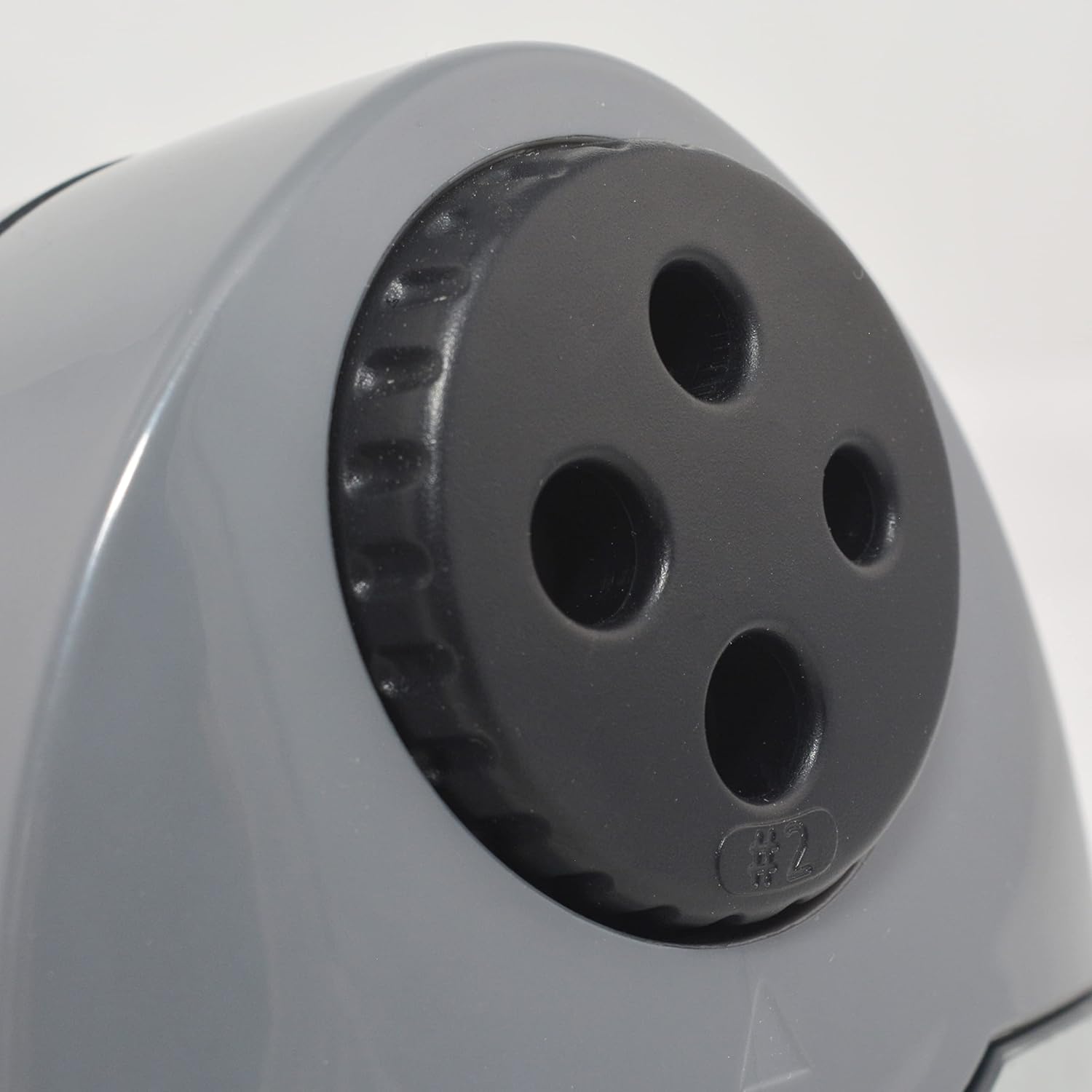
Figure 2: Multi-hole dial for different pencil sizes.
Video 1: Overståetview of the Westcott Compact Electric Horizontal Pencil Sharpener, demonstrating its features and design.
Opsætning
- Unpack the Sharpener: Carefully remove all packaging materials from the sharpener.
- Placer på en stabil overflade: Position the sharpener on a flat, stable surface to prevent movement during use.
- Tilslut strøm: Insert the power adapter into the designated port on the sharpener, then plug the adapter into a standard electrical outlet.

Figure 3: Connecting the power adapter to the sharpener.
Betjeningsvejledning
- Select the Correct Hole: Rotate the multi-hole dial on the top of the sharpener to align the appropriate size opening with the pencil you intend to sharpen. The sharpener can accommodate various pencil diameters.
- Indsæt blyanten: Gently insert the pencil into the selected sharpening hole. The sharpener will automatically activate when the pencil is inserted correctly.
- Sharpen the Pencil: Apply light pressure to the pencil while the sharpener is running. The sharpener will stop automatically or reduce motor speed when the pencil reaches an optimal point, indicated by the #2 pencil sharpening indicator for standard pencils.
- Remove the Pencil: Once sharpened, carefully remove the pencil.

Figure 4: Inserting a pencil for sharpening.
Video 2: Demonstration of the Westcott Compact Pencil Sharpener in action, showing the sharpening process.
Opretholdelse
- Emptying Shavings Reservoir: Regularly check and empty the shavings reservoir to maintain optimal performance and prevent blockages. To empty, gently pull the transparent reservoir away from the main unit. Dispose of shavings and reattach the reservoir securely.

Figure 5: Emptying the shavings reservoir.
- Rengøring af knivene: If sharpening performance decreases, the blades may need cleaning. Unplug the sharpener. Use a soft brush or cotton swab to carefully remove any graphite or wood residue from the blades. Exercise caution as blades are sharp.
Fejlfinding
If you encounter issues with your sharpener, refer to the following common problems and solutions:
- Sharpener not turning on:
- Ensure the power adapter is securely plugged into both the sharpener and the electrical outlet.
- Kontroller om stikkontakten fungerer ved at tilslutte en anden enhed.
- Verify the shavings reservoir is correctly installed and closed. The sharpener may have a safety switch that prevents operation if the reservoir is open.
- Pencil not sharpening properly (uneven or blunt point):
- Ensure you have selected the correct hole size for your pencil.
- Check the blades for any debris or damage. Clean as per the maintenance section.
- Avoid applying excessive pressure, which can cause uneven sharpening or lead breakage.
- Pencil breaking frequently:
- This can be a sign of dull blades or excessive pressure. Refer to cleaning instructions or consider blade replacement if available.
- Ensure the pencil is inserted straight and not at an angle.
Specifikationer
| Attribut | Værdi |
|---|---|
| Mærke | Westcott |
| Modelnummer | 00406 |
| Specifikke anvendelser af produktet | Grafit blyant |
| Farve | Sort |
| Strømkilde | Elektrisk med ledning |
| Materiale | Metal |
| Målgruppe | Artist, Student |
| Varens vægt | 11.52 ounce |
| Yderligere funktioner | Heavy Duty |
Garantioplysninger
This Westcott product comes with a 7 års garanti. For warranty claims or detailed information, please refer to the official Westcott webwebsted eller kontakt kundesupport.
Kundesupport
If you require further assistance or have questions not covered in this manual, please contact Westcott customer support through their official webwebstedet eller de kontaktoplysninger, der er angivet med dit køb.