
1. Introduktion
This manual provides instructions for the RETROSUN RMF-TX520U MG3-TX520U replacement remote control. This remote is designed to function as a direct replacement for your original Sony Bravia Smart TV or Google TV remote, offering voice control capabilities and dedicated quick access buttons.
2. Kompatibilitet
The RMF-TX520U MG3-TX520U remote control is compatible with various Sony Bravia Smart TV and Google TV models. Please verify your TV model against the list below:
- KD-43X80J
- KD-43X85J
- KD-50X80J
- XR-50X90J
- XR-50X94J
- XR-55A80J
- XR-55A84J


3. Opsætning
3.1 Batteriinstallation
Fjernbetjeningen kræver to (2) AAA alkaline-batterier for at fungere. Batterier medfølger ikke med fjernbetjeningen.
- Find batterirummets dæksel på bagsiden af fjernbetjeningen.
- Skub dækslet nedad for at åbne rummet.
- Isæt to AAA-batterier, og sørg for, at de positive (+) og negative (-) poler er justeret korrekt med markeringerne inde i batterirummet.
- Skub batteridækslet tilbage på plads, indtil det klikker sikkert.
3.2 Parringsinstruktioner
Before using the voice function or full remote capabilities, the remote control must be paired with your Sony Bravia Smart TV or Google TV. Follow these steps to pair the remote:
- Ensure your television is powered on. If it is off, press the power button on the remote or the TV itself to turn it on.
- Tryk og hold på VOL- (Volume Down) key and the Google Assistant key (microphone icon) simultaneously for approximately 2 seconds. This action initiates the pairing process.
- A message indicating the pairing status will appear on your TV screen.
- Once the TV screen indicates successful pairing, press the OK button on the remote control to complete the process.

4. Betjeningsvejledning
4.1 Grundlæggende funktioner
Fjernbetjeningen har standardknapper til betjening af tv'et:
- Power knap: Tænder eller slukker for tv'et.
- Nummertastatur (0-9): Til direkte kanalindgang.
- Lydstyrke op/ned (VOL+/-): Justerer tv-lydstyrken.
- Channel Up/Down (CH+/-): Skifter tv-kanaler.
- Stum: Slår lyden fra eller til for TV-lyden.
- Navigationstastatur (op, ned, venstre, højre, OK): Til menunavigation og valg.
- Tilbage: Vender tilbage til den forrige skærm eller menu.
- Hjem: Giver adgang til tv'ets startskærm eller hovedmenu.
- Input: Vælger inputkilder (HDMI, AV osv.).
- Afspil/Pause/Optag/Vis: Kontrolknapper for medieafspilning.
4.2 Stemmefunktion
The integrated microphone and Google Assistant key allow for voice commands to control your TV and search for content.
- Tryk og hold på Google Assistant key (microphone icon) on the remote.
- Sig din kommando tydeligt ind i mikrofonen på fjernbetjeningen.
- Slip Google Assistant key when you have finished speaking.
Example kommandoer: "Find action movies," "Open YouTube," "What's the weather?"
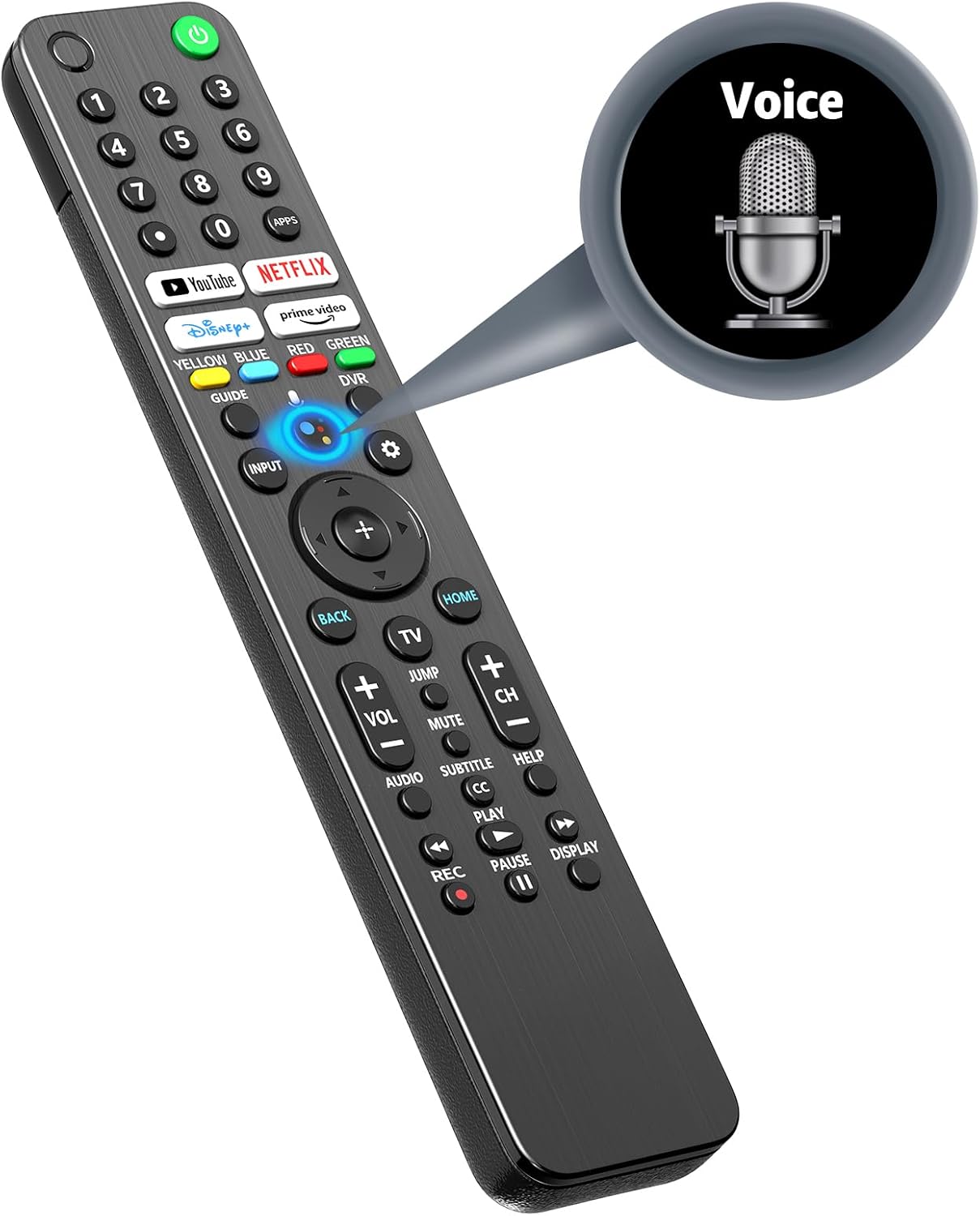


4.3 Hurtig adgangsknapper
The remote includes dedicated buttons for popular streaming services, allowing for quick access:
- YouTube
- Netflix
- Disney+
- Prime video

5. Funktioner
5.1 Advanced Infrared Technology
The remote utilizes advanced infrared technology, providing reliable control over your television. It supports a long operating distance and wide-angle functionality.

5.2 Stable and Smart Signal
The remote is designed for stable and smart signal transmission, ensuring quick acceptance and reaction to your instructions while optimizing power consumption.

5.3 Ergonomisk design
The remote control features an ergonomic design for a comfortable grip, sensitive buttons for responsive feedback, and an arc design for ease of use.

6. Fejlfinding
Hvis du støder på problemer med din fjernbetjening, kan du bruge følgende almindelige løsninger:
- Fjernbetjeningen reagerer ikke:
- Kontroller, om batterierne er korrekt isat og har tilstrækkelig opladning. Udskift batterierne om nødvendigt.
- Sørg for, at der ikke er nogen forhindringer mellem fjernbetjeningen og tv'ets infrarøde modtager.
- Gentag parringsprocessen som beskrevet i afsnit 3.2.
- Stemmefunktionen virker ikke:
- Confirm the remote is successfully paired with the TV.
- Ensure you are pressing and holding the Google Assistant key while speaking.
- Check your TV's settings to ensure the voice assistant feature is enabled.
- Delayed Response:
- Sørg for, at fjernbetjeningen er rettet direkte mod tv'et.
- Try replacing the batteries, as low battery power can sometimes affect response time.
- If the issue persists, it may indicate a compatibility or signal interference problem.
7. Specifikationer
| Feature | Specifikation |
|---|---|
| Modelnummer | RMF-TX520U MG3-TX520U |
| Pakkedimensioner | 9.29 x 1.85 x 0.87 tommer |
| Varens vægt | 3.84 ounce |
| Strømforsyning | 2 x AAA batterier (medfølger ikke) |
| Maks. antal understøttede enheder | 1 (Fjernsyn) |
| Speciel funktion | Ergonomisk, Stemmestyring |
| Farve | Sort |
8. Garanti og support
For any issues or questions regarding your RETROSUN RMF-TX520U MG3-TX520U remote control, please contact us via Amazon messenger. We are committed to resolving any problems within 24 hours.