
1. Introduktion
Tak for købetasing the Blaupunkt PB10DB Bluetooth Karaoke Speaker. This manual provides essential information for the safe and efficient operation of your device. Please read it thoroughly before use and keep it for future reference. The PB10DB is a portable party speaker designed for high-quality audio playback and karaoke, featuring Bluetooth connectivity, USB, and AUX inputs.
2. Sikkerhedsoplysninger
For at sikre sikker drift og forhindre skader, bedes du overholde følgende forholdsregler:
- Udsæt ikke enheden for ekstreme temperaturer, direkte sollys eller høj luftfugtighed.
- Keep the speaker away from water and other liquids. The product is indicated as waterproof, but avoid submerging it.
- Do not attempt to disassemble or modify the speaker. Repairs should only be performed by qualified personnel.
- Brug kun det angivne opladningstilbehør.
- Sørg for tilstrækkelig ventilation omkring højttaleren under brug.
- Undgå at lytte ved for høj lydstyrke i længere perioder for at forhindre høreskader.
3. Pakkens indhold
Kontroller venligst, at alle varer er til stede i pakken:
- Blaupunkt PB10DB Bluetooth Karaoke Speaker
- Strømadapter/opladerkabel
- Brugervejledning (dette dokument)
- Microphone (if included in your specific package)
4. Produktet er slutview
Familiarize yourself with the various parts of your Blaupunkt PB10DB speaker.
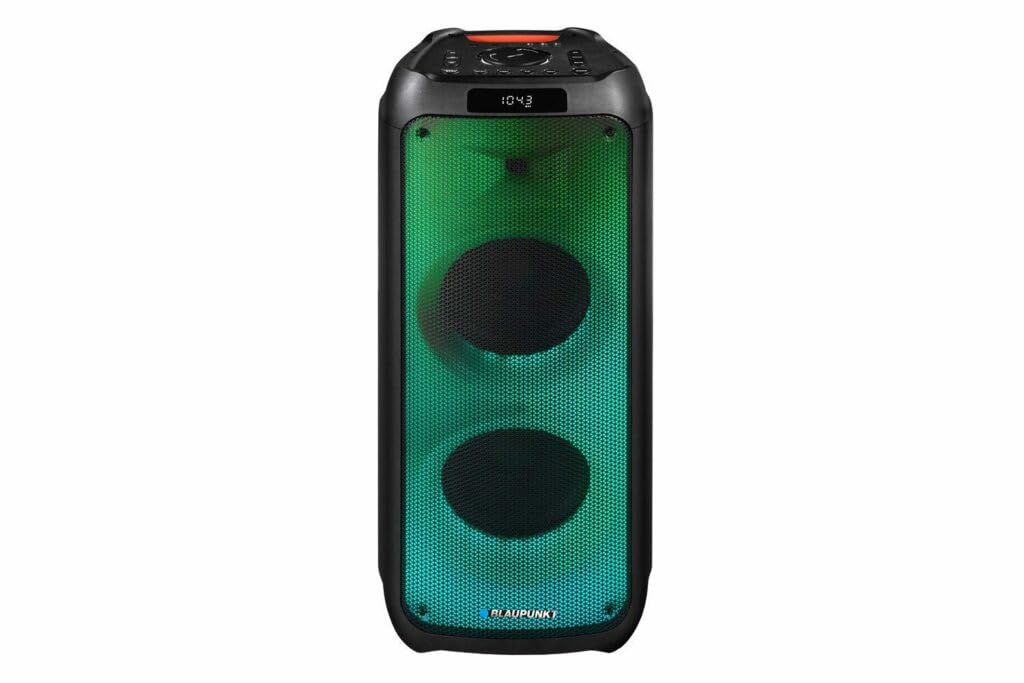
Figur 1: Front view of the Blaupunkt PB10DB speaker, showcasing the dual speaker grilles and dynamic LED lighting. The top panel features a display and control buttons.

Figur 2: Vinklet view of the Blaupunkt PB10DB speaker, highlighting its portable design and the side profile.
Controls and Ports (Typical Layout)
- Power knap: Tænder/slukker højttaleren.
- Mode knap: Skifter mellem Bluetooth-, USB-, AUX- og FM-radiotilstande.
- Lydstyrkekontrol: Justerer masterlydstyrken.
- Afspil/pause knap: Styrer medieafspilning.
- Knapper til forrige/næste spor: Navigerer gennem spor.
- Mikrofonindgang (MIC IN): For connecting a wired microphone for karaoke.
- USB-port: For playing music from a USB drive or charging external devices.
- AUX-indgang (3.5 mm): Til tilslutning af eksterne lydenheder via et lydkabel.
- Opladningsport: For connecting the power adapter to charge the speaker.
5. Opsætning
5.1 Opladning af højttaleren
- Connect the provided power adapter to the charging port on the speaker.
- Sæt adapteren i en passende stikkontakt.
- Opladningsindikatorlampen lyser (farven kan variere) for at vise, at højttaleren oplader.
- Når den er fuldt opladet, kan indikatorlampen skifte farve eller slukke. Frakobl opladeren.
A full charge typically takes several hours and provides approximately 8 hours of playback time.
5.2 Tænd/sluk
- For at tænde: Press and hold the Power button for a few seconds until the display lights up and you hear an audible prompt.
- For at slukke: Press and hold the Power button again for a few seconds until the display turns off and you hear an audible prompt.
6. Betjeningsvejledning
6.1 Bluetooth -parring
- Ensure the speaker is powered on and in Bluetooth mode. If not, press the Mode button until "Bluetooth" or a similar indicator appears on the display. The speaker will enter pairing mode, indicated by a flashing Bluetooth icon or LED.
- Aktiver Bluetooth på din mobilenhed (smartphone, tablet osv.) og søg efter tilgængelige enheder.
- Select "Blaupunkt PB10DB" from the list of found devices.
- Once paired, the speaker will emit an audible confirmation, and the Bluetooth indicator will stop flashing.
- Du kan nu afspille lyd fra din enhed via højttaleren.
Højttaleren vil automatisk forsøge at genoprette forbindelsen til den sidst parrede enhed, når den tændes.
6.2 Karaoke-funktion
- Connect a wired microphone (not always included) to the MIC IN port on the speaker.
- Ensure the microphone is switched on (if it has a power switch).
- Play your desired karaoke track via Bluetooth, USB, or AUX.
- Adjust the microphone volume and echo effects (if available on the speaker) using the dedicated controls.
6.3 USB-afspilning
- Indsæt et USB-flashdrev med MP3-lyd files i USB-porten.
- Press the Mode button to switch to USB mode. The speaker will automatically begin playing music from the USB drive.
- Brug knapperne Afspil/Pause og Forrige/Næste spor til at styre afspilningen.
6.4 AUX-indgang
- Tilslut den ene ende af et 3.5 mm lydkabel (medfølger ikke) til AUX IN-porten på højttaleren.
- Tilslut den anden ende af kablet til hovedtelefonstikket eller lydudgangen på din eksterne lydenhed.
- Press the Mode button to switch to AUX mode.
- Styr afspilning og lydstyrke fra din eksterne lydenhed.
7. Vedligeholdelse
7.1 Rengøring
- Sluk altid højttaleren og afbryd den fra strømkilden før rengøring.
- Brug en blød, tør klud til at tørre højttalerens yderside af.
- Brug ikke slibende rengøringsmidler, voks eller opløsningsmidler, da disse kan beskadige finishen.
7.2 Opbevaring
- Opbevar højttaleren et køligt, tørt sted væk fra direkte sollys og ekstreme temperaturer.
- Hvis batteriet opbevares i længere tid, skal det oplades med jævne mellemrum (f.eks. hver 3. måned) for at opretholde batteriets tilstand.
8. Fejlfinding
| Problem | Mulig årsag | Løsning |
|---|---|---|
| Højttaleren tænder ikke. | Batteriet er afladet. | Oplad højttaleren med den medfølgende strømadapter. |
| Ingen lyd fra højttaleren. | Lydstyrken er for lav eller slået fra. Forkert inputtilstand. | Increase volume. Press the Mode button to select the correct input (Bluetooth, USB, AUX). |
| Bluetooth-parring mislykkes. | Højttaleren er ikke i parringstilstand. Enheden er for langt væk. Interferens. | Ensure speaker is in Bluetooth pairing mode. Move device closer to speaker. Turn off other Bluetooth devices. |
| Mikrofon virker ikke. | Microphone not connected properly or switched off. Microphone volume too low. | Check microphone connection. Ensure microphone is powered on. Adjust microphone volume. |
| USB-afspilning virker ikke. | USB-drevet er ikke formateret korrekt eller understøttes ikke file typer. | Sørg for, at USB-drevet er formateret til FAT32 og indeholder MP3 files. Prøv et andet USB-drev. |
9. Specifikationer
| Modelnavn: | PB10DB |
| Mærke: | BLAUPUNKT |
| Forbindelse teknologi: | Auxiliary, Bluetooth, USB |
| Maksimal højttalerudgangseffekt: | 1000 watt |
| Lydudgangstilstand: | Stereoanlæg |
| Monteringstype: | Bordmontering |
| Materiale: | Metal og plastik |
| Højttalertype: | Tweeter |
| Speciel funktion: | Musik |
| Anbefalede anvendelser: | For music player |
| Farve: | Blå |
| Vandtæt: | ægte |
| Kontrolmetode: | Røre |
| Diskant-diameter: | 4 centimeter |
| Gennemsnitlig batterilevetid: | 8 timer |
| Kompatible enheder: | Laptop, smartphone |
| Strømkilde: | Batteridrevet |
| Varens vægt: | 105 gram |
| Produktmål (L x B x H): | 24 x 69 x 2.5 cm |
10. Garanti og support
Blaupunkt products are designed and manufactured to the highest quality standards. For detailed warranty information, please refer to the warranty card included with your product or visit the official Blaupunkt webwebsted.
For technical support, troubleshooting assistance, or service inquiries, please contact Blaupunkt customer support through their official channels.
- Officiel Webwebsted: www.blaupunkt.com
- Kundeservice: Refer to your regional Blaupunkt webwebsted for kontaktoplysninger.