
1. Produktet er slutview
The Xanlite PRS1500DB is an autonomous LED solar spotlight designed for outdoor use. It features a motion sensor, two lighting modes, and provides 1500 lumens of bright illumination. Its IP54 rating ensures resistance to water splashes, making it suitable for various outdoor environments like patios and gardens. This product is designed for energy efficiency and ease of installation.
Nøglefunktioner:
- Solcelledrevet: Operates autonomously using solar energy, promoting energy savings.
- Høj lysstyrke: Delivers 1500 lumens for effective outdoor lighting.
- Bevægelsessensor: Automatically activates at night upon detecting movement.
- Holdbart design: Modern design with robust, weather-resistant materials (IP54 rated).
- Nem installation: Designed for simple setup in outdoor spaces.

Figur 1: Front view of the Xanlite PRS1500DB Solar Spotlight.

Figur 2: Key features of the Xanlite PRS1500DB, including IP54 rating, extended autonomy, 1500 lumens, and solar power.
2. Sikkerhedsoplysninger
Please read all safety instructions before installing and operating the Xanlite PRS1500DB Solar Spotlight. Failure to follow these instructions may result in electric shock, fire, or serious injury.
- Sørg for, at produktet er installeret et sted, hvor det får direkte sollys, for optimal opladning.
- Do not attempt to disassemble or modify the product. This will void the warranty and may cause damage or injury.
- Hold solpanelet rent for at sikre effektiv opladning.
- This product is designed for outdoor use and is IP54 rated for water resistance. Do not submerge it in water.
- Avoid looking directly into the LED light when it is on, as it can be very bright.
- Bortskaf produktet og dets komponenter forsvarligt i henhold til lokale regler ved udgangen af dets levetid.
3. Pakkens indhold
Verify that all components are present and in good condition before installation.
- Xanlite PRS1500DB Solar Spotlight Unit
- Monteringsudstyr (skruer, vægdyvler)
- Brugervejledning (dette dokument)
4. Opsætning og installation
Follow these steps to properly install your solar spotlight.
- Vælg en placering: Select an outdoor location that receives at least 6-8 hours of direct sunlight daily for the solar panel. Ensure the light can illuminate the desired area effectively. Avoid areas under eaves or heavy shade.
- Markér borepunkter: Hold the spotlight unit against the desired mounting surface (wall, fence, etc.) and mark the positions for drilling holes using a pencil. Refer to the dimensions image for proper spacing.
- Bore huller: Use an appropriate drill bit for your mounting surface and drill holes at the marked points. Insert wall plugs if necessary.
- Monter Spotlight: Align the spotlight with the drilled holes and secure it firmly using the provided screws.
- Indledende opkrævning: Allow the solar panel to charge for at least 24-48 hours in direct sunlight before first use to ensure the battery is fully charged. The light may not operate optimally if not fully charged initially.

Figur 3: Dimensions of the Xanlite PRS1500DB Solar Spotlight for mounting.
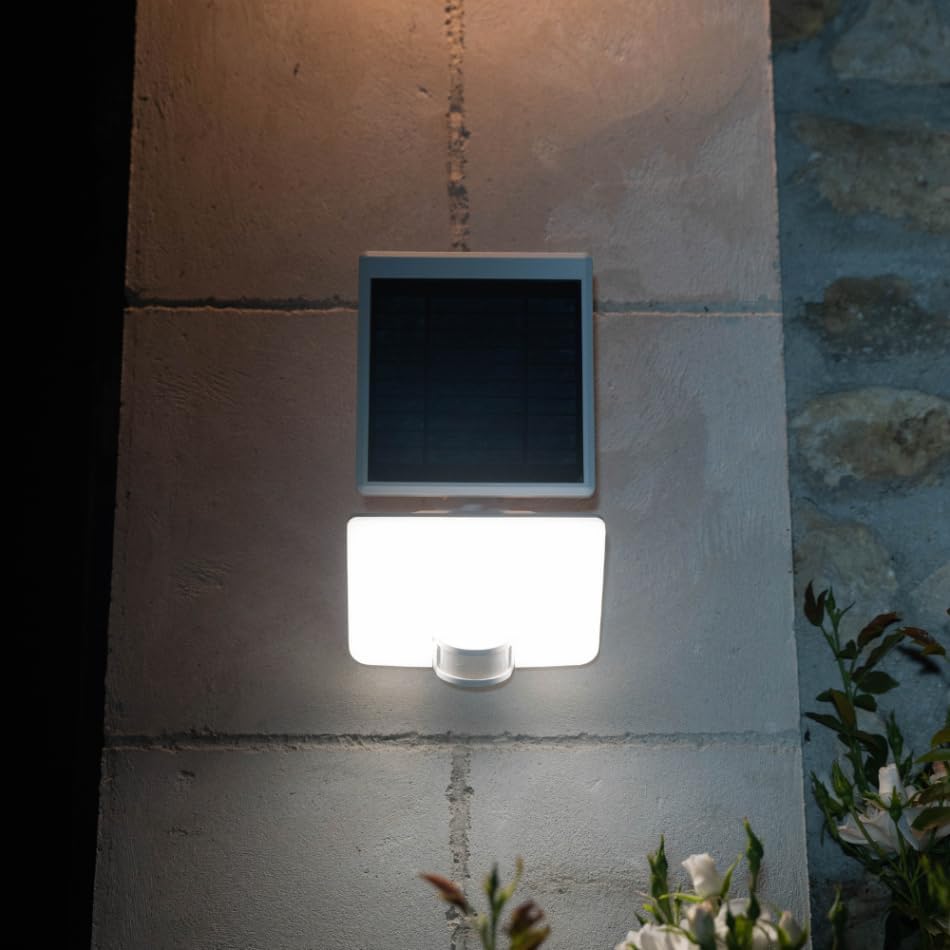
Figur 4: Xanlite PRS1500DB Solar Spotlight installed on an exterior wall, demonstrating its appearance when active.
5. Betjeningsvejledning
The Xanlite PRS1500DB Solar Spotlight is designed for automatic operation.
Automatisk drift:
- During the day, the solar panel charges the internal battery.
- At dusk, the light will automatically enter a standby mode.
- When the motion sensor detects movement within its range, the spotlight will activate at full brightness (1500 lumens) for a set duration.
- After the set duration or when no further motion is detected, the light will either dim to a lower brightness mode or turn off, depending on the selected lighting mode.
Belysningstilstande:
The PRS1500DB features two lighting modes. Refer to the product's physical switch or button (if present) to cycle between these modes. Typically, these modes are:
- Mode 1 (Motion Activated Full Brightness): The light remains off until motion is detected, then illuminates at 1500 lumens for approximately 20-30 seconds before turning off.
- Mode 2 (Dim Light + Motion Activated Full Brightness): The light stays on at a low brightness (e.g., 100-200 lumens) from dusk till dawn. When motion is detected, it brightens to 1500 lumens for approximately 20-30 seconds, then returns to dim light.
Consult the specific instructions on the product packaging or a dedicated button for mode selection, as this can vary.

Figur 5: Detail of the integrated motion sensor on the spotlight.

Figur 6: The solar spotlight actively illuminating an outdoor area at night.
6. Vedligeholdelse
Regular maintenance ensures optimal performance and extends the lifespan of your solar spotlight.
- Rengør solpanelet: Tør solpanelet regelmæssigt af med en blød kludamp cloth to remove dust, dirt, leaves, or snow. A clean panel ensures maximum sunlight absorption and efficient battery charging.
- Rengør lampen: Clean the LED light cover and housing with a soft, damp klud. Undgå slibende rengøringsmidler eller opløsningsmidler.
- Tjek montering: Occasionally check that the spotlight is securely mounted and that all screws are tight.
- Udskiftning af batteri: The internal battery is typically not user-replaceable. If the light's performance significantly degrades after several years, consider replacing the unit.
7. Fejlfinding
If your Xanlite PRS1500DB Solar Spotlight is not functioning as expected, try the following solutions:
| Problem | Mulig årsag | Løsning |
|---|---|---|
| Lyset tænder ikke om natten. | Utilstrækkelig solopladning. | Ensure the solar panel receives 6-8 hours of direct sunlight daily. Clean the solar panel. Allow 24-48 hours for initial charge. |
| Lyset forbliver tændt i løbet af dagen. | Solar panel is not detecting darkness. | Ensure the solar panel is not obstructed or exposed to other light sources at night (e.g., streetlights). |
| Bevægelsessensor virker ikke. | Sensor blokeret eller snavset. | Clean the motion sensor lens. Ensure there are no obstructions in front of the sensor. |
| Light is dim or only stays on for a short time. | Low battery charge or aging battery. | Ensure adequate solar charging. If the product is old, the battery may be reaching the end of its lifespan. |
8. Specifikationer
Detailed technical specifications for the Xanlite PRS1500DB Solar Spotlight.
| Feature | Detalje |
|---|---|
| Mærke | Xanlite |
| Modelnummer | PRS1500DB |
| Modelnavn | SOLAR LED WALL FLOODLIGHT IP54, ABS WHITE, MOTION SENSOR, 2 LIGHTING MODES, 1500 LUMENS |
| Lyskildetype | LED |
| Lysstyrke | 1500 lumen |
| Strømkilde | Solcelledrevet |
| Særlige funktioner | Motion Sensor, Water-resistant (IP54) |
| Materiale | Metal (kabinet), Plast (skærm) |
| Farve | Hvid |
| Monteringstype | Vægmontering |
| Værelsestype | Have, gårdhave |
| Vandmodstandsniveau | IP54 (Vandtæt) |
| Antal lyskilder | 1 |
| Montering påkrævet | Ja |
9. Garanti og support
Xanlite products are designed for quality and reliability. For specific warranty information, please refer to the documentation included with your purchase or visit the official Xanlite website. If you encounter any issues or require technical assistance, please contact Xanlite customer support through their official channels.