
Indledning
Thank you for choosing the AMERTEER H101 Digital Presenter. This device is designed to enhance your presentations with advanced features such as a digital pointer, spotlight, magnifier, and timer. Please read this manual carefully to ensure proper use and optimal performance.
Pakkens indhold
- AMERTEER H101 Presenter Unit x 1
- USB-modtager x 1
- Brugsanvisning x 1
Produkt overview
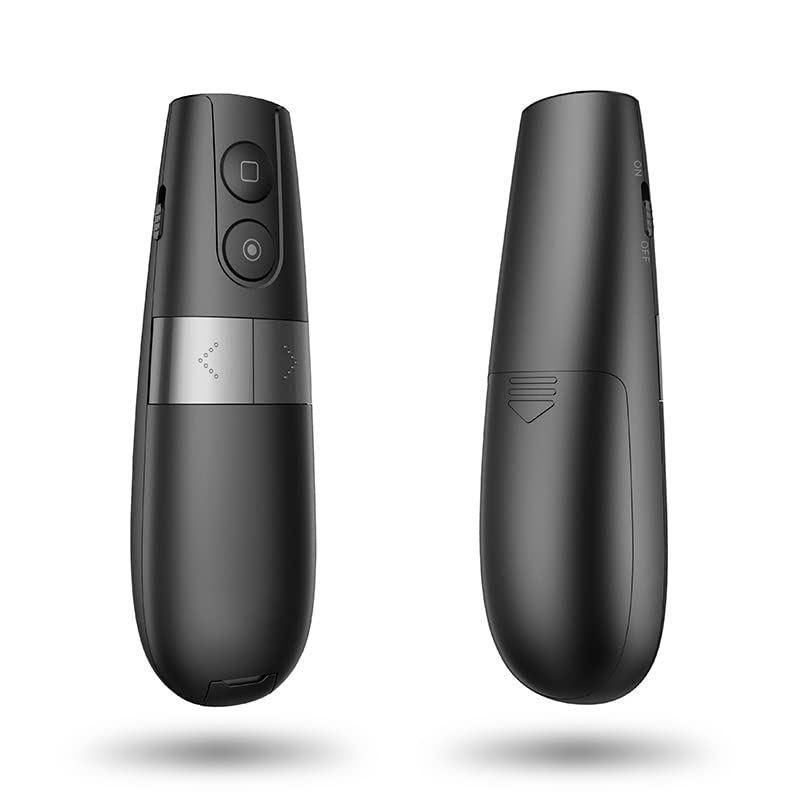
The AMERTEER H101 features an ergonomic design for comfortable handling and intuitive controls for seamless presentation delivery. Its black and silver finish provides a professional appearance.

Figur 1: Forside og bagside view of the AMERTEER H101 Digital Presenter, showcasing its sleek design and ergonomic shape.
Nøglefunktioner omfatter:
- Digital peger: Displays a red circle on screen, visible on LED/LCD displays, controlled by gravity induction.
- Spotlight funktion: Dims surroundings to highlight content within a circular area.
- Magnifier Function: Enlarges content within a circular area for detailed viewing.
- Timer funktion: Helps manage presentation time with an on-device display, configurable via a PC application.
- Trådløs rækkevidde: Operates up to 20 meters (66.6 feet) radius.
- Kompatibilitet: Supports Windows, macOS, and Android operating systems. Compatible with presentation software like PowerPoint and Keynote.
Figur 2: The presenter is compatible with Windows, macOS, Android, and Linux, supporting applications like PowerPoint and Keynote.
Opsætning
1. Installation af batterier
The AMERTEER H101 requires batteries for operation. Locate the battery compartment on the presenter unit.
Figur 3: The battery compartment is located at the bottom of the presenter. Insert the required batteries, ensuring correct polarity.
- Åbn batterirummets dæksel.
- Insert the specified alkaline batteries, observing the correct polarity (+/-).
- Luk batterirummets dæksel forsvarligt.
2. Tilslutning af USB-modtageren
The presenter communicates wirelessly with your computer via the USB receiver.

Figur 4: The USB receiver is conveniently stored within the presenter unit. Remove it before use.

Figur 5: Insert the USB receiver into an available USB port on your computer. For Android devices, a Type-C adapter may be required.
- Remove the USB receiver from its storage slot in the presenter.
- Plug the USB receiver into an available USB port on your computer (Windows, macOS) or Android device (using a Type-C adapter if necessary).
- Dit operativsystem burde automatisk registrere og installere de nødvendige drivere.
Betjeningsvejledning
Grundlæggende funktioner

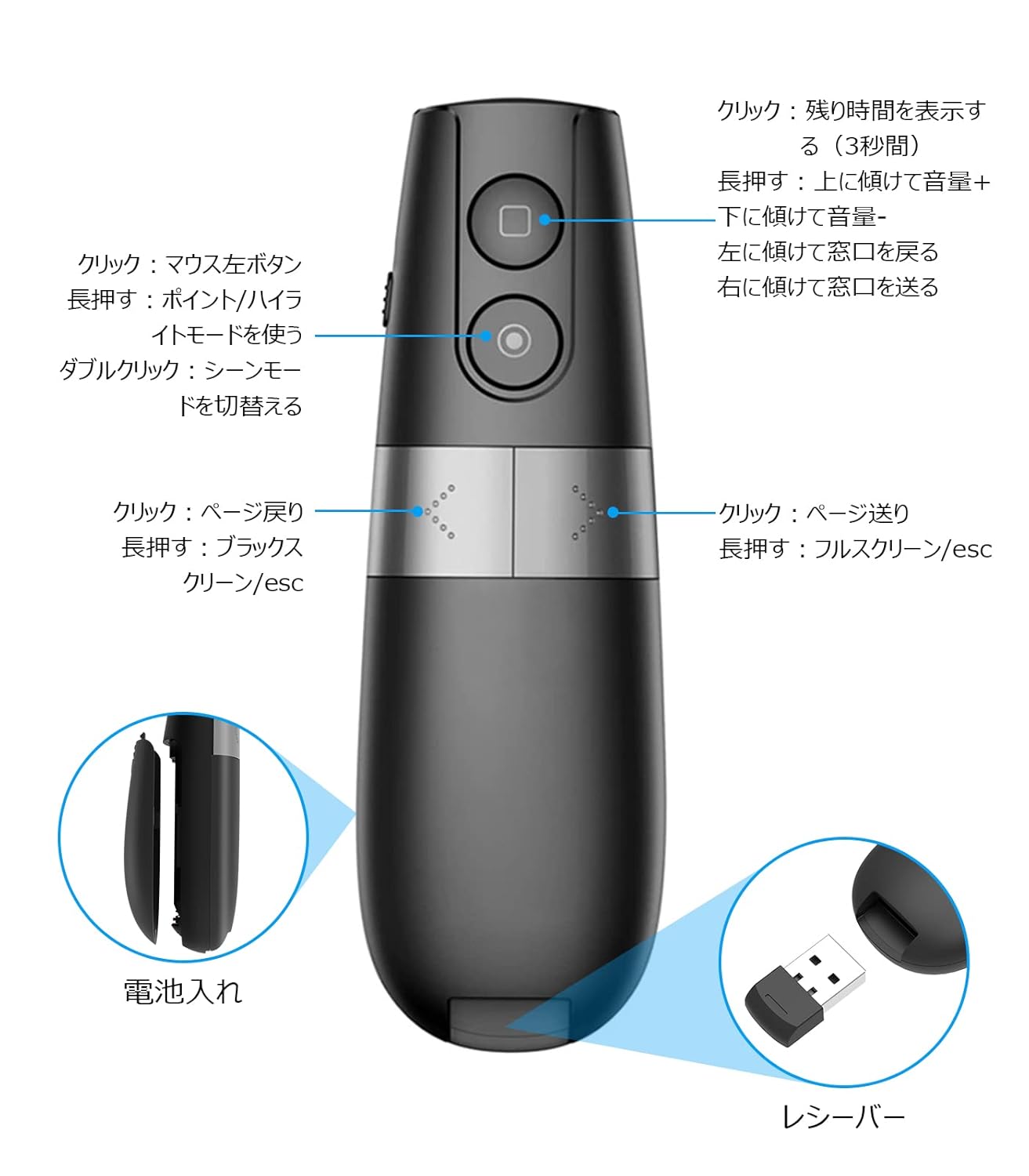
Figur 6: Detaljeret view of the presenter's buttons and their corresponding functions for navigation and special features.
- Side op/ned: Use the dedicated buttons to navigate slides forward or backward.
- Fuld skærm/Sort skærm: Long press the page down button to enter/exit full screen or black screen mode.
- Lydstyrkekontrol: Tilt the presenter up or down while holding the appropriate button (refer to Figure 6 for exact button) to adjust volume.
- Window Switching: Tilt the presenter left or right while holding the appropriate button to switch between open windows.
Advanced Pointer Modes
The AMERTEER H101 offers three distinct emphasizing modes: Spotlight, Magnifier, and Digital Pointer.

Figur 7: Visual representation of the three pointer modes: Analog Pointer, Spotlight, and Magnifier, demonstrating their effects on screen content.
- Entering Mode: Press and hold the designated mode button (refer to Figure 6).
- Skiftemetoder: Double-click the mode button to cycle between Spotlight, Magnifier, and Digital Pointer.
- Spotlight: Dims the screen except for a circular area, drawing attention to specific content.
- Forstørrelsesglas: Enlarges content within a circular area for detailed viewing.
- Digital peger: Displays a red circular pointer on the screen, controlled by the presenter's movement (gravity induction). The size of the pointer can be adjusted.
Timer funktion
The built-in timer helps you keep track of your presentation time.
- Indstilling af timeren: Use the accompanying PC application to set your desired presentation time.
- Displaying Remaining Time: Click the square button on the presenter to display the remaining time on its mini screen.
Opretholdelse
- Hold enheden ren ved at tørre den af med en blød, tør klud.
- Avoid exposing the presenter to extreme temperatures, humidity, or direct sunlight.
- Fjern batterierne, hvis enheden ikke skal bruges i længere tid, for at forhindre lækage.
- Store the USB receiver inside the presenter unit when not in use to prevent loss.
Fejlfinding
| Problem | Mulig årsag | Løsning |
|---|---|---|
| Oplægsholder svarer ikke |
|
|
| Digital pointer not visible |
|
|
| Timeren fungerer ikke |
|
|
Specifikationer
| Modelnummer | LNKO13157-01 |
| Mærke | AMERTEER |
| Trådløs teknologi | TELEC certified wireless technology |
| Driftsafstand | Op til 20 meter (66.6 fod) |
| Kompatible operativsystemer | Windows, macOS, Android, iOS |
| Kompatibel software | PowerPoint, Keynote |
| Varens vægt | 50 g |
| Pakkedimensioner | 14.9 x 6.1 x 2.9 cm |
| Batteritype | Alkaline (Batteries not included) |
| Farve | Sort |
Garanti og support
AMERTEER products undergo rigorous inspection before shipping. If you encounter any quality issues or require assistance, please contact AMERTEER customer support. Refer to your purchase documentation for specific warranty terms and contact information.
For support, please visit the AMERTEER official webwebsted eller kontakt din forhandler.
Overholdelsesoplysninger
This device complies with TELEC wireless technology standards, ensuring reliable and safe operation.