
1. Produktet er slutview
The G-MARK STUDIO 2 is a compact and versatile 2-channel audio interface mixer designed for various audio applications, including live shows, recording, DJ sets, podcasts, and streaming. It features two XLR combo inputs for microphones or instruments, switchable stereo line outputs, and individual volume controls for each channel. The mixer includes a 48V phantom power supply for condenser microphones and a Hi-Z input for direct guitar or bass connection. Its USB connectivity ensures simple plug-and-play operation with computers and other devices.

Figure 1: G-MARK STUDIO 2 Mini Audio Mixer, overall view.
2. Opsætningsvejledning
2.1 Tilslutning af strøm
Connect the provided USB cable to the Type-B USB 2.0 port on the rear panel of the mixer and to a compatible USB power source (e.g., computer USB port, USB power adapter). The 'POWER' indicator light will illuminate when the device is powered on.
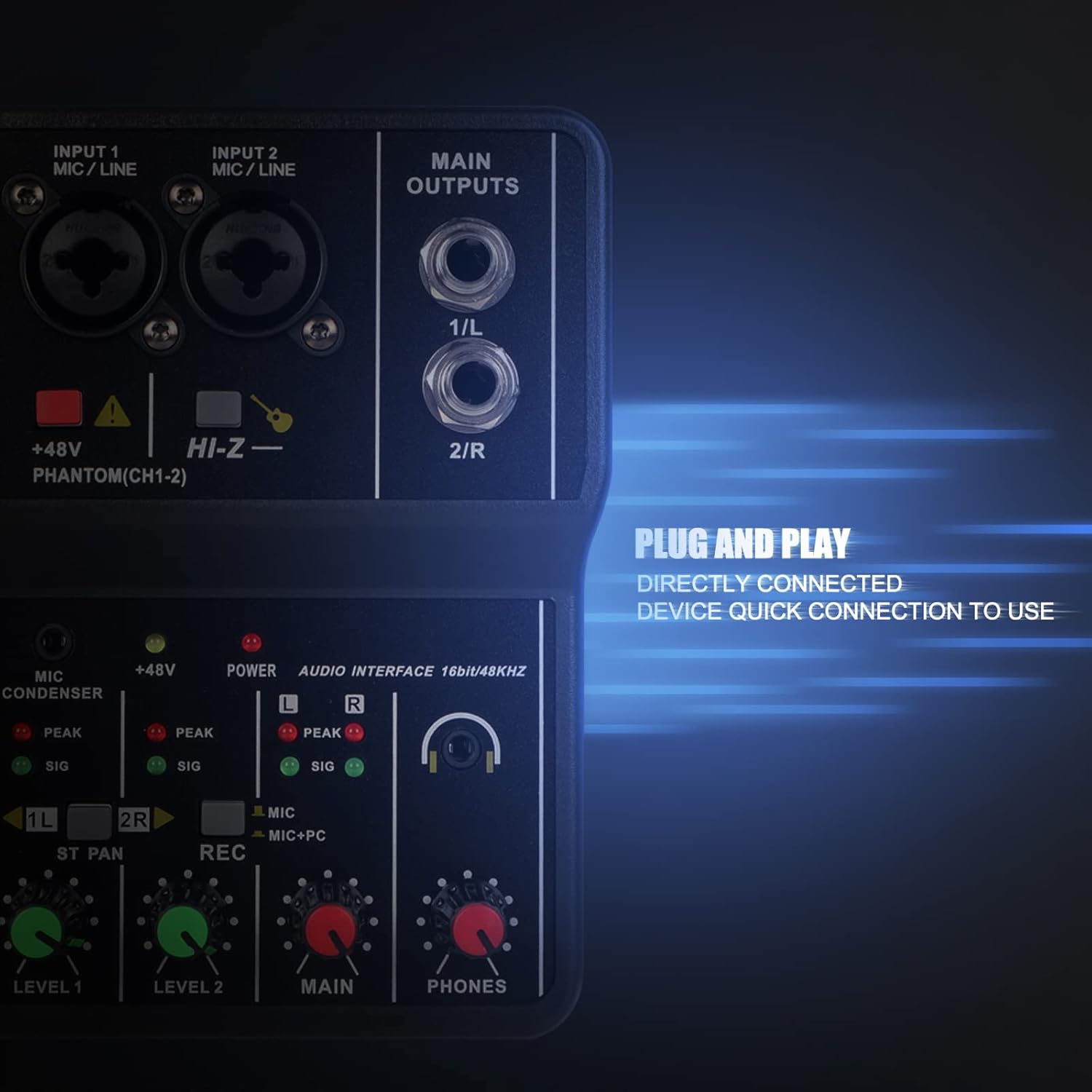
Figure 2: Rear panel showing the USB Type-B port for power and data connection.
2.2 Connecting Audio Inputs
The mixer features two combo inputs (INPUT 1 MIC/LINE, INPUT 2 MIC/LINE) that accept both XLR and 6.35mm (1/4-inch) TRS/TS connectors.
- Mikrofoner: Connect XLR microphones to either combo input. For condenser microphones requiring power, press the +48V PHANTOM(CH1-2) button. The corresponding indicator will light up.
- Instrumenter: Connect instruments like guitars or basses using a 6.35mm (1/4-inch) TS cable. For high-impedance instruments, press the HI-Z button for optimal signal.
- 3.5 mm mikrofon: A dedicated 3.5mm microphone input is available for condenser microphones.

Figure 3: Close-up of the XLR/TRS combo input jacks.
2.3 Connecting Main Outputs
The mixer provides two 6.35mm (1/4-inch) TRS/TS MAIN OUTPUTS (1/L and 2/R) for connecting to external speakers, ampløftere eller andet lydudstyr.
2.4 Tilslutning af hovedtelefoner
Plug your headphones into the 3.5mm PHONES jack for real-time monitoring of your audio. Adjust the headphone volume using the PHONES knob.
Video 1: G-MARK Mini Audio Mixer 2 Channel Setup and Features. This video demonstrates connecting power, audio inputs, and adjusting controls for recording and monitoring.
3. Betjeningsvejledning

Figure 4: Detailed diagram of the G-MARK STUDIO 2 mixer controls.
3.1 Input Level Controls
Juster NIVEAU 1 og NIVEAU 2 knobs to set the input gain for each channel. Monitor the 'SIG' (signal) and 'PEAK' (overload) indicator lights. The 'SIG' light should illuminate green during normal operation, and the 'PEAK' light (red) should only flash occasionally. If 'PEAK' stays red, reduce the input level to prevent distortion.
3.2 Fantomstrøm (+48V)
Tryk på +48V PHANTOM(CH1-2) button to activate phantom power for condenser microphones connected to INPUT 1 or INPUT 2. Ensure this is only used with microphones that require phantom power.
3.3 Hi-Z Input
Tryk på HI-Z button when connecting high-impedance instruments like electric guitars or basses directly to the mixer for proper signal matching.
3.4 Recording Mode Selection (REC)
De REC button allows you to select the audio source for computer recording:
- Button Up (MIC): Records only the microphone/instrument inputs (Channels 1 and 2).
- Button Down (MIC+PC): Records a mixed signal of the microphone/instrument inputs and the audio playback from your connected computer.
3.5 Stereo/Mono Channel Switching (ST PAN)
De ST PAN buttons (1L and 2R) control the stereo panning or mono summing of the input channels:
- Buttons Up: Channels 1 and 2 are treated as separate mono inputs, panned left and right respectively.
- Buttons Down: Channels 1 and 2 are summed to a mono signal. This is useful when using a single microphone and wanting the sound to be present in both left and right channels of the output.
3.6 Hovedudgang og hovedtelefonlydstyrke
Juster HOVED knob to control the overall output volume to your speakers or recording device. Use the TELEFON knob to adjust the volume for your connected headphones.
Video 2: G-MARK 2 Channel Interface Audio Mixer Overview. This video provides a quick look at the mixer's interface and basic functionality.
4. Vedligeholdelse
To ensure the longevity and optimal performance of your G-MARK STUDIO 2 mixer, follow these maintenance guidelines:
- Rensning: Brug en blød, tør klud til at rengøre armaturets yderside. Undgå at bruge flydende rengøringsmidler eller opløsningsmidler, da de kan beskadige overfladen eller de indvendige komponenter.
- Opbevaring: Opbevar mixeren et køligt, tørt sted væk fra direkte sollys, ekstreme temperaturer og høj luftfugtighed.
- Håndtering: Avoid dropping the device or subjecting it to strong impacts. Do not attempt to disassemble the mixer, as this will void the warranty.
5. Fejlfinding
- Ingen lyd eller lav lydstyrke:
- Kontrollér alle kabelforbindelser (indgange, udgange, hovedtelefoner).
- Ensure input LEVEL knobs, MAIN knob, and PHONES knob are turned up.
- Verify that the correct input source is selected on your computer's audio settings.
- For condenser microphones, ensure +48V phantom power is activated.
- For instruments, ensure the HI-Z button is pressed if applicable.
- Forvrænget lyd:
- Reduce the input LEVEL knobs if the 'PEAK' indicator lights are consistently red.
- Check the audio source for distortion before it reaches the mixer.
- Optagelsesproblemer:
- Ensure the REC button is set to the desired mode (MIC or MIC+PC).
- Verify your computer's recording software is configured to use the G-MARK STUDIO 2 as the input device.
- Ingen Bluetooth-forbindelse:
Please note that the G-MARK STUDIO 2 Mini Audio Mixer does not feature Bluetooth connectivity. Any mention of Bluetooth in external product descriptions may be inaccurate. The device connects via USB for digital audio transfer.
6. Specifikationer
| Feature | Beskrivelse |
|---|---|
| Mærke | G-MARK |
| Modelnummer | 2 STUDIO |
| Antal kanaler | 2 |
| Forbindelsesteknologi | USB |
| Strømkilde | Ledningsbaseret elektrisk (USB 5V) |
| Lydindgang | XLR, 6.35mm (1/4-inch) TRS/TS, 3.5mm (MIC CONDENSER) |
| Udgangsstiktype | 6.35mm (1/4-inch) TRS/TS (Main Outputs), 3.5mm (Phones) |
| Fantomkraft | +48V (switchable for CH1-2) |
| Hi-Z Input | Yes (switchable for instruments) |
| USB Audio Interface | 16-bit/48 kHz |
| Varens vægt | 0.3 kilo |
7. Garanti og support
7.1 Garantioplysninger
This product comes with a 3-month warranty from the date of purchase. Please retain your proof of purchase for any warranty claims. The warranty covers manufacturing defects but does not cover damage caused by misuse, accidents, unauthorized modifications, or normal wear and tear.
7.2 Kundesupport
For technical assistance, troubleshooting, or warranty inquiries, please contact G-MARK customer support through the retailer's platform or visit the official G-MARK webwebsted for kontaktoplysninger.