
Indledning
The ARCTIC P9 PWM PST is a 92mm PC case fan designed for efficient cooling, particularly in applications requiring high static pressure. This fan features a wide RPM range, PWM control for precise speed adjustment, and a 0dB mode for silent operation at low loads. Its high-quality bearing ensures an extended lifespan and quiet performance.

Image: The ARCTIC P9 PWM PST 92mm PC fan, showcasing its black frame and fan blades.
Opsætning og installation
This section provides instructions for installing your ARCTIC P9 PWM PST fan into your computer case or onto a heatsink/radiator.
Tilslutning af ventilator
The ARCTIC P9 PWM PST fan utilizes a 4-pin connector for power and PWM control. It also features a 4-pin socket for daisy-chaining additional fans, thanks to its PWM Sharing Technology (PST).
- Identify a suitable mounting location: Determine where the fan will be installed (e.g., case fan mount, CPU heatsink, radiator). Ensure proper airflow direction for optimal cooling.
- Secure the fan: Use the provided screws to firmly attach the fan to the desired mounting point. Avoid overtightening.
- Connect to motherboard: Plug the fan's 4-pin connector into an available 4-pin fan header on your motherboard. If daisy-chaining, connect the first fan to the motherboard, then connect subsequent PST-compatible fans to the 4-pin socket on the previous fan.

Image: The 4-pin PWM PST connector and socket, illustrating the daisy-chaining capability for multiple fans.
Betjeningsvejledning
The ARCTIC P9 PWM PST fan offers flexible operation modes controlled via its 4-pin PWM connection.
PWM Control and RPM Range
- The fan speed can be precisely controlled via a Pulse Width Modulation (PWM) signal from your motherboard or fan controller.
- The fan operates within a wide RPM range of 200 to 3000 RPM, allowing for a balance between cooling performance and noise levels.
- 0dB Mode: When the PWM signal is below 5%, the fan will stop spinning completely, providing a 0dB noise level for silent operation during low system loads. Above 5% PWM, the fan will spin up and adjust its speed infinitely within its specified range.
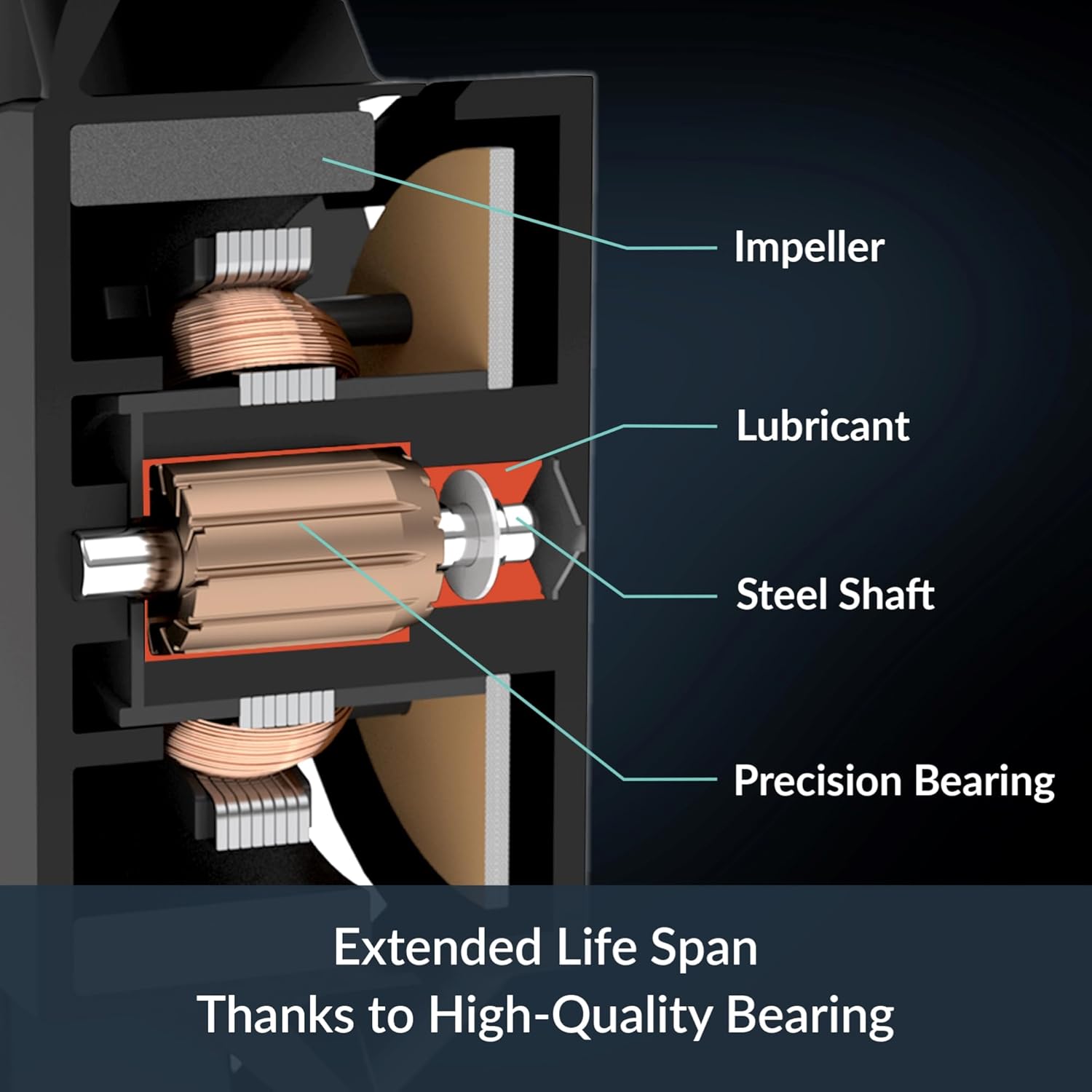
Image: Illustration of the 0dB mode, indicating the fan stops below 5% PWM signal for silent operation.
Optimeret til statisk tryk
The fan's design is optimized for high static pressure, making it particularly effective for use on heatsinks and radiators where air resistance is higher. This ensures efficient heat dissipation even through dense fins.

Image: Diagram showing airflow through a fan optimized for static pressure, suitable for radiators and heatsinks.
Opretholdelse
Regular maintenance helps ensure the longevity and optimal performance of your ARCTIC P9 PWM PST fan.
- Støvrensning: Undersøg regelmæssigt ventilatorbladene og huset for støvophobning. Brug trykluft eller en blød børste til forsigtigt at fjerne støv. Sørg for, at ventilatoren er slukket, før du rengør den.
- Bearing Longevity: The fan features a high-quality bearing with a combination of alloy and lubricant designed to reduce friction and prevent excessive heat build-up, contributing to an extended lifespan. No user maintenance is required for the bearing itself.

Image: Cross-section diagram of the fan's internal components, highlighting the impeller, lubricant, steel shaft, and precision bearing, which contribute to its extended lifespan.
Fejlfinding
If you encounter issues with your ARCTIC P9 PWM PST fan, refer to the following common troubleshooting steps:
| Problem | Mulig årsag | Løsning |
|---|---|---|
| Ventilatoren roterer ikke |
|
|
| Ventilatoren er for højlydt |
|
|
| Dårlig køleydelse |
|
|
Specifikationer
Detailed technical specifications for the ARCTIC P9 PWM PST fan.
| Feature | Værdi |
|---|---|
| Model | P9 PWM PST |
| Fan størrelse | 92 mm |
| Blæserhastighed | 200 - 3000 o/min (PWM-styret) |
| Luftstrøm | 38.83 CFM | 65.97 m³/t |
| Statisk tryk | 3.12 mmHXNUMX |
| Strømstik | 4-pin fan connector + 4-pin socket (PST) |
| Voltage | 12 volt |
| Wattage | 1.44 watt |
| Strøm | 0.12 A |
| Leje Type | High Quality Fluid Dynamic Bearing |
| Dimensioner (L x B x H) | 3.6" x 3.6" x 1" (92 mm x 92 mm x 25 mm) |
| Vægt | 106 gram |
| Materiale | Plast |

Image: Visual representation of key technical data including fan speed, static pressure, airflow, current, and voltage.
Garantioplysninger
ARCTIC products are manufactured to high quality standards. For specific warranty terms and conditions applicable to your ARCTIC P9 PWM PST fan, please refer to the official ARCTIC website or the warranty card included with your product. Typically, ARCTIC offers a limited warranty against defects in materials and workmanship.
Support og kontakt
For further assistance, technical support, or inquiries regarding your ARCTIC P9 PWM PST fan, please visit the official ARCTIC webwebsted:
You may also find helpful resources, FAQs, and driver downloads on their support pages.