
1. Introduktion
Tak for købetasing the ZEBRONICS Zeb-PIXAPLAY 11 Portable LED Projector. This manual provides essential information for setting up, operating, and maintaining your projector. Please read it thoroughly before use to ensure proper functionality and to maximize your viewoplevelse.
The Zeb-PIXAPLAY 11 is designed for home entertainment, offering FHD 1080p support, multiple connectivity options, and a compact design for portability. Enjoy movies, TV shows, and gaming on a large screen up to 381cm (150 inches).
2. Sikkerhedsoplysninger
- Se ikke direkte ind i projektorlinsen, når lamp er tændt.
- Sørg for korrekt ventilation omkring projektoren for at forhindre overophedning.
- Use only the provided power adapter or a compatible 5V DC, 3A USB power source.
- Hold projektoren væk fra vand, fugt og ekstreme temperaturer.
- Forsøg ikke selv at skille projektoren ad eller reparere den. Kontakt kvalificeret servicepersonale.
- Rengør linsen og ventilationsåbningerne regelmæssigt for at opretholde optimal ydeevne.
3. Pakkens indhold
Bekræft, at alle nedenstående varer er inkluderet i din pakke:
- Projector (1 unit)
- Fjernbetjening (1 enhed)
- Strømadapter (1 enhed)
- AV-kabel (1 enhed)
- HDMI-kabel (1 enhed)
- Brugermanual

Figur 3.1: Projector and Included Accessories
This image displays the ZEBRONICS Zeb-PIXAPLAY 11 projector along with its complete set of accessories: a remote control, a power adapter, an AV cable, an HDMI cable, and a QR code for the user manual. These items are typically found in the product packaging.
4. Produktet er slutview
Gør dig bekendt med projektorens komponenter og betjeningselementer.

Figur 4.1: Forside og Top View of the Projector with Remote
This image shows the ZEBRONICS Zeb-PIXAPLAY 11 portable LED projector from a front and slightly top-down angle, with its accompanying remote control placed beside it. The projector features a two-tone design, with the lens visible at the front.
4.1 Betjeningselementer på øverste panel

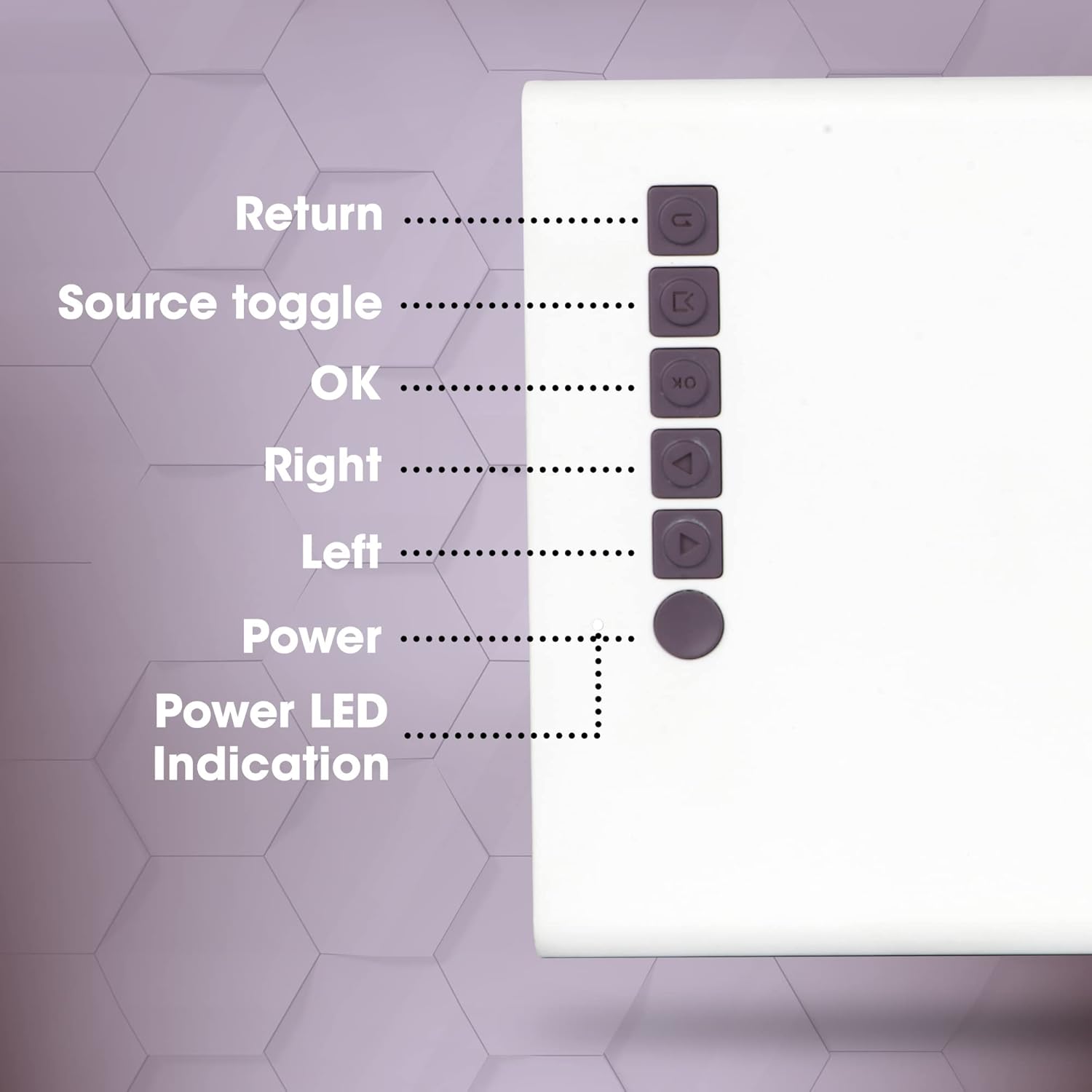
Figur 4.2: Kontrolpaneler på øverste panel
This close-up image highlights the control buttons located on the top panel of the ZEBRONICS Zeb-PIXAPLAY 11 projector. The buttons are labeled for their functions: Return, Source toggle, OK, Right, Left, Power, and Power LED Indication.
- Retur: Navigerer tilbage i menuer.
- Source toggle: Switches between input sources (HDMI, USB, mSD, AV).
- OK: Bekræfter valg.
- Højre/venstre: Navigerer i menupunkter.
- Magt: Tænder/slukker projektoren.
- Power LED-indikation: Viser strømstatus.
4.2 Bag- og sideporte
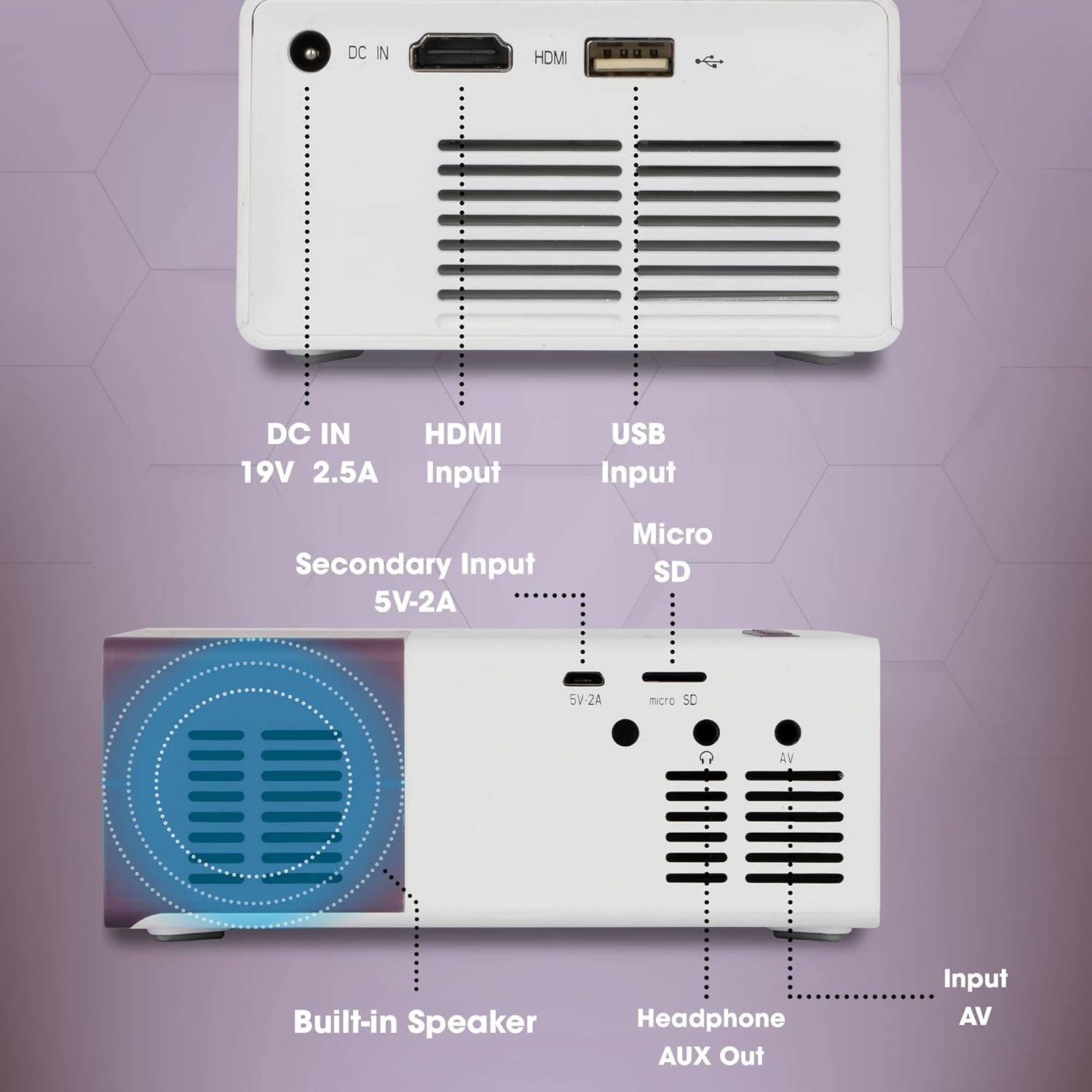
Figur 4.3: Rear and Side Connectivity Ports
Dette billede giver en detaljeret view of the connectivity ports located on the rear and side of the ZEBRONICS Zeb-PIXAPLAY 11 projector. Labels indicate the functions of each port: DC IN (19V 2.5A), HDMI Input, USB Input, Micro SD slot, Secondary Input (5V-2A), Built-in Speaker, Headphone AUX Out, and Input AV.
- DC-indgang (19V 2.5A): Hovedstrømindgang.
- Secondary Input (5V-2A): Alternative power input via USB (e.g., power bank).
- HDMI -indgang: Connects to devices like laptops, gaming consoles, TV boxes.
- USB-indgang: Tilsluttes USB-flashdrev til afspilning af medier.
- Micro SD: Slot for Micro SD cards for media playback.
- Input AV: Connects to devices using the included AV cable.
- Headphone AUX Out: Tilsluttes eksterne højttalere eller hovedtelefoner.
- Indbygget højttaler: Integreret lydudgang.
5. Opsætning
5.1 Strømtilslutning
- Tilslut den medfølgende strømadapter til DC IN (19V 2.5A) port on the projector and then to a power outlet.
- Alternatively, for portable use, connect a 5V DC, 3A USB power source (e.g., a power bank) to the Secondary Input (5V-2A) havn.
Figur 5.1: Dual Power Input Capability
This image illustrates the ZEBRONICS Zeb-PIXAPLAY 11 projector's compatibility with both a standard adapter and a 5V power bank, highlighting its portability for outdoor use. Children are shown enjoying a movie projected onto a screen in a garden setting.
5.2 Placering og skærmstørrelse
- Placer projektoren på en stabil, flad overflade.
- Position the projector at an appropriate distance from the projection surface (wall or screen) to achieve the desired screen size. The projector supports a maximum screen size of 381cm (150 inches).
- Sørg for, at projektionsstien er fri for forhindringer.

Figur 5.2: Large Screen Projection and Picture Clarity
This image demonstrates the ZEBRONICS Zeb-PIXAPLAY 11 projector's capability to project a large screen size of up to 381cm (150 inches) with FHD 1080p support, emphasizing the stunning picture clarity it delivers.
5.3 Fokusjustering
Locate the focus ring near the projector lens. Rotate it until the projected image appears sharp and clear on the screen.
6. Betjeningsvejledning
6.1 Tænd/sluk
- Tryk på Magt button on the projector or the remote control to turn the unit on. The Power LED will illuminate.
- Tryk på Magt knappen igen for at slukke for enheden.
6.2 Valg af indgangskilde
Efter tænding skal du bruge Source toggle button on the projector or the remote control to cycle through available input sources: HDMI, USB, mSD, and AV.
6.3 Tilslutning af enheder
- HDMI: Connect an HDMI cable from your laptop, gaming console, or TV box to the projector's HDMI input port. Select HDMI as the input source.
- USB: Insert a USB flash drive into the USB input port. Select USB as the input source and navigate through your media files using the remote or top panel controls.
- Micro SD: Insert a Micro SD card into the Micro SD slot. Select mSD as the input source and browse your media.
- AV: Use the included AV cable to connect older devices (e.g., DVD players) to the AV input port. Select AV as the input source.
6.4 Lydudgang
- The projector has a built-in speaker for audio playback.
- For enhanced audio, connect external speakers or headphones to the Headphone AUX Out porten ved hjælp af et 3.5 mm lydkabel.
6.5 Understøttede medieformater
The projector supports various video file formats including 3GP, AVI, DIVX, H264, MOV, MP4, MPEG1, MPEG2, MKV, and VOB.
7. Vedligeholdelse
- Rengøring af linser: Tør forsigtigt projektorlinsen af med en blød, fnugfri klud. Undgå at bruge slibende rengøringsmidler.
- Ventilationsrensning: Periodically clean the ventilation openings to ensure proper airflow and prevent dust buildup. Use a soft brush or compressed air.
- Opbevaring: Når projektoren ikke er i brug, skal den opbevares køligt og tørt, væk fra direkte sollys og ekstreme temperaturer.
- Lamp Levetid: LED lamp har en anslået levetid på 30,000 timer.

Figur 7.1: Projector Brightness and Lamp Levetid
This image visually represents the ZEBRONICS Zeb-PIXAPLAY 11 projector's key specifications: 1500 lumens of brightness and a long-lasting LED lamp with a lifespan of 30,000 hours.
8. Fejlfinding
Hvis du støder på problemer med din projektor, kan du se følgende almindelige problemer og løsninger:
| Problem | Mulig årsag | Løsning |
|---|---|---|
| Ingen strøm | Strømkabel ikke tilsluttet; stikkontakt defekt | Sørg for, at strømadapteren er korrekt tilsluttet; prøv en anden stikkontakt. |
| Intet billede | Incorrect input source; Cable not connected; Device not outputting signal | Select correct input source; Check cable connections; Ensure source device is on and configured to output. |
| Sløret billede | Fokus ikke justeret; Projektor for tæt på/for langt væk | Juster fokusringen; Flyt projektoren for optimal afstand. |
| Ingen lyd | Volume too low; External speakers not connected; Source device audio issue | Increase projector volume; Connect external speakers via AUX out; Check audio settings on source device. |
9. Specifikationer
| Feature | Specifikation |
|---|---|
| Mærke | ZEBRONIK |
| Modelnummer | GC-RB-2725 |
| Skærmopløsning | 1280 x 720 (Native HD), 1080p FHD Support |
| Lysstyrke | 1500 lumen |
| Lamp Levetid | 30,000 Hours (LED) |
| Max skærmstørrelse | 381 cm (150 tommer) |
| Forbindelsesteknologi | HDMI, USB, Micro SD, AV In, AUX Out |
| Højttaler type | Indbygget |
| Strømindgang | DC 19V 2.5A (Primary), 5V 3A USB (Secondary) |
| Varens vægt | 1.85 pund |
| Produktdimensioner | 5.79 x 4.02 x 0.98 tommer |
10. Garanti og support
This product is covered by a manufacturer's warranty. Please refer to the warranty card included in your package for specific terms and conditions. For technical support, service, or further inquiries, please visit the official ZEBRONICS webwebsted eller kontakt deres kundeservice.
You can also access the digital user manual and support resources by scanning the QR code provided in the package or by visiting: https://l.ead.me/zebpp11