
ARCADE1UP PAC-D-10182
Arcade1Up Super PAC-MAN Partycade Instruktionsmanual
Model: PAC-D-10182
Indledning
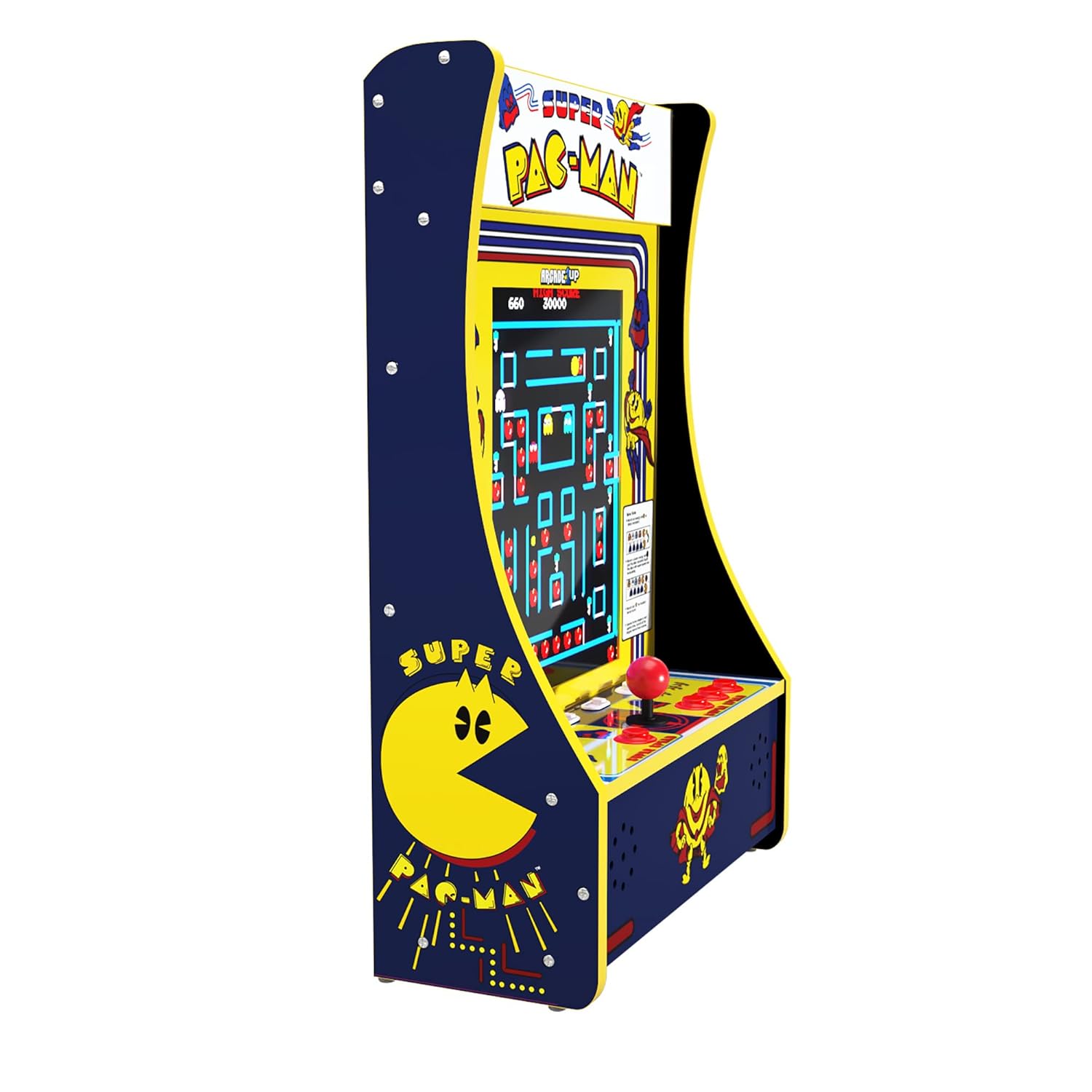
Arcade1Up Super PAC-MAN Partycade er en bærbar og alsidig arkademaskine designet til nem opsætning og underholdning i forskellige miljøer. Den leveres fuldt samlet og tilbyder flere visningsmuligheder, herunder bordmontering, dørophængning og vægmontering. Denne Partycade har en 17-tommer farve-LCD-skærm og autentiske kontroller, der giver en klassisk arkadeoplevelse. Den indeholder 10 ikoniske spil: PAC-MAN, PAC-LAND, PAC-MANIA, DIG DUG, DIG DUG II, MAPPY, ROMPERS, ROLLING THUNDER og NEW RALLY-X.

Figur 1: Forside view af Arcade1Up Super PAC-MAN Partycade.
Nøglefunktioner
- 10 klassiske spil: Nyd en samling af 10 forudinstallerede arkadespil, herunder Super PAC-MAN, PAC-MAN, PAC-LAND, MAPPY, DIG DUG, DIG DUG II, ROMPERS, ROLLING THUNDER og NEW RALLY-X.
- Lysende telt: Har et oplyst telt med "Super PAC-MAN"-logoet, der fremhæver den autentiske arkadeæstetik.
- Alsidige monteringsmuligheder: Inkluderer hardware til dørophængning, vægmontering og aftagelige ben til bordspil, hvilket giver fleksibel placering.
- Klar dækbeskytter: En slidstærk, klar beskyttelse dækker kontrolpanelet og beskytter joystick og knapper mod slid.
- Kompakt design: Med dimensioner på 19.45 cm D x 14.49 cm B x 28.74 cm H er Partycade designet til nemt at passe ind i forskellige rum.

Figur 2: Nærbillede view af kontrolpanelet og lysende markise.
Opsætning
Monteringsmuligheder
Arcade1Up Partycade tilbyder tre primære opsætningskonfigurationer:
- Bordspil: Fastgør de medfølgende aftagelige ben til enhedens bund for stabil placering på enhver plan overflade, såsom et bord eller en disk.
- Dørophængning: Brug det medfølgende dørophæng til at hænge Partycade sikkert op over en standarddør. Sørg for, at dørkarmen er robust nok til at bære enhedens vægt (ca. 32.4 kg).
- Vægmontering: For en mere permanent installation skal du bruge vægmonteringsbeslagene til at fastgøre Partycade direkte til en væg. Det er afgørende at montere enheden i vægstolper for maksimal stabilitet og sikkerhed. Kontakt en professionel, hvis du er usikker på vægmonteringsprocedurerne.

Figur 3: Partycade-enheden vist i en vægmonteret konfiguration.
Indledende opstart
Når enheden er sikkert placeret eller monteret, skal du tilslutte strømadapteren til den angivne port på bagsiden af Partycade og sætte den i en almindelig stikkontakt. Find tænd/sluk-knappen på kontrolpanelet, og drej den til 'TIL'-positionen. Skærmen lyser op, og Arcade1Up-logoet vises, hvilket indikerer, at enheden tændes.
Betjeningsvejledning
Spilvalg
Når du tænder for strømmen, vises hovedmenuen for spilvalg. Brug joysticket til at navigere gennem listen over 10 tilgængelige spil. Tryk på 'A'-knappen (typisk den primære handlingsknap) for at vælge det ønskede spil. For at vende tilbage til hovedmenuen fra et spil skal du holde 'A'-knappen nede i 5 sekunder.
Figur 4: Spilvalgsskærmen, der viser de 10 tilgængelige titler.
Gameplay
Hvert spil bruger joysticket til retningsbestemt input og de forskellige knapper til handlinger såsom at skyde, hoppe eller bruge særlige evner. Se instruktionerne på skærmen eller vejledningerne i spillet for specifikke kontroller til hver titel. Enheden understøtter både singleplayer- og twoplayer-tilstande, afhængigt af det valgte spil. Tryk på knapperne 'Spiller 1' eller 'Spiller 2' for at starte et spil.
Kontrolelementer
Kontrolpanelet har et klassisk arkade-joystick til retningsbestemt input og flere handlingsknapper. Layoutet er designet til at genskabe følelsen af originale arkademaskiner. En gennemsigtig deck-beskytter er installeret over kontrolpanelet for at sikre lang levetid og beskytte komponenterne under intens gameplay.

Figur 5: Detaljeret view af joysticket og handlingsknapperne på kontrolpanelet.
Lydstyrkejustering
Lydstyrken kan justeres ved hjælp af de dedikerede lydstyrkeknapper på kontrolpanelet, typisk mærket 'VOL+' og 'VOL-'. Juster lydstyrken til et behageligt niveau for dit spillemiljø.
Opretholdelse
For at sikre din Arcade1Up Partycade's lange levetid og optimale ydeevne, skal du følge disse enkle vedligeholdelsesretningslinjer:
- Rensning: Brug en blød, tør klud til at tørre de udvendige overflader af, inklusive skærmen og kontrolpanelet. Ved genstridige pletter kan du bruge en let tør klud.amp En klud med et mildt, ikke-slibende rengøringsmiddel kan bruges, så der ikke trænger væske ind i enheden.
- Støvforebyggelse: Opbevar enheden i et rent og støvfrit miljø. Støv regelmæssigt ventilationsåbninger og -åbninger for at forhindre ophobning, der kan påvirke ydeevnen.
- Opbevaring: Hvis enheden opbevares i længere tid, skal den afbrydes til strømmen og opbevares et køligt, tørt sted væk fra direkte sollys og ekstreme temperaturer.
Fejlfinding
Ingen strøm / Blank skærm
Hvis enheden ikke tændes, eller skærmen forbliver tom efter at den er tændt:
- Sørg for, at strømadapteren er korrekt tilsluttet både enheden og en fungerende stikkontakt.
- Bekræft, at stikkontakten er aktiv, ved at teste den med en anden enhed.
- Kontrollér tænd/sluk-knappen på kontrolpanelet for at sikre, at den er helt aktiveret.
Joystick eller knap reagerer ikke
Hvis joysticket eller knapperne ikke reagerer korrekt under spillet:
- Genstart enheden ved at slukke den og derefter tænde den igen.
- Sørg for, at kontrolpanelet er rent og fri for snavs, der kan blokere knappernes bevægelse.
- Selvom det er sjældent, kan det være nødvendigt at stramme et joystick, hvis det føles løst. Dette indebærer typisk at fjerne den gennemsigtige beskyttelsesplade og forsigtigt stramme joystickens bund. Hvis du føler dig utilpas ved at udføre dette, skal du kontakte kundesupport.
Spillet fryser eller går ned
Hvis et spil fryser, eller enheden ikke reagerer:
- Hold 'Spiller 1'-knappen nede i 5 sekunder for at nulstille det aktuelle spil.
- Hvis problemet fortsætter, skal du slukke og tænde enheden igen ved at slukke den, vente i 10 sekunder og derefter tænde den igen.
Specifikationer
| Feature | Detalje |
|---|---|
| Mærke | ARCADE1UP |
| Modelnummer | PAC-D-10182 |
| Platform | Ikke maskinspecifik |
| Controller type | Joystick, knapstyring |
| Skærmstørrelse | 17 tommer |
| Hardware-interface | Lyn |
| Produktmål (L x B x H) | 19.45 x 14.49 x 28.74 tommer |
| Varens vægt | 32.4 pund |
| Materiale | Plast |
| Display Type | LCD |
Garanti og support
For detaljerede garantioplysninger, produktregistrering eller teknisk support henvises til den officielle Arcade1Up webwebstedet eller kontakt deres kundeserviceafdeling. Gem din købsbevis til eventuelle garantikrav.
For yderligere ressourcer og ofte stillede spørgsmål, besøg ARCADE1UP Butik på Amazon.
Ask a question about this manual
Ask about setup, troubleshooting, compatibility, parts, safety, or missing instructions. Manuals+ will review the question and use this page’s manual context to help answer it.